I have seen various people talking about Project Fargo (also known as VM Fork or Instant Clone) and what struck me is that many are under the impression that Project Fargo is the result of the CloudVolumes acquisition. Lets set that straight first, Project Fargo is not based on any technology developed by the CloudVolumes team. Project Fargo has been developed in house and as far as I can tell is an implementation of Snowflock (University of Toronto / Carnegie Mellon University), although I know that in house they have been looking at techniques like these for a long time. Okay, now that we have that out of the way, what is Project Fargo?
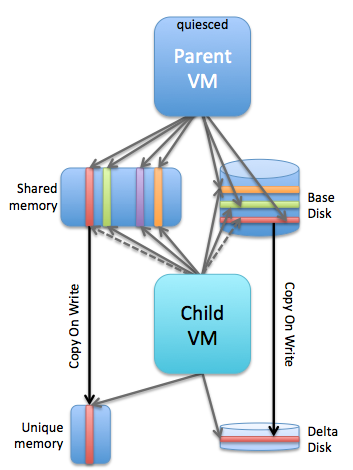
Simply said: Project Fargo is a solution that enables you to rapidly clone a running VM. When I say “rapidly clone”, I mean RAPIDLY… Within seconds. Yes, that is extremely fast for a running VM. What should be noted here of course is the fact that it is not a full clone. I guess this is where the “VMFork” name comes in to play, the “parent” virtual machine is quiesced and forked and a “child” VM is born. This child VM is leveraging the disk and memory of the parent (for reads), this is why it is so extremely fast to instantiate… as I said literally seconds, as it “only” needs to create empty delta files, create a VMX and instantiate the process, and do some networking magic as you do not want to have VMs popping up on the network with the same MAC address. Note that the child VM starts where the parent VM left off, so there is no boot process it is instant on! (just like you suspend and resume it) I can’t reveal too much around how this works, yet, but you can imagine that a technique like “fast suspend resume” (FSR), which is the corner stone of features like Storage vMotion, is leveraged.
The question then arises, what if the child wants to write data to memory or disk? This is where the “copy on write” technique comes in to play. Of course the child won’t be allowed to over write shared memory pages (or disk for that matter) and as such a new page will be allocated. For those having a hard time visualizing it, note that this is a conceptual diagram and not how it actually is implemented, I should have maybe drawn the different layers but it would make it too complex. In this scenario you see a single parent with a single child, but you can imagine there could also be 10 child VMs or more, you can see how efficient that would be in terms of resource sharing! And even for the pages which would be unique compared to the parent, if you clone many similar VMs there is a significant chance that TPS will be able to collapse those even! One thing to point out here is that the parent VM is quiesced, in other words it’s sole purpose is allowing for the quick creation of child VMs.
Cool piece of technology I agree, but what would the use case be? Well there are multiple use cases, and those who will be attending VMworld should definitely visit the sessions which will discuss this topic or watch them online (SDDC3227, SDDC3281, EUC2551 etc). I think there are 2 major use cases: virtual desktops and test/dev.
The virtual desktop (just in time desktops) use case is pretty obvious… You create that parent VM, spin it up and it gets quiesced and you can start forking that parent when needed. This will almost be instant, very efficient and also reduce the required resource capacity for VDI environments.
With test/dev scenarios you can imagine that when testing software you don’t want to wait for lengthy cloning processes to finish. Forking a VM will allow you to rapidly test what has been developed , within seconds you have a duplicate environment which you can use / abuse any way you like and destroy it when done. As the disk footprint is small, create/destroy will have a minimal impact on your existing infrastructure both from a resource and “stress” point of view. It basically means that your testing will take less time “end-to-end”.
Can’t wait for it to be available and to start testing it, especially when combined with products like CloudVolumes and Virtual SAN this feature has a lot of potential.
** UPDATE: Various people asked questions around what would happen with VMFork now TPS is disabled by default in upcoming versions of vSphere. I spoke with the lead engineer on this topic and he assured me there is no impact on VMFork. The disabling of TPS will be overruled per VMFork group. So the parent and childs belonging to the same group will be able to leverage TPS and share pages. **
 When I look at discussions being held around whether server side caching solutions is preferred over an all-flash arrays, which is just another form factor discussion if you ask me, the only right answer that comes to mind is “it depends”. It depends on what your business requirements are, what your budget is, if there are any constraints from an environmental perspective, hardware life cycle, what your staff’s expertise / knowledge is etc etc. It is impossible to to provide a single answer and solution to all the problems out there. What I realized is that what the software-defined movement actually brought us is choice, and in many of these cases the form factor is just a tiny aspect of the total story. It seems to be important though for many people, maybe still an inheritance from the “server hugger” days where hardware was still king? Those times are long gone though if you ask me.