• Skip to primary navigation
  • Skip to main content
  • Skip to primary sidebar

Yellow Bricks

by Duncan Epping

  • Home
  • Unexplored Territory Podcast
  • HA Deepdive
  • ESXTOP
  • Stickers/Shirts
  • Privacy Policy
  • About
  • Show Search
Hide Search

My first week with Pebble Time

Duncan Epping · Jun 17, 2015 ·

When Pebble Time was announced I backed the project on kickstarter based on Joe Baguley and Alan Renouf’s stories. Last week I received it and I’ve played with it a lot I must say and have been impressed from the moment it arrived. Simple things like the box it comes in (hardly any packaging) to the ease of use and how it feels / wears. Lets go over some of the things that stand out for me personally and why I like the watch.

As soon as it arrived I downloaded the Pebble Time app for iOS and added some apps and watch faces. I’ve ended up going with a more classic watch face called Thin for a couple of days, and then switched to Trek V3 which has been on there for 4 days now. I also like “Stock Weather” which shows time/battery/weather and stock details by default. I am looking for a good dual timezone face still which allows me to show time of the current location and the time at “home” so that I always know if I can phone home or not. Changing watch face is really easy, so when I travel I could swap from Trek V3 to a dual timezone face. I may just end up creating something myself as that doesn’t appear to be rocket science either.

One thing I wasn’t completely sold on was the “look” of the watch, and I wasn’t too convinced of how it would feel / wear either. I normally don’t wear watches as they annoy me during work etc. The pebble feels light (42.5 grams) and looks good in my opinion but I do think it is one of those designs which you either like or you don’t. The strap is rubber based and comfortable. I wear the Pebble 24hrs a day. During 15k hikes, during desk work, during crossfit etc and not once did I take it off, which I used to do with other watches.

** Update – June 19th** Literally two hours after I published this I scratched the bezel of my Pebble. I wasn’t doing anything special and didn’t hit concrete or a rock wall or anything like that. Seems like it scratches easily and if you do a search on google for Pebble Time Scratces you will see more users reporting it. Also seem like the screen scratches easily, I just ordered screen/bezel protectors from gadgetwraps. Hope Pebble will fix this over time. ** Update – June 19th**
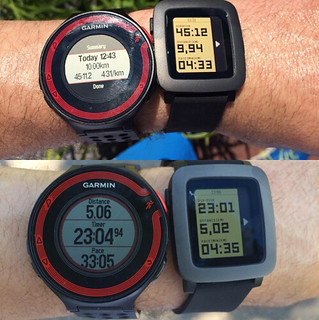
First App I wanted to install was runkeeper, but for some strange reason it wouldn’t install… It took me a while to figure out that Runkeeper is integrated with the Pebble Time to the extend where you don’t need an app. As soon as you open the Runkeeper app on your phone the screen on your watch changes and it shows: distance, time and average pace. My feedback to Runkeeper was to also show the current pace, and I would also love to see the stats per kilometer after you have finished a kilometer. Especially when running this is useful as it allows you to keep pace. You can pause and start your run using the Pebble, you can’t stop it… you will need to grab your phone for that. Other than that it appears to work great, and the fact you don’t need to wear a headphone to hear your stats or grab your phone to check your stats is worth it by itself. There was a difference in distance and average pace as well compared to the Garmin, but it was negligible if you ask me. Some more testing showed though that Runkeeper/Pebble seems less accurate than a dedicated GPS tracking device like Garmin.  (Not the only person who has noticed it.)What I like though about the Pebble is that if for whatever reason someone needs to contact you they actually can and you can decide if you stop your workout or finish it before you respond to an email / text / phonecall. Notifications I guess is what I like!

Talking about notifications, this is of course is a big thing on the Pebble, email / twitter / calendar / whatsapp / sms and much more. I tried to keep it to those 5 though as I didn’t want to find myself constantly dismissing notifications. I use tweetbot and it comes in handy I can specify that I only want notifications for direct messages and mentions from people I follow. This restricts the number of notifications I get. This was one of the big reasons I bought a Pebble by the way. I used to be on my phone checking notifications all the time, and then immidiately responding to email/twitter/facebook etc. Considering the number of messages I receive it resulted on basically holding your phone in your hands for hours a day, driving my family nuts. I can’t respond to anything on my Pebble really, so that prevents me from responding to things which can wait. It is nice that after ~3 minutes notifications are automatically dismissed, would be even better if this was configurable though and I submitted that as a feature request to the Pebble team.

First night wearing it I realized that it would be useful to setup “do not disturb” on my Pebble like I have on my iPhone as it woke me up twice. (I have it setup to vibrate on a notification.) Luckily “do not disturb” is easy to setup. It is described in this article, but in short: go to settings, notifications, do not disturb. Works great and solved my problem. Talking about sleeping, there’s also apps for that of course. I figured I would try a “sleep monitoring” app. I installed Morpheuz and configured the smart alarm which wakes you at an optimal point during your sleep cycle (not during the REM / deep sleep). So far it woke me up at various times between 07:00 and 07:25, I am not the type who has problems getting out of bed to be honest but it seems like it is even easier using Morpheuz. Will continue to use it for a while to see if it really makes a difference or not.

** Update – August 13th** Pebble added the option to instant mute the watch from the do not disturb menu, very useful when you go watch a move or are presenting a sessions etc. I’ve also upped the “do not disturb” hours as getting notifications every second of the day when you are awake can be a bit too much, not sure if being “on call” all of the time is a good thing yet. Now set to 22:00 – 08:00 to not show any notifications. ** Update – August 13th**
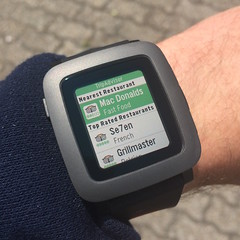
Some other apps which are worth mentioning are Evernote, Transport and TripAdvisor. Evernote is primarily for me to quickly dig up that note and read it. Don’t expect to use it a lot, but can be useful every now and then. TripAdvisor can be useful when looking for a place to eat in the area, couple of clicks and you know what can be found relatively closeby. Transport is probably the most useful of the three, as it will allow you to request an Uber ride from your Pebble. There are plenty of apps you can install / try on the Pebble appstore and I suspect that considering the massive number of Pebble watches sold this will increase steadily.

Last but not least battery life. When it comes to battery life the Pebble is pretty impressive. I’ve played with it extensively the last week and I reach about 4-5 days, Pebble promises up to 7 days with normal usage, but considering the number of notifications I get and how extensive I used it I think 4-5 days is pretty good. It charges pretty fast as well, and it comes with a magnetic usb charging cable which is easy to use and carry with you if needed when traveling.

** Update – August 13th** I have had some strange problems with battery life over the last 2 weeks. Had to “factory reset” my Pebble twice as it was draining the battery within a day. The last couple of days it seems to behave normal again. Not sure if the factory reset helped or the new firmware that was released. ** Update – August 13th**

So I guess the question remains if I would recommend it? Yes, I most definitely would. I like the Pebble watch so far, and I think it would be worth it even if you use it for just notifications!

** Update – December 10th – 6 months in **

I think it is fair to say that I was positive about the watch, that kind of already eludes to the fact that my opinion seems to have changed after 6 months. Well not really about the Pebble to be honest, I still think it is a decent device and it still does what I expect it to do, plus compared to the Apple Watch for instance it is relatively cheap. So what is the problem?

I didn’t really think about it until I read this article on readwrite. I had taken off my Pebble a couple of months ago and wanted to see how I would get on without it. Did I miss it? Did I really need it? What do I find useful and what don’t I find useful? Well first off all, what I did not like… I think the author James King of readwrite is spot on:

I couldn’t put my finger on exactly the moment that things turned sour, but the passion started to ebb away. Little things started to irk me—too many notifications, too many little reminders. The things that excited me in the first weeks were the very things that made me want to retreat.

This is exactly my feeling about the device. What I felt was very useful the first week, notifications and reminders, started to become annoying and distracting over time. There are too many emails/messages (different services) coming in on a daily basis and every time the watch vibrates or the screen lights up you have to glance over it. It is like that little “red light” on the Blackberry back in the days, at least to me it is. In the meanwhile, the person you are having a conversation with is wondering why you are looking at your watch and if you need to be somewhere. That is why I took it off, and to be fair I didn’t miss it, and I didn’t put it back on again, which I guess says enough.

Of course there are plenty of things to like about it, but when I look at my original post above and think about how I used it, it is clear that to me it is an extension of my phone, a different UI which doesn’t add enough value to me personally. What I hoped is that it would help me focus more on things that matter, but that doesn’t appear to be the case.

** Update – December 10th – 6 months in **

I will see you at VMworld 2015!

Duncan Epping · Jun 16, 2015 ·

Just got the word that I am going to be part of three sessions at VMworld this year, and still waiting on news about the quick talks I submitted. So if you are going to VMworld 2015 make sure to note down these session IDs:

  • SDDC5027 – VCDX Unwrapped – Everything You Wanted to Know About VCDX (US only)
    The VMware Certified Design Expert (VCDX) program is growing every year. More and more people are interested in what it takes to become a VCDX. This moderated talk-show style panel session made up of a VCDX from each of the four tracks, (DCV, NV, DTM, CMA) will help potential candidates understand the value of getting their VCDX. It will also be a no-holds barred open discussion on what it takes to achieve this premier VMware certification. Hear from these experts on their journey and the incredible value that comes with becoming a VCDX yourself. This session will also feature live Q&A from the audience so come prepared with your own questions! This is the place to find out everything you ever wanted to know about becoming a VCDX, from live VCDX holders in a lively interactive session. Featuring: Chris Colotti, Simon Long, Jason Nash and Matt Vandenbeld.
  • SDDC4593 – Ask the Expert vBloggers (US only)
    Back on stage with Rick Scherer, Chad Sakac, Scott Lowe and for me the first time with Chris Wahl! 8th year at VMworld, awesome panel of the industries top bloggers. In this session there are no powerpoints, no sales pitches and no rules! Experts in the industry are here to answer the audiences questions while having some fun in the process. Bring your topic, anything from Software-Defined Data Center, End-User Computing to Hybrid Cloud… Storage, Networking, Security. No questions are off limits.
  • INF4535 – 5 Functions of Software Defined Availability (US and EMEA)
    Together with my friend Frank Denneman… Long time since I’ve been up on stage with Frank, and this VMworld we will be looking at Software Defined Availability. We will discuss 5 functions of Software Defined Availability, which are part of vSphere 6.0. For each of these functions certain scenarios will be discussed to explain how vSphere can help improving availability of your workloads. This ranges from “how Site Recovery Manager and Storage DRS are loosely coupled but tightly integrated” with vSphere 6.0 to “how vSphere HA responds in the case of a certain failure”. Be prepared to get in to the trenches of workload availability…

Synchronet leverages Virtual SAN to provide scale, agility and reduced costs to their customers

Duncan Epping · Jun 11, 2015 ·

This week I had the pleasure to talk to John Nicholson who works for one of our partners (Synchronet out of Houston). John has been involved with various Virtual SAN implementations and designs and I felt that it would make for an interesting conversation. John in my opinion is a true datacenter architect, he has a good understanding of all aspects and definitely has a lot of experience with different storage platforms (both traditional and hyper-converged). Something I did not mention during our conversation, but the answers John was giving me to some of the questions were most definitely VCDX-level. (If you can find the time, do it John :-)) Below is John’s bio, make sure to follow him on twitter:

John Nicholson vExpert (2013-2015) is the manager of client services for Synchronet.  He oversees the professional services who deploy cutting edge virtualization, VDI, and storage solutions for customers as well as the managed services who keep these environments running smoothly.  He enjoys a deep dive into the syslog, and can telepathically sense slow and undersized storage.

First customer / project we discussed was a Virtual SAN environment for a construction company. The environment was build on top of Dell R720s and they have 400GB flash capacity in each node and 7x 1.2TB 10K RPM. In this environment MS SQL is running on top of Virtual SAN and Exchange. The SQL database is used for ~ 1000 customers as part of a real time bidding and tracking solution. As you can imagine reliability and predictable performance is key in this environment. Also hosted on Virtual SAN is their ERP system and it is also used for their development environment for their end-customer applications.

What was interesting with this particular project is that there were some strange performance anomalies, as you can imagine Virtual SAN being a new product was a suspect but after troubleshooting the environment they found out that there was a mismatch driver/firmware mismatch for the 10GbE Intel NICs they were using. Further investigation revealed that all types of traffic were impacted. John wrote about it on their corporate blog here, worth reading if you are using the Intel X540 10GbE NICs.

Key take away: Always verify driver / firmware combination and compatibility as it can have an impact.

What pleased John and the customer the most is probably the performance Virtual SAN is providing. Especially when it comes to latency, or should I say the lack of latency as they are hitting sub millisecond numbers. They’ve been so happy running Virtual SAN in their environment that they’ve just purchased new hosts and a DR site with VSAN is being implemented this week. The DR site will be used at first to test VSAN 6.0 and when proven stable and reliable the production environment will be upgraded to 6.0 and the DR site will be configured for DR purposes leveraging vSphere Replication. I asked John how they went about advising the customer to leverage a virtual replication technology which is asynchronous and John mentioned that as part of their advisory/consultancy services they have business analysts on-board which will assess what the cost of down time is and map out the cost of availability and decide a solution based on that outcome. Same applies to de-duplication by the way, what is the price of disk, what is the dedupe ratio, does it make sense in your environment?

While discussing this project John mentioned that he has worked with customers in the past which had two or three IT folks of which one being a dedicated storage admin, primarily because of the complexity of the environment and the storage system. In todays world with solutions like Virtual SAN that isn’t needed any longer and the focus of IT people should be enabling the business.

During our discussion about networking John mentioned that Synchronet has a long history with IP based storage solution (primarily iSCSI), and based on their experience top grade switches were in absolute must when deploying these types of storage. While talking to some of the Virtual SAN engineers John asked about how Virtual SAN would handle switches which have a lower “PPS” (packets per second). The Virtual SAN team mentioned that VSAN was less prone to the common issues faced in iSCSI/NFS environments, John being the techie that he is of course was skeptical and wanted to test this for himself. The results were published in this white paper, fair to say that John and his team were impressed with how Virtual SAN handled itself indeed with relatively cheap switches. For the majority of Virtual SAN deployments their typical customer setup is leveraging 2 VMkernel interfaces each connected to a different switch so that traffic isn’t going outside of the switch, this is what it would look like for those interested:

Host 1 / NIC-A —> Switch-A
Host 2 / NIC-A —> Switch-A
Host 3 / NIC-A —> Switch-A
Host 1 / NIC-B —> Switch-B
Host 2 / NIC-B —> Switch-B
Host 3 / NIC-B —> Switch-B

The second project John mentioned was for a software startup in the healthcare space. They’ve been doing a lot of mergers and acquisitions. Initially they wanted to get 6 VMs up and running but with the ability to scale-up and scale-out when needed. I found the “scale-up” comment interesting so asked what John was referring to. In this scenario the server configuration used was SuperMicro Fat Twin initially deployed with 3 hosts using a single socket and 800GB of flash capacity and two NL-SAS drives. As the company started growing of course the number of virtual machines increased and they have over 70 VMs running currently, simply achieved by adding an additional CPU in each box and add some drives. The question I had was what about flash capacity then compared to disk capacity? John said that they started out with flash overprovisioned simply to allow them to scale-up when required. Especially in the merger and acquisition space where the growth pattern is unknown this is a huge advantage of a solution like Virtual SAN which allows you to both scale-out and scale-up when required. Compared to traditional storage systems this model worked very well as they avoided the huge up front cost (50K USD – 100K USD not uncommon). On top of that, John said that with the majority of storage systems a big discount is given during the initial purchase but when it is time to add a disk shelve that discount has magically disappeared. Also, with traditional storage systems you can fairly easily reach the limits of a storage controller and be stuck with a system which can’t scale to the size you need it to scale. Another problem that disappears when leveraging VSAN.

Key take away: Large upfront costs can be avoided while offering flexibility in terms of scaling and sizing

Synchronet isn’t just an implementation partner by the way, they also do managed services and one of the things they are doing for instance is monitor customer environments leveraging Log Insight. This includes monitoring Virtual SAN, and they’ve created custom dashboard so that they can respond to  issues like for instance when a snapshot removal has failed and solve the problem before an issue arises as a result of it. They can go as far as monitoring the raw syslog feeds if needed, but each time a problem occurs in any environment this is recorded and custom dashboards and warnings are created so that every customer immediately benefits from it. For some customers they even do full management of the vSphere environment.

We had some small talk about VDI. John mentioned that VSAN is great for PoC’s and small test environments because it is easy to get in their, use it and then grow it as soon as the PoC / test has completed. Especially the price per desktop licensing is really handy as it keeps the cost down initially, and at the same time the customer knows what it is paying and getting. From an architectural point of view John mentioned that the majority of their customers use non-persistent desktops and as such the Virtual SAN environment looks different then the traditional server VM environments. Typically less disk capacity and higher flash capacity to ensure performance.

Before we wrapped up there was one thing I was interested in knowing, that was if they tweaked any of the Virtual SAN related settings (within the storage policy or for instance advanced settings). John mentioned that they would tweak the number of stripes per VM from 1 to 3 by default. This is primarily to speed up the backup with Virtual SAN 5.5, preliminary tests are showing though that with Virtual SAN and the new snapshotting mechanism this isn’t needed any longer. While talking about striping John also mentioned that for their hosting services the one thing that stood out to him is that Virtual SAN was performing so well that the customers paying for a lower tier of storage were actually getting a lot more storage performance resources then they paid for and the storage policies were used to ensure that a tier 2 VM wouldn’t receive more resources than a tier 1 VM, pretty neat problem to have I guess.

Key take away: Increasing stripe-width with Virtual SAN 5.5 can have a positive impact on performance. With 6.0 this appears no longer needed.

Last thing John wanted to mention was the VIP Tool (https://vip.vmware.com/). He said it helped them immense figuring out how much data was active and designing / sizing Virtual SAN environments for customers. I think it is fair to say that John (and Synchronet) has had huge success introducing Virtual SAN to their customers and deploying it there where applicable. Thanks John for taking the time, and thanks for being a great VMware and Virtual SAN advocate!

VSAN and large VMDKs on relative small disks?

Duncan Epping · Jun 4, 2015 ·

Last week and this week I received a question and as it was the second time in a short time I figured I would share it. The question was around how VSAN places a VMDK which is larger than the disks. Lets look at a diagram first as that will make it obvious instantly.

If you look at the diagram you see these stripes. You can define the number of stripes in a policy if you want. In the example above, the stripe width is 2. This is not the only time when you can see objects being striped though. If an object (VMDK for instance) is larger than 256GB it will create multiple stripes for this object. Also, if a physical disk is smaller than the size of the VMDK it will create multiple stripes for that VMDK. These stripes can be located on the same host as you can see in the diagram but also can be across hosts. Pretty cool right.

How Virtual SAN enables IndonesianCloud to remain competitive!

Duncan Epping · Jun 2, 2015 ·

Last week I had the chance to catch up with one of our Virtual SAN customers. I connected to Neil Cresswell through twitter and after going back and forth we got on a conference call. Neil showed me what they had created for the company he works for, a public cloud provider called IndonesianCloud. No need to tell you where they are located as the name kind of reveals it. Neil is the CEO of IndonesianCloud by the way, and very very passionate about IT / Technology and VMware. It was great talking to him, and before I forget I want to say thanks for taking time out of your busy schedule Neil, I very much appreciate it!
IndonesianCloud is a 3 year old, cloud service provider, part of the vCloud Air Network, which focuses on the delivery of enterprise class hosting services to their customers. Their customers primarily run mission critical workloads in IndonesianCloud’s three DC environment, which means that stability, reliability and predictability is really important.

Having operated a “traditional” environment for a long time Neil and his team felt it was time for a change (Servers + Legacy Storage). They needed something which was much more fit for purpose, was robust / reliable and was capable of providing capacity as well as great performance. On top of that, from a cost perspective it needed to be significantly cheaper. The traditional environment they were maintaining just wasn’t allowing them to remain competitive in their dynamic and price sensitive market. Several different hyperconverged and software based offerings were considered, but finally the settled on Virtual SAN.

Since the Virtual SAN platform was placed into production two months ago, they have deployed over 450 new virtual machines onto their initial 12 node cluster. In addition, migration of another 600 virtual machines from one of their legacy storage platforms to their Virtual SAN environment is underway. While talking to Neil I was mostly interested in some of the design considerations, some of the benefits but also potential challenges.

From a design stance Neil explained how they decided to go with SuperMicro Fat Twin hardware, 5 x NL-SAS drives (4TB) and Intel S3700 SSDs (800GB) per host. Unfortunately no affordable bigger SSDs were available, and as such the environment has a lower cache to capacity ratio than preferred. Still, when looking at the cache hit rate for reads it is more or less steady around 98-99%. PCIe flash was also looked at, but didn’t fit within the budget. These SuperMicro systems were on the VSAN Ready Node list, and this was one of the main reasons for Neil and the team to pick them. Having a pre-validated configuration, which is guaranteed to be supported by all parties, was seen as a much lower risk than building their own nodes. Then there is the network; IndonesianCloud decided to go with HP networking gear after having tested various products. One of the reasons for this was the better overall throughput, better multicast performance, and lower price per port. The network is 10GbE end to end of course.

Key take away: There can be substantial performance difference between the various 10GbE switches, do your homework!

The choice to deploy 4TB NL-SAS drives was a little risky; IndonesianCloud needed to balance the performance, capacity, and price ratios. Luckily having already run their existing cloud platform for 3 years, there was a history of IO information readily available. Using this GB/IOPS historical information meant that IndonesianCloud were able to make a calculated decision that 4TB drives with 800GB SSD would provide the perfect combination of performance and capacity. With very good cache hit rates, Neil would like to deploy larger SSD drives when they become available, as he believes that cache is a great way to minimise the impact of the slower drives. Equally, the write performance of the 4TB drives was also concerning. Using the default VSAN stripe size configuration of 1 meant that at most, only 2 drives were able to service write de-stage requests for a given VM, and due to the slow speed of the 4TB drives, this could have an impact on performance. To mitigate this, IndonesianCloud performed a series of internal tests that baselined different stripe sizes to get a good balance of performance. In the end a stripe size of 5 was selected, and is now being used for all workloads. This also helps in situations where reads are coming from disk by the way, great side effect. BTW, the best way to think about Stripe Size and Failures to Tolerate is like Raid 1E (mirrored stripes).

Key take away: Write performance of large NL-SAS drives is low, striping can help improving performance.

IndonesianCloud has standardised on a 12 node Virtual SAN cluster, and I asked why, given that Virtual SAN 5.5 U1 supports up to 32 nodes (64 with 6.0 even). Neil’s response was that 12 nodes is what comprises an internal “zone”, and that customers can balance their workloads across zones to provide higher levels of availability. Having all nodes in a single cluster, whilst possible, was not considered the best fit for a service provider that is all about containing risk. 12 nodes also maps to approximately 1000 VMs, which is what they have modelled the financial costs against, so 1000 VMs deployed on the 12 node cluster would consume CPU/Memory/Disk at the same ratio, effectively ensuring maximum utilisation of the asset.

If you look at the workloads IndonesianCloud customers run, they range from large databases, time sensitive ERP systems, webservers, streaming TV CDN services, and they are even running Airline ERP operations for a local carrier… All of these VMs are from external paying customers by the way, and all of them are mission critical for those customers. On top of Virtual SAN some customers even have other storage services running. One of them for instance is running SoftNAS on top of Virtual SAN to offer shared file services to other VMs. Vast ranges of different applications, with different IO profiles and different needs but all satisfied by Virtual SAN. One thing that Neil stressed was that the ability to change the characteristics (failures to tolerate) specified in a profile was key for them, it allows for a lot of flexibility / agility.

I did wonder, with VSAN being relative new to the market, if they had concerns in terms of stability and recoverability. Neil actually showed me their comprehensive UAT Testing Plan and the results. They were very impressed by how VSAN handled these tests without any problem. Tests ranging from pulling drives, failing network interfaces and switches, through to removing full nodes from the cluster, all of these were performed whilst simultaneously running various burn-in benchmarks. No problems whatsoever were experienced, and as a matter of fact the environment has been running great in production (don’t curse it!!).

Key take away: Testing, Testing, Testing… Until you feel comfortable with what you designed and implemented!

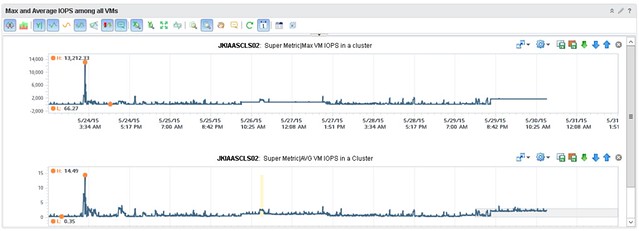
When it comes to monitoring though, the team did want to see more details than what is provided out of the box, especially because it is a new platform they felt that this gave them a bit more insurance that things were indeed going well and it wasn’t just their perception. They worked with one of VMware’s rock stars (Iwan Rahabok) when it comes to VR Ops on creating custom dashboards with all sorts of data ranging from cache hit ratio to latency per spindle to ANY type of detail you want on a per VM level. Of course they start with generic dashboard which then allow you to drill down; any outlier is noted immediately and leveraging VR Ops and these custom dashboards, they can drill deep whenever they need. What I loved most is how relatively easy it is for them to extend their monitoring capabilities. During our WebEx Iwan felt he needed some more specifics on a per VM basis and added these details literally within minutes to VR Ops. IndonesianCloud has been kind enough to share a custom dashboard they created, where they can catch a rogue VM easily. In this dashboard, when a single VM, and it can be any VM, generates excessive IOPS it will trigger a spike right away in the overall dashboard.

I know I am heavily biased, but I was impressed. Not just with Virtual SAN, but even more so with how IndonesianCloud has implemented it. How it is changing the way IndonesianCloud manages their virtual estate and how it enables them to compete in today’s global market.

  • « Go to Previous Page
  • Page 1
  • Interim pages omitted …
  • Page 125
  • Page 126
  • Page 127
  • Page 128
  • Page 129
  • Interim pages omitted …
  • Page 497
  • Go to Next Page »

Primary Sidebar

About the Author

Duncan Epping is a Chief Technologist and Distinguished Engineering Architect at Broadcom. Besides writing on Yellow-Bricks, Duncan is the co-author of the vSAN Deep Dive and the vSphere Clustering Deep Dive book series. Duncan is also the host of the Unexplored Territory Podcast.

Follow Us

  • X
  • Spotify
  • RSS Feed
  • LinkedIn

Recommended Book(s)

Also visit!

For the Dutch-speaking audience, make sure to visit RunNerd.nl to follow my running adventure, read shoe/gear/race reviews, and more!

Do you like Hardcore-Punk music? Follow my Spotify Playlist!

Do you like 80s music? I got you covered!

Copyright Yellow-Bricks.com © 2026 · Log in