• Skip to primary navigation
  • Skip to main content
  • Skip to primary sidebar

Yellow Bricks

by Duncan Epping

  • Home
  • Unexplored Territory Podcast
  • HA Deepdive
  • ESXTOP
  • Stickers/Shirts
  • Privacy Policy
  • About
  • Show Search
Hide Search

VMUGs next week in South Africa, sign up!

Duncan Epping · Feb 26, 2016 ·

Last year when I visited South Africa and presented at 3 events someone on twitter said: if I would have known I would have shown up. Already tweeted it a couple of times, but just in case people missed it, I figured I would also do a short post on the topic. I am presenting at 3 VMUGs in South Africa next week together with Scott Lowe and Joe Baguley. If you live near any of these three cities, make sure to sign up… Great way to meet like minded people, extend your network, and get to hear all about Software Defined Everything from Joe, The future of NSX from Scott and all about VSAN 6.2 from myself. (Note, Joe will not be able to present in Durban unfortunately)

  • Monday, February 29, 2016 – Johannesburg
  • Wednesday, March 2, 2016 – Durban
  • Friday, March 4, 2016 – Cape Town

Hope to see you guys next week, and euuh… Yes, I would love a Stellenbrau 😉
Check your VSAN disk controllers against the HCL with PowerCLI

Duncan Epping · Feb 24, 2016 ·

Every now and then customers ask if it is possible to check if disk controllers are on the VSAN HCL (Or VMware Compatibility Guide (VCG) as it is actually called these days) for a given set of hosts through PowerCLI. Alan Renouf figured he would knock something out, thanks Alan for sharing! (Next up would be validate drivers and firmware of all components, thanks!) What this script does is the following, note that you need internet access for this to work:

  • Connect to vCenter
  • Download latest VSAN HCL details (json file)
  • Compare controllers of each host against the VSAN HCL
  • Report the state of your infra

Here is the script, it can also be found in the VMware Developer Center repository by the way.

Connect-VIServer myvcenter -user Administrator -password MyPass23
 
 
Function Get-CompatibleVSANController {
    if (-Not $vSANHCL) {
        $vSANHCL = Invoke-WebRequest -Uri http://partnerweb.vmware.com/service/vsan/all.json | ConvertFrom-Json
    }
    $vSANHCL.data.controller
}
 
$HBAs = get-vmhost | Get-VMHostPciDevice | where { $_.DeviceClass -eq "MassStorageController" }
 
Foreach ($HBA in $HBAs) {
    $HBAFound = $false
    Write-Host "Looking for $($hba.name) from host $($HBA.VMhost)"
    Foreach ($entry in Get-CompatibleVSANController) {
        $vid = [String]::Format("{0:x}", $HBA.VendorId)
              $did = [String]::Format("{0:x}", $HBA.DeviceId)
              $svid = [String]::Format("{0:x}", $HBA.SubVendorId)
        $ssid = [String]::Format("{0:x}", $HBA.SubDeviceId)
        If (($vid -eq $entry.vid) -and ($did -eq $entry.did) -and ($svid -eq $entry.svid) -and ($ssid -eq $entry.ssid) ) {
            Write-Host " HBA in $($HBA.VMHost) is $($HBA.Name) which can be found in the HCL as $($Entry.vendor) - $($Entry.Model) at the following URL: `n $($entry.vcglink)" -ForegroundColor Green
            $HBAFound = $true
        }
    }
    If (-Not $HBAFound){
        Write-Host " $($HBA.Name) in $($HBA.VMHost) is not found!" -ForegroundColor Red
    }
}

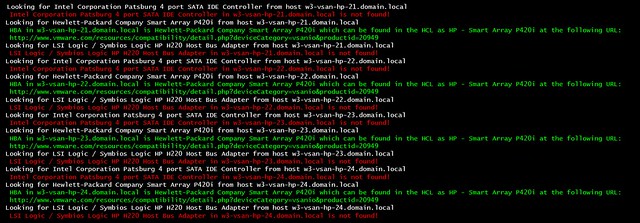
If you run it the output will look like this:

vSphere HA deepdive 6.x available for free!

Duncan Epping · Feb 18, 2016 ·

I’ve been discussing this over the last 12 months with Frank, and to be honest we are still not sure what is the right thing to do but we decided to take this step anyway. Over the past couple of years we released various updates of the vSphere Clustering Deepdive. Updating the book sometimes was a massive pain (version 4 to 5 for instance), but some of the minor updates have been relative straight forward, although still time consuming due to formatting / diagrams / screenshots etc.

Ever since we’ve been looking for new ways to distribute our book, or publication as I will refer to it from now on. I’ve looked at various options, and found one which I felt was the best of all worlds: Gitbook. Gitbook is a solution which allows you as an author to develop content in Markdown and distribute it in various different formats. This could be as static html, pdf, ePub or Mobi. Basically any format you would want in this day and age. The great thing about the platform as well is that it integrates with Github and you can share your source there and do things like version control etc. It does it in such a way that I can use the Gitbook client on my Mac, while someone else who wants to contribute or submit a change can simply use their client of choice and submit a change through git. Although I don’t expect too many people to do this, it will make it easier for me to have material reviewed for instance by one of the VMware engineers.

So what did I just make available for free? Well in short, an updated version (vSphere 6.0 Update 1) of the vSphere HA Deepdive. This includes the stretched clustering section of the book. Note that DRS and SDRS have not been included (yet). This may or may not happen in some shape or form in the future though. For now, I hope you will enjoy and appreciate the content that I made available for free. You can access it by clicking “HA Deepdive” on the left, or (in my opinion) for a better reading experience read it on Gitbook directly through this link: ha.yellow-bricks.com.

Note that there are links as well to download the content in different formats, for those who want to read it on their iPad / phone / whatever. Also note that Gitbook allows you to comment on a paragraph by clicking the “+” sign on the right side of the paragraph when you hover over it… Please submit feedback when you see mistakes! And for those who are really active, if you want to you could even contribute to the content! I will keep updating the content over the upcoming months probably with more info on VVols and for instance the Advanced Settings, so keep checking back regularly!

EMC and VMware introduce VxRail, a new hyper-converged appliance

Duncan Epping · Feb 16, 2016 ·

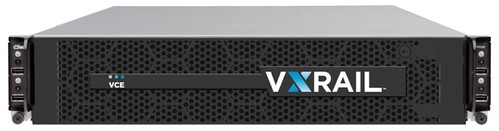
As most of you know I’ve been involved in Virtual SAN in some shape or form since the very first release. Reason I was very excited about Virtual SAN is because I felt it would provide anyone the ability to develop a hyper-converged offering. Many VMware partners have already done this, and with the VSAN Ready Node program growing and enhancing every day (more about this soon) customers have an endless list of options to chose from. Today EMC and VMware introduce a new hyper-converged appliance: VxRail.

vxrail

I am not going to make this an extremely long post, as my friend Chad has already done that of course and there is no point in repeating his blog word for word. I do feel however that VxRail truly is the best both EMC and VMware have to offer. The great thing about VxRail in my opinion is that it can be configured in anyway you like. From 6 all the way up to 28 cores per CPU, from 64GB of memory all the way up to 512GB of memory, from 3.6TB of storage all the way up to 19TB of storage. And yes that was per “node” not per appliance. And considering the roadmap, I can see those numbers increasing fast as well. Also note that we are talking “hybrid” and “all-flash” models here. I have to agree with Chad, I think that all-flash will be preferably to hybrid. The tipping point in terms of economics have definitely been reached, especially when you take the various data services in to account that VSAN has to offer.

These are the models which VCE will offer for All-Flash. Note that you can start with 3 nodes and scale up in 1 node increments.

What I think is great about VxRail is the fact (besides that it comes with vSphere and VSAN) that it comes with additional services like for instance RecoverPoint for VM (15 VMs for free per appliance), which is completely integrated with the Web Client by the way. (For those who don’t know, RecoverPoint provides sync and a-sync replication.) Or for instance S-3 compliant object storage is provided out of the box, 10TB license is included for free per appliance. On top of that there is integration built in with Data Domain.

Must be expensive right? Well actually it isn’t. Smallest configuration starts at $60k list price… Great price point, and I can’t wait for the first boxes to hit the street. Heck I need to talk Chad in to sending me one of those All-Flash models for our lab at some point.

The 10% rule for VSAN caching, calculate it on a VM basis not disk capacity!

Duncan Epping · Feb 16, 2016 ·

Over the last couple of weeks I have been talking to customers a lot about VSAN 6.2 and how to design / size their environment correctly. Since the birth of VSAN we have always spoken about 10% cache to capacity ratio to ensure performance is where it needs to be. When I say 10% cache to capacity ratio, I should actually say the following:

The general recommendation for sizing flash capacity for Virtual SAN is to use 10% of the anticipated consumed storage capacity before the NumberOfFailuresToTolerate is considered.

Reality is though that what most customers did was they looked at their total capacity, cut it in half (FTT=1) and then said “we will take 10%” of that. So a 10TB VSAN Datastore would require “10% of 5TB” in terms of cache. This is fast way of indeed calculating what your caching requirements are… That is, if ALL of your virtual machines have the same “availability” requirements. Because even in 6.1 and prior the outcome would change if you had VMs which required FTT=2 or FTT=3 or even FTT=0. (Although I would not recommend FTT=0.)

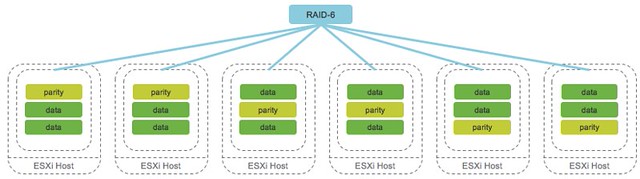
With VSAN 6.2 this is amplified even more. Why? Well as you hopefully read, VSAN 6.2 introduces space efficiency functionality (for all-flash) like deduplication, compression, RAID-5 or RAID-6 over the network. The following diagram depicts what that looks like. In this case we show RAID-6 with 4 data blocks and 2 parity blocks, which is capable of tolerating 2 failures anywhere in the cluster of 6 hosts.

raid-6

If you look at the above, and take that old “FTT=1”  or “FTT=2” diagram in mind you quickly realize that the effective capacity per datastore is not as easy to calculate as it was in the past. Lets take a look at a simple example to show the impact which using certain data services can have on your design / sizing.

  • 1000 VMs with on average 50GB disk space required
  • 1000 * 50GB = 50TB

Lets take a look at both FTT=1 and FTT=2 with and without Raid-5/6 enabled. The calculations are pretty simple. Note that “FTT” stands for “Failures to Tolerate” and FTM stands for “Failure Tolerance Method”.

FTTFTMCalculationResult
1Raid-11000 VMs * 50GB * 2 (overhead)100TB
1Raid-5/61000 VMs * 50GB * 1.33 (overhead)66.5TB
2Raid-11000 VMs * 50GB * 3 (overhead)150TB
2Raid-5/61000 VMs * 50GB * 1.5 (overhead)75TB

Now if you look at the table, you will see there is a big difference between the capacity requirements for FTT=2 using RAID-1 and FTT=2 using RAID-5/6 even between the FTT=1 variations the difference is significant. You can imagine that when you base your required cache capacity simply on the required disk capacity that the math will be off. Assuming that the amount of hot data in all cases is 10% the difference could be substantial. However, when you base your cache requirements on the initial 10% of “1000* 50GB” the result never changes!

And in this case I haven’t even taken deduplication and compression in to account, you can imagine that with a data reduction of 2x using VSAN compression and deduplication that the math will change again for the caching tier, well that is if you do it wrong and calculate it based on the actual capacity layer… To summarize, when you do your VSAN design and sizing, make sure to always base it on the Virtual Machine size, it is the safest and definitely the easiest way to do the math!

For more details on RAID-5/6 and – or on Deduplication and Compression make sure to read Cormac’s excellent articles on these topics.

  • « Go to Previous Page
  • Page 1
  • Interim pages omitted …
  • Page 111
  • Page 112
  • Page 113
  • Page 114
  • Page 115
  • Interim pages omitted …
  • Page 497
  • Go to Next Page »

Primary Sidebar

About the Author

Duncan Epping is a Chief Technologist and Distinguished Engineering Architect at Broadcom. Besides writing on Yellow-Bricks, Duncan is the co-author of the vSAN Deep Dive and the vSphere Clustering Deep Dive book series. Duncan is also the host of the Unexplored Territory Podcast.

Follow Us

  • X
  • Spotify
  • RSS Feed
  • LinkedIn

Recommended Book(s)

Also visit!

For the Dutch-speaking audience, make sure to visit RunNerd.nl to follow my running adventure, read shoe/gear/race reviews, and more!

Do you like Hardcore-Punk music? Follow my Spotify Playlist!

Do you like 80s music? I got you covered!

Copyright Yellow-Bricks.com © 2026 · Log in