• Skip to primary navigation
  • Skip to main content
  • Skip to primary sidebar

Yellow Bricks

by Duncan Epping

  • Home
  • Unexplored Territory Podcast
  • HA Deepdive
  • ESXTOP
  • Stickers/Shirts
  • Privacy Policy
  • About
  • Show Search
Hide Search

Disable VSAN site locality in low latency stretched cluster

Duncan Epping · Jan 15, 2016 ·

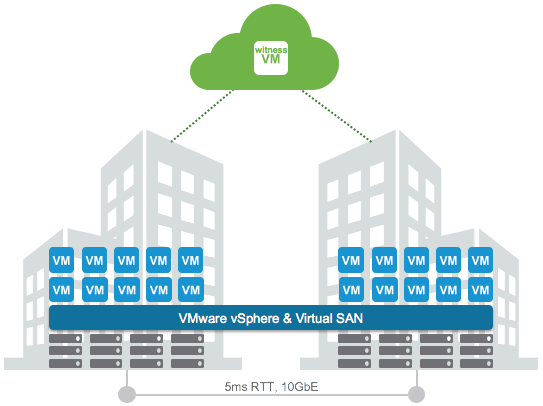
This week I was talking to a customer in Germany who had deployed a VSAN stretched cluster within a building. As it was all within a building (extremely low latency) and they preferred to have a very simple operational model they decided not to implement any type of VM/Host rules. By default when a stretched cluster is deployed in VSAN (and ROBO uses this workflow as well) then “site locality” is implemented for caching. This means that a VM will have its read cache on the host which holds the components in the site where it is located.

This is great of course and avoids incurring latency hit for reads. Now in some cases you may not desire this behaviour. For instance in the situation above where there is an extremely low latency connection between the different rooms in the same building. In this case as well because there are no VM/Host rules implemented a VM can freely roam around the cluster. Now when a VM moves between VSAN Fault Domains in this scenario the cache will need to be rewarmed as it only reads locally. Fortunately you can disable this behaviour easily through the advanced setting called DOMOwnerForceWarmCache:

[root@esxi-01:~] esxcfg-advcfg -g /VSAN/DOMOwnerForceWarmCache
Value of DOMOwnerForceWarmCache is 0
[root@esxi-01:~] esxcfg-advcfg -s 1 /VSAN/DOMOwnerForceWarmCache
Value of DOMOwnerForceWarmCache is 1

In a stretched environment you will see that this setting is set to 0 set it to 1 to disable this behaviour. In a ROBO environment VM migrations are uncommon, but if they do happen on a regular basis you may also want to look in to setting this setting.

Where do I run my VASA Vendor Provider for vVols?

Duncan Epping · Jan 6, 2016 ·

I was talking to someone before the start of the holiday season about running the Vendor Provider (VP) for vVols as a VM and what the best practices are around that. I was thinking about the implication of the VP not being available and came to the conclusion that when the VP is unavailable a bunch of things stop working out of which “bind” is probably most important.

The “bind” operation is what allows vSphere to access a given Virtual Volume (vVol), and this operation is issued during a power-on of a VM. This is how the vVols FAQ describes it:

When a vVol is created, it is not immediately accessible for IO. To Access vVol, vSphere needs to issue a “Bind” operation to a VASA Provider (VP), which creates IO access point for a vVol on a Protocol Endpoint (PE) chosen by a VP. A single PE can be the IO access point for multiple vVolss. “Unbind” Operation will remove this IO access point for a given vVol.

This means that when the VP is unavailable, you can’t power-on VMs at that particular time. For many storage systems that problem is mitigated by having the VP as part of their storage system itself, and of course there is the option to have multiple VPs as part of your solution, either in active/active or in active/standby configuration. In the case of VSAN for instance, each host has a VASA provider out of which one is active and others are standby, if the active fails the standby will take over automatically. So to be clear, it is up to the vendor to decide what type of availability to provide for the VP, some have decided to go for a single instance and rely on vSphere HA to restart the appliance, others have created active/standby etc.

But back to vVols, what if you own a storage system that requires an external VASA VP as a VM?

  • Run your VP VMs in a management cluster, if the hosts in the “production” cluster are impacted and VMs are restarted then at least the VP VMs should be up and running in your management cluster
  • Use multiple VP VMs if and when possible, if active/active or active / standby is supported make sure to run your VPs in that configuration
  • Do not use vVols for the VP itself, you don’t want to have any (circular) dependency between the availability of the VP and being able to power-on the VP itself
  • If there is no availability story for the VP, depending on the configuration of the appliance vSphere FT should be considered.

One more thing, if you are considering buying new storage, I think one question you definitely need to ask your vendor is what their story is around the VP. Is it a VM or is it part of the storage system itself? Is there an availability story for the VP, and if so is this “active/active” or “active/standby”? If not, what do they have on their roadmap around this? You are probably also asking yourself what VMware has planned to solve this problem, well there are a couple of things cooking and I can’t say too much about it. One important effort though is the inclusion of bind/unbind in the T10 SCSI standard, but as you can imagine, those things take time. (Which would allow us to power-on new VMs even when the VP is unavailable as it would be a SCSI command.) Until then, when you design a vVol environment, take the above into account when it comes to your Vendor Provider aka VP!

Jumbo Frames and VSAN Stretched Cluster configurations

Duncan Epping · Dec 22, 2015 ·

I received a question last week from a customer who had implemented a stretched VSAN cluster. The Health Check after the implementation indicated that there was an “issue” with the MTU configuration. The customer had explained that he had configured an MTU of 9000 between the two data sites and an MTU of (default) 1500 between data sites and the witness.

The question of course was, why the Health Check indicated there was an issue. The problem here is that witness traffic and data in todays version of Virtual SAN use the same VMkernel interface. If the VSAN VMkernel interface on the the “data” site is configured for 9000 and one the “witness” site is configured for 1500 then there is a mismatch which causes fragmentation etc. This is what the health check calls out. VSAN (and the health check as such) expects an “end-to-end” consistently configured MTU, even in a stretched environment.

AirSembly by AirVM, great interface for vCloud Director and vCenter for SPs

Duncan Epping · Dec 18, 2015 ·

This week I had a conf call with one of my old colleagues Willem van Engeland. Willem showed me a product called AirSembly by the new company he works for called AirVM. I had bumped in to the AirVM folks at VMworld, their booth kinda stood out you can say. Recently AirVM also revealed that they had been selected by VMware to be the preferred cloud management platform for vCloud Air Network partners. All of this made me curious and I figured I would have a quick look at what they have to offer.

Willem showed me what they offer, which is basically a cloud management platform for vCloud Director environments. It does a lot of things vCloud Director doesn’t offer today out of the box, which saves a lot of time and resources as you would normally custom develop this functionality. Here I am talking about for instance a fully customizable HTML5 interface, and a management solution which allows you as a cloud provider to create distributors, the distributors to create partners and the partners to sell to customers. Yes you can have multiple layers, which is a very common model for cloud providers. (Now you have the option to cut out the “distributor layer” as AirVM found out this is less common than expected at first.)

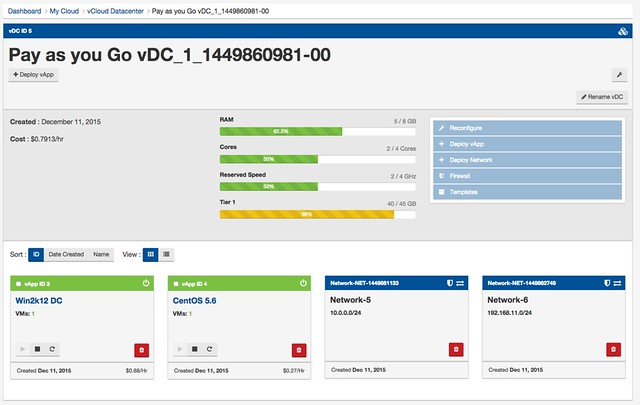
What I like about the layered approach is that I get to see as a partner what is important to me (same for the provider, customer etc) and aren’t overwhelmed with details I don’t care about. For instance as a customer you will want to know what is running in your VDC.

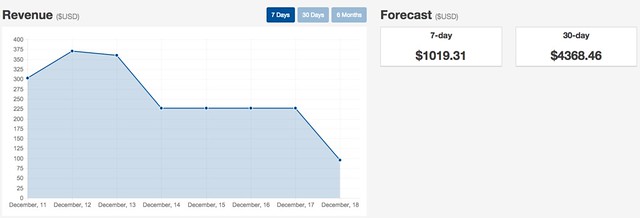
But as a partner I probably care about other things, things like these:

Now those of course are just two simple examples of what you get with AirSembly. For the vCAN partner it is probably more important to know that there is deep vCloud Director integration. Some of the stats in the AirSembly UI are not even available in the vCloud Director UI itself. On top of leveraging the vCloud Director APIs you can also connect AirSembly to vCenter Server, and they integrate with RabbitMQ. So any changes in your vCloud Director environment will be noticed by AirSembly, and as such AirSembly will always reflect the proper state of the environment.

Even more important, AirSembly allows you to basically customize your whole front-end. You can simply define colour schemes and change the fonts through drop downs, you can add custom headers and footers, logos and slogan… or you can go as far as providing custom CSS and go all-out when it comes to branding. Everything is possible through their interface. It allows you to create a portal that looks and feels like your own website, which is important.

It has been a while since I touched vCloud Director, one thing I still clearly remember though… complexity. That is what I like about AirSembly, it offers a lot of functionality out of the box as a cloud management platform for vCloud Director and vCenter Server, but it doesn’t feel complex at any point. The different layers for cloud provider, distributor, partner and customer take a while to get used to, but depending on where you sit in the chain you should not as a “consumer” ever notice that.

I am going to leave it at that for now, mainly because the weekend is coming up and my holiday is about to get started. If you want to know more, have a look at this interview that Jeremy van Doorn did for VMworld TV with AirVM and the demo that was given to Eric Sloof.

VSAN VROps Management Pack version 6.0.3 available

Duncan Epping · Dec 17, 2015 ·

On the 15th the VROps Management Pack for VSAN 6.0.3 was released. If you have VROps Standard or higher you can take advantage of this management pack. It is supported for the latest release of VSAN, 6.1, as of this management pack officially. Very useful to find out if there are any anomalies and what the trends are. I’ve always loved VROps and it just became even more useful to me!

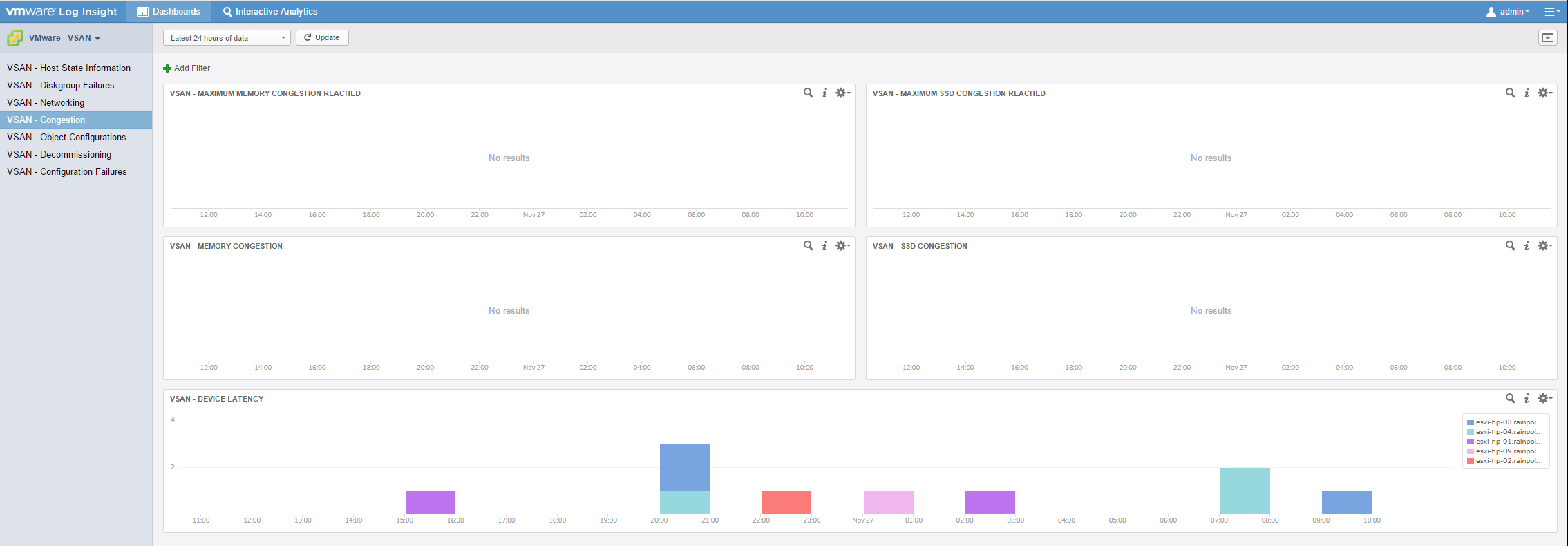
For those who want even more info, there is also a Log Insight Content Pack for VSAN available, which can give you some great insights on what is going on within your VSAN environment. For instance when there is congestion as shown in the screenshot below, which I borrowed from Cormac.

  • « Go to Previous Page
  • Page 1
  • Interim pages omitted …
  • Page 113
  • Page 114
  • Page 115
  • Page 116
  • Page 117
  • Interim pages omitted …
  • Page 497
  • Go to Next Page »

Primary Sidebar

About the Author

Duncan Epping is a Chief Technologist and Distinguished Engineering Architect at Broadcom. Besides writing on Yellow-Bricks, Duncan is the co-author of the vSAN Deep Dive and the vSphere Clustering Deep Dive book series. Duncan is also the host of the Unexplored Territory Podcast.

Follow Us

  • X
  • Spotify
  • RSS Feed
  • LinkedIn

Recommended Book(s)

Also visit!

For the Dutch-speaking audience, make sure to visit RunNerd.nl to follow my running adventure, read shoe/gear/race reviews, and more!

Do you like Hardcore-Punk music? Follow my Spotify Playlist!

Do you like 80s music? I got you covered!

Copyright Yellow-Bricks.com © 2026 · Log in