• Skip to primary navigation
  • Skip to main content
  • Skip to primary sidebar

Yellow Bricks

by Duncan Epping

  • Home
  • Unexplored Territory Podcast
  • HA Deepdive
  • ESXTOP
  • Stickers/Shirts
  • Privacy Policy
  • About
  • Show Search
Hide Search

vSAN

Why Queue Depth matters!

Duncan Epping · Jun 9, 2014 ·

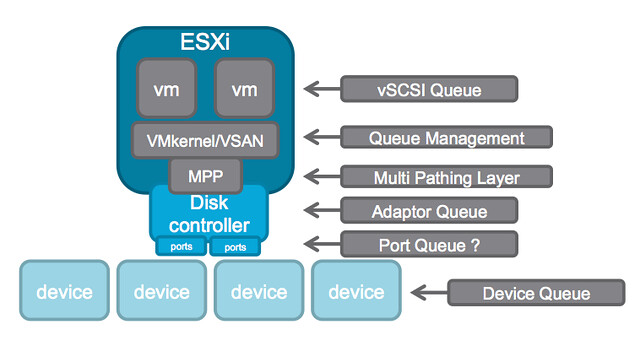
A while ago I wrote an article about the queue depth of certain disk controllers and tried to harvest some of the values and posted those up. William Lam did a “one up” this week and posted a script that can gather the info which then should be posted in a Google Docs spreadsheet, brilliant if you ask me. (PLEASE run the script and lets fill up the spreadsheet!!) But some of you may still wonder why this matters… (For those who didn’t read some of the troubles one customer had with a low-end shallow queue depth disk controller, and Chuck’s take on it here.) Considering the different layers of queuing involved, it probably makes most sense to show the picture from virtual machine down to the device.
queue depth

In this picture there are at least 6 different layers at which some form of queuing is done. Within the guest there is the vSCSI adaptor that has a queue. Then the next layer is VMkernel/VSAN which of course has its own queue and manages the IO that is pushed to the MPP aka muti-pathing layer the various devices on a host. On the next level a Disk Controller has a queue, potentially (depending on the controller used) each disk controller port has a queue. Last but not least of course each device (i.e. a disk) will have a queue. Note that this is even a simplified diagram.

If you look closely at the picture you see that IO of many virtual machines will all flow through the same disk controller and that this IO will go to or come from one or multiple devices. (Typically multiple devices.) Realistically, what are my potential choking points?

  1. Disk Controller queue
  2. Port queue
  3. Device queue

Lets assume you have 4 disks; these are SATA disks and each have a queue depth of 32. Total combined this means that in parallel you can handle 128 IOs. Now what if your disk controller can only handle 64? This will result in 64 IOs being held back by the VMkernel / VSAN. As you can see, it would beneficial in this scenario to ensure that your disk controller queue can hold the same number of IOs (or more) as your device queue can hold.

When it comes to disk controllers there is a huge difference in maximum queue depth value between vendors, and even between models of the same vendor. Lets look at some extreme examples:

HP Smart Array P420i - 1020
Intel C602 AHCI (Patsburg) - 31 (per port)
LSI 2008 - 25
LSI 2308 - 600

For VSAN it is recommended to ensure that the disk controller has a queue depth of at least 256. But go higher if possible. As you can see in the example there are various ranges, but for most LSI controllers the queue depth is 600 or higher. Now the disk controller is just one part of the equation, as there is also the device queue. As I listed in my other post, a RAID device for LSI for instance has a default queue depth of 128 while a SAS device has 254 and a SATA device has 32. The one which stands out the most is the queue depth of the SATA device, only a queue depth of 32 and you can imagine this can once again become a “choking point”. However, fortunately the shallow queue depth of SATA can easily be overcome by using NL-SAS drives (nearline serially attached SCSI) instead. NL-SAS drives are essentially SATA drives with a SAS connector and come with the following benefits:

  • Dual ports allowing redundant paths
  • Full SCSI command set
  • Faster interface compared to SATA, up to 20%
  • Larger (deeper) command queue [depth]

So what about the cost then? From a cost perspective the difference between NL-SAS and SATA is for most vendors negligible. For a 4TB drive the difference at the time of writing on different website was on average $ 30,-. I think it is safe to say that for ANY environment NL-SAS is the way to go and SATA should be avoided when possible.

In other words, when it comes to queue depth: spent a couple of extra bucks and go big… you don’t want to choke your own environment to death!

Looking back: Software Defined Storage…

Duncan Epping · May 30, 2014 ·

Over a year ago I wrote an article (multiple actually) about Software Defined Storage, VSAs and different types of solutions and how flash impacts the world. One of the articles contained a diagram and I would like to pull that up for this article. The diagram below is what I used to explain how I see a potential software defined storage solution. Of course I am severely biased as a VMware employee, and I fully understand there are various scenarios here.

As I explained the type of storage connected to this layer could be anything DAS/NFS/iSCSI/Block who cares… The key thing here is that there is a platform sitting in between your storage devices and your workloads. All your storage resources would be aggregated in to a large pool and the layer should sort things out for you based on the policies defined for the workloads running there. Now I drew this layer coupled with the “hypervisor”, but thats just because that is the world I live in.

Looking back at this article and looking at the state of the industry today, a couple of things stood out. First and foremost, the term “Software Defined Storage” has been abused by everyone and doesn’t mean much to me personally anymore. If someone says during a bloggers briefing “we have a software defined storage solution” I typically will ask them to define it, or explain what it means to them. Anyway, why did I show that diagram, well mainly because I realised over the last couple of weeks that a couple of companies/products are heading down this path.

If you look at the diagram and for instance think about VMware’s own Virtual SAN product than you can see what would be possible. I would even argue that technically a lot of it would be possible today, however the product is also lacking in some of these spaces (data services) but I expect this to be a matter of time. Virtual SAN sits right in the middle of the hypervisor, the API and Policy Engine is provided by the vSphere layer, it has its own caching service… For now it isn’t supported to connect SAN storage, but if I want to I could even today simply by tagging “LUNs” as local disks.

Another product which comes to mind when looking at the diagram is Pernix Data’s FVP. Pernix managed to build a framework that sits in the hypervisor, in the data path of the VMs. They provide a highly resilient caching layer, and will be able do both flash as well as memory caching in the near future. They support different types of storage connected with the upcoming release… If you ask me, they should be in the right position to slap additional data services like deduplication / compression / encryption / replication on top of it. I am just speculating here, and I don’t know the PernixData roadmap so who knows…

Something completely different is EMC’s ViPR (read Chad’s excellent post on ViPR) and although they may not entirely fit the picture I drew today they are aiming to be that layer in between you and your storage devices and abstract it all for you and allow for a single API to ease automation and do this “end to end” including the storage networks in between. If they would extend this to allow for certain data services to sit in a different layer then they would pretty much be there.

Last but not least Atlantis USX. Although Atlantis is a virtual appliance and as such a different implementation than Virtual San and FVP, they did manage to build a platform that basically does everything I mentioned in my original article. One thing it doesn’t directly solve is the management of the physical storage devices, but today neither does FVP or Virtual SAN (well to a certain extend VSAN does…) But I am confident that this will change when Virtual Volumes is introduced as Atlantis should be able to leverage Virtual Volumes for those purposes.

Some may say, well what about VMware’s Virsto? Indeed, Virsto would also fit the picture but the end of availability was announced not too long ago. However, it has been hinted at multiple times that Virsto technology will be integrated in to other products over time.

Although by now “Software Defined Storage” is seen as a marketing bingo buzzword the world of storage is definitely changing. The question now is I guess, are you ready to change as well?

One versus multiple VSAN disk groups per host

Duncan Epping · May 22, 2014 ·

I received two questions on the same topic this week so I figured it would make sense to write something up quickly. The questions were around an architectural decision for VSAN, one versus multiple VSAN disk groups per host. I have explained the concept of disk groups already in various posts but in short this is what a disk group is and what the requirements are:

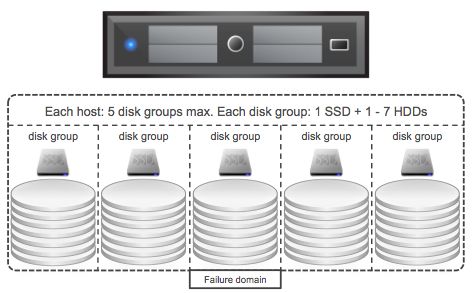
A disk group is a logical container for disks used by VSAN. Each disk groups needs at a minimum 1 magnetic disk and can have a maximum of 7 disks. Each disk group also requires 1 flash device.

VSAN disk groups

Now when designing your VSAN cluster at some point the question will arise should I have 1 or multiple disk groups per host? Can and will it impact performance? Can it impact availability?

There are a couple of things to keep in mind when it comes to VSAN if you ask me. The flash device which is part of each disk group is the caching/buffer layer for those disks, without the flash device the disks will also be unavailable. As such a disk group can be seen as a “failure domain”, because if the flash device fails the whole disk group is unavailable for that period of time. (Don’t worry, VSAN will automatically rebuild all your components that are impacted automatically.) Another thing to keep in mind is performance. Each flash device will provide an X amount of IOPS.A higher total number of IOPS could (probably will) change performance drastically, however it should be noted that capacity could still be a constraint. If this all sounds a bit fluffy lets run through an example!

  • Total capacity required: 20TB
  • Total flash capacity: 2TB
  • Total number of hosts: 5

This means that per host we will require:

  • 4TB of disk capacity (20TB/5 hosts)
  • 400GB of flash capacity (2TB/5 hosts)

This could simply result in each host having 2 x 2TB NL-SAS and 1 x 400GB flash device. Lets assume your flash device is capable of delivering 36000 IOPS… You can see where I am going right? What if I would have 2 x 200GB flash and 4x 1TB magnetic disks instead? Typical the lower capacity drives will do less write IOPS but for the Intel S3700 for instance that is 4000 less. So instead of 1 x 36000 IOPS it would result in 2 x 32000 IOPS. Yes, that could have a nice impact indeed….

But not just that, we also have more disk groups and smaller fault domains as a result. On top of that we will end up with more magnetic disks which means more IOPS per GB capacity in general. (If an NL-SAS drive does 80 IOPS for 2TB then two NL-SAS drives of 1TB will do 160 IOPS. Which means same TB capacity but twice the IOPS if you need it.)

In summary, yes there is a benefit in having more disk groups per hosts and as such more flash devices…

Disk Controller features and Queue Depth?

Duncan Epping · Apr 17, 2014 ·

I have been working on various VSAN configurations and a question that always comes up is what are my disk controller features and queue depth for controller X? (Local disks, not FC based…) Note that this is not only useful to know when using VSAN, but also when you are planning on doing host local caching with solutions like PernixData FVP or SanDisk FlashSoft for instance. The controller used can impact the performance, and a really low queue depth will result in a lower performance, it is as simple as that.

** NOTE: This post is not about VSAN disk controllers, but rather about disk controllers and their queue depth. Always check the HCL before buying! **

I have found myself digging through documentation and doing searches on the internet until I stumbled across the following website. I figured I would share the link with you, as it will help you (especially consultants) when you need to go through this exercise multiple times:

http://forums.servethehome.com/index.php?threads/lsi-raid-controller-and-hba-complete-listing-plus-oem-models.599/

Just as an example, the Dell H200 Integrated disk controller is on the VSAN HCL. According to the website above it is based on the LSI 2008 and provides the following feature set: 2×4 port internal SAS, no cache, no BBU, RAID 0, 1 and 10. According to the VSAN HCL also provides “Virtual SAN Pass-Through”. I guess the only info missing is queue depth of the controller. I have not been able to find a good source for this. So I figured I would make this thread a source for that info.

Before we dive in to that, I want to show something which is also important to realize. Some controllers take: SAS / NL-SAS and SATA. Although typically the price difference between SATA and NL-SAS is neglectable, the queue depth difference is not. Erik Bussink was kind enough to provide me with these details of one of the controllers he is using as an example, first in the list is “RAID” device – second is SATA and third SAS… As you can see SAS is the clear winner here, and that includes NL-SAS drives.

mpt2sas_raid_queue_depth: int
     Max RAID Device Queue Depth (default=128)
  mpt2sas_sata_queue_depth: int
     Max SATA Device Queue Depth (default=32)
  mpt2sas_sas_queue_depth: int
     Max SAS Device Queue Depth (default=254)

If you want to contribute, please take the following steps and report the Vendor, Controller type and aqlength in a comment please.

  1. Run the esxtop command on the ESXi shell / SSH session
  2. Press d
  3. Press f and select Queue Stats (d)
  4. The value listed under AQLEN is the queue depth of the storage adapter

The following table shows the Vendor, Controller and Queue Depth. Note that this is based on what we (my readers and I) have witnessed in our labs and results my vary depending on the firmware and driver used. Make sure to check the VSAN HCL for the supported driver / firmware version, note that not all controllers below are on the VSAN HCL, this is a “generic” list as I want it to serve multiple use cases.

Generally speaking it is recommended to use a disk controller with a queue depth > 256 when used for VSAN or “host local caching” solutions.

Vendor Disk Controller Queue Depth
Adaptec RAID 2405 504
Dell (R610) SAS 6/iR 127
Dell PERC 6/i 925
Dell PERC H200 Integrated 600
Dell PERC H310 25
Dell PERC H330 256
Dell (M710HD) PERC H200 Embedded 499
Dell (M910) PERC H700 Modular 975
Dell PERC H700 Integrated 975
Dell (M620) PERC H710 Mini 975
Dell (T620) PERC H710 Adapter 975
Dell (T620) PERC H710p 975
Dell PERC H810 975
HP Smart Array B110i 1020
HP Smart Array B120i 31
HP Smart Array P220i 1020
HP Smart Array P400i 128
HP Smart Array P410i 1020
HP Smart Array P420i 1011
HP Smart Array P440ar 1020
HP Smart Array P700m 1200
IBM ServeRAID-M5015 965
IBM ServeRAID-M5016 975
IBM ServeRAID-M5110 975
Intel C602 AHCI (Patsburg) 31 (per port)
Intel C602 SCU (Patsburg) 256
Intel RMS25KB040 600
LSI 2004 25
LSI 2008 25 / 600 (firmware dependent!)
LSI 2108 600
LSI 2208 600
LSI 2308 600
LSI 3008 600
LSI 9271-8i 975
LSI 9300-8i 600

Updating LSI firmware through the ESXi commandline

Duncan Epping · Apr 8, 2014 ·

I received an email this week from one of my readers / followers on twitter who had gone through the effort of upgrading his LSI controller firmware. He shared the procedure with me as unfortunately it wasn’t well documented. I hope this will help others in the future, I know it will help me as I was about to look at the exact same for my VSAN environment, thanks for sharing this Tom!

— copy / paste from Tom’s document —

We do quite a bit of virtualization and storage validation and performance testing in the Taneja Group Labs (http://tanejagroup.com/). Recently, we were performing some tests with VMware’s VSAN and due to some performance issues we were having with the AHCI controllers on our servers we needed to revise our environment to add some LSI SAS 2308 controllers and attach our SSD and HDDs to the LSI card. However our new LSI SAS controllers didn’t come with the firmware mandated by the VSAN HCL (they had v14 and the HCL specifies v18) and didn’t recognize the attached drives.  So we set about updating LSI 2308 firmware. Updating the LSI firmware is a simple process and can be accomplished from an ESXi 5.5 U1 server but isn’t very well documented. After updating the firmware and rebooting the system the drives were recognized and could be used by VSAN. Below are the steps I took to update my LSI controllers from v14 to v18. [Read more…] about Updating LSI firmware through the ESXi commandline

  • « Go to Previous Page
  • Page 1
  • Interim pages omitted …
  • Page 58
  • Page 59
  • Page 60
  • Page 61
  • Page 62
  • Interim pages omitted …
  • Page 71
  • Go to Next Page »

Primary Sidebar

About the Author

Duncan Epping is a Chief Technologist and Distinguished Engineering Architect at Broadcom. Besides writing on Yellow-Bricks, Duncan is the co-author of the vSAN Deep Dive and the vSphere Clustering Deep Dive book series. Duncan is also the host of the Unexplored Territory Podcast.

Follow Us

  • X
  • Spotify
  • RSS Feed
  • LinkedIn

Recommended Book(s)

Also visit!

For the Dutch-speaking audience, make sure to visit RunNerd.nl to follow my running adventure, read shoe/gear/race reviews, and more!

Do you like Hardcore-Punk music? Follow my Spotify Playlist!

Do you like 80s music? I got you covered!

Copyright Yellow-Bricks.com © 2026 · Log in