• Skip to primary navigation
  • Skip to main content
  • Skip to primary sidebar

Yellow Bricks

by Duncan Epping

  • Home
  • Unexplored Territory Podcast
  • HA Deepdive
  • ESXTOP
  • Stickers/Shirts
  • Privacy Policy
  • About
  • Show Search
Hide Search

vSAN

vSAN 6.6: Manual vs Automatic Disk Claim Mode

Duncan Epping · May 3, 2017 ·

I received this question on Manual vs Automatic disk claim mode in vSAN 6.6. Someone upgraded a cluster from 6.2 to 6.6 and  wanted to add a second cluster. They noticed that during the creation of the new cluster there was no option to select “automatic vs manual”.
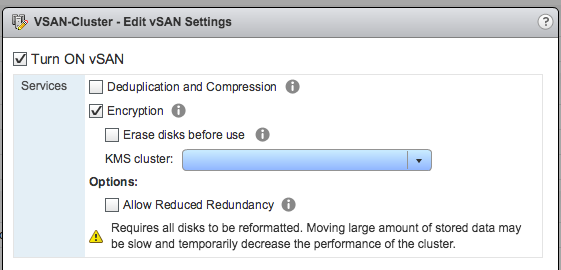
I think a blog post will be published that explains the reasoning behind this, I figured I would share some of it before hand so you don’t end up looking for something that does not exist. In vSAN 6.6 the “Automatic” option which automatically creates disk groups for you has disappeared. The reason for this is because we see the world moving to all-flash rather fast. With All-Flash it is difficult to differentiate between the capacity and cache device. For that reason, in previous versions of vSphere/vSAN you already had to grab the devices yourself when it was an all-flash configuration. With 6.6 we removed the “automatic” option as we also recognized that when there are multiple disk groups and you need to take disk controllers, and location of disks etc in to account it even becomes more complex to automatically form disk groups. In our experience most customers preferred to maintain control and had this configured to “manual” by default. As such this option was removed.

I hope that clarifies things. I will add a link to the article explaining it.

Disk format change going from 6.x to vSAN 6.6?

Duncan Epping · Apr 20, 2017 ·

Internally I received a comment around the upgrade to 6.6 and the disk format version change. When you upgrade to 6.6 also the version of  disk changes, it goes to version 5. In the past with these on-disk format changes a data move was needed and the whole disk group would be reformat. When going from vSAN 6.2 (vSphere 6.0 U2 that is!) to vSAN 6.6 there is no data move needed. The update is simply a metadata update, and on the average cluster will take less than 20 minutes.

When introducing encryption in to the environment you will need to evac data though as this will be a reformat of the disk. Reason for it being is that the disk will need to be encrypted and so will the data. This doesn’t mean however that if you want to “rekey” your environment a full format and data move is needed, vSAN Encryption has the ability to do a so called “shallow rekey” which means that the Key Encryption Key (KEK) will be replaced (see animated gif below), but not the Data Encryption Key (DEK). It is possible to do a deep rekey, but this will mean a full reformat and data evac of all disk groups. I hope that clears things up.

vSAN 6.6 available now

Duncan Epping · Apr 18, 2017 ·

vSAN 6.6 is available now. Check the release notes before you upgrade! Also note that for vSAN users currently on 6.0 Update 3 – upgrade to vSAN 6.6 is not yet supported. If you like to learn more about vSAN 6.6 check the following material:

  • vSAN Encryption demo
  • vSAN 6.6 demo
  • vSAN 6.6 What’s new blog

Note that vSAN 6.6 comes as a patch release, download the bits here from the vSAN 6.6 landing page:

  • vCenter Server 6.5.0d
  • ESXi 6.5.0d
  • vSAN 6.6 Release Notes


VMware vSAN 6.6 demo: vSAN Encryption

Duncan Epping · Apr 13, 2017 ·

Yesterday I posted a quick video overview of a couple new features that are part of vSAN 6.6. (haven’t seen it, go watch that one first!) I mentioned in that demo that I would potentially do one on Encryption. As I had over a dozen people asking already I figured I would throw a demo together today. Build an environment in our development cloud and below is the result. In the demo we will show how to configure vSAN Encryption and more. Oh, 1080p version can be found here. Enjoy.

VMware vSAN 6.6 demo

Duncan Epping · Apr 12, 2017 ·

I was playing around with a vSAN 6.6 environment yesterday and I figured I would record a quick demo of some of the new functionality introduced. Took me a bit longer than expected, but here it is. I hope you will find it useful, a 1080p version can be viewed on youtube.

  • « Go to Previous Page
  • Page 1
  • Interim pages omitted …
  • Page 34
  • Page 35
  • Page 36
  • Page 37
  • Page 38
  • Interim pages omitted …
  • Page 71
  • Go to Next Page »

Primary Sidebar

About the Author

Duncan Epping is a Chief Technologist and Distinguished Engineering Architect at Broadcom. Besides writing on Yellow-Bricks, Duncan is the co-author of the vSAN Deep Dive and the vSphere Clustering Deep Dive book series. Duncan is also the host of the Unexplored Territory Podcast.

Follow Us

  • X
  • Spotify
  • RSS Feed
  • LinkedIn

Recommended Book(s)

Also visit!

For the Dutch-speaking audience, make sure to visit RunNerd.nl to follow my running adventure, read shoe/gear/race reviews, and more!

Do you like Hardcore-Punk music? Follow my Spotify Playlist!

Do you like 80s music? I got you covered!

Copyright Yellow-Bricks.com © 2026 · Log in