• Skip to primary navigation
  • Skip to main content
  • Skip to primary sidebar

Yellow Bricks

by Duncan Epping

  • Home
  • Unexplored Territory Podcast
  • HA Deepdive
  • ESXTOP
  • Stickers/Shirts
  • Privacy Policy
  • About
  • Show Search
Hide Search

vSAN

How to convert a standard cluster to a stretched cluster while expanding it!

Duncan Epping · Sep 27, 2022 ·

On VMTN a question was asked about how you could convert a 5-node standard cluster to a stretched cluster. It is not documented in our regular documentation, probably as the process is pretty straightforward, so I figured I would write it down. When you create a stretched cluster you will need a Witness Appliance in a third location first. I would recommend deploying that Witness Appliance before doing anything else.

After you deployed the Witness Appliance add the additional hosts to vCenter Server. DO NOT yet add them to the cluster yet though! First, configure each host separately. After you have configured each host, place the host into maintenance mode. After the host is placed into maintenance mode, move it into the cluster and do not take it out of maintenance mode!

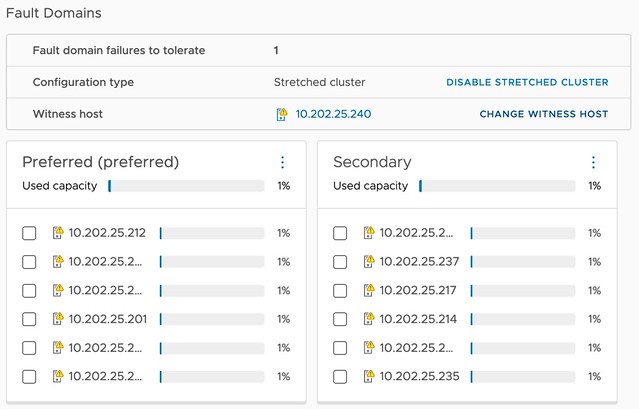
Now, when all hosts are part of the cluster you can create the Stretched Cluster. This process is simple, you pick the hosts that belong to each location, and then you select the witness. After the cluster has been created you simply take the hosts out of maintenance mode and you should be good! Note, you take the host out of maintenance after the Stretched Cluster has been created to ensure that you don’t have any rebalancing happening while you are creating the stretched cluster. Simply avoiding unneeded resyncs from occuring.

Do note, all VMs will have the same storage policy assigned still, so you will need to change that policy to ensure that the vSAN objects are placed and replicated according to your requirements! (RAID1 across locations and RAID-1/5/6 within a location for instance.)
Introducing vSAN 8 – Express Storage Architecture (ESA)

Duncan Epping · Aug 30, 2022 ·

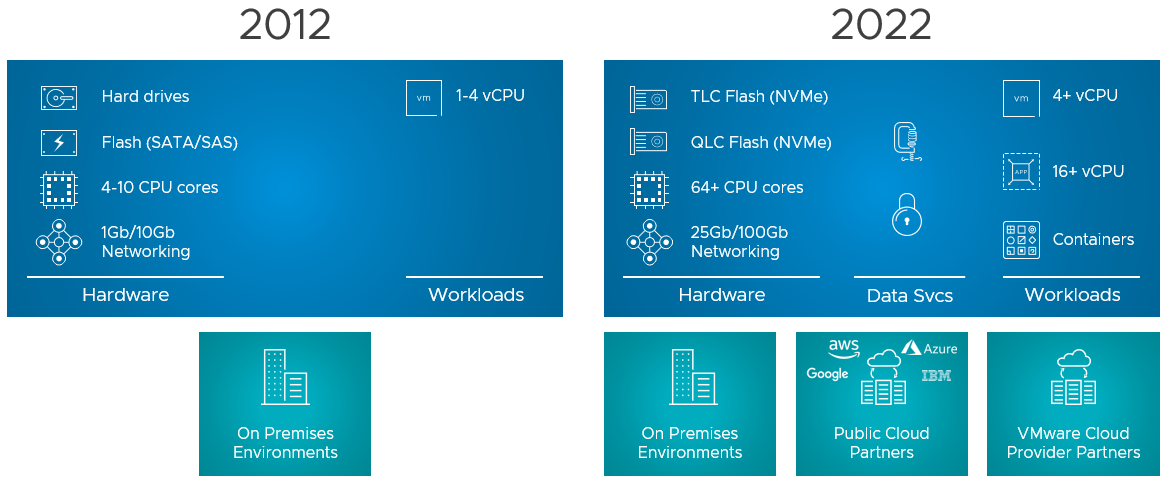
I debated whether I would write this blog now or wait a few weeks, as I know that the internet will be flooded with articles. But as it helps me as well to write down these things, I figured why not. So what is this new version of vSAN? vSAN Express Storage Architecture (vSAN ESA) introduces a new architecture for vSAN specifically with vSAN 8.0. This new architecture was developed to cater to this wave of new flash devices that we have seen over the past years, and we expect to see in the upcoming years. Not just storage, it also takes the huge improvements in terms of networking throughput and bandwidth into consideration. On top of that, we’ve also seen huge increases in available CPU and Memory capacity, hence it was time for a change.

Does that mean the “original” architecture is gone? No, vSAN Original Storage Architecture (OSA) still exists today and will exist for the foreseeable future. VMware understands that customers have made significant investments, so it will not disappear. Also, vSAN 8 brings fixes and new functionality for users of the current vSAN architecture (the logical cache capacity has been increased to 1.6TB instead of 600GB for instance.) VMware also understands that not every customer is ready to adopt this “single tier architecture”, which is what vSAN ESA delivers in the first release, but mind that this architecture also caters to other implementations (two-tier) in the future. What does this mean? When you create a vSAN cluster, you get to pick the architecture that you want to deploy for that environment (ESA or OSA), it is that simple! And of course, you do that based on the type of devices you have available. Or even better, you look at the requirements of your apps and you base your decision of OSA vs ESA and the type of hardware you need on those requirements. Again, to reiterate, vSAN Express Storage Architecture provides a flexible architecture that will use a single tier in vSAN 8 taking modern-day hardware (and future innovations) into consideration.

Before we look at the architecture, why would a customer care, what does vSAN ESA bring?

  • Simplified storage device provisioning
  • Lower CPU usage per processed IO
  • Adaptive RAID-5 and RAID-6 at the performance of RAID-1
  • Up to 4x better data compression
  • Snapshots with minimal performance impact

When you create a vSAN ESA cluster the first thing that probably stands out is that you no longer need to create disk groups, which speaks to the “Simplified storage device provisioning” bullet point. With the OSA implementation, you create a disk group with a caching device and capacity devices, but with ESA that is no longer needed. This is the first thing I noticed. You now simply select all devices and they will be part of your vSAN datastore. It doesn’t mean though that there’s no caching mechanism, but it just has been implemented differently. With vSAN ESA, all devices contribute to capacity and all devices contribute to performance. It has the added benefit that if one device fails that it doesn’t impact anything else but what is stored on that device. With OSA, of course, it could impact the whole disk group that the device belonged to.

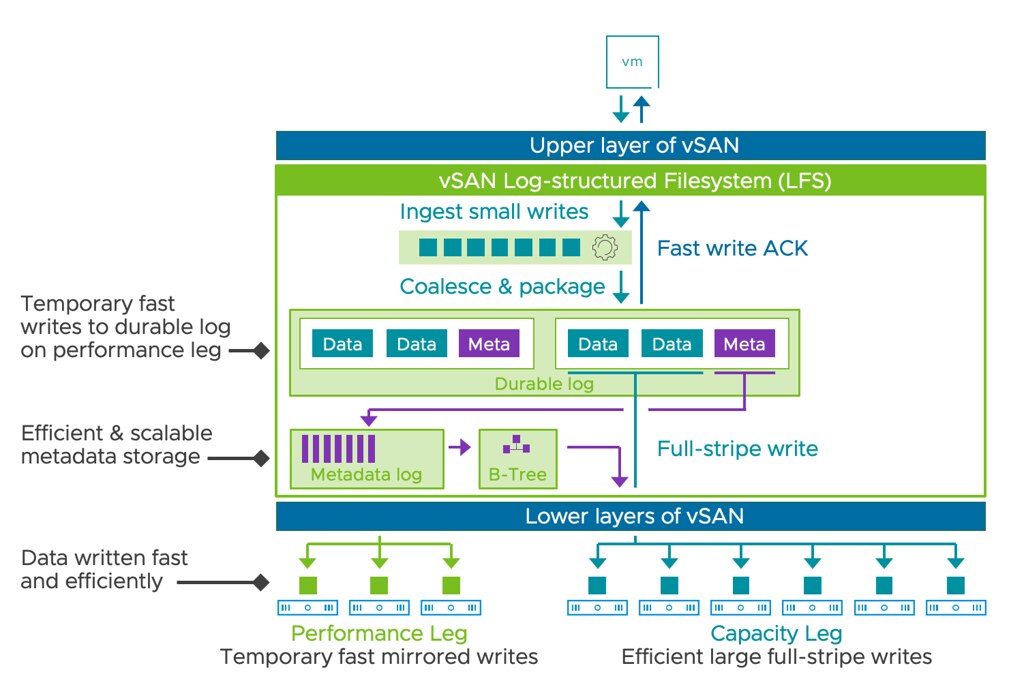
So now that we know that we no longer have disk groups with caching disks, how do we ensure we still get the performance customers expect? Well, there were a couple of things that were introduced that helped with that. First of all, a new log-structured file system was introduced. This file system helps with coalescing writes and enables fast acknowledgments of the IOs. This new layer will also enable direct compression of the data (enabled by default, and can be disabled via policy) and packaging of full stripes for the capacity “leg”. Capacity what? Yes, this is a big change that is introduced as well. With vSAN ESA you have a capacity leg and a performance leg. Let me show you what that looks like, and kudos to Pete Koehler for the great diagram!

As the above diagram indicates, you have a performance leg which is RAID-1 and then there’s a capacity leg which can be RAID-1 but will typically be RAID-5 or RAID-6. Depending on the size of your cluster of course. Another thing that will depend on the size of the cluster, this the size of your RAID-5 configuration, that is where the adaptable RAID-5 comes into play. It is an interesting solution, and it enables customers to use RAID-5 implementations starting with only 3 hosts all the way up to 6 hosts or more. If you have 3-5 hosts then you will get a 2+1 configuration, meaning 2 components for data and 1 for parity. When you have 6 hosts or larger you will get a 4+1 configuration. This is different from the original implementation as there you would always get 3+1. For RAID-6 the implementation is 4+2 by the way.

I’ve already briefly mentioned it, but compression is now enabled by default. The reason for it is that the cost of compression is really low with the current implementation as compression happens all the way at the top. That means that when a write is performed the blocks actually are sent over the network compressed as well to their destination and they are stored immediately. So no need to unpack and compress again. The other interesting thing is that the implementation of compression has also changed, leading to an improved efficiency that can go up to an 8:1 data reduction. The same applies to encryption implementation, it also happens at the top, so you get data-at-rest and data-in-transit encryption automatically when it is enabled. Enabling encryption still happens at the cluster level though, where compression can now be enabled/disabled on a per VM basis.

Another big change is the snapshot implementation. We’ve seen a few changes in snapshot implementation over the years, but this one is a major change. I guess the big change is that when you create a snapshot vSAN does not create a separate object. This means that the snapshot basically exists within the current object layout. Big benefit, of course, being that the object count doesn’t skyrocket when you create many snapshots, another added benefit is the performance of this implementation. Consolidation of a snapshot for instance when tested went 100x faster, this means much lower stun times, which I know everyone can appreciate. Not only is it much much faster to consolidate, but also normal IO is much faster during consolidation and during snapshot creation. I love it!

The last thing I want to mention is that from a networking perspective vSAN ESA not only performs much better, but it also is much more efficient. Allowing for ever faster resyncs, and faster virtual machine I/O. On top of that, because compression has been implemented the way it has been implemented it simply also means there’s more bandwidth remaining.

For those who prefer to hear the vSAN 8 ESA story through a podcast, make sure to check the Unexplored Territory Podcast next week, as we will have Pete Koehler answering all questions about vSAN ESA. Also, on core.vmware.com you will find ALL details of this new architecture in the upcoming weeks, and also make sure to read this official blog post on vmware.com.

Nested Fault Domains on a 2-Node vSAN Stretched Cluster, is it supported?

Duncan Epping · Jun 20, 2022 ·

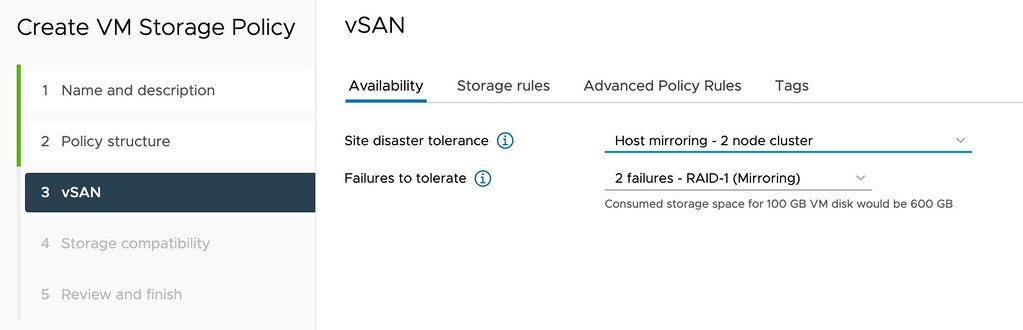
I spotted a question this week on VMTN, the question was fairly basic, are nested fault domains supported on a 2-node vSAN Stretched Cluster? It sounds basic, but unfortunately, it is not documented anywhere, probably because stretched 2-node configurations are not very common. For those who don’t know, with a nested fault domain on a two-node cluster you basically provide an additional layer of resiliency by replicating an object within a host as well. A VM Storage Policy for a configuration like that will look as follows.

This however does mean that you would need to have a minimum of 3 fault domains within your host as well if you want to, this means that you will need to have a minimum of 3 disk groups in each of the two hosts as well. Or better said, when you configure Host Mirroring and then select the second option failures to tolerate the following list will show you the number of disk groups per host you need at a minimum:

  • Host Mirroring – 2 Node Cluster
    • No Data Redundancy – 1 disk group
    • 1 Failure – RAID1 – 3 disk groups
    • 1 Failure – RAID5 – 4 disk groups
    • 2 Failures – RAID1 – 5 disk groups
    • 2 Failures – RAID6 – 6 disk groups
    • 3 Failures – RAID1 – 7 disk groups

If you look at the list, you can imagine that if you need additional resiliency it will definitely come at a cost. But anyway, back to the question, is it supported when your 2-node configuration happens to be stretched across locations, and the answer is yes, VMware supports this.

New book: VMware vSAN 7.0 U3 Deep Dive

Duncan Epping · May 9, 2022 ·

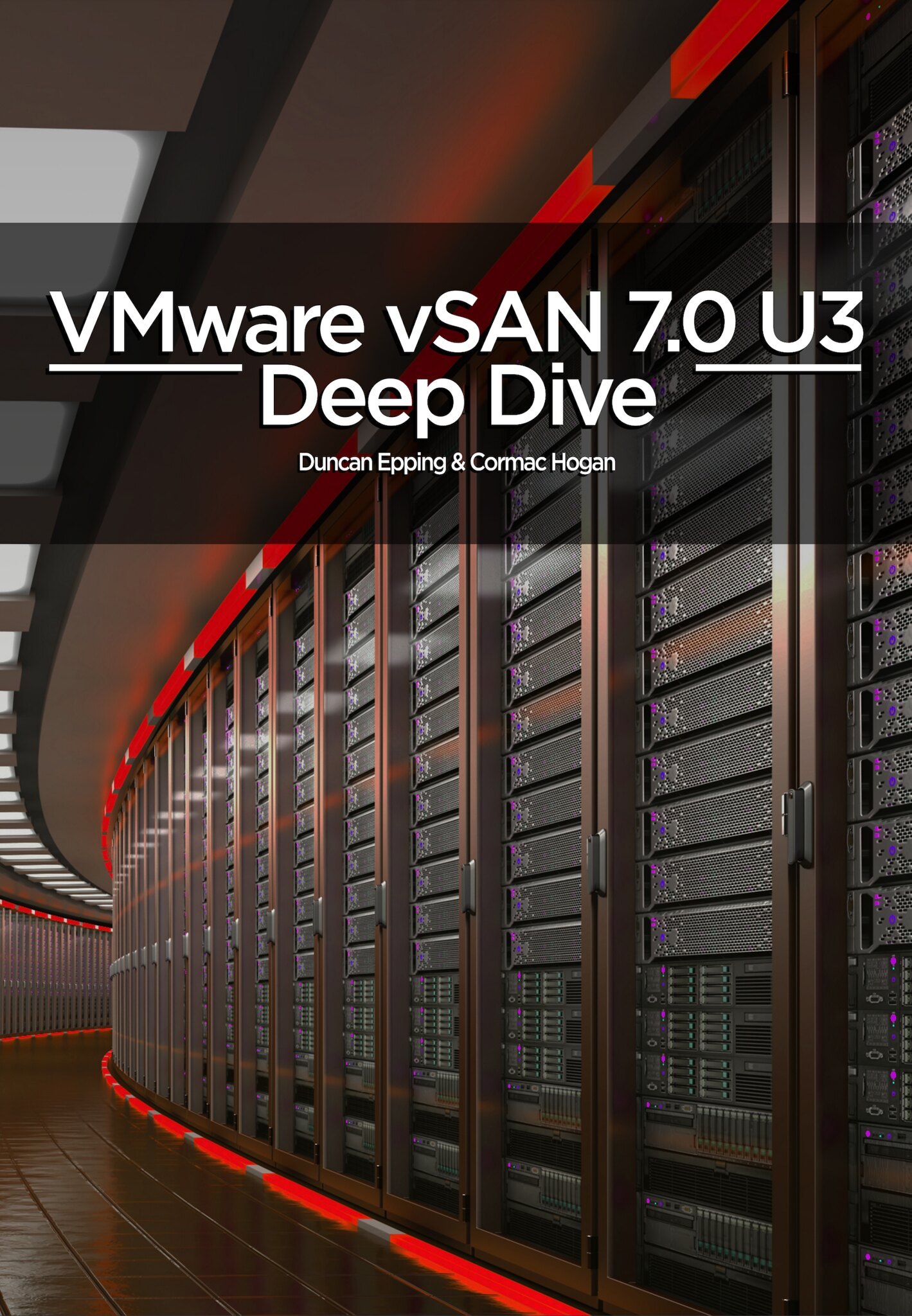
Yes, we’ve mentioned it a few times already on Twitter that we were working on it, but today Cormac and I are proud to announce that the VMware vSAN 7.0 U3 Deep Dive is available via Amazon on both ebook as well as paper! We had the pleasure of working with Pete Koehler again as a technical editor, the foreword was written by John Gilmartin (SVP and GM for Cloud Storage and Data), the cover was created by my son (Aaron Epping), and it is once again fully self-published! We changed the format (physical dimension) of the book to be able to increase the size of the screenshots, as we realize that most of us are middle-aged by now, we feel it really made a huge difference in readability.

VMware’s vSAN has rapidly proven itself in environments ranging from hospitals to oil rigs to e-commerce platforms and is the top player in the hyperconverged space. Along the way, it has matured to offer unsurpassed features for data integrity, availability, space efficiency, stretched clustering, and cloud-native storage services. vSAN 7.0 U3 has radically simplified IT operations and supports the transition to hyperconverged infrastructures (HCI). The authors of the vSAN Deep Dive have thoroughly updated their definitive guide to this transformative technology. Writing for vSphere administrators, architects, and consultants, Cormac Hogan, and Duncan Epping explain what vSAN is, how it has evolved, what it now offers, and how to gain maximum value from it. The book offers expert insight into preparation, installation, configuration, policies, provisioning, clusters, architecture, and more. You’ll also find practical guidance for using all data services, stretched clusters, two-node configurations, and cloud-native storage services.

Although we pressed publish, sometimes it takes a while before the book is available in all Amazon stores, but it should just trickle in the upcoming 24-48 hours. The book is priced at 9.99 USD (ebook) and 29.99 USD (paper) and is sold through Amazon only. Get it while it is hot, and we would appreciate it if you would use our referral links and leave a review when you finish it. Thanks, and we hope you will enjoy it!

  • Paper book – 29.99 USD
  • Ebook – 9.99 USD

Of course, we also have the links to other major Amazon stores:

  • United Kingdom – Kindle – Paper
  • Germany – Kindle – Paper
  • Netherlands – Kindle – Paper
  • Canada – Kindle – Paper
  • France – Kindle – Paper
  • Spain – Kindle – Paper
  • India – Kindle
  • Japan – Kindle – Paper
  • Italy – Kindle – Paper
  • Mexico – Kindle
  • Australia – Kindle – Paper
  • Or just do a search!

Does the Native Key Provider require a host to have a TPM?

Duncan Epping · Feb 23, 2022 ·

I got this question on the VMTN forum this week, does the Native Key Provider require a host to have a TPM? (Trusted Platform Module) The documentation does discuss the use of TPM 2.0 when you enable the Native Key Provider. Let’s be clear, the vCenter Server Native Key Provider does not require a TPM! If a TPM is available on each host then it will be used by the Native Key Provider to store a secret on, which enables us to encrypt and decrypt the ESXi configuration. Again, as stated, it is not a requirement to use a TPM. I have asked to get the documentation appended so that it is officially documented as well, just posting it here so that it indexed by google.

  • « Go to Previous Page
  • Page 1
  • Interim pages omitted …
  • Page 13
  • Page 14
  • Page 15
  • Page 16
  • Page 17
  • Interim pages omitted …
  • Page 71
  • Go to Next Page »

Primary Sidebar

About the Author

Duncan Epping is a Chief Technologist and Distinguished Engineering Architect at Broadcom. Besides writing on Yellow-Bricks, Duncan is the co-author of the vSAN Deep Dive and the vSphere Clustering Deep Dive book series. Duncan is also the host of the Unexplored Territory Podcast.

Follow Us

  • X
  • Spotify
  • RSS Feed
  • LinkedIn

Recommended Book(s)

Also visit!

For the Dutch-speaking audience, make sure to visit RunNerd.nl to follow my running adventure, read shoe/gear/race reviews, and more!

Do you like Hardcore-Punk music? Follow my Spotify Playlist!

Do you like 80s music? I got you covered!

Copyright Yellow-Bricks.com © 2026 · Log in