• Skip to primary navigation
  • Skip to main content
  • Skip to primary sidebar

Yellow Bricks

by Duncan Epping

  • Home
  • Unexplored Territory Podcast
  • HA Deepdive
  • ESXTOP
  • Stickers/Shirts
  • Privacy Policy
  • About
  • Show Search
Hide Search

Server

VMworld 2015: Site Recovery Manager 6.1 announced

Duncan Epping · Sep 1, 2015 ·

This week Site Recovery Manager 6.1 was announced. There are many enhancements in SRM 6.1 like the integration with NSX for instance and policy driven protection, but personally I feel that support for stretched storage is huge. When I say stretched storage I am referring to solutions like EMC VPLEX, Hitachi Virtual Storage Platform and IBM San Volume Controller(etc). In the past, and you can still today, when you had these solutions deployed you would have a single vCenter Server with a single cluster and moved VMs around manually when needed, or let HA take care of restarts in failure scenarios.

As of SRM 6.1 running these types of stretched configurations is now also supported. So how does that work, what does it allow you to do, and what does it look like? Well in contrary to a vSphere Metro Storage Cluster solution with SRM 6.1 you will be using two vCenter Server instances. These two vCenter Server instances will have an SRM server attached to it which will use a storage replication adaptor to communicate to the array.

But why would you want this? Why not just stretch the compute cluster also? Many have deployed these stretched configurations for disaster avoidance purposes. The problem is however that there is no form of orchestration whatsoever. This means that all workloads will come up typically in a random fashion. In some cases the application knows how to recover from situations like that, in most cases it does not… Leaving you with a lot of work, as after a failure you will now need to restart services, or VMs, in the right order. This is where SRM comes in, this is the strength of SRM, orchestration.
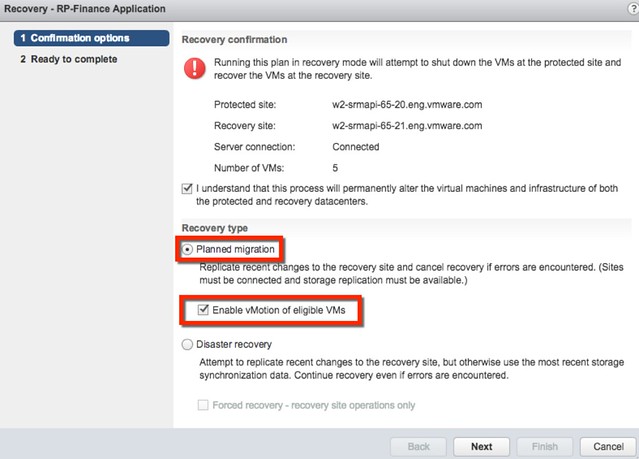
Besides doing orchestration of a full failover, what SRM can also do in the 6.1 release is evacuate a datacenter using vMotion in an orchestrated / automated way. If there is a disaster about to happen, you can now use the SRM interface to move virtual machines from one datacenter to another, with just a couple of clicks, planned migration is what it is called as can be seen in the screenshot above.

Personally I think this is a great step forward for stretched storage and SRM, very excited about this release!
Virtual SAN beta coming up with dedupe and erasure coding!

Duncan Epping · Sep 1, 2015 ·

Something I am personally very excited about is the fact that there is a beta coming up soon for an upcoming release of Virtual SAN. This beta is all about space efficiency and in particular will contain two new great features which I am sure all of you will appreciate testing:

  • Erasure Coding
  • Deduplication

My guess is that many people will get excited about dedupe, but personally I am also very excited about erasure coding. As it stands with VSAN today when you deploy a 50GB VM and have failures to tolerate defined as 1 you will need to have ~100GB of capacity available. With Erasure Coding the required capacity will be significantly lower. What you will be able to configure is a 3+1 or a 4+2 configuration, not unlike RAID-5 and RAID-6. This means that from a capacity stance you will need 1.3x the space of a given disk when 3+1 is used or 1.5x the space when 4+2 is used. Significant improvement over 2x when using FTT=1 in todays GA release. Do note of course that in order to achieve 3+1 or 4+2 you will need more hosts then you would normally need with FTT=1 as we will need to guarantee availability.

Dedupe is the second feature that you can test with the upcoming beta. I don’t think I really need to explain what it is. I think it is great we may have this functionality as part of VSAN at some point in the future. Deduplication will be applied on a “per disk group” basis. Of course the results of deduplication will vary, but with the various workloads we have tested we have seen up to 8x improvements in usable capacity. Again, this will highly depend on your use case and may end up being lower or higher.

And before I forget, there is another nice feature in the beta which is end-to-end checksums (not just on the device). This will protect you not only against driver and firmware bugs, anywhere on the stack,  but also bit rot on the storage devices. And yes, it will have scrubber constantly running in the background. The goal is to protect against bit rot, network problems, software and firmware issues. The checksum will use CRC32c, which utilizes special CPU instructions thanks to Intel, for the best performance. These software checksums will complement the hardware-based checksums available today. This will be enabled by default and of course will be compatible with the current and future data services. 

If you are interested in being considered for the beta (and apologies in advance that we will not be able to accommodate all requests), then you can summit your information at www.vmware.com/go/vsan6beta.  

Go VSAN

What is new for Virtual SAN 6.1?

Duncan Epping · Aug 31, 2015 ·

It is VMworld, and of course there are many announcements being doing one of which is Virtual SAN 6.1 which will come as part of vSphere 6.0 Update 1. Many new features have been added, but there are a couple which stand out if you ask me. In this post I am going to talk about what are in my opinion the key new features. Lets list them first and then discuss some of them individually.

  • Support for stretched clustering
  • Support for 2 node ROBO configurations
  • Enhanced Replication
  • Support for SMP-FT
  • New hardware options
    • Intel NVMe
    • Diablo Ultra Dimm
  • Usability enhancements
    • Disk Group Bulk Claiming
    • Disk Claiming per Tier
    • On-Disk Format Upgrade from UI
  • Health Check Plug-in shipped with vCenter Server
  • Virtual SAN Management Pack for VR Ops

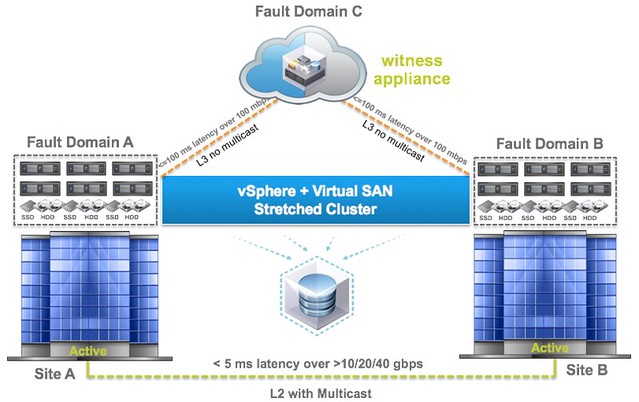
When explaining the Virtual SAN architecture and concepts there is always one question that comes up, what about stretched clustering? I guess the key reason for it being the way Virtual SAN distributes objects across multiple hosts for availability reasons and people can easily see how that would work with datacenters. With Virtual SAN 6.1 we now fully supported stretched clustering. But what does that mean, what does that look like?

As you can see in the diagram above it starts with 3 failure domains, two of which will be “hosting data” and one of which will be a “witness site”. All of this is based on the Failure Domains technology that was introduced with 6.0, and those who have used it now how easy it is. Of course there are requirements when it comes to deploying in a stretched fashion and the key requirements for Virtual SAN are:

  • 5ms RTT latency max between data sites
  • 200ms RTT latency at most from data sites to witness site

Worth noting from a networking point of view is that from the data sites to the witness site there is no requirement for multicast routing and it can be across L3. On top of that the Witness can be nested ESXi, so no need to dedicate a full physical host just for witness purposes. Of course the data sites can also connect to each other over L3 if that is desired, but personally I suspect that VSAN over L2 will be a more common deployment and it is also what I would recommend. Note that between the data sites there is still a requirement for multicast.

When it comes to deploying virtual machines on a stretched cluster not much has changed. Deploy a VM, and VSAN will ensure that there is 1 copy of your data in Fault Domain A and one copy in Fault Domain B with your witness in Fault Domain C. Makes sense right? If one of the data sites fails then the other can take over. If the VM is impacted by a site failure then HA can take action… It is no rocket science and dead simple to set up. I will have a follow up post with some more specifics in a couple of weeks

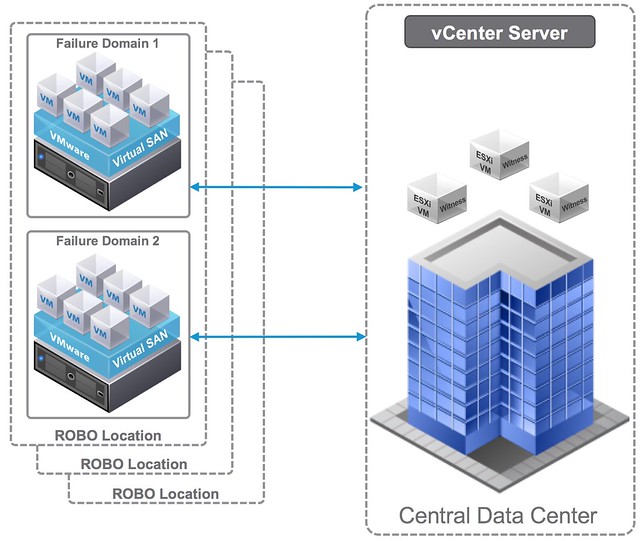
Besides stretched clustering Virtual SAN 6.1 also brings a 2 node ROBO option. This is based on the same technique as the stretched clustering feature. It basically allows you to have 2 nodes in your ROBO location and a witness in a central location. The max latency (RTT) in this scenario is 500ms RTT, which should accommodate for almost every ROBO deployment out there. Considering the low number of VMs typically in these scenarios you are usually okay as well with 1GbE networking in the ROBO location, which further reduces the cost.

When it comes to disaster recovery work has also been done to reduce the recovery point objective (RPO) for vSphere Replication. By default this is 15 minutes, but for Virtual SAN this has now been certified for 5 minutes. Just imagine combining this with a stretched cluster, that would be a great disaster avoidance and disaster recovery solution. Sync replication between active sites and then async to where ever it needs to go.

But that is not it in terms of availability, support for SMP FT has also been added. I never expected this to be honest, but I have had many customers asking for this in the past 12 months. Other common requests I have seen is the support of these super fast flash devices like Intel NVMe and Diablo Ultra Dimm, and 6.1 delivers exactly that.

Another big focus in this release has been usability and operations. Many enhancements have been done to make life easier. I like the fact that the Health Check plugin is now included with vCenter Server and you can do things like upgrading the on-disk format straight from the UI. And of course there is the VR Ops Management Pack, which will enrich your VR Ops installation with all the details you ever need about Virtual SAN. Very very useful!

All of this making Virtual SAN 6.1 definitely a release to check out!

VMworld 2015: vSphere APIs for IO Filtering update

Duncan Epping · Aug 31, 2015 ·

I suspect that the majority of blogs this week will all be about Virtual SAN, Cloud Native Apps and EVO. If you ask me then the vSphere APIs for IO Filtering announcements are just as important. I’ve written about VAIO before, in a way, and it was first released in vSphere 6.0 and opened to a select group of partners. For those who don’t know what it is, lets recap, the vSphere APIs for IO Filtering is a framework which enables VMware partners to develop data services for vSphere in a fully supported fashion. VMware worked closely with EMC and Sandisk during the design and development phase to ensure that VAIO would deliver what partners would require it to deliver.

These data services can be applied to on a VM or VMDK granular level and can be literally anything by simply attaching a policy to your VM or VMDK. In this first official release however you will see two key use cases for VAIO though:

  1. Caching
  2. Replication

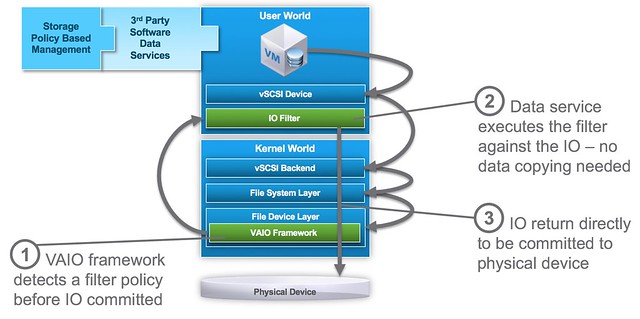
The great thing about VAIO if you ask me is that it is an ESXi user space level API, which over time will make it possible for all the various data services providers (like Atlantis, Infinio etc) who now have a “virtual appliance” based solution to move in to ESXi and simplify their customers environment by removing that additional layer. (To be technically accurate, VAIO APIs are all user level APIs, the filters are all running in user space, only a part of the VAIO framework runs inside the kernel itself.) On top of that, as it is implemented on the “right” layer it will be supported for VMFS (FC/iSCSI/FCoE etc), NFS, VVols and VSAN based infrastructures. The below diagram shows where it sits.

VAIO software services are implemented before the IO is directed to any physical device and does not interfere with normal disk IO. In order to use VAIO you will need to use vSphere 6.0 Update 1. On top of that of course you will need to procure a solution from one of the VMware partners who are certified for it, VMware provides the framework – partners provide the data services!

As far as I know the first two to market will be EMC and Sandisk. Other partners who are working on VAIO based solutions and you can expect to see release something are Actifio, Primaryio, Samsung, HGST and more. I am hoping to be able to catch up with one or two of them this week or over the course of the next week so I can discuss it a bit more in detail.

Project #vGiveback

Duncan Epping · Aug 30, 2015 ·

It is VMworld again, and just like last year VMware decided to give back to the community. No I am not talking about the virtualization community, but I am talking about charity, the great thing is that just like last year you can get VMware to give away an X amount to a charity cause of your choice (health, children, education or environment). As a friend of the VMware foundation I would like to ask ALL of you to help. So what do you need to do, what is the goal?

Well it is simple. Publish a picture on either Instagram or Twitter. Make sure the picture represents the cause and of course you need to tag it, use #vGiveBack and copy in @vmwFoundation. Your message should look like something like this:

Make sure to take a pic at Mos West and select your charity cause! Slightly awkward though 😀 #environment #vGiveBack pic.twitter.com/UUJ1EvO58X

— Duncan Epping (@DuncanYB) August 30, 2015

(Causes can be: #health #children #education or #environment)

The goal is 10,000 photos between Monday, August 31st and Thursday, September 3rd, out of which a mosaic will be crated. The final image for the mosaic symbolizes our community impact, and once complete, unlocks a donation that will be divided in proportion to the causes you select.

So what am I asking?

  1. Post a picture on twitter or instagram with the right hashtags and make copy in @vmwFoundation (it doesn’t need to be in front of one of those signs by the way, it can be a different pic…)
  2. Ask all of your friends to do the same, we need to hit that number lets make this go viral!

Every little bit will help. Each tweet or instagram post will bring us one step closer to unlocking our collective impact. If you don’t have twitter or instagram, ask your wife/son/daughter/friend to post for you!

  • « Go to Previous Page
  • Page 1
  • Interim pages omitted …
  • Page 79
  • Page 80
  • Page 81
  • Page 82
  • Page 83
  • Interim pages omitted …
  • Page 336
  • Go to Next Page »

Primary Sidebar

About the Author

Duncan Epping is a Chief Technologist and Distinguished Engineering Architect at Broadcom. Besides writing on Yellow-Bricks, Duncan is the co-author of the vSAN Deep Dive and the vSphere Clustering Deep Dive book series. Duncan is also the host of the Unexplored Territory Podcast.

Follow Us

  • X
  • Spotify
  • RSS Feed
  • LinkedIn

Recommended Book(s)

Also visit!

For the Dutch-speaking audience, make sure to visit RunNerd.nl to follow my running adventure, read shoe/gear/race reviews, and more!

Do you like Hardcore-Punk music? Follow my Spotify Playlist!

Do you like 80s music? I got you covered!

Copyright Yellow-Bricks.com © 2026 · Log in