• Skip to primary navigation
  • Skip to main content
  • Skip to primary sidebar

Yellow Bricks

by Duncan Epping

  • Home
  • Unexplored Territory Podcast
  • HA Deepdive
  • ESXTOP
  • Stickers/Shirts
  • Privacy Policy
  • About
  • Show Search
Hide Search

Server

vMSC and Disk.AutoremoveOnPDL on vSphere 6.x and higher

Duncan Epping · Mar 21, 2016 ·

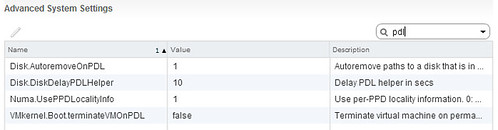
I have discussed this topic a couple of times, and want to inform people about a recent change in recommendation. In the past when deploying a stretched cluster (vMSC) it was recommended by most storage vendors and by VMware to set Disk.AutoremoveOnPDL to 0. This basically disabled the feature that automatically removes LUNs which are in a PDL (permanent device loss) state. Upon return of the device a rescan would then allow you to use the device again. With vSphere 6.0 however there has been a change to how vSphere responds to a PDL scenario, vSphere does not expect the device to return. To be clear, the PDL behaviour in vSphere was designed around the removal of devices, they should not stay in the PDL state and return for duty, this did work however in previous version due to a bug.

With vSphere 6.0 and higher VMware recommends to set Disk.AutoremoveOnPDL to 1, which is the default setting. If you are a vMSC / stretched cluster customer, please change your environment and design accordingly. But before you do, please consult your storage vendor and discuss the change. I would also like to recommend testing the change and behaviour to validate that the environment returns for duty correctly after a PDL! Sorry about the confusion.
Disk.AutoremoveOnPDL

KB article backing my recommendation was just posted: https://kb.vmware.com/kb/2059622. Documentation (vMSC whitepaper) is also being updated.

Want to hear all about VSAN 6.2? Watch the #SFD9 recordings!

Duncan Epping · Mar 20, 2016 ·

Last week my colleagues had the pleasure to present at Storage Field Day 9 (SFD9). The topic was Virtual SAN, and more specifically what we released with 6.2 and how we are doing from a business point of view / where we stand in the industry. Great explanation by the team on all the different aspects of this release, and even around some of the basic constructs like disk groups etc. One thing that stood out to me, was the explanation of Yanbing around the customer count, I’ve seen one of our competitors screaming shelfware every time they get the chance, which I guess is a great validation to begin with because why worry about something that isn’t a problem to begin with, but still I would like to share this quote:

VSAN has well over 3000 customers. So how did we count these 3000 customers. VSAN’s business is largely build on a transaction based business. Three quarters (75%) of the customers come from the transaction deals. Another quarter (25%) comes from ELA (enterprise license agreements), and most of those customers go through a Proof of Concept with VSAN and they have decided to make that choice. We also have another customer segment which is through the Horizon / VDI use case where we track actual deployments in those use cases.

The intro is by Yanbing Li, General Manager of the Storage and Availability business unit at VMware. Followed by the basics, what’s new and deeper dives by Christos Karamanolis, CTO Storage and Availability at VMware. And last a short demo to show the operational simplicity by Rawlinson Rivera, Principal Architect Storage and Availability at VMware. I created a simple playlist, if you want to skip videos you can do so by clicking those lines top left and select the one you want to view. Thanks Stephen Foskett for capturing and sharing these sessions, awesome job once again!

VSAN Health checks disabled after upgrade to vCenter 6.0 U2

Duncan Epping · Mar 18, 2016 ·

Yesterday at the Dutch VMUG I was talking to my friend @GabVirtualWorld. Gabe mentioned that he had just upgraded his vCenter Server to 6.0 U2 in his VSAN environment, but hadn’t upgraded the hosts yet. Funny enough later someone else mentioned the same scenario and both of them noticed that the VSAN Health Checks were disabled after upgrading vCenter Server. Below a screenshot of the issue Gabe saw in his environment. (Thanks Gabe)

vsan health checks disabled

So does that mean there is no backwards compatibility for the Healthcheck, well yes and no. In this release we made our APIs public, William Lam wrote a couple of great articles on this, and in order to deliver a high quality SDK backwards compatibility had to be broken with this release. So if you received the “health checks disabled” message after upgrading to vCenter Server 6.0 U2, you can simply solve this by also upgrading the hosts to ESXi 6.0 U2. I hope this helps.

** Update March 23rd **

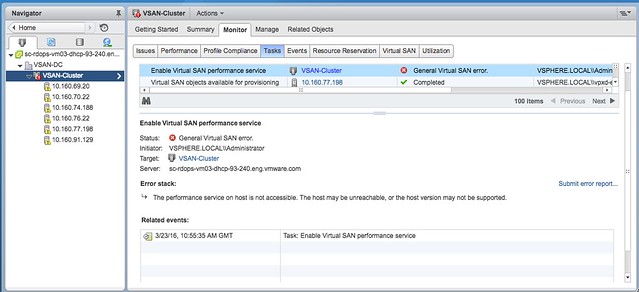
Please note that ESXi 6.0 Update 2 is also a requirement in order to enable the “Performance Service” which was newly introduced in Virtual SAN 6.2. Although the Performance Service capability is exposed in vCenter Server 6.0 Update 2, without ESXi 6.0 U2 you will not be able to enable it. When trying to enable it on any version of ESXi lower than 6.0 U2 the following error will be thrown:

Task Details:

Status: General Virtual SAN error.
Start Time: Mar 23, 2016 10:55:35 AM
Completed Time: Mar 23, 2016 10:55:38 AM
State: Error

Error Stack: The performance service on host is not accessible. The host may be unreachable, or the host version may not be supported

This is what the error looks like in the UI:

Here you go, VSAN 6.2 GA!

Duncan Epping · Mar 16, 2016 ·

We’ve been talking about if for a while now, but last night the moment finally arrived… VSAN 6.2 aka vSphere 6.0 Update 2 was released. I am not going to go in to any level of depth here, as I have written many posts on the subject of VSAN 6.2 already, and so has my friend Cormac, the best start is probably this blog though. You can read those if you want to get the nitty gritty details, or nerd knobs as apparently some like to call it. (I prefer to call it a healthy level of curiosity, but that is a different discussion.) Here is what is in 6.2:

  • Deduplication and Compression
  • RAID-5/6 (Erasure Coding)
  • Sparse Swap Files
  • Checksum / disk scrubbing
  • Quality of Service / Limits
  • In mem read caching
  • Integrated Performance Metrics
  • Enhanced Health Service

Now that is not it, there is also some new stuff in vSphere 6.0 Update 2, one which I feel is very welcome and that is the Host Client! A full HTML5 based client which comes as part of your ESXi host, very useful if you ask me! Also two-factor authentication was added for the Web Client, several enhancements to the vSphere APIs for IO Filtering and support for different databases for vCenter etc.

Okay, lets stop blabbing, start your download engines, find your bits here:

  • ESXi 6.0 U2 – Release Notes
  • vCenter Server 6.0 U2 – Release Notes

vSphere Beta coming soon….

Duncan Epping · Mar 11, 2016 ·

If you are one of those guys (or girls of course) who likes to stay on top of his (or her) game, wouldn’t it be nice to be able to test the upcoming vSphere Beta? I know I got excited about all the cool new functionality that is introduced in it. I can’t share any details unfortunately it is a private beta and those details can only be shared under NDA… However, the Beta is open for everyone to register. So if you have a home-lab, a lab at work, you want to test stuff nested… Make sure to sign up here: VMware vSphere Beta Interest Capture.

Note that the vSphere Beta Program leverages a private Beta community to download software and share information. It will provide you the ability to discuss features, functionality and potential issues you see with Engineers and Product Managers but also with your peers. Testing is free-form and there is even the option to test it in a VMware hosted environment, easy right? Best however would be to test it in your labs the way you use the product in production…

  • « Go to Previous Page
  • Page 1
  • Interim pages omitted …
  • Page 70
  • Page 71
  • Page 72
  • Page 73
  • Page 74
  • Interim pages omitted …
  • Page 336
  • Go to Next Page »

Primary Sidebar

About the Author

Duncan Epping is a Chief Technologist and Distinguished Engineering Architect at Broadcom. Besides writing on Yellow-Bricks, Duncan is the co-author of the vSAN Deep Dive and the vSphere Clustering Deep Dive book series. Duncan is also the host of the Unexplored Territory Podcast.

Follow Us

  • X
  • Spotify
  • RSS Feed
  • LinkedIn

Recommended Book(s)

Also visit!

For the Dutch-speaking audience, make sure to visit RunNerd.nl to follow my running adventure, read shoe/gear/race reviews, and more!

Do you like Hardcore-Punk music? Follow my Spotify Playlist!

Do you like 80s music? I got you covered!

Copyright Yellow-Bricks.com © 2026 · Log in