• Skip to primary navigation
  • Skip to main content
  • Skip to primary sidebar

Yellow Bricks

by Duncan Epping

  • Home
  • Unexplored Territory Podcast
  • HA Deepdive
  • ESXTOP
  • Stickers/Shirts
  • Privacy Policy
  • About
  • Show Search
Hide Search

Server

The following VIBs on the host are missing from the image and will be removed from the host during remediation: vmware-fdm

Duncan Epping · Jan 2, 2023 ·

I’ve seen a few people being confused about a message which is shown when upgrading ESXi. The message is: The following VIBs on the host are missing from the image and will be removed from the host during remediation: vmware-fdm(version number + build number). Now this happens when you use vLCM (Lifecycle Manager) to upgrade from one version of ESXi to the next. The reason for it is simple, the vSphere HA VIB (vmware-fdm) is never included in the image.

The following VIBs on the host are missing from the image and will be removed from the host during remediation: vmware-fdm

If it is not included, how do the hosts get the VIB? The VIB is pushed by vCenter Server to the hosts when required! (When you enable HA for instance on a cluster.) This also is the case after an upgrade. After the VIB is removed it will simply be replaced by the latest version of it by vCenter Server. So no need to be worried, HA will work perfectly fine after the upgrade!
vSAN 8.0 ESA – Dude, where’s my vSAN disk group?

Duncan Epping · Nov 29, 2022 ·

Last week I was talking to a customer and he mentioned that he deployed vSAN 8.0 in his lab and he was shocked that when he wanted to define disk groups he noticed that they don’t exist anymore. Well, not in vSAN 8.0 ESA (Express Storage Architecture) that is. They do still exist in the Original Storage Architecture! The big change with vSAN 8.0 ESA is that the “bottleneck” in the previous architecture has been removed. No longer will you select a single device for caching for a particular disk group, and no longer do you designate devices purely for capacity.

With vSAN 8.0 ESA all your devices will be part of a single storage pool, and all those devices will contribute to both storage capacity as well as storage performance! The added benefit of course is the fact that writes and reads will be distributed across all devices, removing a potential choking point, and also removing a single point of failure. Why? Well with vSAN OSA when the caching device fails the whole disk group becomes unavailable. With ESA that is no longer the case as there’s no caching device!

So how does vSAN ESA provide both optimal efficiency for capacity as well as optimal performance? Well, it does this by introducing additional layers. The idea is that vSAN will provide write performance at the level of RAID-1 but space efficiency at the level of RAID-5 or RAID-6. That would be the best of both worlds. It would need to do this however while taking into consideration that we are also dealing with different types of flash devices than you normally would be with vSAN OSA. In other words, writes will also need to be optimized for the types of devices used (TLC), and it will also need to be future-proof for devices that may be supported later on (QLC).

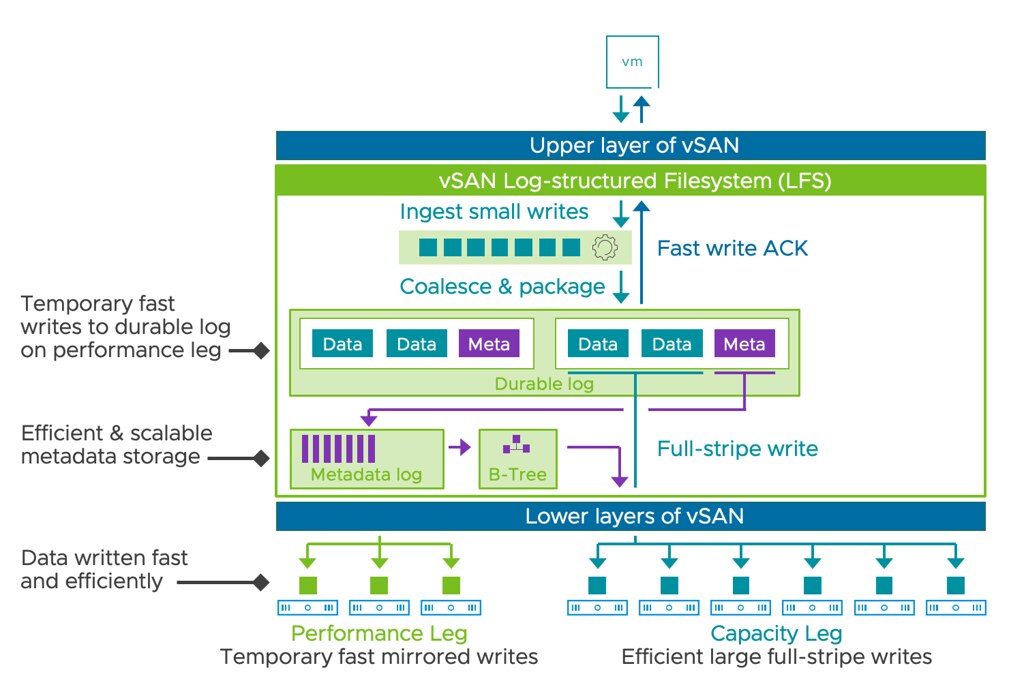
One of the key elements in this new architecture is the introduction of the “log-structured filesystem” and the “durable log”. Let’s look at the below diagram first.

What we do with vSAN ESA is that all data is written to the log-structured file system first in the durable log. This ensures that data is persistently stored. This is what the “performance leg” provides. The performance leg literally stores the writes first. That could be 4KB blocks, or 32KB blocks, or whatever. It stores the data first, collects a full stripe write (512KB), and then writes the data to the capacity leg. Why these 2-layers? Well, the performance leg is a RAID-1 configuration, so it is optimal for write performance, while in general, the capacity leg will be RAID-5 or RAID-6, which is optimal for space efficiency. By creating this small performance leg component that holds the durable log, vSAN is capable of immediately acknowledging the writes as it is persisted in the log, and then when there’s a full stripe write it efficiently as RAID-5 or RAID-6.

Now of course, in the UI you will be able to see those new performance leg components and the capacity leg components. They are not marked as “performance” or “capacity” but they are easily recognizable. I created a quick demo that talks you through the above. If you are interested, check it out!

Unexplored Territory Podcast 31 – VMware Edge Compute Stack? Featuring Marilyn Basanta!

Duncan Epping · Nov 21, 2022 ·

In episode 30 we spoke with Alan Renouf about the potential future of edge deployments, aka Project Keswick. We figured we also need to cover what is available today in the form of VMware Edge Compute Stack, so we invited Marilyn Basanta who is the Senior Director at VMware for Edge! Marilyn explains what the VMware Edge Compute Stack looks like, what customer use cases she encounters in the field, and how VMware Edge Compute Stack can help you run and deploy applications securely and efficiently in remote, and sometimes strange, locations. You can listen via Spotify – https://spoti.fi/3WWNIKu , Apple – https://apple.co/3hEFu9L, or use the embedded player below!

Can you exceed the number of FT enabled vCPUs per host or number of FT enabled vCPUs per VM?

Duncan Epping · Nov 18, 2022 ·

Not sure why, but the last couple of weeks I have had several questions about FT (Fault Tolerance). The questions where around the limits, what is the limit per VM, what is the limit per host, and can I somehow exceed these? All of this is documented by VMware, but somehow seems to be either difficult to find or difficult to understand. Let me write a short summary that hopefully clarifies things.

First of all, the license you use dictates the maximum number of vCPUs a VM can have when enabling FT on that VM:

  • vSphere Standard and Enterprise. Allows up to 2 vCPUs
  • vSphere Enterprise Plus. Allows up to 8 vCPUs

Now, there are also two other things that come into play. You can have a maximum of 4 FT enabled VMs per host, and a maximum of 8 FT enabled vCPUs per host. You can change these settings, this is fully supported as I already discussed in this blog post. There is however a caveat, while VMware has tested with a higher number of FT enabled VMs per host than 4, and with a high number of FT enabled vCPUs, there’s no guarantee that you will get acceptable performance. The more you increase these default values, the bigger the chance that there will be a performance impact.

When FT is enabled a significant amount of communication between hosts (Primary / Shadow VM) needs to occur to ensure the VMs are in lockstep. This overhead can cause a slowdown, and this is the reason why we have those limitations in place. If you have sufficient networking bandwidth and CPU capacity then you can increase these numbers. Note, typically VMware development does not test beyond the maximum specified numbers. If performance is impacted, or you receive unexpected errors/results, and you contact support then support may request to lower the numbers as that impact can unfortunately not be solved in a different way. I hope that clarifies it.

Unexplored Territory Podcast 29 – What is vSphere Distributed Services Engine? Featuring Parag Chakraborty!

Duncan Epping · Oct 25, 2022 ·

At VMware Explore I was very intrigued by the sessions on vSphere Distributed Services Engine. After the session I briefly was in touch with Parag Chakraborty, Senior Product Line Manager for vSphere Distributed Services Engine (Project Monterey), and asked him if he wanted to join our podcast. Parag was enthusiastic and that is noticeable in this recording if you ask me. In this episode, he explains what is introduced in vSphere 8.0 by VMware with the vSphere Distributed Services Engine, why VMware is building a solution for SmartNICs/DPUs, what the benefits and use cases are, and goes over some operational considerations when adopting this new technology. It does make me wonder what datacenter infrastructure will look like in 10 years! Listen now via Spotify (https://spoti.fi/3S5NH3o), Apple (https://apple.co/3TqeRTr), or below via the embedded player.

  • « Go to Previous Page
  • Page 1
  • Interim pages omitted …
  • Page 5
  • Page 6
  • Page 7
  • Page 8
  • Page 9
  • Interim pages omitted …
  • Page 336
  • Go to Next Page »

Primary Sidebar

About the Author

Duncan Epping is a Chief Technologist and Distinguished Engineering Architect at Broadcom. Besides writing on Yellow-Bricks, Duncan is the co-author of the vSAN Deep Dive and the vSphere Clustering Deep Dive book series. Duncan is also the host of the Unexplored Territory Podcast.

Follow Us

  • X
  • Spotify
  • RSS Feed
  • LinkedIn

Recommended Book(s)

Also visit!

For the Dutch-speaking audience, make sure to visit RunNerd.nl to follow my running adventure, read shoe/gear/race reviews, and more!

Do you like Hardcore-Punk music? Follow my Spotify Playlist!

Do you like 80s music? I got you covered!

Copyright Yellow-Bricks.com © 2026 · Log in