• Skip to primary navigation
  • Skip to main content
  • Skip to primary sidebar

Yellow Bricks

by Duncan Epping

  • Home
  • Unexplored Territory Podcast
  • HA Deepdive
  • ESXTOP
  • Stickers/Shirts
  • Privacy Policy
  • About
  • Show Search
Hide Search

Server

vSphere 6.5 what’s new – VMFS 6 / Core Storage

Duncan Epping · Oct 18, 2016 ·

I haven’t spend a lot of time looking at VMFS lately. I was looking in to what was new for vSphere 6.5 and then noticed a VMFS section. Good to see there is still being worked on new features and functionality for the core vSphere file system. So what is new with VMFS 6:

  • Support for 4K Native Drives in 512e mode
  • SE Sparse Default
  • Automatic Space Reclamation
  • Support for 512 devices and 2000 paths (versus 256 and 1024 in the previous versions)
  • CBRC aka View Storage Accelerator

Lets look at them one by one, I think support for 4K native drives in 512e mode speaks for itself. Sizes of spindles keep growing and these new “advanced format” drives come with a 4K byte sector instead of the usual 512 byte sector, which is primarily for better handling of media errors. As of vSphere 6.5 this is now fully supported but note that for now it is only supported when running in 512e mode! The same applies to Virtual SAN in the 6.5 release, only supported in 512e mode. This basically means that 512 byte sectors is being emulated on a 4k drive. Hopefully we will have more on full support for 4Kn for vSphere/VSAN soon.

From an SE Sparse perspective, right now SE Sparse is used primarily View and for LUNs larger than 2TB. When on VMFS 6 the default will be SE Sparse. Not much more to it than that. If you want to know more about SE Sparse, read this great post by Cormac.

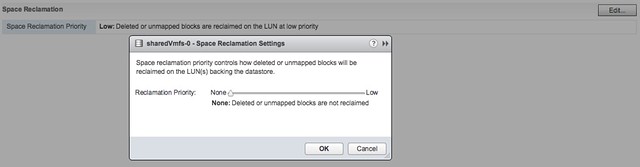
Automatic Space Reclamation is something that I know many of my customers have been waiting for. Note that this is based on VAAI Unmap which has been around for a while and allows you to unmap previously used blocks. In other words, storage capacity is reclaimed and released to the array so that when needed other volumes can use these blocks. In the past you needed to run a command to reclaim  the blocks, now this has been integrated in the UI and can simply be turned on or off. Oh, you can find this in the UI when you go to your datastore object and then click configure, you can set it to “none” which means you disable it, or you set it to low in the UI as shown in the screenshot below.
If you prefer “esxcli” then you can do the following to get the info of a particular datastore (sharedVmfs-0 in my case) :

esxcli storage vmfs reclaim config get -l sharedVmfs-0
   Reclaim Granularity: 1048576 Bytes
   Reclaim Priority: low

Or set the datastore to a particular level, note that using esxcli you can also set the priority to medium and high if desired:

esxcli storage vmfs reclaim config set -l sharedVmfs-0 -p high

Next up, support for 512 Devices and 2000 Paths. In previous versions the limit was 256 devices and 1024 paths and some customers were hitting this limit in their cluster. Especially when RDMs are used or people have a limited number of VMs per datastore, or maybe 8 paths to each device are used it becomes easy to hit those limits. Hopefully with 6.5 that will not happen anytime soon. On the other hand, personally I would hope more and more people are considering moving towards either VSAN or Virtual Volumes.

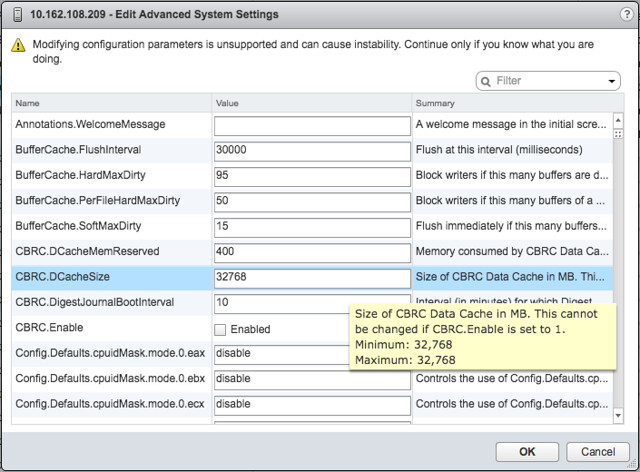
This is one I accidentally ran in to and not really directly related to VMFS but I figured I would add it here anyway otherwise I would forget about it. In the past CBRC aka View Storage Accelerator was limited to 2GB of memory cache per host. I noticed in the advanced settings that it now is set to 32GB, which is a big difference compared to the 2GB in previous releases. I haven’t done any testing, but I assume our EUC team has and hopefully we will see some good performance data on this big increase soon.
And that was it… some great enhancements in the core storage space if you ask me. And I am sure there was even more, and if I find out more details I will share those with you as well.

Cool Tool: SDDC Discovery aka bringing back “Maps”

Duncan Epping · Oct 16, 2016 ·

You still recall the days where you had the awesome map view in the vCenter Client? That unfortunately was removed from the Web Client. A shame as it was very useful for troubleshooting and seeing relationships between components of their stack. Guess what?! We just released a fling where we show you a map of your VMware products and how they are connected. I think it is brilliant to have that fling made available, and it would even be better if we can get this in to our products at some point. If you want to test it out, go to the SDDC Discovery Tool fling page and download it, don’t forget to leave feedback!
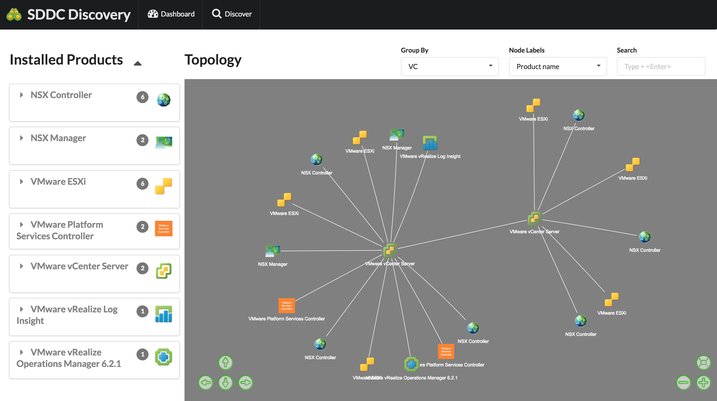
Awesome tool if you ask me, very useful, and if I can do a feature request, I would love to see some sort of grouping for the hosts which belong to the same cluster. Maybe stack the hosts in a cluster object and allow to drill down to see them all. Just a thought.

Hyper-Converged is here, but what is next?

Duncan Epping · Oct 11, 2016 ·

Last week I was talking to a customer and they posed some interesting questions. What excites me in IT (why I work for VMware) and what is next for hyper-converged? I thought they were interesting questions and very relevant. I am guessing many customers have that same question (what is next for hyper-converged that is). They see this shiny thing out there called hyper-converged, but if I take those steps where does the journey end? I truly believe that those who went the hyper-converged route simply took the first steps on an SDDC journey.

Hyper-converged I think is a term which was hyped and over-used, just like “cloud” a couple of years ago. Lets breakdown what it truly is: hardware + software. Nothing really groundbreaking. It is different in terms of how it is delivered. Sure, it is a different architectural approach as you utilize a software based / server side scale-out storage solution which sits within the hypervisor (or on top for that matter). Still, that hypervisor is something you were already using (most likely), and I am sure that “hardware” isn’t new either. Than the storage aspect must be the big differentiator right? Wrong, the fundamental difference, in my opinion, is how you manage the environment and the way it is delivered and supported. But does it really need to stop there or is there more?

There definitely is much more if you ask me. That is one thing that has always surprised me. Many see hyper-converged as a complete solution, reality is though that in many cases essential parts are missing. Networking, security, automation/orchestration engines, logging/analytic engines, BC/DR (and orchestration of it) etc. Many different aspects and components which seem to be overlooked. Just look at networking, even including a switch is not something you see to often, and what about the configuration of a switch, or overlay networks, firewalls / load-balancers. It all appears not to be a part of hyper-converged systems. Funny thing is though, if you are going on a software defined journey, if you want an enterprise grade private cloud that allows you to scale in a secure but agile manner these components are a requirement, you cannot go without them. You cannot extend your private cloud to the public cloud without any type of security in place, and one would assume that you would like to orchestrate every thing from that same platform and have the same networking / security capabilities to your disposal both private and public.

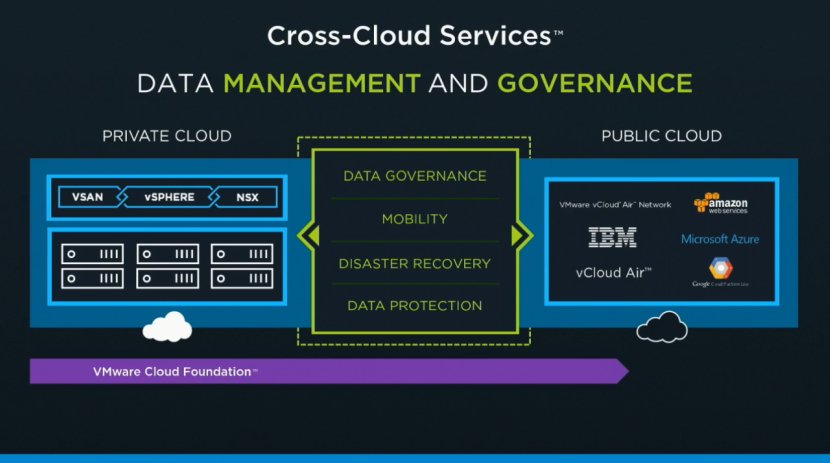
That is why I was so excited about the VMworld US keynote. Cross Cloud Services on top of hyper-converged leveraging all the tools VMware provides today (vSphere, VSAN, NSX) will exactly allow you to do what I describe above. Whether that is to IBM, vCloud Air or any other of the mega clouds listed in the slide below is even besides the point. Extending your datacenter services in to public clouds is what we have been talking about for a while, this hybrid approach which could bring (dare I say) elasticity. This is a fundamental aspect of SDDC, of which a hyper-converged architecture is simply a key pillar.

Hyper-converged by itself does not make a private cloud. Hyper-converged does not deliver a full SDDC stack, it is a great step in to the right direction however. But before you take that (necessary) hyper-converged step ask yourself what is next on the journey to SDDC. Networking? Security? Automation/Orchestration? Logging? Monitoring? Analytics? Hybridity? Who can help you reach full potential, who can help you take those next steps? That’s what excites me, that is why I work for VMware. I believe we have a great opportunity here as we are the only company who holds all the pieces to the SDDC puzzle. And with regards to what is next? Deliver all of that in an easy to consume manner, that is what is next!


This blog has been hacked by @vS0ciety

Duncan Epping · Sep 27, 2016 ·

As some seemed to have taken this too serious:

Thanks to all who took part in the viral video hoax today, the vCommunity Rocks – No vBloggers were harmed in the making of this video

— vS0ciety (@vS0ciety) September 27, 2016

How to make a host win the HA Master Election

Duncan Epping · Sep 27, 2016 ·

On the community forums someone asked if it was possible to influence the HA/FDM master election. (For those who don’t know, FDM is the engineering name for vSphere HA.) Let me state first that I wouldn’t recommend doing this, but there actually is a way to make it very likely a certain host becomes the HA master. In this case this customer wanted to influence the outcome of the election as hosts are distributed across rooms and one host is less likely to fail than others due to power layout etc.

The setting is:

fdm.nodeGoodness

The explanation provided is:

When a master election is held, the FDMs exchange a goodness value, and the FDM with the largest goodness value is elected master. Ties are broken using the host IDs assigned by vCenter Server. This parameter can be used to override the computed goodness value for a given FDM. To force a specific host to be elected master each time an election is held and the host is active, set this option to a large positive value. This option should not be specified at the cluster level.

You can set this by manually editing the following file on the host where you want to increase the chances of winning the election:

/etc/opt/vmware/fdm/fdm.cfg

More details about this can be found in this KB, which also lists many other advanced options.

** Disclaimer: This article contains references to the words master and/or slave. I recognize these as exclusionary words. The words are used in this article for consistency because it’s currently the words that appear in the software, in the UI, and in the log files. When the software is updated to remove the words, this article will be updated to be in alignment. **

  • « Go to Previous Page
  • Page 1
  • Interim pages omitted …
  • Page 62
  • Page 63
  • Page 64
  • Page 65
  • Page 66
  • Interim pages omitted …
  • Page 336
  • Go to Next Page »

Primary Sidebar

About the Author

Duncan Epping is a Chief Technologist and Distinguished Engineering Architect at Broadcom. Besides writing on Yellow-Bricks, Duncan is the co-author of the vSAN Deep Dive and the vSphere Clustering Deep Dive book series. Duncan is also the host of the Unexplored Territory Podcast.

Follow Us

  • X
  • Spotify
  • RSS Feed
  • LinkedIn

Recommended Book(s)

Also visit!

For the Dutch-speaking audience, make sure to visit RunNerd.nl to follow my running adventure, read shoe/gear/race reviews, and more!

Do you like Hardcore-Punk music? Follow my Spotify Playlist!

Do you like 80s music? I got you covered!

Copyright Yellow-Bricks.com © 2026 · Log in