• Skip to primary navigation
  • Skip to main content
  • Skip to primary sidebar

Yellow Bricks

by Duncan Epping

  • Home
  • Unexplored Territory Podcast
  • HA Deepdive
  • ESXTOP
  • Stickers/Shirts
  • Privacy Policy
  • About
  • Show Search
Hide Search

Server

All-Flash HCI is taking over fast…

Duncan Epping · Nov 23, 2016 ·

Two weeks ago I tweeted about All-Flash HCI taking over fast, maybe I should have said All-Flash vSAN as I am not sure every vendor is seeing the same trend. Reason for it being of course is the price of flash dropping while capacity goes up. At the same time with vSAN 6.5 we introduced “all-flash for everyone” by dropping the “all-flash” license option down to vSAN Standard.

I love getting these emails about huge vSAN environments… this week alone 900TB and 2PB raw capacity in a single all-flash vSAN cluster

— Duncan Epping (@DuncanYB) November 10, 2016

So the question naturally came, can you share what these customers are deploying and using, I shared those later via tweets, but I figured it would make sense to share it here as well. When it comes to vSAN there are two layers of flash used, one for capacity and the other for caching (write buffer to be more precise). For the write buffer I am starting to see a trend, the 800GB and 1600 NVMe devices are becoming more and more popular. Also the write-intensive SAS connected SSDs are often used. I guess it largely depends on the budget which you pick, needless to say but NVMe has my preference when budget allows for it.

For the capacity tier there are many different options, most people I talk to are looking at the read intensive 1.92TB and 3.84TB SSDs. SAS connected are a typical choice for these environments, but it does come at a price. The SATA connected S3510 1.6TB (available at under 1 euro per GB even) seems to be a choice many people make who have a tighter budget, these devices are relatively cheap compares to the SAS connected devices. With the downside being the shallow queue depth though, but if you are planning on having multiple devices per server than this probably isn’t a problem. (Something I would like to see at some point is a comparison between SAS and SATA connected for real life workloads for drives with similar performance capabilities to see if there actually is an impact.)

With prices still coming down and capacity still going up it will be interesting to see how the market shifts in the upcoming 12-18 months. If you ask me hybrid is almost dead, of course there are still situations where it may make sense (low $ per GB requirements), but in most cases all-flash just makes more sense these days.

I would interested in hearing from you as well, if you are doing all-flash HCI/vSAN, what are the specs and why are you selecting specific devices/controllers/types?


Change of dates: VMworld Europe now September 11th until 14th!

Duncan Epping · Nov 18, 2016 ·

Just received the confirmation / news that VMworld Europe has a changed date. It will be held in Barcelona again in 2017, however the date is now September 11th until 14th! So make sure to write this down in your calendar already, personally I think it is great… the closer we can get to Barcelona summer, the better! Note that VMworld US is once again in Mandelay Bay in Las Vegas, and will be held from August 27 – August 31, 2017. See you there next year.

Oh and before I forget, Metallica will have a new album out… just saying @VMworld Event Team. #MetallicaAtVMworld

Benchmarking an HCI solution with legacy tools

Duncan Epping · Nov 17, 2016 ·

I was driving back home from Germany on the autobahn this week when thinking about 5-6 conversations I have had the past couple of weeks about performance tests for HCI systems. (Hence the pic on the rightside being very appropriate ;-)) What stood out during these conversations is that many folks are repeating the tests they’ve once conducted on their legacy array and then compare the results 1:1 to their HCI system. Fairly often people even use a legacy tool like Atto disk benchmark. Atto is a great tool for testing the speed of your drive in your laptop, or maybe even a RAID configuration, but the name already more or less reveals its limitation: “disk benchmark”. It wasn’t designed to show the capabilities and strengths of a distributed / hyper-converged platform.
Now I am not trying to pick on Atto as similar problems exist with tools like IOMeter for instance. I see people doing a single VM IOMeter test with a single disk. In most hyper-converged offerings that doesn’t result in a spectacular outcome, why? Well simply because that is not what the solution is designed for. Sure, there are ways to demonstrate what your system is capable off with legacy tools, simply create multiple VMs with multiple disks. Or even with a single VM you can produce better results when picking the right policy as vSAN allows you to stripe data across 12 devices for instance (which can be across hosts, diskgroups etc). Without selecting the right policy or having multiple VMs, you may not be hitting the limits of your system, but simply the limits of your VM virtual disk controller, host disk controller, single device capabilities etc.

But there is even a better option, pick the right toolset and select the right workload(Surely only doing 4k blocks isn’t representative of your prod environment). VMware has developed a benchmarking solution that works with both traditional as well as with hyper-converged offerings called HCIBench. HCIBench can be downloaded for free, and used for free, through the VMware Flings website. Instead of that single VM single disk test, you will now be able to test many VMs with multiple disks to show how a scale-out storage system behaves. It will provide you great insights of the capabilities of your storage system, whether that is vSAN or any other HCI solution, or even a legacy storage system for that matter. Just like the world of storage has evolved, so has the world of benchmarking.

The difference between VM Encryption in vSphere 6.5 and vSAN encryption

Duncan Epping · Nov 7, 2016 ·

More and more people are starting to ask me what the difference is between VMCrypt aka VM Encryption and the beta feature we announced not to long ago called vSAN Encryption. (Note, we announced a beta, no promises were made around dates or actual releases or releasing of the feature.) Both sounds very much the same and essential both end up encrypting the VM but there is a big difference in terms of how it is implemented. There are advantages and disadvantages to both solutions. Lets look at VM Encryption first.

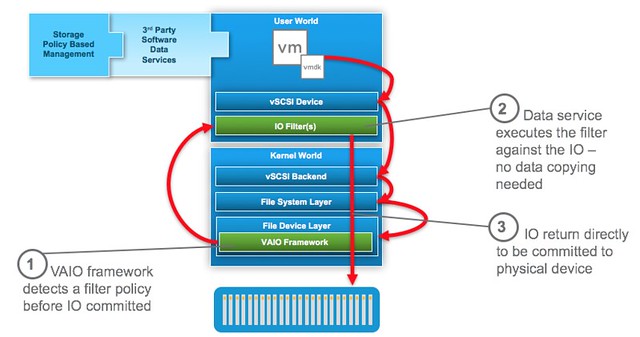
VM Encryption is implemented through VAIO (vSphere APIs for IO Filters). The VAIO framework allows a filter driver to do “things” to/with the IO that a VM sends down to a device. One of these things is encryption. Now before I continue, take a look at this picture of where the filter driver sits.

As you can see the filter driver is implemented in the User World and the action against the IO is taken at the top level. If this for instance is encryption then any data send across the wire is already encrypted. Great in terms of security of course. And all of this can be enabled through policy. Simply create the policy, select the VM or VMDK you want to encrypt and there you go. So if it is that awesome, why vSAN Encryption?

Well the problem is that all IO is encrypted at the top level. This means that it is received in the vSAN write buffer fully encrypted, then the data at some point needs to be destaged and is deduplicated and compressed (in all-flash). As you can imagine, encrypted blocks do not dedupe (or compress) well. As such in an all-flash environment with deduplication and compression enabled any VM that has VM Encryption through VAIO enabled will not provide any space savings.

With vSAN Encryption this will be different. The way it will work is that it will provide “encryption at rest”. The data travels to the destination unencrypted then when it reaches its destination it is written encrypted to the cache tier, then it is decrypted before it is destaged, and it will be encrypted after it is deduplicated and/or compressed again. This means that you will benefit from space saving functionality, however encryption in this case is a cluster wide option, which means that every VM will be encrypted, which may not be desirable.

So in short:

  • VM Encryption (VAIO)
    • Policy based (enable per VM)
    • Data travels encrypted
    • No/near zero dedupe
  • vSAN Encryption
    • Enabled on a cluster level
    • Data travels unencrypted, but it is written encrypted to the cache layer
    • Full compatibility with vSAN data services

I hope that clarifies why we announced the beta of vSAN Encryption and what the difference is with VM Encryption that is part of vSphere 6.5.

Virtual SAN >> vSAN, and grown to 5500 customers!

Duncan Epping · Oct 28, 2016 ·

Not that it is a big deal, but as some people are like me they probably prefer to use the right name. As of this week Virtual SAN was renamed to vSAN. I am not sure we will see the change in the product in 6.5 (I doubt it) and even the website changes will take a while, but expect to see this soon.

The correct name is vSAN. The small v shows the integration with vSphere. https://t.co/3FAHPCqFdA

— Lee Caswell (@leecaswell) October 24, 2016

Oh, and before I forget, there was the Q3 earnings announcement, vSAN is still growing strong, 5500 customers at the moment! And lets not forget: “software license bookings continue to exceed expectations with vSAN and VxRail increasing over 150% year over year.” I say: Bring on Q4! And I can’t wait for 6.5 to ship 🙂

  • « Go to Previous Page
  • Page 1
  • Interim pages omitted …
  • Page 60
  • Page 61
  • Page 62
  • Page 63
  • Page 64
  • Interim pages omitted …
  • Page 336
  • Go to Next Page »

Primary Sidebar

About the Author

Duncan Epping is a Chief Technologist and Distinguished Engineering Architect at Broadcom. Besides writing on Yellow-Bricks, Duncan is the co-author of the vSAN Deep Dive and the vSphere Clustering Deep Dive book series. Duncan is also the host of the Unexplored Territory Podcast.

Follow Us

  • X
  • Spotify
  • RSS Feed
  • LinkedIn

Recommended Book(s)

Also visit!

For the Dutch-speaking audience, make sure to visit RunNerd.nl to follow my running adventure, read shoe/gear/race reviews, and more!

Do you like Hardcore-Punk music? Follow my Spotify Playlist!

Do you like 80s music? I got you covered!

Copyright Yellow-Bricks.com © 2026 · Log in