• Skip to primary navigation
  • Skip to main content
  • Skip to primary sidebar

Yellow Bricks

by Duncan Epping

  • Home
  • Unexplored Territory Podcast
  • HA Deepdive
  • ESXTOP
  • Stickers/Shirts
  • Privacy Policy
  • About
  • Show Search
Hide Search

Server

New version of RVTools is out

Duncan Epping · Feb 26, 2018 ·

I was talking with a couple of VMware partners last week, one of them mentioned how much they used RVTools for sizing and designing. Funny if you consider that this little free tool is made by someone in his spare time. RVTools is closing in on 1 million downloads, so it is safe to say that this is probably the most successful tool out there made by an individual. So once again, thanks Rob for spending the time and effort on this!

Here’s what’s new :

Version 3.10 (February, 2018)

  • Upgraded RVTools solution to Visual Studio 2017
  • Upgraded RVTools to .Net Framework version 4.6.1
  • Upgraded Log4net to version 2.0.8, Waffle.AD to version 1.8.3 and NPOI to version 2.3.0
  • Connection error when TLSv1.0 and TLSv1.1 are disabled and only TLSv1.2 is enabled is solved by using .Net Framework 4.6.1
  • vInfo tab page new columns: The latency-sensitivity setting of the virtual machine, Change Block Tracking (CBT) and disk.EnableUUID values
  • vDisk tab page new columns: SCSI label, unit number and sharedBus
  • vHost tab page new columns: Assigned License(s), ATS heartbeat, ATS locking values. 0 = disabled 1 = enabled, Host Power Policy shortname, CPU Power Management current policy and CPU power hardware support
  • When Export to xlsx is executed a metadata worksheet with version number of RVTools and date time stamp is added to the output xlsx file
  • All columns in the RVTools export xlsx file(s) now have a filter
  • When export to csv newline characters are replaced by spaces
  • When started from cli and login fails an error message and login box was displayed. Now RVTools will exit with exit code -1, without showing the error message and login form.
  • Added an example PowerShell script with which you can merge RVTools export xlsx files
  • Added a example PowerShell script to start Export all to xlsx for multiple vCenters
  • vDatastore tab page: For NFS datastores the address column is now filled with remote host and path info
  • vDatastore tab page new columns: Datastore Cluster Name, Cluster capacity and Cluster free space
  • The upper limit on the Health check for number of VMs on a datastore is now 9999
  • vHealth tab page: new column “message type” which can be used as a filter in Excel
  • vHealth tab page: hbrdisk.RDID files are no longer reported as possible zombie files
  • vHealth tab page: low disk space messages no also show the free space in MB
  • All tab pages: Refresh or auto-refresh will respect your sort order
  • CLI export2xls parameters changed to export2xlsx (old parameter will still work)
  • Bug Fix: invalid “Horizontal Alignment” value in xlsx style sheet.
  • Bug Fix: Calculation of total snapshot size was not always correct
  • Bug Fix: Child snapshot hierarchy was not always correct
  • Default installation directory is changed to C:\Program Files (x86)\RobWare\RVTools without the version number
Where did ESXi 6.5.0 build 7526125 go?

Duncan Epping · Jan 24, 2018 ·

I had two customers asking today what happened to ESXi 6.5 build 7526125. They downloaded patches and installed them in their test environment. Ready to patch some of their clusters they did a validation and found out that the patch (ESXi650-201801001.zip) has disappeared from the face of the earth. This patch included microcode for Intel processors, and Intel informed VMware that there was potentially an issue with their microcode. As such VMware decided to pull the patch as noted in the KB article. Those who had already downloaded the patches and are manually updating, make sure to delete these. Those who use VUM, make sure to exclude them from your baseline as mentioned in the KB:

Any baseline (including VMware Pre-defined Baseline), that includes one or more of  the bulletins that  correspond to patch VMSA-2018-0004, would experience the above listed error and hence, will not be able to proceed with the remediation process. For such customers, it is recommended to create dynamic or static baseline excluding the bulletins ESXi650-201801401-BG, ESXi650-201801402-BG,  ESXi600-201801401-BG,  ESXi600-201801402-BG ,ESXi550-201801401-BG and continue with the remediation process. For more information on Create and Edit Patch or Extension Baselines see vSphere 6.5 document.

Normally I don’t share these types of things anymore, but as I had two people asking on the same day I figured I would as it seems not everyone had seen that the patches were pulled and replaced. If you haven’t downloaded the patches yet, or haven’t patched your systems but want to, read this advisory first and use the patches mentioned it.

vSAN Adaptive Resync, what does it do?

Duncan Epping · Jan 18, 2018 ·

I am starting to get some more questions about vSAN Adaptive Resync lately. This was introduced a while back, but is also available in the latest versions of vSAN through vSphere 6.5 Patch 02. As a result various folks have started to look at it and are starting to wonder what it is. Hopefully by now everyone understands what resync traffic is and when you see resync traffic. The easiest example of course is a host failure. If a host has failed and there’s sufficient disk space and there’s additional hosts available to make the impacted VMs compliant with their policy again then vSAN will resync the data.

Resync aims to finish the creation of these new components asap, simple reason for this is availability. The longer the resync takes, the longer you are at risk. I think that makes sense right? In some cases however it may occur that when VMs are very busy and resync is happening that VM observed latency goes through the roof. We already had a manual throttling mechanism for when this situation occurs, but of course preferably vSAN should throttle resync traffic properly for you. This is what vSAN Adaptive Resync does.

So how does that work? Well, when the high watermark is reached for VM latency then vSAN will cut the bandwidth of resync in half. Next vSAN will check if the VM latency is below the low watermark, if not then it will cut resync traffic in half again. It does this until the latency is below the low watermark. When the latency is below the low watermark then vSAN will increase the bandwidth of resync traffic granularly until the low watermark is reached and stay at that level. (Some official info can be found in this kb, and this virtual blocks blog.)

Hope that helps,

Where is the vSAN storage performance proactive test in vSphere 6.5 U1 patch 02?

Duncan Epping · Jan 16, 2018 ·

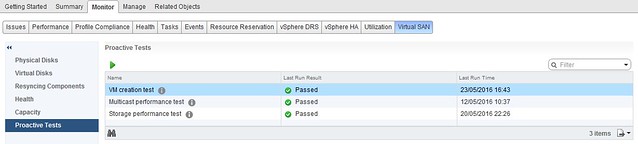
I had some customers asking where the storage performance proactive test and the multicast proactive test was in the latest release of vSAN. In the past this is what the UI looked like when they would go to the Proactive Test section:

proactive test disappeared

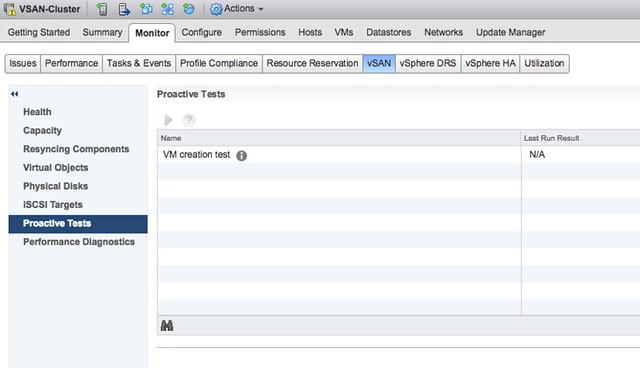
But now it looks like this:

proactive test disappeared

What happened? Well, two tests have been removed. I guess most people will understand why the Multicast test has been removed, with the disappearance of Multicast in vSAN the test was not needed any longer. To be clear, if you are running vSAN in unicast mode the test will not show, if you are running in multicast mode however then of course the test will still be shown. But what about the Storage Performance Test?

We have noticed that most customers were using HCI Bench when doing benchmarks or using their own tooling (please don’t use legacy tools). Those who were using the proactive test often drew incorrect conclusions as it does not provide the flexibility a solution like HCI Bench offers. VMware felt that HCI Bench was a more suitable solution for doing benchmarks and this is definitely VMware’s recommended solution, as such the decision was made to focus on HCI Bench from a development perspective and deprecate the perf benchmark feature in the Proactive Tests section.

Happy 10th Birthday Yellow-Bricks.com

Duncan Epping · Dec 20, 2017 ·

Just wanted to share with all of you the fact that this week marks the 10th anniversary of Yellow-Bricks.com. Crazy thinking back about how it all started, and what it turned in to. Thanks everyone for taking the time to read and comment on many of the articles over the years. Those wondering what’s next, what to expect in the upcoming year? Well definitely an update to the vSAN Essentials book released yesterday, but also an update to probably one of the best sold VMware related books:

Keeping the good news coming… A preview of whats happening in 2018! #ClusterDeepDive #vExpert pic.twitter.com/yxiMXaQeSR

— Clustering Deep Dive (@ClusterDeepDive) December 19, 2017

  • « Go to Previous Page
  • Page 1
  • Interim pages omitted …
  • Page 48
  • Page 49
  • Page 50
  • Page 51
  • Page 52
  • Interim pages omitted …
  • Page 336
  • Go to Next Page »

Primary Sidebar

About the Author

Duncan Epping is a Chief Technologist and Distinguished Engineering Architect at Broadcom. Besides writing on Yellow-Bricks, Duncan is the co-author of the vSAN Deep Dive and the vSphere Clustering Deep Dive book series. Duncan is also the host of the Unexplored Territory Podcast.

Follow Us

  • X
  • Spotify
  • RSS Feed
  • LinkedIn

Recommended Book(s)

Also visit!

For the Dutch-speaking audience, make sure to visit RunNerd.nl to follow my running adventure, read shoe/gear/race reviews, and more!

Do you like Hardcore-Punk music? Follow my Spotify Playlist!

Do you like 80s music? I got you covered!

Copyright Yellow-Bricks.com © 2026 · Log in