• Skip to primary navigation
  • Skip to main content
  • Skip to primary sidebar

Yellow Bricks

by Duncan Epping

  • Home
  • Unexplored Territory Podcast
  • HA Deepdive
  • ESXTOP
  • Stickers/Shirts
  • Privacy Policy
  • About
  • Show Search
Hide Search

Server

ESX 3.0.3 available now!

Duncan Epping · Aug 9, 2008 ·

For those that are still using 3.0.2 and are not looking to upgrade to 3.5 U2 yet, VMware just released 3.0.3! Don’t expect new features to popup. Version 3.0.3 is mainly about compatability and patches:

Processors

Newly supported processors are:

  • Quad-Core AMD Opteron 8300 series and 2300 series processor families (collectively code-named Barcelona)
  • Dual-core Intel Xeon 5200 series processors (code-named Wolfdale)

Drivers

Upgraded drivers are:

  • igb driver version 1.0.0
  • Broadcom 5722 tg3 driver version upgraded from 3.43.to 3.58b
  • Emulex lpfc driver version upgraded to 7.3.2_vmw10

Guest Operating Systems

Newly supported guest operating systems are:

  • Microsoft Windows Server 2003 R2 Data Center Edition
  • Red Hat Enterprise Linux 5.1

Enhanced Patch and Upgrade Management

Significant improvements to the following patch management utilities:

  • esxupdate Utility – Support for super-bundle and rollup features in esxupdate.
  • Support for VMware Update Manager.

Service Console

Update for service console from RHEL3 U8 to RHEL3 U9.

Management Agents

Support for new versions of Management Agents:

  • HP Insight Manager 8.1
  • Dell OpenManage Server Administrator 5.4
  • IBM Director 5.20 Update 1

Backup Software

Support for additional backup software from third-party vendors:

  • EMC Networker Version 7.4 SP1
  • IBM Tivoli Storage Manager Version 5.5

Quality Improvements

A significant number of issues have been fixed. Some of these issues have been described in Resolved Issues in this Release.

Get it while it’s stil hot and read the complete release notes here!
das.allowNetwork where and when

Duncan Epping · Aug 8, 2008 ·

I’ve seen a lot misinterpretations of the new advanced HA option “das.allowNetwork”. What is this option for and when should I use it or shouldn’t is the most asked question.

So let’s start with a little history, back in the days “pre 3.5 U2” one could configure a cluster on multiple IP subnets without facing any problems, but this could lead into start up or execution problems. HA would configure without checking if the network on every host was compatible with the other, but in ESX 3.5 U2 this procedure changed. As of this version during the configuration of HA the host checks it’s network for compatability with the first configured HA host. So if the first host has the following configuration:
esx01 – 192.168.1.11 – 255.255.255.0.

And the second host has the following configuration:
esx02- 192.168.2.11 – 255.255.255.0

HA will fail with the following error:
“HA Agent on <hostname> in cluster <clustername> in <datacenter> has an error Incompatible HA Networks: Host has network(s) that don’t exist on cluster members: <ip address>: Cluster has network(s) missing on host: <ip address>: Consider using Advanced Cluster Settings das.allowNetwork to control network usage”

With the advance option “das.allowNetwork” you can rule out certain Service Consoles for HA usage. In other words, if you have several SC’s on each ESX host you can specify which SC should be used for HA. HA, as most of you probably know, uses the SC network for it’s heartbeat.

A couple of examples when to use das.allowNetwork and when not to use it:

  1. So what should you do to get things running when you’ve used different subnets for each host?
    Well that’s an easy one… get all your Service Consoles on the same subnet. Even if’s a routable vlan, HA will just calculate the network and if the values mismatch than configuring HA will fail!
  2. So what if I’ve got multiple SC’s and some are on different subnets but there’s at least one on each host on the same subnet with the same portgroup name?
    Here’s where das.allowNetwork comes in to place, set this option in the “Advanced Option” section of the HA tab and specify which SC should be used for HA. The ones that aren’t specified will not be used.

There have been numerous people asking if this “network compatibility” check could be disabled. At this moment the answer is no and there’s now workaround at this moment. When using das.allowNetwork specify the first as “das.allowNetwork0” the second as “das.allowNetwork1” etc.

More info can be found here:

KB1006541

KB1006606

Resource Management PDF

What if my VirtualCenter server crashes?

Duncan Epping · Aug 5, 2008 ·

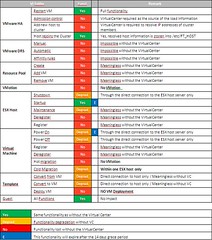
Seva, a VMware Technical Account Manager, put together a cool table with the implications of a VirtualCenter crash. This is a follow up to my blog about VirtualCenter getting more important by the minute. I think the most important thing to remember is that the VM’s keep running whatever happens to your VC Server and HA will still work if VC fails, well except for adding hosts to the cluster of course. So reinstalling the VirtualCenter server and re-adding the hosts is still possible, but in my opinion not recommended. Especially when you’ve got complex Resource Pools and Folder structures set up.

Open this link to the PDF or click on the picture below.

Health status not showing..

Duncan Epping · Aug 5, 2008 ·

I’ve seen this one on the VMTN forum a couple of times. When the Health Status isn’t showing you could do the following to fix it:

  1. Restart VirtualCenter service on the VC Server
  2. Restart mgmt-vmware service on the hosts that are affected (service mgmt-vmware restart)
  3. Restart vmware-vpxa on the hosts that are affected (service vmware-vpxa restart)

If the above did not fix the issue:

  1. Disconnect the affected Host from Inventory on VC
  2. Reconnect the affected Host from Inventory on VC

And if that doesn’t work this is also a possible solution:

  1. Restart the Pegasus service (service pegasus restart)

HA configuration and incompatible networks

Duncan Epping · Aug 1, 2008 ·

There seems to be a lot of fuss about HA not being reconfigured when Update 2 is installed.

The error message that appears:

“HA Agent on <hostname> in cluster <clustername> in <datacenter> has an error Incompatible HA Networks: Host has network(s) that don’t exist on cluster members: <ip address>: Cluster has network(s) missing on host: <ip address>: Consider using Advanced Cluster Settings das.allowNetwork to control network usage”

Pre-Update 2 environments would except incompatible networks between hosts in a cluster and just install/reconfigure. As of Update 2 this clearly isn’t the case any more, there are a couple of misunderstandings that I want to clear up:

If you have redundant service consoles set up they don’t need to be on the same subnet. (Better said, they should not be on the same subnet because of a bug described in this blog!) But they do need to be the same on every host. In other words you can’t mix up subnets, this will not work:

Host A – Service Console – 192.168.1.10
Host B – Service Console – 10.0.0.10

In this case you will need to change the IP-Address of Host B. Or add an additional Service Console named “Service Console HA” to both and filter out the first. You can filter out the first by setting the Service Console used for HA to a specific portgroup:

das.allowNetwork0 “Service Console HA”

For more info read this topic and especially the reply that msevigny posted. The knowledge base article Marc points out to in his post is an internal one, as soon as it’s officially released I will let you guys know.

  • « Go to Previous Page
  • Page 1
  • Interim pages omitted …
  • Page 304
  • Page 305
  • Page 306
  • Page 307
  • Page 308
  • Interim pages omitted …
  • Page 336
  • Go to Next Page »

Primary Sidebar

About the Author

Duncan Epping is a Chief Technologist and Distinguished Engineering Architect at Broadcom. Besides writing on Yellow-Bricks, Duncan is the co-author of the vSAN Deep Dive and the vSphere Clustering Deep Dive book series. Duncan is also the host of the Unexplored Territory Podcast.

Follow Us

  • X
  • Spotify
  • RSS Feed
  • LinkedIn

Recommended Book(s)

Also visit!

For the Dutch-speaking audience, make sure to visit RunNerd.nl to follow my running adventure, read shoe/gear/race reviews, and more!

Do you like Hardcore-Punk music? Follow my Spotify Playlist!

Do you like 80s music? I got you covered!

Copyright Yellow-Bricks.com © 2026 · Log in