• Skip to primary navigation
  • Skip to main content
  • Skip to primary sidebar

Yellow Bricks

by Duncan Epping

  • Home
  • Unexplored Territory Podcast
  • HA Deepdive
  • ESXTOP
  • Stickers/Shirts
  • Privacy Policy
  • About
  • Show Search
Hide Search

Server

Did you know? vCloud Director Reservation Pool allocation model fact

Duncan Epping · Dec 15, 2010 ·

I did not know about this, but someone pointed this out last week and I figured it was worth blogging about as this feature can potentially impact your design. (Think HA admission control policies and resource management)

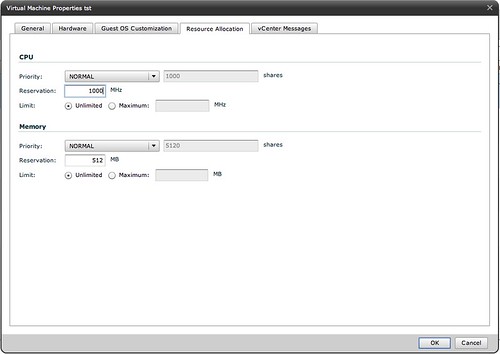
When you create a VM in an Org vDC which is defined as a Reservation Pool you can actually manually set the shares per type of resource (memory and CPU) and also set a reservation and even a limit if and when needed. Pretty cool, but as you can imagine also very complex at some point to figure out to what it should be set.

Shares set on Resource Pools

Duncan Epping · Dec 14, 2010 ·

During our session at the Dutch VMUG Frank was explaining Resource Pools and the impact of limits and reservations. As I had the feeling not everyone in the room was using resource pools I asked the following questions:

  1. How many people are using Resource Pools today?
    • Out of the roughly 300 people who attended our session 80 showed their hands. The follow-up question I asked was…
  2. How many people change the Shares setting from the default?
    • Out of those 80 hands roughly 20 people raised their hands and that lead me to the next question…
  3. How many people change the Shares value based on the amount of VMs running in that Resource Pool?
    • Now only a handful of people raised their hand.

That is what triggered this post as I believe it is an often made mistake. First of all when you create a Resource Pool there are a couple of things you can set a reservation, a limit and of course shares. For some reason shares are often overlooked. There are a couple of things I wanted to make sure everyone understands as judging by the numbers of hands that were raised I am certain there are a couple of common misunderstandings when it comes to Resource Pools:

  • If you create a Resource Pool a default Shares value is defined for the resource pool on both Memory and CPU
  • Shares specify the priority of the resource pool relative to other resource pools on the same level

This means that even if you don’t touch the shares values they will come into play whenever there is contention. This also means that the resource allocation on a VM level is dependent on the entitlement of the resource pool it belongs to.

Now what is the impact of that? I guess I should quote from the “The Resource Pool Priority-Pie Paradox” blog post my colleague Craig Risinger wrote as it clearly demonstrates the issues that can be encountered when Resource Pools are used and Shares values are not based on the relative priority AND the amount of VMs per pool.

“Test” 1000 shares, 4 VMs => 250 units per VM (small pie, a few big slices):

“Production” 4000 shares, 50 VMs => 80 units per VM (bigger pie, many small slices):

I guess this makes it really obvious that shares might not always give you the results you expected it would.

Another issue that could arise is when Virtual Machines are created on the same level as the Resource Pools…. Believe me it doesn’t take a lot for a single VM to have higher priority than a Resource Pool in times of contention.

Again, whenever you create a Resource Pool it will “inherit” the default shares value, which equals a 4vCPU/16GB Virtual Machine, and whenever there is contention these will come into play. Keep this in mind when designing your virtual infrastructure as it could potentially lead to unwanted results.

VMware HA Deployment Best Practices

Duncan Epping · Dec 13, 2010 ·

Last week VMware officially released an official paper around Deployment Best Practices for HA. I was one of the authors of the document. Together with several people from the Technical Marketing Team we gathered all best practices that we could find, validated and simplified them to make it rock solid. I think it is a good read. It is short and sweet and I hope you will enjoy it.

Latest Revision:
Dec 9, 2010

Download:
http://www.vmware.com/files/pdf/techpaper/VMW-Server-WP-BestPractices.pdf

Description

This paper describes best practices and guidance for properly deploying VMware HA in VMware vSphere 4.1.  These include discussions on proper network and storage design, and recommendations on settings for host isolation response and admission control.

European distributor for the HA and DRS Technical Deepdive

Duncan Epping · Dec 10, 2010 ·

Frank published the following yesterday, but as many people have asked me about this I thought I would post it as well. For those who were looking for a European distributor of our book:

As of today, our book “vSphere 4.1 HA and DRS Technical Deepdive” can be ordered via ComputerCollectief. Computercollectief is a dutch computer book and software reseller and ships to most European countries. Using Computercollectief, we hope to evade the long shipping times and accompanying costs.

Go check it out. http://www.comcol.nl/detail/73133.htm

Comcol expects to be able to deliver at the end of this month.

Using opvizor

Duncan Epping · Dec 9, 2010 ·

I introduced Opvizor a couple of days ago and figured why not give it a spin with a vm-support files of one of my hosts in my lab. I used vCenter to create the vm-support file, for those who have never done that it is really simple:

  • open the vSphere Client
  • Click Administration
  • Click “Export System Logs”
  • Select the server of which you want to dump the system logs and select the location where they need to be uploaded to

The next thing you will need to do is create an account on the opvizor website and login. After that you can simply upload the System Log File of the server. After uploading it takes a few seconds before the System Logs are processed but you can actually see the status at the lower right by clicking the icon. After uploading you can use one of the following two options:

  • isLogViewer
  • isClient

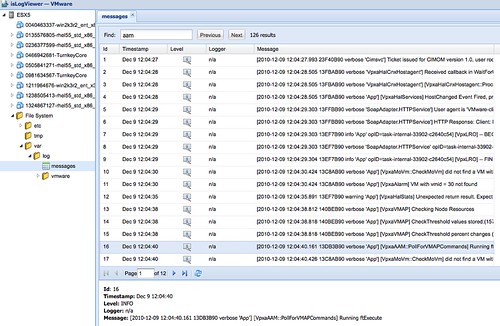
I guess it is pretty obvious what isLogViewer does. It enables you to view the logfiles of VMs and your Host. But not only logfiles, you can for instance also see the vmdk meta files and your vmx files. This can come in handy when troubleshooting issues and I can imagine that at some point opvizor will warn you when invalid or insecure settings / statements are used in those files. The isLogViewer also enables you to search logfiles as shown in the following screenshot where I did a search on “aam”.

Although it isn’t completely intuitive yet; it definitely has potential. Couple of things I would like to see added:

  • color coding for error types
  • direct linking to KB articles for known error codes

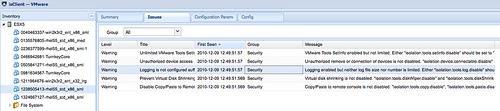
The second feature that is currently offered is “isClient”. This feature currently shows you more details about for instance the VM configuration and the host configuration. For me the most valuable feature here is “Issues”. Clearly it still needs to be expanded as many sections are not available, but again this has a lot of potential as you can see in the screenshot below:

Again I would like to see things like color coding added and possibly links to KBs and for instance references to best practices and recommendations. Think about things like Network redundancy, Storage PSP used, HCL check… you can go anyway with this and this could be the ultimate troubleshooting / health check tool. If all of this is added and if it is possible to upload support files of a full environment instead of just a single host.

All in all, I realize that opvizor is just in an early beta phase and because of that some features aren’t fully implemented yet. It clearly has a lot potential though and if everyone takes the time to check it out and give feedback I think this can become a killer tool.

  • « Go to Previous Page
  • Page 1
  • Interim pages omitted …
  • Page 197
  • Page 198
  • Page 199
  • Page 200
  • Page 201
  • Interim pages omitted …
  • Page 336
  • Go to Next Page »

Primary Sidebar

About the Author

Duncan Epping is a Chief Technologist and Distinguished Engineering Architect at Broadcom. Besides writing on Yellow-Bricks, Duncan is the co-author of the vSAN Deep Dive and the vSphere Clustering Deep Dive book series. Duncan is also the host of the Unexplored Territory Podcast.

Follow Us

  • X
  • Spotify
  • RSS Feed
  • LinkedIn

Recommended Book(s)

Also visit!

For the Dutch-speaking audience, make sure to visit RunNerd.nl to follow my running adventure, read shoe/gear/race reviews, and more!

Do you like Hardcore-Punk music? Follow my Spotify Playlist!

Do you like 80s music? I got you covered!

Copyright Yellow-Bricks.com © 2026 · Log in