• Skip to primary navigation
  • Skip to main content
  • Skip to primary sidebar

Yellow Bricks

by Duncan Epping

  • Home
  • Unexplored Territory Podcast
  • HA Deepdive
  • ESXTOP
  • Stickers/Shirts
  • Privacy Policy
  • About
  • Show Search
Hide Search

Server

Paperback editions finally available of vSphere 5 Clustering Tech Deepdive

Duncan Epping · Jul 18, 2011 ·

I guess Amazon and Createspace had enough of getting those phone calls three or four times from Frank every day since Tuesday as magically the book popped up on Amazon overnight. It took a while and our apologies for that, here are the links to all three books:

Amazon:
eBook (Kindle) – $ 9.99

Black & White Paperback – $ 29.95
Full Color Paperback – $ 49.95

I hope you guys will enjoy it. Frank and I are considering to do a book signing at VMworld, let me know if that is something you would be interested in!
vSphere 5.0: Storage initiatives

Duncan Epping · Jul 18, 2011 ·

Storage has been my primary focus for the 5.0 launch. The question often asked when talking about the separate components is how it all fits together. Lets first list some of the new or enhanced features:

  • VMFS-5
  • vSphere Storage APIs – Array Integration aka VAAI
  • vSphere Storage APIs – Storage Awareness aka VASA
  • Profile-Driven Storage (VM Storage Profiles in the GUI)
  • Storage I/O Control
  • Storage DRS

I wrote separate articles about all of these features and hopefully you have read them and already see the big picture. If you don’t than this is a good opportunity to read them or head over to the vSphere Storage Blog for more details on some of these.. I guess the best way to explain it is by using an example of what life could be like when using all of these new or enhanced features compared to what is used to be like:

The Old Way: Mr Admin is managing a large environment and currently has 300 LUNs each being 500GB divided across three 8 hosts clusters. He is maintaining a massive spreadsheet with storage characteristics and runs scripts to validate virtual machines are place on the correct tier of storage. He is leveraging SIOC to avoid the noisy neighbor problem and leveraging the VAAI primitives to offload some of the tasks to the array. Still he spends a lot of time waiting, monitoring, managing virtual machines and datastores.

vSphere 5.0: Mr Admin is managing a large environment and currently has 60 thin provisioned 2.5TB LUNs presented to a single cluster. Mr Admin defines several storage tiers using VM Storage Profiles detailing storage characteristics provided through VASA. Per tier based on the information provided through VASA a Datastore Cluster is created. Datastore Clusters form the basis of Storage DRS and Storage DRS will be responsible for initial placement and preventing both IO and diskspace bottlenecks in your environment. As Storage IO Control is automatically enabled when SDRS IO balancing is enabled the noisy neighbor problem will also be eliminated. When provisioning a new virtual machine Mr Admin simple picks the appropriate VM Storage Profile and selects the compliant Datastore Cluster. If in any case Storage DRS would move things around, the “Reclaim Dead Space” feature of VAAI is used to unmap the blocks from the source datastore so that these can be re-used if and when needed.

No more spreadsheets, no extensively monitoring diskspace / latency, no more manual validation of virtual machine placement… It is all about ease of management, reducing operational effort and offloading tasks to vCenter or even your storage array!

vSphere 5.0: ESXCLI

Duncan Epping · Jul 18, 2011 ·

Many of us have been logging in to the ESX console for ages and have (ab)used the esxcfg-* commands on a regular basis. We’ve used them in scripts and during troubleshooting and all of that is about to change… vSphere 5.0 introduces a new command line utility: esxcli.

Some of you will say “Hey esxcli was already available before 5.0”, and yes you are correct it was around however it has been completely revamped, it feels different… it is different, hence I said “new”. A unified command is most definitely the direction we are heading in and as such it is of utmost importance that you get familiarized with it. Although the esxcfg-* commands are still available they have been deprecated and as such no longer supported.

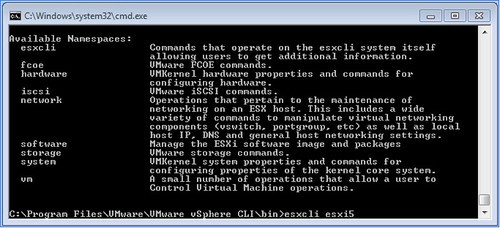
What has changed? Well very simple many new name spaces have been introduced and the namespace that were already in there moved up a layer to allow for a more scalable and flexible tool. Under the “root” of esxcli there are the following namespaces:

So how are these constructed?

esxcli [dispatcher options] <namespace> [<namespace> …] <cmd> [cmd options]

With dispatcher options we are referring to the ability to connect to a remote host for instance but also with a different username/password. Namespaces is mentioned twice as namespaces can actually be nested and use a drill down approach as I would like to call it. Cmd options refers to the command that needs to be executed to this namespace, this could be “get”, “list” or “set”.

I guess most namespaces actually make a lot of sense. Lets give a couple of example to show the power of esxcli:

  • Add a portgroup to a vSwitch –> esxcli network vswitch standard portgroup add –portgroup-name=<portgroup> –vswitch-name=<vSwitch>
  • List all storage devices –> esxcli storage nmp device list
  • Add a dns-server –> esxcli network ip dns server add –server=<dns server name or ip>
  • Add an nfs-share –> esxcli filesystem nfs add –host=<host_name> –share=<share_name> –volume=<volume_name>
  • Change MTU of vmkernel interface –> esxcli network ip interface set -m <mtu size> -i <interface_name>

It is all fairly straight forward as you’ve seen, but I have found myself lost in the trenches of esxcli already a couple of times. If this happens to you remember that you can also list all namespaces very simply by doing the following:

  • esxcli esxcli command list

For more detailed and in-depth info check this excellent article by William Lam.

vSphere 5.0: UNMAP (vaai feature)

Duncan Epping · Jul 15, 2011 ·

With vSphere 5.0 a brand new primitive has been introduced which is called Dead Space Reclamation as part of the overall thin provisioning primitive. Dead Space Reclamation is also sometimes referred to as unmap and it enables you to reclaim blocks of thin-provisioned LUNs by telling the array that specific blocks are obsolete, and yes that command used is the SCSI “unmap” command.

Now you might wonder when you would need this, but think about it for a second.. what happens when you enable Storage DRS? Indeed, virtual machines might be moved around. When a virtual machine is migrated from a thin provisioned LUN to a different LUN you probably would like to reclaim the blocks that were originally allocated by the array to this volume as they are no longer needed for the source LUN. That is what unmap does. Now of course not only when a virtual machine is storage vmotioned but also when a virtual machine or for instance a virtual disk is deleted. Now one thing I need to point out that this is about unmapping blocks associated to a VMFS volume, if you delete files within a VMDK those blocks will not be unmapped!

When playing around with this I had a question from one of my colleagues, he did not have the need to unmap blocks from these thin-provisioned LUNs so he asked if you could disable it, and yes you can:

esxcli system settings advanced set --int-value 1 --option /VMFS3/EnableBlockDelete

The cool thing is that it works with net-new VMFS-5 volumes but also with upgraded VMFS-3 to VMFS-5 volumes:

  1. Open the command line and go to the folder of the datastore:
    cd /vmfs/volumes/datastore_name
  2. Reclaim a percentage of free capacity on the VMFS5 datastore for the thin-provisioned device by running:
    vmkfstools -y <value>

The value should be between 0 and 100, with 60 being the maximum recommended value. I ran it on a thin provisioned LUN with 60% as the percentage to reclaim. Unfortunately I didn’t have access to the back-end of the array so could not validate if any disk space was reclaimed.

/vmfs/volumes/4ddea74d-5a6eb3bc-f95e-0025b5000217 # vmkfstools -y 60
Attempting to reclaim 60% of free capacity 3.9 TB on VMFS-5 file system 'tm-pod04-sas600-sp-4t'.
Done.
/vmfs/volumes/4ddea74d-5a6eb3bc-f95e-0025b5000217 #

Storage DRS interoperability

Duncan Epping · Jul 15, 2011 ·

I was asked about this a couple of times over the last few days so I figured it might be an interesting topic. This is described in our book as well in the Datastore Cluster chapter but I decided to rewrite it and add some of it into a table to make it easier to digest. Lets start of with the table and explain why/where/what… Keep in mind that this is my opinion and not necessarily the best practice or recommendation of your storage vendor. When you implement Storage DRS make sure to validate this against their recommendations. I have marked the area where I feel caution needs to be taken with (*).

Capability Mode Space I/O Metric
Thin Provisioning Manual Yes (*) Yes
Deduplication Manual Yes (*) Yes
Replication Manual (*) Yes Yes
Auto-tiering Manual Yes No (*)

Yes you are reading that correctly, Storage DRS enabled with all of them and even with I/O metric enabled except for auto-tiering. Now although I said “Manual” for all of them I even believe that in some of these cases Fully Automated mode would be perfectly fine. Now as it will of course depend on the environment I would suggest to start out in Manual mode if any of these 4 storage capabilities are used to see what the impact is after applying a recommendation.

First of all “Manual Mode”… What is it? Manual Mode basically means that Storage DRS will make recommendations when the configured thresholds for latency or space utilization has been exceeded. It also will provide recommendations for placement during the provisioning process of a virtual machine or a virtual disk. In other words, when setting Storage DRS to manual you will still benefit from it as it will monitor your environment for you and based on that recommend where to place or migrate virtual disks to.

In the case of Thin Provisioning I would like to expand. I would recommend before migrating virtual machines that the “dead space” that will be left behind on the source datastore after the migration can be reclaimed by the use of the unmap primitive as part of VAAI.

Deduplication is a difficult one. The question is, will the “deduplication” process be as efficient after the migration as it was before the migration. Will it be able to deduplicate the same amount of data? There is always a chance that this is not the case… But than again, do you really care all that much about it when you are running out of disk space on your datastore or are exceeding your latency threshold? Those are very valid reasons to move a virtual disk as both can lead to degradation of service.

In an environment where replication is used care should be taken when balancing recommendations are applied. The reason for this being that the full virtual disk that is migrated will need to be replicated after the migration. This temporarily leads to an “unprotected state” and as such it is recommended to only migrate virtual disks which are protected during scheduled maintenance windows.

Auto-tiering arrays have been a hot debate lately. Not many seem to agree with my stance but up til today no one has managed to give me a great argument or explain to me exactly why I would not want to enable Storage DRS on auto-tiering solutions. Yes I fully understand that when I move a virtual machine from datastore A to datastore B the virtual machine will more than likely end up on relatively slow storage and the auto-tiering solution will need to optimize the placement again. However when you are running out of diskspace what would you prefer, down time or a temporary slow down? In the case of “I/O” balancing this is different and in a follow up post I will explain why this is not supported.

** This article is based on vSphere 5.0 information **

  • « Go to Previous Page
  • Page 1
  • Interim pages omitted …
  • Page 181
  • Page 182
  • Page 183
  • Page 184
  • Page 185
  • Interim pages omitted …
  • Page 336
  • Go to Next Page »

Primary Sidebar

About the Author

Duncan Epping is a Chief Technologist and Distinguished Engineering Architect at Broadcom. Besides writing on Yellow-Bricks, Duncan is the co-author of the vSAN Deep Dive and the vSphere Clustering Deep Dive book series. Duncan is also the host of the Unexplored Territory Podcast.

Follow Us

  • X
  • Spotify
  • RSS Feed
  • LinkedIn

Recommended Book(s)

Also visit!

For the Dutch-speaking audience, make sure to visit RunNerd.nl to follow my running adventure, read shoe/gear/race reviews, and more!

Do you like Hardcore-Punk music? Follow my Spotify Playlist!

Do you like 80s music? I got you covered!

Copyright Yellow-Bricks.com © 2026 · Log in