• Skip to primary navigation
  • Skip to main content
  • Skip to primary sidebar

Yellow Bricks

by Duncan Epping

  • Home
  • Unexplored Territory Podcast
  • HA Deepdive
  • ESXTOP
  • Stickers/Shirts
  • Privacy Policy
  • About
  • Show Search
Hide Search

Server

vCD Allocation Models – the vCD 1.5 update

Duncan Epping · Jan 26, 2012 ·

My post on vCloud Director Allocations Models back in September 2010 has always done fairly well in terms of view/visits. Lately I have been receiving some offline questions about how valid this article still is with vCloud Director 1.5 so I decided to go through the same exercise here. Instead of doing a full copy I will just copy and paste the characteristics section for each of the three different Allocation Models. For those who can’t be bothered the short summary is, nothing has changed… I only discovered something which I did not notice the first time around.

Allocation Pool

No changes have been introduced with vCloud Director 1.5 compared to 1.0 for the “Allocation Pool” allocation model. Below are the characteristics of this allocation model and the resource pool / vm construct used on the vSphere layer:

  • Pool of resources of which a percentage will be guaranteed
    • A reservation will be set to guarantee resources on a resource pool level
    • By default the resource pool reservations on CPU is 0% and memory 100%
    • Tenant has a guaranteed set of resources and has the ability to burst to the upper limit
    • The resource pool is not expandable!
  • VM Level characteristics
    • No reservations or limits set on a per VM level for CPU
    • Reservations set on a per VM level for memory. This reservation is based on the percentage of guaranteed resources.

Pay-As-You-Go

Nothing has changed for Pay-As-You-Go either. I slightly changed the wording though to make it more obvious what happens on a vSphere layer:

  • Percentage of resources guaranteed on a per VM level
    • A reservation and a limit will be set on a VM level
    • By default the VM reservation on CPU is 0% and memory 100%
    • By default the vCPU speed is set to 0.26GHz, which means you vCPU will be limited to 0.26GHz
  • The Org vDC resource pool is just an accumulation of all reservations set on a per VM level
    • Note that this will include the memory overhead per VM!
    • The resource pool is set to expandable

Reservation Pool

When looking at the vSphere layer it appears that not much has changed. The characteristics are still the same from a Resource Pool and virtual machine perspective… However I spotted something which was apparently already part of vCoud Director 1.0 but somehow I missed this. vCloud Director 1.x offers you the capability to add a reservation for CPU and memory and even allows you customize the shares! None of the other allocation models allow you to do this!

  • Fully guaranteed pool of resources
    • A reservation will be set to guarantee resources on a resource pool level
    • A limit will be set equal to the reservation
  • No reservations or limits set on a per VM level for CPU
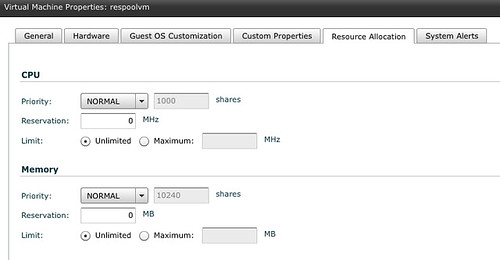
    • Note that is is possible to set a reservation/limit for CPU or Memory with vCloud Director 1.x on a per VM level. See screenshot below, this is configurable on a per virtual machine basis!

 

vCloud Director Appliance Password

Duncan Epping · Jan 26, 2012 ·

Although this is documented on page 59 of the excellent Evaluators Guide I figured it wouldn’t hurt to write a tiny blog post. I found myself googling for it multiple times already with no succes, so there must be more people facing that “problem”. Below you can find the passwords of the vCloud Director Appliance and the embedded database, just in case you need it:

  • VMware vCloud Director Appliance:
    username = root
    password = Default0
  • VMware vCloud Director Appliance/Oracle Database 11g R2 XE instance:
    username = vcloud
    password = VCloud
While we are at it, these are the passwords for other appliances:
  • VMware vCenter Server Appliance:
    username = root
    password = vmware
  • VMware vShield Manager Appliance:
    username = admin
    password = default
  • vSphere Management Assistant (vMA):
    username = vi-admin
    password = <defined during configuration>
  • vSphere Data Recovery Appliance:
    username = root
    password = vmw@re
  • VMware vCenter Operations Manager
    username = admin
    password =  admin


Re: when to disable HA? /cc @hashmibilal

Duncan Epping · Jan 25, 2012 ·

Bilal Hashmi wrote a nice article about HA today and in this article he asked a couple of questions. As I think the info is useful for everyone I decided to respond through a blog article instead of by commenting.

Let me start by saying that in general HA should never be disabled. The later versions of vSphere have a neat option called “Enable Host Monitoring”. This option should be used for scheduled network maintenance. The difference between disabling host monitoring and disabling HA is that disabling host monitoring does not cause a full reconfiguration (see screenshot below) of HA and a new election process. Just the “host monitoring” functionality is disabled, which is what you want in this scenario.

Bilal asked multiple questions / made multiple statements in his article, I will respond to two of these specifically to explain the way HA handles failures/isolation:

In this case within 30 sec of the management network outage, each host would have declared itself isolated and wont attempt to restart any VMs like the primaries would in vSphere 5.

So why is this? As soon as a Master is isolated it will drop “ownership” of datastores on which VMs are running that are part of its cluster. Before the other hosts trigger the isolation response for a given VM they will validate if the datastore on which this VM is stored is “owned” by a master. In the case of a cluster wide isolation due to a network outage / maintenance the ownership would be dropped and this would result in HA not triggering the isolation response. This is a major change compared to vSphere 4.x and prior!

Now what happens when the network outage is over and the hosts are in a position to talk to each other? I have not been able to find documentation on whether an isolated host will enter an election (vSphere 4 or 5) ones the communication channel is open and bring the cluster back to life.

Lets focus on vSphere 5.0 as that seems most relevant. A host remains isolated until it observes HA network traffic, like for instance election messages OR it starts getting a response from an isolation address. Meaning that as long as the host is in “isolated state” it will continue to validate its isolation by pinging the isolation address. As soon as the isolation address responds it will initiate an election process or join an existing election process and the cluster will return to a normal state.

There’s absolutely no need to manually intervene. HA takes care of all of this for you.

iBook / Nook? What really?

Duncan Epping · Jan 24, 2012 ·

It took us a while to figure this one out, but finally we managed to create a proper epub version of our book. Converting from Kindle to iBooks / Nook is not easy, but after using multiple tools and manually editing the book using Sigil we managed to create version which was submitted to the iBooks store and Barnes & Nobles a couple of weeks ago. This morning I noticed that the book has been made available. So for all those who have been asking about it, here are the links:

  • iBook – $ 9.99
  • Nook – $ 9.99

We hope you will enjoy it!

No Jumbo frames on your Management Network! (Updated!)

Duncan Epping · Jan 20, 2012 ·

I was just reading some of the comments posted today and Marc Sevigny, one of the vSphere HA developers, pointed out something which I did not know. I figured this is probably something that many are not aware of so I copied and pasted his comment:

Another thing to check if you experience this error is to see if you have jumbo frames enabled on the management network, since this interferes with HA communication.

This is document here in a note: http://kb.vmware.com/kb/2006729

To make it crystal clear: disable jumbo frames on your management network with vSphere 5.0 as there’s a problem with it! This problem is currently being investigated by the HA engineering team and will hopefully be resolved.

<Update> Just received an email that all the cases where we thought vSphere HA issues were caused by Jumbo Frames being enabled were actually caused by the fact that it was not configured correctly end-to-end. Please validate Jumbo Frame configuration on all levels when configuring. (Physical Switches, vSwitch, Portgroup, VMkernel etc)</Update>

  • « Go to Previous Page
  • Page 1
  • Interim pages omitted …
  • Page 160
  • Page 161
  • Page 162
  • Page 163
  • Page 164
  • Interim pages omitted …
  • Page 336
  • Go to Next Page »

Primary Sidebar

About the Author

Duncan Epping is a Chief Technologist and Distinguished Engineering Architect at Broadcom. Besides writing on Yellow-Bricks, Duncan is the co-author of the vSAN Deep Dive and the vSphere Clustering Deep Dive book series. Duncan is also the host of the Unexplored Territory Podcast.

Follow Us

  • X
  • Spotify
  • RSS Feed
  • LinkedIn

Recommended Book(s)

Also visit!

For the Dutch-speaking audience, make sure to visit RunNerd.nl to follow my running adventure, read shoe/gear/race reviews, and more!

Do you like Hardcore-Punk music? Follow my Spotify Playlist!

Do you like 80s music? I got you covered!

Copyright Yellow-Bricks.com © 2026 · Log in