• Skip to primary navigation
  • Skip to main content
  • Skip to primary sidebar

Yellow Bricks

by Duncan Epping

  • Home
  • Unexplored Territory Podcast
  • HA Deepdive
  • ESXTOP
  • Stickers/Shirts
  • Privacy Policy
  • About
  • Show Search
Hide Search

Server

Should I use many small LUNs or a couple large LUNs for Storage DRS?

Duncan Epping · Dec 6, 2012 ·

At several VMUGs I presented a question that always came up was the following: “Should I use many small LUNs or a couple of large LUNs for Storage DRS? What are the benefits of either?”

I posted about VMFS-5 LUN sizing a while ago and I suggest reading that first if you haven’t yet, just to get some idea around some of the considerations taken when sizing datastores. I guess that article already more or less answers the question… I personally prefer many “small LUNs” than a couple of large LUNs, but let me explain why. As an example, lets say you need 128TB of storage in total. What are your options?

You could create 2x 64TB LUNs, 4x 32TB LUNs, 16x 8TB LUNs or 32x 4TB LUNs. What would be easiest? Well I guess 2x 64TB LUNs would be easiest right. You only need to request 2 LUNs and adding them to a datastore cluster will be easy. Same goes for the 4x 32TB LUNs… but with 16x 8TB and 32x 4TB the amount of effort increases.

However, that is just a one-time effort. You format them with VMFS, add the to the datastore cluster and you are done. Yes, it seems like a lot of work but in reality it might take you 20-30 minutes to do this for 32 LUNs. Now if you take a step back and think about it for a second… why did I wanted to use Storage DRS in the first place?

Storage DRS (and Storage IO Control for that matter) is all about minimizing risk. In storage, two big risks are hitting an “out of space” scenario or extremely degraded performance. Those happen to be the two pain points that Storage DRS targets. In order to prevent these problems from occurring Storage DRS will try to balance the environment, when a certain threshold is reached that is. You can imagine that things will be “easier” for Storage DRS when it has multiple options to balance. When you have one option (2 datastores – source datastore) you won’t get very far. However, when you have 31 options (32 datastores – source datastore) that increases the chances of finding the right fit for your virtual machine or virtual disk while minimizing the impact on your environment.

I already dropped the name, Storage IO Control (SIOC), this is another feature to take in to account. Storage IO Control is all about managing your queues, you don’t want to do that yourself. Believe me it is complex and no one likes queues right. (If you have Enterprise Plus, enable SIOC!) Reality is though, there are many queues in between the application and the spindles your data sits on. The question is would you prefer to have 2 device queues with many workloads potentially queuing up, or would you prefer to have 32 device queues? Look at the impact that this could have.

Please don’t get me wrong… I am not advocating to go really small and create many small LUNs. Neither am I saying you should create a couple of really large LUNs. Try to find the the sweetspot for your environment by taking failure domain (backup restore time), IOps, queues (SIOC) and load balancing options for Storage DRS in to account.

Insufficient resources to satisfy HA failover level on cluster

Duncan Epping · Dec 4, 2012 ·

I had this question yesterday where the error “Insufficient resources to satisfy HA failover level on cluster” comes from. And although it is hopefully clear to all of my regular readers this is caused by something that is called vSphere HA Admission Control, I figured I would reemphasize it and make sure people can easily find it when they do a search on my website.

When vSphere HA Admission Control is enabled vCenter Server validates if enough resources are available to guarantee all virtual machines can be restarted. If this is not the case the error around the HA failover level will appear. So what could cause this to happen and how do you solve it?

  • Are all hosts in your cluster still available (any hosts down )?
    • If a host is down  it could be insufficient resource are available to guarantee restarts
  • Check which admission control policy has been selected
    • Depending on which policy has been selected a single large reservation could skew the admission control algorithm (primarily “host failures” policy is impacted by this)
  • Admission Control was recently enabled
    • Could be that the cluster was overcommitted, or various reservations are used,  causing the policy to be violated directly when enabled

In most cases when this error pops up it is caused by a large reservation on memory or CPU and that should always be the first thing to check. There are probably a million scripts out there to check this, but I prefer to use either the CloudPhysics appliance (cloud based flexible solution with new reports weekly), or RVTools which is a nice Windows based utility that produces quick reports. If you are interested in more in-depth info on admission control I suggest reading this section of my vSphere HA deepdive page.

Win A free copy of the ‘VMware ThinApp 4.7 Essentials’, just by leaving a comment!

Duncan Epping · Nov 29, 2012 ·

*** CONTEST CLOSED, winners will receive an email ***

For the contest we have two copies of VMware ThinApp 4.7 Essentials to be given away to two lucky winners.

How you can win:
To win your copy of this book, all you need to do is leave a comment below which highlights the reason “why you would like to win this book”.

Please note: Winners residing only in the USA and Europe would get a chance to win print copies. Others would be provided with eBook copies.

The contest is valid for 7 days, and is open to everyone. Winners will be selected on the basis of their comment posted and will be notified on Thursday December 6th.

VMware ThinApp 4.7 Essentials is written by Peter Björk.

In this book you will learn about how application virtualization works and how to deploy ThinApp packages. You will learn how to update and tweak ThinApp Projects before distribution. This book will then cover design and implementation considerations for future ThinApp projects.

This book will be useful to developers, System admins and consultants who want to install and manage a virtualized app environment using VMware ThinApp 4.7.

If you can’t wait… You can find it on Amazon here: Kindle ($ 23.25) – Paper (54.99).

vCenter Extension error when deploying vSphere Replication?

Duncan Epping · Nov 26, 2012 ·

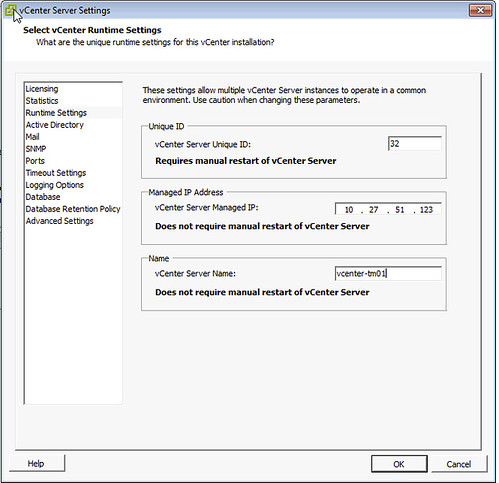
I’ve seen this popping up fairly often now and was under the impression I wrote about it a while back, but can’t find it. So here you go. If during the deployment of an OVF, in this case vSphere Replication, you hit a vCenter extension error it is probably due to a field missing in the vCenter runtime section of the vCenter settings.

The error which is shown in the log is:

“The virtual machine ‘<vm name>’ has a required vService dependency ‘vCenter Extension Installation’ which is not bound to a provider.”

It will show up in the UI with “No provider available” and “This dependency is required”. You can simply solve this by doing the following:

  • Open the vSphere Client
  • Go to “Administration” and “vCenter Server Settings”
  • Click “Runtime Settings”
  • Ensure both “Managed IP Address” (typically missing) and “vCenter Server Name” are filled out.
    vcenter extension error

Now the OVF should deploy correctly. Note that the “Managed IP Address” field is empty by default, so if you are deploying a new vCenter Server instance make sure to fill it out. This will help preventing from running into the vCenter extension error in the future when adding other services.

VMware ThinApp 4.7 Essentials by Peter Björk!

Duncan Epping · Nov 26, 2012 ·

About a year ago one of my colleagues reached out with some questions around book publishing. Many people ask me questions around what it takes, hours involved etc etc, and unfortunately many decide it is not the right time. I guess Peter Björk decided it was the right time as he managed to crank out this awesome book within a year. Congrats Peter, awesome work and major achievement!

The book is titled “VMware ThinApp 4.7 Essentials” and contains everything you need to know about ThinApp, or as the website states:

“VMware ThinApp 4.7 Essentials” shows you how to deploy ThinApp packages in order to improve the portability, manageability and compatibility of applications by encapsulating them from the underlying operating system on which they are executed.

In this book you will learn about how application virtualization works and how to deploy ThinApp packages. You will learn how to update and tweak ThinApp Projects before distribution. This book will then cover design and implementation considerations for future ThinApp projects.

You can find it on Amazon here: Kindle ($ 23.25) – Paper (54.99). Pick it up!

  • « Go to Previous Page
  • Page 1
  • Interim pages omitted …
  • Page 133
  • Page 134
  • Page 135
  • Page 136
  • Page 137
  • Interim pages omitted …
  • Page 336
  • Go to Next Page »

Primary Sidebar

About the Author

Duncan Epping is a Chief Technologist and Distinguished Engineering Architect at Broadcom. Besides writing on Yellow-Bricks, Duncan is the co-author of the vSAN Deep Dive and the vSphere Clustering Deep Dive book series. Duncan is also the host of the Unexplored Territory Podcast.

Follow Us

  • X
  • Spotify
  • RSS Feed
  • LinkedIn

Recommended Book(s)

Also visit!

For the Dutch-speaking audience, make sure to visit RunNerd.nl to follow my running adventure, read shoe/gear/race reviews, and more!

Do you like Hardcore-Punk music? Follow my Spotify Playlist!

Do you like 80s music? I got you covered!

Copyright Yellow-Bricks.com © 2026 · Log in