• Skip to primary navigation
  • Skip to main content
  • Skip to primary sidebar

Yellow Bricks

by Duncan Epping

  • Home
  • Unexplored Territory Podcast
  • HA Deepdive
  • ESXTOP
  • Stickers/Shirts
  • Privacy Policy
  • About
  • Show Search
Hide Search

Server

Startup News Flash part 16

Duncan Epping · Apr 2, 2014 ·

Number 16 of the Startup News Flash, here we go:

Nakivo just announced the beta program for 4.0 of their backup/replication solution. It adds some new features like: recovery of Exchange objects directly from compressed and deduplicated VM backups, Exchange logs truncation, and automated backup verification. If you are interested in testing it, make sure to sign up here. I haven’t tried it, but they seem to be a strong upcoming player in the backup and DR space for SMB.

SanDisk announced a new range of SATA SSDs called “cloudspeed”. They released 4 different models with various endurance levels and workload targets, of course ranging in sizes from 100GB up to 960GB depending on the endurance level selected. Endurance level ranges from 1 up to 10 full drive writes per day. (Just as an FYI, for VSAN we recommend 5 full drive writes per day as a minimum) Performance numbers range between 15k to 20k write IOps and 75 to 88K read IOps. More details can be found in the spec sheet here. What interest me most is the FlashGuard Technology that is included, interesting how SanDisk is capable of understanding wear patterns and workloads to a certain extend and place data in a specific way to prolong the life of your flash device.

CloudPhysics announced the availability of their Storage Analytics card. I gave it a try last week and was impressed. I was planning on doing a write up on their new offering but as various bloggers already covered it I felt there was no point in repeating what they said. I think it makes a lot more sense to just try it out, I am sure you will like it as it will show you valuable info like “performance” and the impact of “thin disks” vs “thick disks”. Sign up here for a 30day free trial!

VSAN – Misconfiguration Detected

Duncan Epping · Mar 31, 2014 ·

Although Cormac Hogan already wrote about this I figured I would repeat some of his work. It seems like various folks are hitting this issue where an error is thrown while configuring VSAN: Misconfiguration Detected. The misconfiguration in this case refers to how the physical network has been configured. In order for VSAN to be successfully configured your layer 2 VSAN network will need to be enabled for multicast traffic. (below a screenshot of the error which I borrowed from Cormac… thanks Cormac)

In order to successfully configure VSAN you can do two things, now lets be clear that I am not the networking expert and personally I would always advise to discuss with your networking team what the best option is. Here are your two options:

  • Enable IGMP Snooping for your VSAN network (VLAN) and define an IGMP Snooping Querier. Default setting on most Cisco switches is IGMP Snooping enabled but without an IGMP Snooping Querier. In this configuration VSAN will not be able to configure correctly!
  • Disable IGMP Snooping for your VSAN network (VLAN). Please note that you can typically disable IGMP Snooping globally and per VLAN, in this case if you want to disable it… disable it on your VLAN!

Please consult your network vendor documentation on how to do this.

Startup News Flash part 15

Duncan Epping · Mar 25, 2014 ·

Number 15 of the Startup News Flash… What happened in the world of (storage / flash related) startup’s in the last couple of weeks? Not too much news, but I felt it was worth releasing anyway as other wise the below would be really old news.

One of the most interesting BC/DR startups of the last couple of years, if you ask me, just announced a new round of funding: 100 million. Investors include North Bridge, Greylock, Advanced Technology Ventures, Andreessen Horowitz, and Technology Crossover Ventures. For those who don’t know Actifio… Actifio offers what is commonly referred to as a “Data Copy Management” solution. It could be described as a solution which sits in between your storage solution and your hypervisor and can do things like: backup, cloning, replication, archiving etc. Really neat solution, with a brilliant super simple UI. Worth checking out if you are looking to improve your business continuity story!

A while back I wrote an introduction to SoftNAS. When doing that review there was one thing that stood out to me and that was that SoftNAS didn’t have a great availability story. I spoke with Rick Brady about that and he said that it would be one of the first things they would try to tackle in an upcoming release. In the just announced release SoftNAS introduces Snap HA. Snap HA provides an “active / passive” solution where when an issue arises ownership is transferred to the “passive” node which then of course becomes “active”. More details can be found in this blog post by Rick Brady. Awesome work guys!

VSAN Basics – Changing a VM’s storage policy

Duncan Epping · Mar 22, 2014 ·

I have been talking a lot about the architecture of VSAN and have written many articles. It seems that somehow some of the more basic topics have not been fully addressed yet like changing a VM’s storage policy. One of our field folks had a question from a customer which was based on this video.

The question was how do you change the policy of a single VM? And why would you change the policy for a group of VMs?

Lets answer the “group of VMs” question first. You can imagine setting a policy for VMs that perform a specific function, for instance web servers. It could be that after a period of monitoring you notice that these VMs are not performing as expected when data needs to come from spindles. By changing the policy, as demonstrated in the video, you can simply increase the stripe width for all virtual machines.

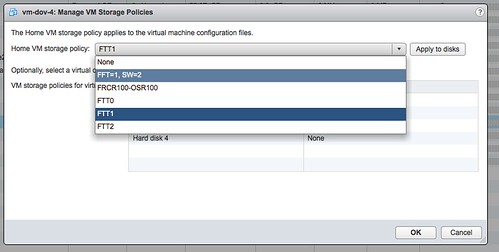
Now the question remains, how do I change the policy of a single VM? It is actually really straight forward:

  • Create a new policy
    • Go to VM Storage Policies
    • Click “Create a new storage policy”
    • Select the capabilities
  • Now go to your virtual machines and right click VM which needs a new policy
  • Click on “all vCenter actions”
  • Click on “VM Storage Policies”
  • Click on “Manage…”
  • Select a new policy
  • Apply to disks
  • Click “Ok”

Now the new policy will be applied to the VM. Depending on the selected policy this will take a certain amount of time as new components of your objects may need to be created.


VSAN HCL more than VSAN-ready nodes

Duncan Epping · Mar 20, 2014 ·

Over the last couple of weeks, basically since VSAN was launched, I noticed something and I figured I would blog about it. Many people seem to be under the impression that the VSAN Ready Nodes are your only option if you want to buy new servers to run VSAN on. This is definitely NOT the case. VSAN Ready Nodes are a great solution for people who do not want to bother going through the exercise of selecting components themselves from the VSAN HCL. However, the process is not as complicated as it sounds.

There are a couple of “critical aspects” when it comes to configuring a VSAN host and those are:

  • Server which is on the vSphere HCL (pick any)
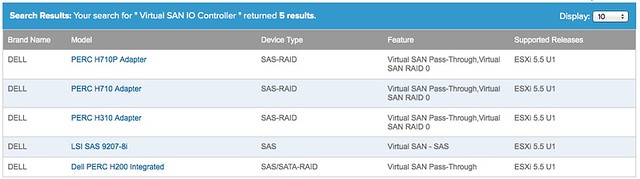
  • SSD, Disk Controller and HDD which is on the VSAN HCL: vmwa.re/vsanhcl

Yes that is it! So if you look at the current list of Ready Nodes for instance, it contains a short list of Dell Servers (T620 and R720). However the vSphere HCL has a long list of Dell Servers, and you can use ANY of those. You just need to make sure your VSAN (critical) components are certified, and you can simply do that using the VSAN HCL. For instance, even the low end PowerEdge R320 can be configured with components that are supported by VSAN today as it supports the H710 and the H310 disk controller which are also on the VSAN HCL.

So let me recap that: You can select ANY host from the vSphere HCL, as long as you ensure the SSD / Disk Controller and HDD are on the VSAN HCL you should be good.

  • « Go to Previous Page
  • Page 1
  • Interim pages omitted …
  • Page 107
  • Page 108
  • Page 109
  • Page 110
  • Page 111
  • Interim pages omitted …
  • Page 336
  • Go to Next Page »

Primary Sidebar

About the Author

Duncan Epping is a Chief Technologist and Distinguished Engineering Architect at Broadcom. Besides writing on Yellow-Bricks, Duncan is the co-author of the vSAN Deep Dive and the vSphere Clustering Deep Dive book series. Duncan is also the host of the Unexplored Territory Podcast.

Follow Us

  • X
  • Spotify
  • RSS Feed
  • LinkedIn

Recommended Book(s)

Also visit!

For the Dutch-speaking audience, make sure to visit RunNerd.nl to follow my running adventure, read shoe/gear/race reviews, and more!

Do you like Hardcore-Punk music? Follow my Spotify Playlist!

Do you like 80s music? I got you covered!

Copyright Yellow-Bricks.com © 2026 ยท Log in