One of the VMware product managers asked me to share this with you guys and ask you to please take the time to fill out this vCenter Server availability and performance survey. It is a very in-depth survey which should help the engineering team and the product management team making the right decisions when it comes to scalability and availability. So if you feel vCenter scalability and availability is important, take the time to fill it out!
Server
Automation is scary!
 Last couple of months I noticed something which led me to believe that automation is scary… And I am sure that my friends William Lam, Luc Dekens and Alan Renouf are on top of their desk right now and yelling at me but when they finished reading this post I am sure they agree.
I have been blogging for a while and when I started blogging, more than 6 years back, I posted a couple of simple scripts I wrote. The scripts allowed you to do simple things like checking the available disk space, finding snapshots, committing snapshots, find unregistered VMs, clean unregistered VMs etc. Basically the kind of scripts I used when I was a consultant to clean up the mess I typically found a couple of months after a new environment was deployed.
Many people downloaded these scripts and ran them in their environment, back then I didn’t think much of it to be honest… I mean I wrote some simple scripts and people were using those to their advantage right? Well… yes and no. Yes I did write scripts, and yes they were using them to their advantage and yes they were simple for sure. (I am not a scripting god.) So what is the problem then?
The problem is simple, 6+ years after I wrote those scripts I still receive questions about how to use them. Now note this: Those scripts were written when ESX was still the core hypervizor to use. Those scripts were written to run within the service console. Those scripts were written for ESX version 2.5.x and 3.x. Today we use ESXi and majority of folks will be on version 5.x. More than 6 years have passed, but people are still downloading them and putting them in places where they don’t belong and try to run them; without thinking about.
That is why I think Automation is Scary! (Yes in this case capital S is warranted.) If you are looking to automate operational procedures / tasks. (Automation is NOT a replacement for proper operational procedures by the way!) If you are looking to create or re-use (simple) reporting scripts, or scripts which execute simple tasks for you make sure you:
- Read the script, and make sure you understand every line of code
- Test the script in a test environment
- Check for which version the script was written and validate it against your version
- Don’t trust ANYONE blindly, and when changes are introduced in your environment or to the script go to step 1 again!
Automation isn’t really scary of course, automation can make your life easier. Just make sure you don’t become that person who has to restore 80 VMs because that script which was cleaning up unregistered VMs unintentionally deleted production VMs… Make sure you understand what your scripts are doing and assess the potential risk.
New beta of the vSphere 5.5 U1 Hardening Guide released
Mike Foley just announced the new release of the vSphere 5.5 U1 Hardening Guide. Note that it is still labeled as a “beta” as Mike is still gathering feedback, however the document should be finalized first week of June.
For those concerned about security, this is an absolute must read! As always, before implementing ANY of these recommendations make sure to test them on a test cluster and test expected functionality of both the vSphere platform and the virtual machines and applications running on top of it.
Nice work Mike!
One versus multiple VSAN disk groups per host
I received two questions on the same topic this week so I figured it would make sense to write something up quickly. The questions were around an architectural decision for VSAN, one versus multiple VSAN disk groups per host. I have explained the concept of disk groups already in various posts but in short this is what a disk group is and what the requirements are:
A disk group is a logical container for disks used by VSAN. Each disk groups needs at a minimum 1 magnetic disk and can have a maximum of 7 disks. Each disk group also requires 1 flash device.
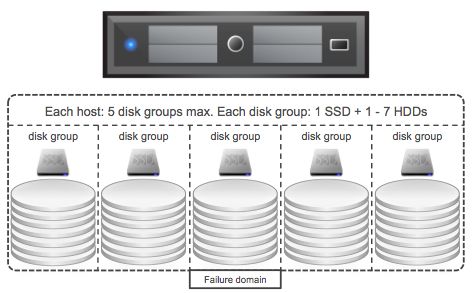
Now when designing your VSAN cluster at some point the question will arise should I have 1 or multiple disk groups per host? Can and will it impact performance? Can it impact availability?
There are a couple of things to keep in mind when it comes to VSAN if you ask me. The flash device which is part of each disk group is the caching/buffer layer for those disks, without the flash device the disks will also be unavailable. As such a disk group can be seen as a “failure domain”, because if the flash device fails the whole disk group is unavailable for that period of time. (Don’t worry, VSAN will automatically rebuild all your components that are impacted automatically.) Another thing to keep in mind is performance. Each flash device will provide an X amount of IOPS.A higher total number of IOPS could (probably will) change performance drastically, however it should be noted that capacity could still be a constraint. If this all sounds a bit fluffy lets run through an example!
- Total capacity required: 20TB
- Total flash capacity: 2TB
- Total number of hosts: 5
This means that per host we will require:
- 4TB of disk capacity (20TB/5 hosts)
- 400GB of flash capacity (2TB/5 hosts)
This could simply result in each host having 2 x 2TB NL-SAS and 1 x 400GB flash device. Lets assume your flash device is capable of delivering 36000 IOPS… You can see where I am going right? What if I would have 2 x 200GB flash and 4x 1TB magnetic disks instead? Typical the lower capacity drives will do less write IOPS but for the Intel S3700 for instance that is 4000 less. So instead of 1 x 36000 IOPS it would result in 2 x 32000 IOPS. Yes, that could have a nice impact indeed….
But not just that, we also have more disk groups and smaller fault domains as a result. On top of that we will end up with more magnetic disks which means more IOPS per GB capacity in general. (If an NL-SAS drive does 80 IOPS for 2TB then two NL-SAS drives of 1TB will do 160 IOPS. Which means same TB capacity but twice the IOPS if you need it.)
In summary, yes there is a benefit in having more disk groups per hosts and as such more flash devices…
How long will VSAN rebuilding take with large drives?
I have seen this question popping up various times now where people want to know how long VSAN rebuilding will take with large drives. And it was something that was asked on twitter as well today, and I think there are some common misconceptions out there when it comes to rebuilding. Maybe this tweet summarizes those misconceptions best:
https://twitter.com/rbergin/status/466908885165424641
There are a couple of things I feel need to be set straight here:
- VSAN is an object store storage solution, each disk is a destination for objects
- There is no filesystem or RAID set spanning disks
I suggest you read the above twice, now if you know that there is no RAID set spanning disks or a single filesystem formatted across multiple you can conclude the following: If a disk fails then what is on the disk will need to be rebuild. Lets look at an example:
I have a 4TB disk with 1TB capacity used by virtual machine objects. The 4TB disk fails. Now the objects are more than likely out of compliance from an availability stance and VSAN will start rebuilding the missing components of those objects. Notice I said “objects and components” and not “disk”. This means that VSAN will start reconstructing the 1TB worth of components of those impacted objects, and not the full 4TB! The total size of the lost components is what matters, and not the total size of the lost disk.
Now when VSAN starts rebuilding it is good to know that all hosts that hold components of impacted objects will contribute to the rebuild. Even better, VSAN does not have to wait for the failed disk to be replaced or return for duty… VSAN used the whole VSAN cluster as a hot spare and will start rebuilding those components within your cluster, as long as there is sufficient disk capacity available of course. On top of that, the rebuilding logic of VSAN is smart… it will not just go all out but it will instead take the current workload consideration. If you have virtual machines which are doing a lot of IO than VSAN, while rebuilding, is smart enough to prioritize the rebuilding of those components in such a way that it will not hurt your workloads.
Now the question remains, how long will it take to rebuild 1TB worth of lost components? Well that depends… And what does it depend on?
- Total size of components to be rebuild of impacted objects
- Number of hosts in the cluster
- Number of hosts contributing to the rebuild
- Number of disks per host
- Network infrastructure
- Current workload of VMs within the cluster
A lot of variables indeed, difficult for me to predict how long it will take. This is something
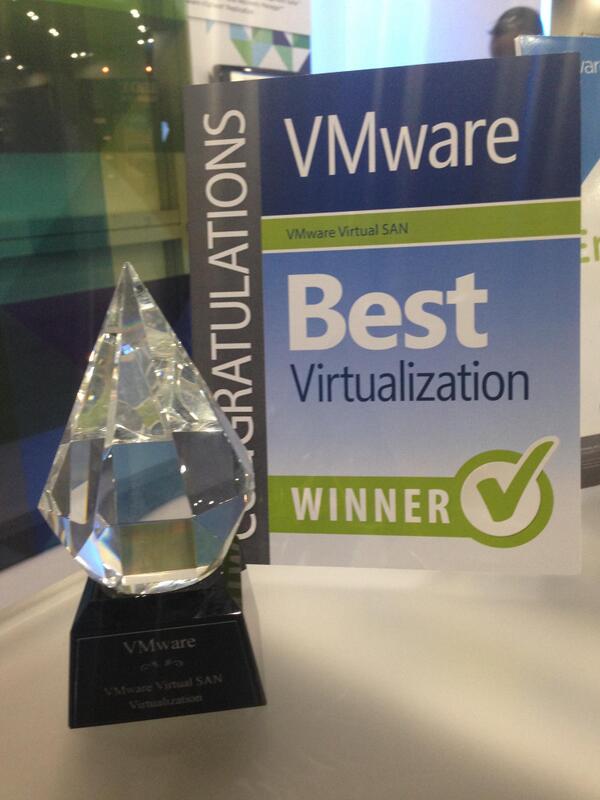
Oh, and before I forget, congrats to the VSAN team for winning best of Microsoft TechEd in the virtualization category. WHAT? Yes you read that correctly…