• Skip to primary navigation
  • Skip to main content
  • Skip to primary sidebar

Yellow Bricks

by Duncan Epping

  • Home
  • Unexplored Territory Podcast
  • HA Deepdive
  • ESXTOP
  • Stickers/Shirts
  • Privacy Policy
  • About
  • Show Search
Hide Search

Software Defined

Startup News Flash part 11

Duncan Epping · Dec 17, 2013 ·

Last Startup News Flash of the year, part 11… It is relatively short this time, I am guessing everyone is wrapping up before the holiday season really starts. I know I am!

I want to congratulate Nimble on their very successful IPO. They introduced their stock at the price of $21.00 per share and are now at $ 35.00 after just a couple of days of trading. Not sure why, but for whatever reason I haven’t written about Nimble yet in-depth, personally I’ve been impressed by what they offer. If you look at the cost of their solution and hold it against quality and features they offer I am sure you will be impressed as well, definitely one of those companies I would be talking to when looking to invest in a new storage system! Once again, congrats to all involved on the successful IPO.

Infinio just announced a new round of funding. 12 million for Series B is not bad if you ask me. Investors include: Bessemer Venture Partners, Highland Capital Partners, Lightspeed Venture Partners, and Osage University Partners (a partner of Columbia University, home of Infinio’s roots). After having recently announced GA of their 1.0 product I guess it is full speed ahead with this new injection. Congrats and looking forward to the upcoming releases.

That was it for this year with regards to startups news , hopefully back next year with more Startup News!

Re: VMware VSAN VS the simplicity of hyperconvergence

Duncan Epping · Dec 11, 2013 ·

I was reading this awesome article by “the other” Scott Lowe. (That is how he calls himself on twitter.) I really enjoyed the article and think it is a pretty fair write-up. Although I’m not sure I really agree with some of the statements or conclusions drawn. Again, do not get me wrong… I really like the article and effort Scott has put in, and I hope everyone takes the time to read it!

A couple of things I want to comment on:

VMware VSAN VS the simplicity of hyperconvergence

I guess I should start with the title… Just like for companies like SimpliVity (Hey guys congrats on winning the well deserved award for best converged solution) and Nutanix their software is the enabler or their hyper-converged solution. Virtual SAN could be that, if you buy a certain type of hardware of course that is.

Hyper-converged infrastructure takes an appliance-based approach to convergence using, in general, commodity x86-based hardware and internal storage rather than traditional storage array architectures. Hyper-converged appliances are purpose-built hardware devices.

Keyword in this sentence if you ask me is “purpose-built”. In most cases there is nothing purpose-built about the hardware. (Except for SimpliVity as they use a purpose built component for deduplication.) In May of 2011 I wrote about these HPC Servers that SuperMicro was selling and how they could be a nice platform for virtualization, I even ask in my article which company would be the first to start using these in a different way. Funny, as I didn’t know back then that Nutanix was planning on leveraging these which was something I found out in August of 2011. The servers used by most of the Hyper-converged players today those HPC servers and are very much generic hardware devices. The magic is not the hardware being used, the magic is the software if you ask me and I am guessing vendors like Nutanix will agree on me that.

Due to its VMware-centric nature and that fact that VSAN doesn’t present typical storage constructs, such as LUNs and volumes, some describe it as a VMDK storage server.

Not sure I agree with this statement. What I personally actually like about VSAN is that it does present a “typical storage construct” namely a (Virtual SAN) data store. From a UI point of view it just looks like a regular datastore. When you deploy a virtual machine the only difference is that you will be picking a VM Storage Policy on top of that, other than that it is just business as usual. For users, nothing new or confusing about it!

As is the case in some hybrid storage systems, VSAN can accelerate the I/O operations destined for the hard disk tier, providing many of the benefits of flash storage without all of the costs. This kind of configuration is particularly well-suited for VDI scenarios with a high degree of duplication among virtual machines where the caching layer can provide maximum benefit. Further, in organizations that run many virtual machines with the same operating system, this breakdown can achieve similar performance goals. However, in organizations in which there isn’t much benefit from cached data — highly heterogeneous, very mixed workloads — the overall benefit would be much less.

VSAN can accelerate ANY type of I/O if you ask me. It has a write buffer and a read cache. Depending on the size of your working set (active data), the size of the cache and the type of policy used you should always benefit regardless of the type of workload used. From a writing perspective as mentioned it will always go to the buffer, but from a read perspective your working set should be in cache. Of course there are always types of workloads where this will not apply but for the majority it should.

VSAN is very much a “build your own” approach to the storage layer and will, theoretically, work with any hardware on VMware Hardware Compatibility list. However, not every hardware combination is tested and validated. This will be one of the primary drawbacks to VSAN…

This is not entirely true. VMware is working on a program called Virtual SAN ready nodes. These Virtual SAN ready nodes will be pre-configured, certified and tested configurations which are optimized for things like performance / capacity etc. I haven’t seen the final list yet, but I can imagine certain vendors like for instance Dell and HP will want to list specific types of servers with an X number of Disks and a specific SSD types to ensure optimal user experience. So although VSAN is indeed a “bring your own hardware” solution, but I think that is the great thing about VSAN… you have the flexibility to use the hardware you want to use. No need to change your operational procedures because you are introducing a new type of hardware, just use what you are familiar with.

PS: I want to point out there are some technical inaccuracies in Scott’s post. I’ve pointed these out and am guessing they will be corrected soon.

Removing a disk group from a VSAN host

Duncan Epping · Dec 4, 2013 ·

I had been playing around with my VSAN cluster for a bit the last couple of weeks and it literally has become messy. I created many VMs and many snapshots and removed many of those again, all of this while pulling cables of servers and pulling disks. Basically stress testing VSAN while injecting faults to see how it responds. It was time to clean up and upgrade to a later build as the beta refresh was just released. After deleting a bunch of VMs I noticed that not everything was removed, I had also uploaded ISOs and some other random stuff which I probably should not have. Anyway, I needed to clean one of my hosts up.

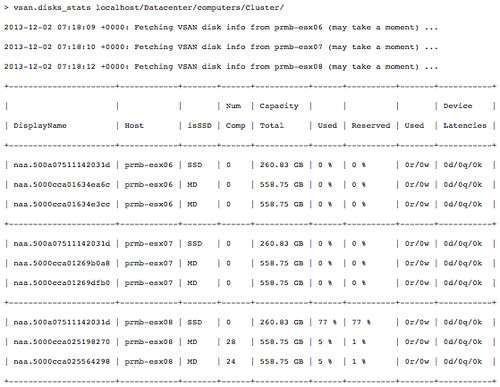
I figured I would use RVC for the exercise just to get a bit more familiar with it. First I wanted to check what the current state was of my cluster, I used the “vsan.disks_stats” command:

Then I figured I would want to just simply remove the disk group for Server “prmb-esx08” using “vsan.host_wipe_vsan_disks”:

Note that you can also do this using the UI:

  • Go to your cluster
  • Click “Manage” and “Virtual SAN” -> “Disk Management”
  • Select the “Disk Group” and click the “Remove the Disk Group” icon

Startup News Flash part 10

Duncan Epping · Nov 29, 2013 ·

There we are, part 10 of the Startup News Flash. Someone asked me on Twitter last week why Company XYZ was never included in the news flash. Let it be clear that I am not leaving anyone out (unless I feel they aren’t relevant to this newsletter or my audience), I have limited time so typically do not do briefings… Which means that if the marketing team doesn’t sent me the details via email and I haven’t somehow stumbled across the announcement it will not appear on here. If you want your company to be listed, make sure they sent their press releases over.

Some new models announced by Nutanix. Funny to see how they’ve been pushing hard from a marketing perspective to remove the “pure VDI play” label they had and now launch a VDI focused model called the 7000 series. (Do not get me wrong, I think this is a brilliant move!) The 7000 series offers you the option to include NVIDIA K1 or K2 Grid cards. Primarily intended to accelerate graphics, so if you are for instance doing a lot of 3D rendering or just are a heavy graphical VDI user these could really provide a benefit over their (and other vendors) normal offerings. On top of that the 3000 and 6000 series has been overhauled. The NX-3061 and NX-3061 with 10 Core (2.8GHz) Ivy Bridge have been introduced and the NX6060 and NX6080 10 Core (2.8 and 3.0GHz respectively) have been introduced. Haven’t seen anything around pricing, so can’t comment on that.

No clue what it is exactly these guys do to be honest. I find their teaser video very intriguing. Not much detail to be found around what they are doing other than “re-imagine enteprise computing”. Hoping to hear more from these guys in the future as their teaser did make me curious.

I don’t care much about benchmarks, but it is always nice to see a smaller (or the underdog) company beat the big players. Kaminario managed to outperform Oracle, IBM and Fujitsu with their SPC-2 Performance Benchmark using their scale-out all flash array K2 v4. Just a couple of weeks after breaking the SPC-1 Benchmark World Record again. Like I said, I don’t care much about benchmarks  as it doesn’t typically say much about the operational efficiency etc. Still it is a nice indication of what can be achieved, though your results may vary depending on your IO pattern of course.

VSAN VDI Benchmarking and Beta refresh!

Duncan Epping · Nov 26, 2013 ·

I was reading this blog post on VSAN VDI Benchmarking today on Vroom, the VMware Performance blog. You see a lot of people doing synthetic tests (max iops with sequential reads) on all sorts of storage devices, but lately more and more vendors are doing these more “real world performance tests”. While reading this article about VDI benchmarking, and I suggest you check out all parts (part 1, part 2, part 3), there was one thing that stood out to me and that was the comparison between VSAN and an All Flash Array.

The following quotes show the strength of VSAN if you ask me:

we see that VSAN can consolidate 677 heavy users (VDImark) for 7-node and 767 heavy users for 8-node cluster. When compared to the all flash array, we don’t see more than 5% difference in the user consolidation.

Believe me when I say that 5% is not a lot. If you are actively looking at various solutions, I would highly recommend to include the “overhead costs” to your criteria list as depending on the solution chosen this could make a substantial difference. I have seen other solutions requiring a lot more resources. But what about response time, cause that is where the typical All Flash Array shines… ultra low latency, how about VSAN?

Similar to the user consolidation, the response time of Group-A operations in VSAN is similar to what we saw with the all flash array.

Both very interesting results if you ask me. Especially the < 5% in user consolidation is what stood out to me the most! Once again, for more details on these tests read the VDI Benchmarking blog part 1, part 2, part 3!

Beta Refresh

For those who are testing VSAN, there is a BETA refresh available as of today. This release has a fix for the AHCI driver issue… and it increases the disk group limit from 6 to 7. From a disk group perspective this will  come in handy as many servers have 8, 16 or 24 disk slots allowing you to do 7HHDs + 1 SSD per group. Also some additional RVC commands have been added in the storage policy space, I am sure they will come in handy!

Nice side affect of the number of HDDs going up is increase in max capacity:

(8 hosts * (5 diskgroups * 7 HDDs)) * Size of HDD = Total capacity

With 2 TB disks this would result in:

(8 * (5 * 7)) * 2TB = 560TB

Now keep on testing with VSAN and don’t forget to report feedback through the community forums or your VMware rep.

  • « Go to Previous Page
  • Page 1
  • Interim pages omitted …
  • Page 57
  • Page 58
  • Page 59
  • Page 60
  • Page 61
  • Interim pages omitted …
  • Page 71
  • Go to Next Page »

Primary Sidebar

About the Author

Duncan Epping is a Chief Technologist and Distinguished Engineering Architect at Broadcom. Besides writing on Yellow-Bricks, Duncan is the co-author of the vSAN Deep Dive and the vSphere Clustering Deep Dive book series. Duncan is also the host of the Unexplored Territory Podcast.

Follow Us

  • X
  • Spotify
  • RSS Feed
  • LinkedIn

Recommended Book(s)

Also visit!

For the Dutch-speaking audience, make sure to visit RunNerd.nl to follow my running adventure, read shoe/gear/race reviews, and more!

Do you like Hardcore-Punk music? Follow my Spotify Playlist!

Do you like 80s music? I got you covered!

Copyright Yellow-Bricks.com © 2026 · Log in