These are my favorite episodes to record… Talking core storage for vSphere 8 with Jason Massae is always fun, as you know you will get to hear details you hadn’t heard yet. Jason discussed the new VASA specs, vVols, NFS, NVMe over fabrics and much more! Listen via via Spotify (https://spoti.fi/3QV5OtT), Apple (https://apple.co/3H3yOLg) or the embedded player below!
Software Defined
What can I change about a vSAN ESA Ready Node?
I’ve had half a dozen people asking about this over the past weeks, it really seems more and more people are at the point of adopting vSAN ESA (Express Storage Architecture. When they look at the various vSAN ESA Ready Node configurations what stands out is that the current list is limited in terms of server models and configurations. (https://vmwa.re/vsanesahcl)
The list is being updated every week, last week for instance Supermicro popped up as a Server vendor. Of course, Dell, HPe, and Lenovo had been on the list since day 1. When you select the vendor, the ready node type, and the model you will then have the option to select a number of things, but in most cases, you seem to be limited to “Storage Device” and “Number of Storage Devices”. This however does not mean you cannot change anything. A knowledge base article has been released which describes what you can, and cannot change when it comes to these configurations! The KB article is listed on the vSAN ESA VMware Compatibility Guide list, but somehow it seems people don’t always notice the link. (Yes, I have asked the team to make the link more obvious somehow.)
Now when you look at the KB it lists what you can change, and what the rules are when it comes to making changes. For instance, you can change the CPU, but only for the same or higher core count and the same or higher base clock speed. For memory, you can increase the amount, and the same applies to storage capacity for instance. For storage it is even a bit more specific, you need to use the same make/model, so basically if the ReadyNode configuration lists a P5600 of 1.6TB, you can swap it for a P5600 of 3.2TB. We recently (May 20th 2023) had a change in support, and we now support the change of device model/make, as long as you follow the other guidelines mentioned in the KB. For instance, you can swap an Intel device for a Samsung, but that Samsung would need to be supported by the OEM vendor and needs to be the same (or higher) performance and endurance class. And of course the device needs to be certified for vSAN ESA: http://vmwa.re/vsanesahclc. Anyway, if you are configuring a Ready Node for ESA, make sure to check the KB so that you make supported changes!
HCI Mesh error: Failed to run the remote datastore mount pre-checks
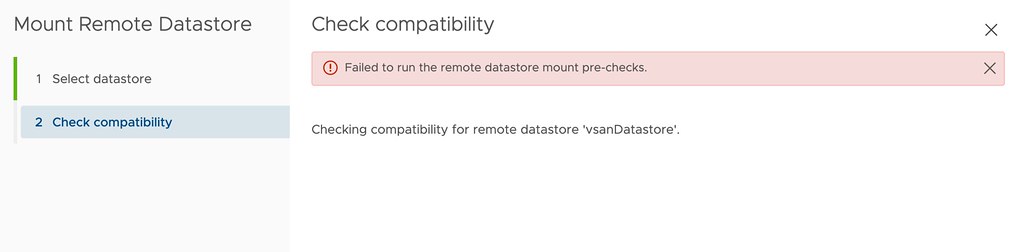
I had two comments on my HCI Mesh compute only blogpost where both were reporting the same error when trying to mount a remote datastore. The error that popped up was the following:
Failed to run the remote datastore mount pre-checks.
I tried to reproduce it in my lab, as both had upgraded from 7.0 to U2 I did the same, that didn’t result in the same error though. The error doesn’t provide any details around why the pre-check fails, as shown below in the screenshot. After some digging I found out that the solution is simple though, you need to make sure IPv6 is enabled on your hosts. Yes, even when you are not using IPv6, it still needs to be enabled to pass the pre-checks. Thanks, Jiří and Reza for raising the issue!
Does vSAN Enhanced Durability work when you have a limited number of hosts?
Last week I had a question about how vSAN Enhanced Durability works when you have a limited number of hosts. In this case, the customer had a 3+3+1 stretched cluster configuration, and they wondered what would happen when they would place a host into maintenance mode. Although I was pretty sure I knew what would happen, I figured I would test it in the lab anyway. Let’s start with a high-level diagram of what the environment looks like. Note I use a single VM as an example, just to keep the scenario easy to follow.

In the diagram, we see a virtual disk that is configured to be stretched across locations, and protected by RAID-1 within each location. As a result, you will have two RAID-1 trees each with two components and a witness, and of course, you would have a witness component in the witness location. Now the question is, what happens when you place esxi-host-1 into maintenance mode? In this scenario, vSAN Enhanced Durability will want to create a “durability component”. This durability component is used to commit all new write IO to. This will allow vSAN to resync fast after maintenance mode, and enhances durability as we would still have 2 copies of the (new) data.
However, in the scenario above we only have 3 hosts per location. The question then is, where is this delta component created then? As normally with maintenance mode you would need a 4th host to move data to. Well, it is simple, in this case, what vSAN does is it creates a “durability component” on the host where the witness resides, within the location of course. Let me show you in a diagram, as that makes it clear instantly.
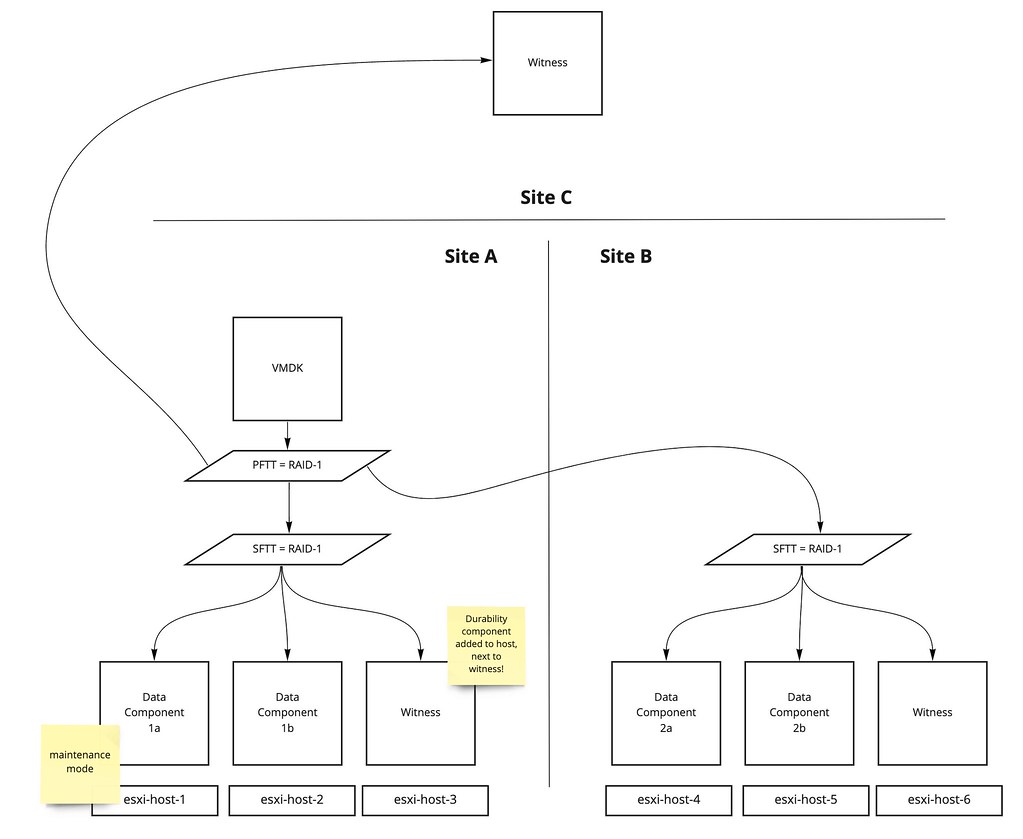
By adding the Durability component next to the witness on esxi-host-3, vSAN enhances durability even in this stretched cluster situation, as it provides a local additional copy of new writes. Now, of course I tested this in my lab. So for those who prefer to see a demo, check out the youtube video below.
vSAN File Services and Stretched Clusters!
As most of you probably know, vSAN File Services is not supported on a stretched cluster with vSAN 7.0 or 7.0U1. However, starting with vSAN 7.0 U2 we now fully support the use of vSAN File Services on a stretched cluster configuration! Why is that?
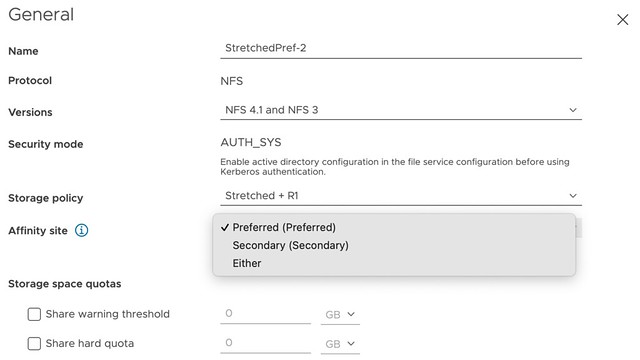
In 7.0 U2, you now have the ability to specify during configuration of vSAN File Services to which site certain IP addresses belong. In other words, you can specify the “site affinity” of your File Service services. This is shown in the screenshot below. Now I do want to note, this is a soft affinity rule. Meaning that if hosts, or VMs, fail on which these file services containers are running it could be that the container is restarted in the opposite location. Again, a soft rule, not a hard rule!

Of course, that is not the end of the story. You also need to be able to specify for each share with which location they have affinity. Again, you can do this during configuration (or edit it afterward if desired), and this basically then sets the affinity for the file share to a location. Or said differently, it will ensure that when you connect to file share, one of the file servers in the specified site will be used. Again, this is a soft rule, meaning that if none of the file servers are available on that site, you will still be able to use vSAN File Services, just not with the optimized data path you defined.
Hopefully, that gives a quick overview of how you can use vSAN File Services in combination with a vSAN Stretched Cluster. I created a video to demonstrate these new capabilities, you can watch it below.