• Skip to primary navigation
  • Skip to main content
  • Skip to primary sidebar

Yellow Bricks

by Duncan Epping

  • Home
  • Unexplored Territory Podcast
  • HA Deepdive
  • ESXTOP
  • Stickers/Shirts
  • Privacy Policy
  • About
  • Show Search
Hide Search

Software Defined

Do I need 2 isolation addresses with a (vSAN) stretched cluster for vSphere HA?

Duncan Epping · Sep 27, 2023 ·

This question has come up multiple times now, so I figured I would write a quick post about it, do you need 2 isolation addresses with a (vSAN) stretched cluster for vSphere HA? This question comes up as the documentation has best practices around the configuration of HA isolation addresses for stretched clusters. The documentation (both for vSAN as well as traditional stretched storage) states that you need to have two reliable addresses, one in each location.
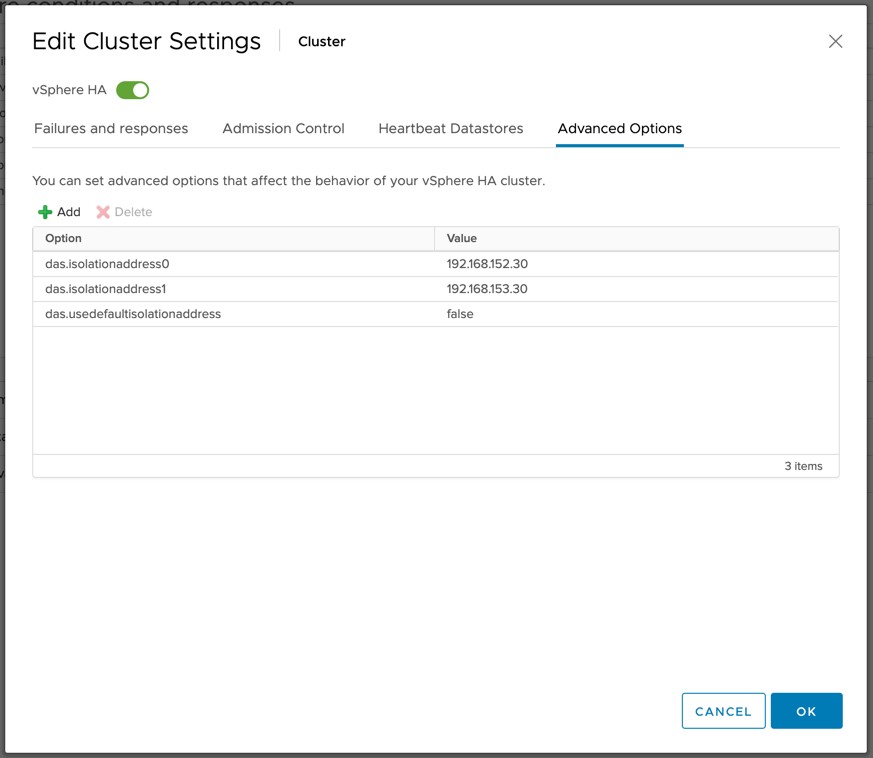
Now I have had the above question multiple times as some folks have mentioned that they can use a Gateway Address with Cisco ACI which would still be accessible in both locations even if there’s a partition due to for instance an ISL failure. If that is the case, and the IP address is indeed available in both locations during those types of failure scenarios then it would suffice to use a single IP address as your isolation address.

You will however need to make sure that the IP address is reachable over the vSAN network when using vSAN as your stretched storage platform. (When vSAN is enabled vSphere HA uses the vSAN network for communications.) If it is reachable you can simply define the isolation address by setting the advanced setting “das.isolationaddress0”. It is also recommended to disable the use of the default gate of the management network by setting “das.usedefaultisolationaddress” to false for vSAN based environments.

I have requested the vSAN stretched clustering documentation to be updated to reflect this.
vSAN ReadyNode emulated configurations? What are those?

Duncan Epping · Sep 26, 2023 ·

Last week Pete Koehler dropped a bomb on us when he blogged about vSAN ReadyNode emulated configurations. Since then I had a few folks asking what this exactly is. It is fairly simple, some vendors have special SKUs for ReadyNodes, which doesn’t always make configuring a ReadyNode to the desired specifications based on the minimum requirements for vSAN ESA and the supported components. SAY WHAT?

Well just imagine you are a Dell shop and you want to use the R750. You simply check if the R750 is listed on the VCG, you list the minimum CPU spec and you go from there based on the minimum (and maximum) specifications for vSAN ESA and based on your workload profile. Just as an example, the minimum specifications for vSAN ESA are now as follows with the introduction of the vSAN AF-0 ReadyNode configuration:

  • Minimum of 16 cores Intel or AMD
    • For example: 2 x Intel Xeon® Gold 6334 3.6G, 8 cores
    • Or: 1 x AMD EPYC 9124 16C 200W 3.0GHz Processor
  • Minimum of 128GB memory
  • Minimum of 10GbE
  • Minimum of 2 NVMe Devices (as listed on vSAN VCG) and 3.2TB per host

Now that we know what those minimums are, I could simply go to the Dell website and spec a Dell R750 Server as desired. This server could have for instance:

  • 2 x Intel® Xeon Gold 6342 2.8G, 24 cores
  • 256GB memory
  • 25GbE networking
  • 6 x Dell Ent NVMe CM6 RI 3.84TB

Even though it is not on the list as a ReadyNode configuration, this configuration would be supported as all the components are certified, and the server itself is also certified as a vSAN ReadyNode platform, and we are following the guidelines as documented in the vSAN ESA RN KB.

I hope this helps those who are going through the process of procuring hardware for vSAN ESA.

New book: VMware vSAN 8.0 U1 Express Storage Architecture Deep Dive!

Duncan Epping · Apr 27, 2023 ·

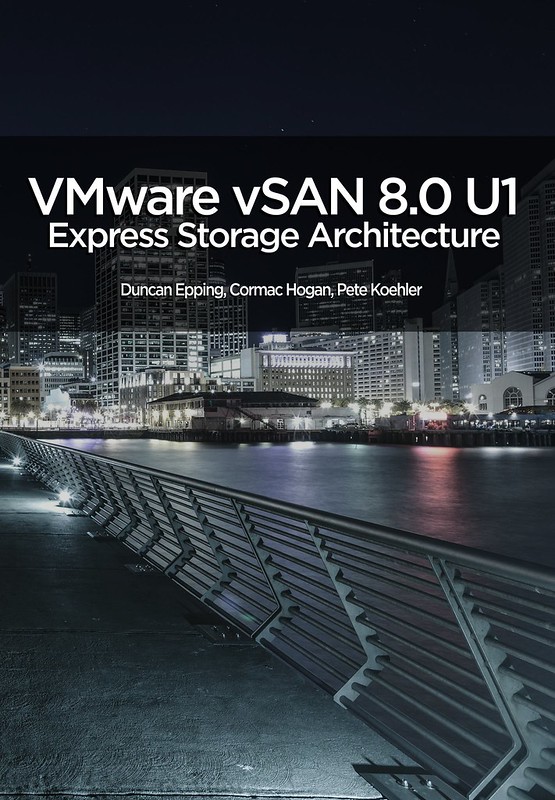
We already gave some hints on twitter, and during an episode of the Unexplored Territory podcast, but here it finally is… The new book, the VMware vSAN 8.0 U1 Express Storage Architecture Deep Dive! It has been a year since we released the vSAN 7.0 U3 Deep Dive book, and with this brand new vSAN architecture being introduced in vSAN 8.0 we figured it was time to do a full overhaul of the book as well. Mind you, this new book purely deals with the Express Storage Architecture, aka vSAN ESA. This also means that some of the features which are not supported by ESA are not discussed in this book, for that you will need to buy the vSAN 7.0 U3 Deep Dive book, which covers OSA. Another big change is that we brought in a third author, we asked our good friend Pete Koehler to contribute to the book. Pete had done reviews of previous books, and considering the amount of material he produced for VMware Tech Marketing for vSAN (and ESA specifically) it made a lot of sense to bring him in!

VMware’s vSAN has rapidly proven itself in environments ranging from hospitals to oil rigs to e-commerce platforms and is the market leader in the hyperconverged space. Along the way, the world of IT has rapidly changed, not just from a software point of view, but also from a hardware perspective. With vSAN 8.0 VMware brought a new architecture to market called vSAN Express Storage Architecture (ESA). This architecture is highly optimized for today’s world of datacenter resources, be it CPU, memory, networking, or NVMe based flash storage.

The authors of the vSAN Deep Dive have thoroughly updated their definitive guide to this transformative technology. Writing for vSphere administrators, architects, and consultants, Cormac Hogan, Duncan Epping , and Pete Koehler explain what vSAN ESA is, why the architecture has changed, what it now offers, and how to gain maximum value from it. The book offers expert insight into preparation, installation, configuration, policies, provisioning, clusters, architecture, and more. You’ll also find practical guidance for using all data services, stretched clusters, two-node configurations, and cloud-native storage services.

Although we pressed publish on Tuesday, sometimes it takes a while before the book is available in all Amazon stores, but it should just trickle down in the upcoming 24-48 hours. The book is priced at 9.99 USD for the ebook and 29.99 USD for a paper copy, and is sold through Amazon only. Get it while it is hot, and we would appreciate it if you would use our referral links and leave a review when you finish it. Thanks for the support, and we hope you will enjoy it!

  • paper – 29.99 USD
  • ebook – 9.99 USD

Of course, we also have the links to other major Amazon stores:

  • United Kingdom – ebook – paper
  • Germany – ebook – paper
  • Netherlands – ebook – paper
  • Canada – ebook – paper
  • France – ebook – paper
  • Spain – ebook – paper
  • India – ebook
  • Japan – ebook – paper
  • Italy – ebook – paper
  • Mexico – ebook
  • Australia – ebook – paper
  • Brazil – ebook
  • Or just do a search in your local amazon store!

Can I change the “Host Image Profile Acceptance Level” for the vSAN Witness Appliance?

Duncan Epping · Feb 8, 2023 ·

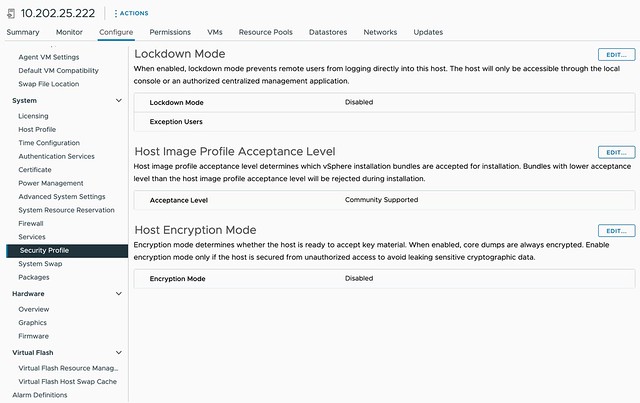
On VMTN a question was asked around the Host Image Profile Acceptance Level for the vSAN Witness Appliance, this is configured to “community supported”. The question was around whether it is supported to change this to “VMware certified” for instance. I had a conversation with the Product Manager for vSAN Stretched Clusters and it is indeed fully supported to make this change, I also filed a feature request to have the Host Image Profile Acceptance Level for the vSAN Witness increased to a higher, more secure, level by default.

So if you want to make that change, feel free to do so!

vSAN ESA is using more CPU cycles than vSAN OSA?

Duncan Epping · Feb 1, 2023 ·

Over the last couple of weeks, I’ve had conversations with customers and partners who have been running performance benchmarks against both vSAN ESA and vSAN OSA. As you can imagine, people want to compare version 8 of OSA against version 8 of ESA, and that is completely fair. What I noticed though is that some of those customers came back with comments around CPU usage of vSAN OSA against ESA. The general comment we get is that vSAN ESA is using more CPU cycles than vSAN OSA.

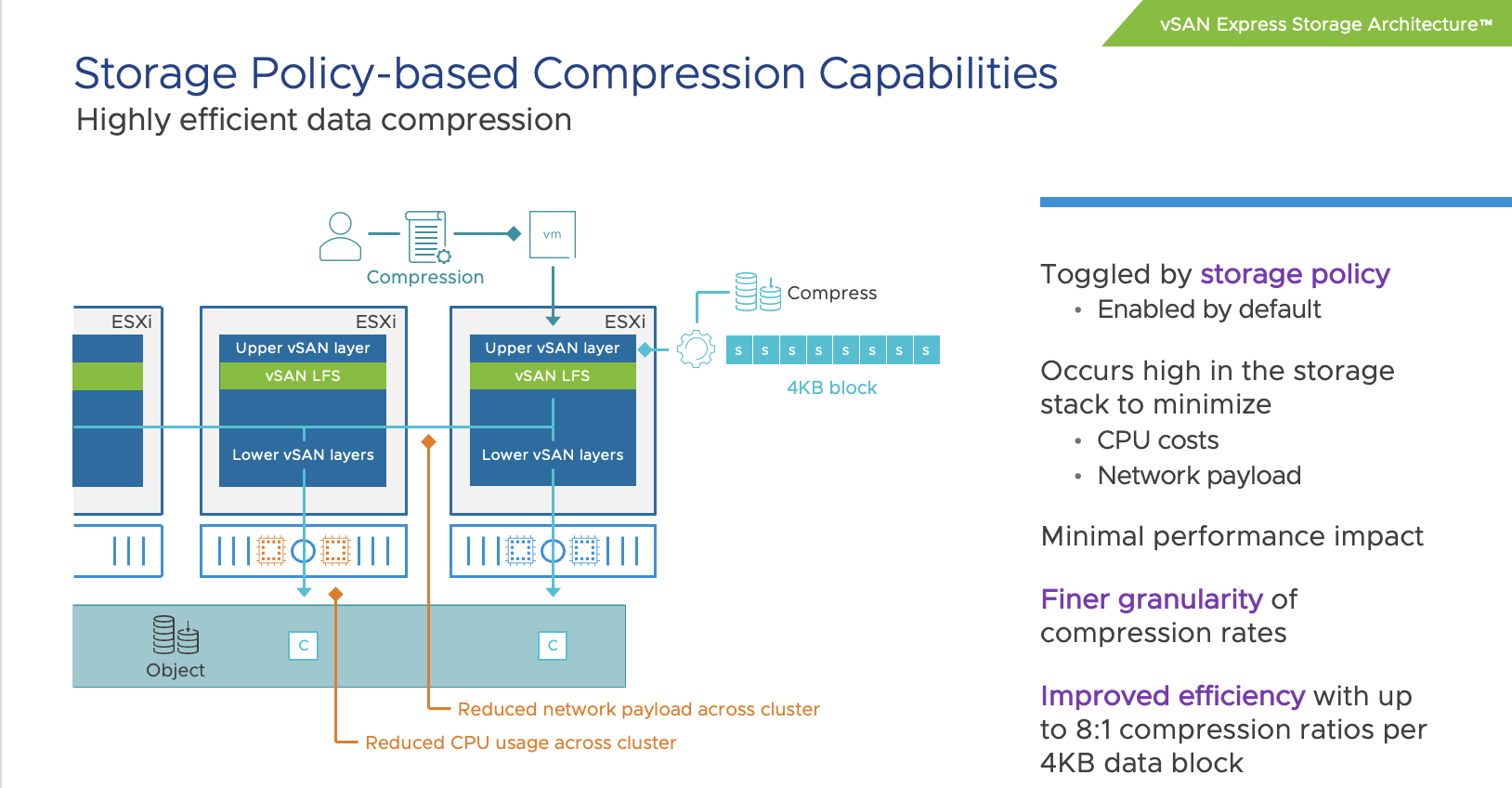
When looking at it from a total number point of view, or CPU cycles consumed, it is very likely you will see vSAN ESA using more cycles than vSAN OSA. The question then typically arises why that is the case, as VMware (the vSAN team) has been claiming that vSAN ESA is much more efficient than vSAN OSA. To be fair, it is much more efficient. For instance data services like checksumming, encryption, and compression have moved to the top of the stack (as shown below) resulting in the fact that we don’t have to compress/encrypt data 3/4/5/6 times but can do it once at the source and then send it over the network to the destination.

Still, it leaves the question, why is more CPU capacity used? The answer is simple, you are pushing much more IO. We’ve seen customers easily reaching 4x the number of IOPS with ESA than with OSA. Even though ESA is more efficient, if you are pushing 4x (or more) the amount of IO then you will need to remember that those additional IOs also come at a cost, and that cost is CPU cycles to process them. So when you make a comparison, please compare apples to apples, and not apples to oranges.

The last thing I want to add, and hopefully I can share some data in the future, the use of RDMA with vSAN 8 ESA seems to have a significant impact on CPU usage, as in lower the amount of CPU required to produce the same results (or better results). So it is worth considering RDMA for sure when adopting vSAN 8 ESA!

  • « Go to Previous Page
  • Page 1
  • Page 2
  • Page 3
  • Page 4
  • Page 5
  • Page 6
  • Interim pages omitted …
  • Page 71
  • Go to Next Page »

Primary Sidebar

About the Author

Duncan Epping is a Chief Technologist and Distinguished Engineering Architect at Broadcom. Besides writing on Yellow-Bricks, Duncan is the co-author of the vSAN Deep Dive and the vSphere Clustering Deep Dive book series. Duncan is also the host of the Unexplored Territory Podcast.

Follow Us

  • X
  • Spotify
  • RSS Feed
  • LinkedIn

Recommended Book(s)

Also visit!

For the Dutch-speaking audience, make sure to visit RunNerd.nl to follow my running adventure, read shoe/gear/race reviews, and more!

Do you like Hardcore-Punk music? Follow my Spotify Playlist!

Do you like 80s music? I got you covered!

Copyright Yellow-Bricks.com © 2026 · Log in