• Skip to primary navigation
  • Skip to main content
  • Skip to primary sidebar

Yellow Bricks

by Duncan Epping

  • Home
  • Unexplored Territory Podcast
  • HA Deepdive
  • ESXTOP
  • Stickers/Shirts
  • Privacy Policy
  • About
  • Show Search
Hide Search

Software Defined

XenDesktop/XenApp 7.12 MCS works with vSAN

Duncan Epping · Jan 25, 2017 ·

This is something that has kept me busy for a while. For the past 2 years there were some challenges with regards to the use of MCS and XenDesktop/XenApp in combination with vSAN. In fact, Citrix never supported vSAN and MCS, and it actually did not work either. PVS worked great in combination with vSAN however. Some customers though prefer to use MCS. After various discussions, emails and engineering discussions it seems that the problem customers faced has finally been resolved.

Citrix recently announced a hotfix that will allow you to use MCS with XenDesktop/XenApp 7.12 and vSAN version 6.0, 6.2 or 6.5. You can find the hotfix and details here: https://support.citrix.com/article/CTX219670

I would like to thank a couple of folks for making this happen, from Citrix: Christian Reilly (Thanks for connecting me to everyone!), Vishal Ganeriwala, Paul Browne, Yuhua Lu, Rick Dehlinger, Amanda Austin and from VMware Weiguo He, Tony Kuo and Sophie Ting Yin. Thanks everyone for making this happen in between releases. I am certain our joint customers will appreciate this! Note, that it is not a full statement of support (yet), but a great step in the right direction!

For those interested in XenDesktop/XenApp with vSAN, make sure to read this great reference paper by Sophie Yin. It provides a lot of detail around performance etc.
 

Two host stretched vSAN cluster with Standard license?

Duncan Epping · Jan 24, 2017 ·

I was asked today if it was possible to create a 2 host stretched cluster using a vSAN Standard license or a ROBO Standard license. First of all, from a licensing point of view the EULA states you are allowed to do this with a Standard license:

A Cluster containing exactly two Servers, commonly referred to as a 2-node Cluster, can be deployed as a Stretched Cluster. Clusters with three or more Servers are not allowed to be deployed as a Stretched Cluster, and the use of the Software in these Clusters is limited to using only a physical Server or a group of physical Servers as Fault Domains.

I figured I would give it a go in my lab. Exec summary: worked like a charm!

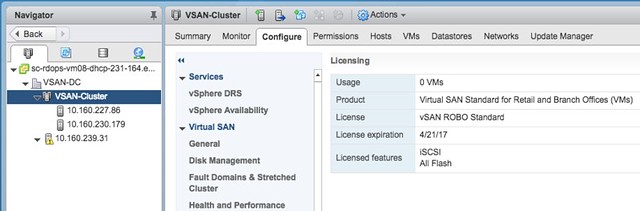
Loaded up the ROBO license:

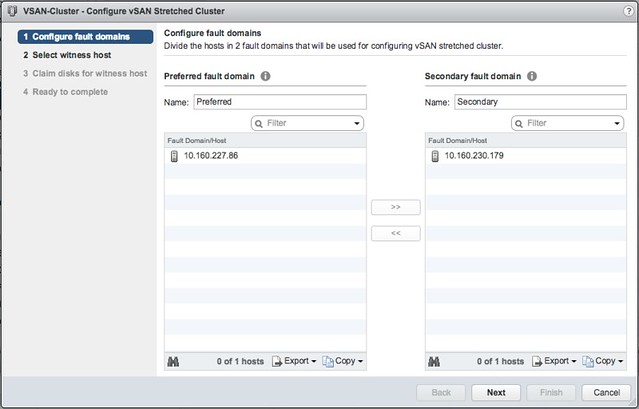
Go to the Fault Domains & Stretched Cluster section under “Virtual SAN” and click Configure. And one host to “preferred” and one to “secondary” fault domain:

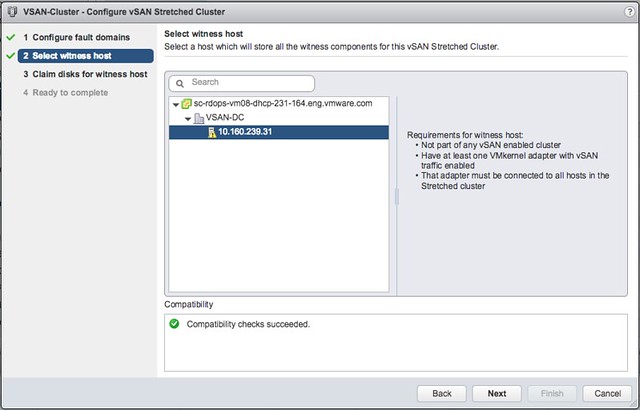
Select the Witness host:

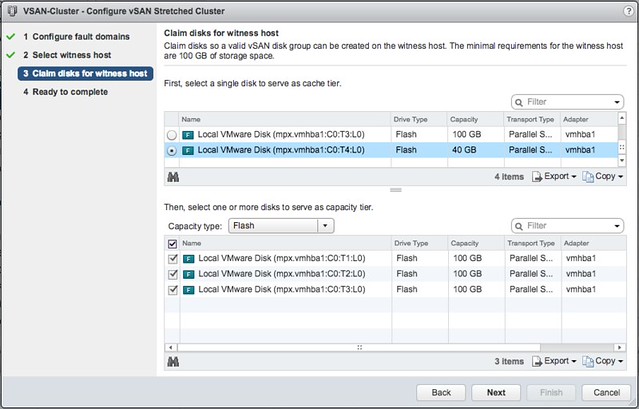
Select the witness disks for the vSAN cluster:

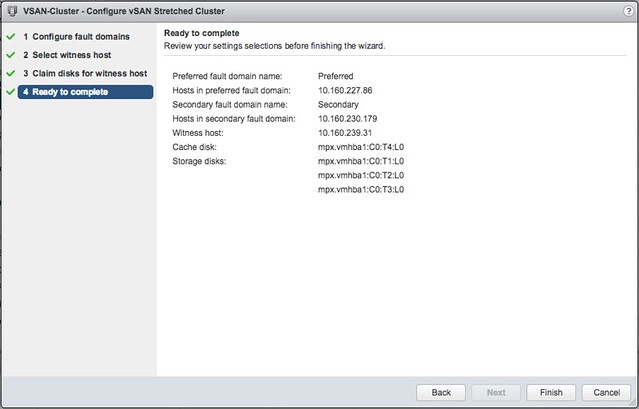
Click Finish:

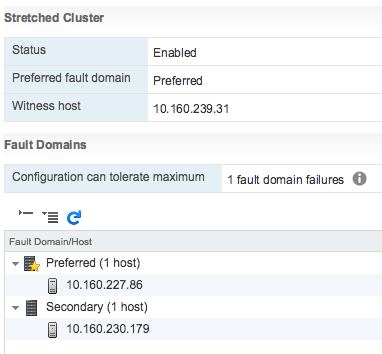
And then the 2-node stretched cluster is formed using a Standard or ROBO license:

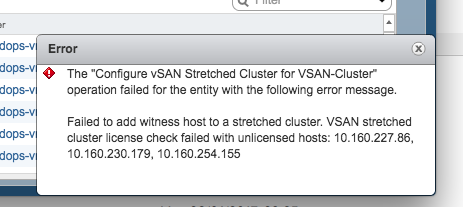
Of course I tried the same with 3 hosts, which failed as my license does not allow me to create a stretched cluster larger than 1+1+1. And even if it would succeed, the EULA clearly states that you are not allowed to do so, you need Enterprise licenses for that.

There you have it. Two host stretched using vSAN Standard, nice right?!

Can you run all-flash with vSAN 6.2 Standard license?

Duncan Epping · Jan 15, 2017 ·

As I get the following question a lot I figured I would share the answer here as well: Can you run all-flash with vSAN 6.2 Standard license? Many of you have seen the change in licensing when 6.5 was introduced. No longer is vSAN licenses based on storage hardware used, spindles or all-flash, you can use the lowest license SKU. Which of course is great for those wanting to use 6.5, but what about those who want to stick to 6.0 U2 aka vSAN 6.2? (This also works for 6.0 and 6.1 of course, but I would highly recommend 6.2 with the latest patches!)

Well there is a way to “downgrade” your license. (I would call it convert myself, but downgrade apparently is the official term for it.) There are 3 simple steps which are described in the following KB, but copied/pasted here for your convenience:

  1. Navigate to and login in to your MyVMware portal at www.myvmware.com.
  2. Locate the page with your licenses, and then select the license to convert. Once selected, click “Downgrade License Keys” from the drop down menu.
  3. Two downgrade options will be displayed in another drop down menu. Select “Virtual SAN 6 with All Flash Add-on” to convert your existing vSAN STD licenses to a STD version that includes the all-flash add-on.

VMs not getting killed after vMSC partition has lifted

Duncan Epping · Jan 12, 2017 ·

I was talking to a VMware partner over the past couple of weeks about challenges they had in a new vSphere Metro Storage Cluster (vMSC) environment. In their particular case they simulated a site partition. During the site partition three things were expected to happen:

  • VMs that were impacted by APD (or PDL) should be killed by vSphere HA Component Protection
    • If HA Component Protection does not work, vSphere should kill the VMs when the partition is lifted
  • VMs should be restarted by vSphere HA

The problems faced were two-fold, VMs were restarted by vSphere HA, however:

  • vSphere HA Component Protection did not kill the VMs
  • When the partition was lifted vSphere did not kill the VMs which had lost the lock to the datastore either

It took a while before we figured out what was going on, at least for one of the problems. Lets start with the second problem first, why aren’t the VMs killed when the partition is lifted? vSphere should do this automatically. Well vSphere does this automatically, but only when there’s a Guest Operating system installed and an I/O is issued. As soon as an I/O is issued by the VM then vSphere will notice the lock to the disk is lost and obtained by another host and kill the VM. If you have an “empty VM” then this won’t happen as there will not be any I/O to the disk. (I’ve filed a feature request to kill VMs as well even without disk I/O or without a disk.) So how do you solve this? If you do any type of vSphere HA testing (with or without vMSC) make sure to install a guest OS so it resembles real life.

Now back to the first problem. The fact that vSphere HA Component Protection does not kick in is still being debated, but I think there is a very specific reason for it. vSphere HA Component Protection is a feature that kills VMs on a host so they can be restarted when an APD or a PDL scenario has occurred. However, it will only do this when it is:

  • Certain the VM can be restarted on the other side (conservative setting)
  • There are healthy hosts in the other partition, or we don’t know (Aggressive)

First one is clear I guess (more info about this here), but what does the second one mean? Well basically there are three options:

  • Availability of healthy host: Yes >> Terminate
  • Availability of healthy host: No >> Don’t Terminate
  • Availability of healthy host: Unknown >> Terminate

So in the case you where you have VMCP set to “Aggressively” failover VMs, it will only do so when it knows hosts are available in the other site or when it does not know the state of the hosts in the other site. If for whatever reason the hosts are deemed as unhealthy the answer to the question if there are healthy hosts available or not will be “No”, and as such the VMs will not be killed by VMCP. The question remains, why are these hosts reported as “unhealthy” in this partition scenario, that is something we are now trying to figure out. Potentially it could be caused by misconfigured Heartbeat Datastores, but this is still something to be confirmed. If I know more, I will update this article.

Just received confirmation from development, heartbeat datastores need to be available on both sites for vSphere HA to identify this scenario correctly. If there are no heartbeat datastores available on both sites then it could happen that no hosts are marked as healthy, which means that VMCP will not instantly kill those VMs when the APD has occured.

New vSAN Management Pack for VROps

Duncan Epping · Dec 19, 2016 ·

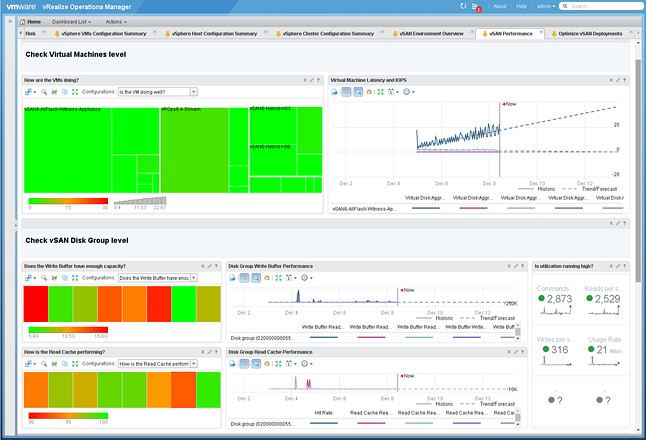
I just wanted to add this pointer, if you are a vSAN and VROps customer then it is good to know that there is a new pack for vSAN. You need to be running vSAN 6.2 or 6.5 and VROps 6.4. It is a dedicated vSAN Management Pack by the way, which has as advantage for us (and you) that we will be able to iterate faster based on your needs.

You can find it here:  https://solutionexchange.vmware.com/store/products/vmware-vrealize-operations-management-pack-for-vsan

  • « Go to Previous Page
  • Page 1
  • Interim pages omitted …
  • Page 24
  • Page 25
  • Page 26
  • Page 27
  • Page 28
  • Interim pages omitted …
  • Page 71
  • Go to Next Page »

Primary Sidebar

About the Author

Duncan Epping is a Chief Technologist and Distinguished Engineering Architect at Broadcom. Besides writing on Yellow-Bricks, Duncan is the co-author of the vSAN Deep Dive and the vSphere Clustering Deep Dive book series. Duncan is also the host of the Unexplored Territory Podcast.

Follow Us

  • X
  • Spotify
  • RSS Feed
  • LinkedIn

Recommended Book(s)

Also visit!

For the Dutch-speaking audience, make sure to visit RunNerd.nl to follow my running adventure, read shoe/gear/race reviews, and more!

Do you like Hardcore-Punk music? Follow my Spotify Playlist!

Do you like 80s music? I got you covered!

Copyright Yellow-Bricks.com © 2026 · Log in