I had a customer asking about an error they received after upgrading to 6.7 U1. The message they saw was the following: “Unexpected VMware Update Manager (VUM) baseline creation failure. Please check vSAN and VUM logs for details.” I had seen some folks on VMTN also complaining about this a couple weeks ago, and I knew a KB article was in the makings. Just to ensure people know where to get it, and to make it easier for myself to find it I want to share KB 60380 with you. I am not going to copy/paste the resolution, as I prefer to have the KB being leading on this, just in case it gets updated. I don’t want to provide potentially outdated info. So just go to KB 60380 if you are hitting the “Unexpected VMware Update Manager (VUM) baseline creation failure. Please check vSAN and VUM logs for details.” error.
Software Defined
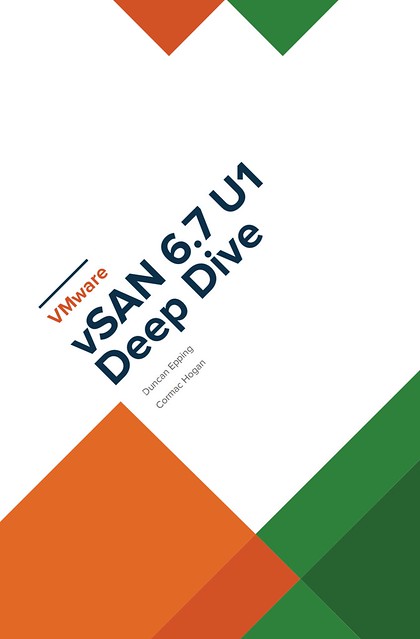
New book: VMware vSAN 6.7 U1 Deep Dive
Cormac Hogan and I have been working late nights and weekends over the past months to update our vSAN book material. Thanks Cormac, it was once again a pleasure working with you on this project! As you may know, we released two versions of a vSAN based book through VMware Press. The book was titled vSAN Essentials. As mentioned before, after restructuring and rewriting a lot of the content we felt that the title of the book didn’t match the content, so we decided to rebrand it to vSAN 6.7 U1 Deep Dive. After receiving very thorough reviews by Frank Denneman and Pete Koehler (Thanks guys!) we managed to complete it this week after we added a great foreword by our business unit’s SVP and General Manager, Yanbing Li.
Cormac and I decided to take the self-publishing route for this book, which allows us to set a great price for the ebook and enable the Amazon matchbook option, giving everyone who buys the paper version through Amazon the option to buy the e-book with a nice discount! As prices will vary based on location I am only going to list the USD prices. Please check your local Amazon website for localized prices. Oh, and before I forget, I would like to recommend buying the ebook flavor! Why? Well:
“On average, each printed book releases 8.85 pounds of carbon dioxide into the environment. Together, the newspaper and book-printing industries cut down 125 million trees per year and emit 44 million tons of CO2.”
We appreciate all support, but we prefer the cleanest option from an environmental stance, this is also the reason we priced the ebook a lot cheaper than the paper version. Anyway, here are the links to the US store, we hope you enjoy the content, and of course as always an Amazon review would be appreciated! Interestingly, it seems we already reached number 1 in the category Virtualization and the category Storage before this announcement, thanks everyone, we really appreciate it! (Please note, as an Amazon Associate I earn from below qualifying purchases.)
- Paper version – 39.95 USD
- Ebook version – 9.99 USD
- Match book price – 2.99 USD for the ebook!
(you need to buy the paper edition first before you see this discount, and this may not be available in all regions, unfortunately.)
UPDATE:
It appears that some Amazon stores take a bit longer to index the content, so listing all the different versions below for the different stores that sell it:
vSAN 6.7 U1 Deep Dive book coming soon!
Cormac and I decided to update the vSAN Essentials book. We added a whole bunch of extra info and also decided to rebrand it. “Essentials” did not really cut it, it is much more than that. Considering I just finished the Clustering Deep Dive with Frank and Niels, we figured this could be a nice addition to that series, complementing both the Host Deep Dive as well as the Clustering Deep Dive. We’ve received all the feedback from our reviewers, Frank Denneman and Pete Koehler, and spend various evenings digesting and processing it. Now it is just a matter of adding the foreword to the book, and then we can simply press: Publish. Hopefully, within 2 weeks, I will have a new article that details how you can buy the book!
The plan is right now to release the paper copy and the ebook at the same time, we will link the books, so those who buy the paper copy can buy the ebook at a discounted price. We will also make sure the ebook is priced very attractive, as we feel it should be the format of choice for everyone!
VMworld Sessions with vSAN Customers
At VMworld, there were various sessions with vSAN Customers, many of which I have met in some shape or form in the past couple of years. Some of these stories contain some great use cases or stories. Considering they are “hidden” in 60-minute sessions I figured I would write about them and share with you the link where and when applicable.
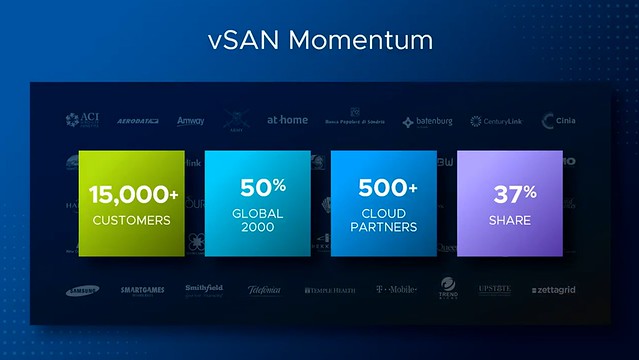
In the Monday keynote, there were also a couple of great vSAN quotes and customers mentioned. Not sure everyone spotted this, but definitely, something I felt is worth sharing, as these were powerful stories and use cases. First of all the vSAN numbers were shared, with 15k customers and adoption within 50% of the Global 2000 within 4 years I think it is fair to say that our business unit is doing great!
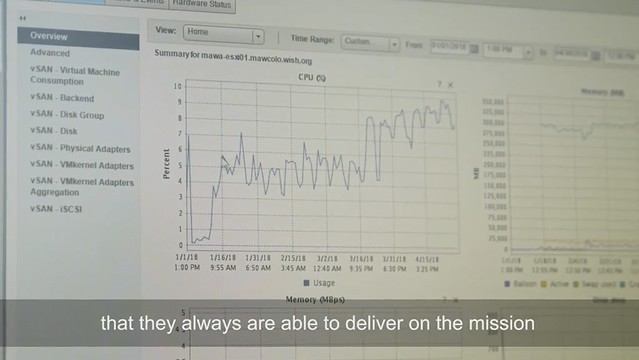
In the Make A Wish foundation video I actually spotted the vSAN management interface, although it was not explicitly mentioned still very cool to see that vSAN is used. As their CEO mentioned, it was great to get all that attention after they appeared on national television but it also resulted in a big website outage. The infrastructure is being centralized and new infra and security policies are put into place, “working with VMware enables us to optimize our processes and grant more wishes”.
 Another amazing story was Mercy Ships, this non-profit operates the largest NGO hospital ship bringing free medical care to different countries in Africa. Not just medical care, they also are providing training to local medical staff so they can continue providing the help needed in these areas of the world. They are now building their next generation ship which is going live in 2020, VMware and Dell/EMC will be a big part of this. As Pat said: “it is truly amazing to see what they do with our technology”. Currently, they use VxRail, Dell Isilon etc on their ships as part of their infrastructure.
The first session I watched was a session by our VP of Product Management and VP of Development, I actually attended this session in person at VMworld, and as a result of technical difficulties, they started 20 minutes late, hence the session is “only” 40 minutes. This session is titled “HCI1469BU – The Future of vSAN and Hyperconverged Infrastructure“. In this session, David Selby has a section of about 10 minutes and he talks about the vSAN journey which Honeywell went through. (If you are just interested in David’s section, skip to 9:30 minutes into the session) In his section, David explains how at Honeywell they had various issues with SAN storage causing outages of 3k+ VMs, as you can imagine very costly. In 2014 Honeywell started tested with a 12 Node cluster for their management VMs. This for them was a low-risk cluster. Their test was successful and they quickly started to move VMs over to vSAN in other parts of the world. Just to give you an idea:
- US Delaware, 11k VMs on vSAN
- US Dallas, 500 VMs on vSAN
- NL Amsterdam, 12k VMs (40% on vSAN, 100% by the end of this year!)
- BE Brussels, 1000 VMs (20% on vSAN, 100% by the end of this year!)
That is a total of roughly 24,500 VMs on vSAN, with close to 1.7PB of capacity, with an expected capacity of around 2.5PB by the end of this year. All running on vSAN All Flash the Dell PowerEdge FX2 platform by the way! Many different types of workloads run on these clusters. Apps ranging from MS SQL, Oracle, Horizon View, Hadoop, Chemical Simulation software, and everything else you can think off. What I found interesting is that they are running their Connexo software on top of vSAN, in this particular case the data of 5,000,000 smart energy meters in homes in a country in Europe is landing on vSAN. Yes, that is 5 million devices sending data to the Honeywell environment and being stored, and analyzed on vSAN.
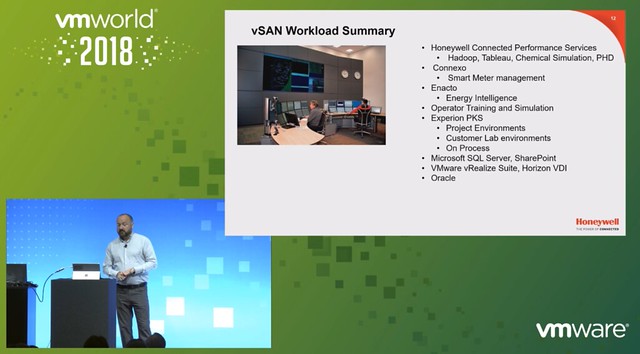
David also explained how they are leveraging IBM cloud with vSAN to run Chemical Plant simulators so operators of chemical plants can be trained. IBM cloud also runs vSAN, and Honeywell uses this so they can leverage the same tooling and processes for on-premises as well as in IBM Cloud. What I think was a great quote, “performance has gone through the roof, applications load in 3 seconds instead of 4 minutes, they received helpdesk tickets as users felt applications were loading too fast”. David works closely with the vSAN team on the roadmap, and had a long list of features he wanted in 2014, all of those have been released now, now there are a couple of things he would like to see addressed and as mentioned by Vijay, they will be worked on in the future.
A session I watched online was “HCI1615PU -vSAN Technical Customer Panel on vSAN Experiences“. This was a panel session that was hosted by Peter Keilty from VMware and had various customers: William Dufrin – General Motors, Mark Fournier – US Senate Federal Credit Union, Alex Rodriguez – Rent A Center, Mariusz Nowak – Oakland University. I always like these customer panels as you get some great quotes and stories, which are not scripted.
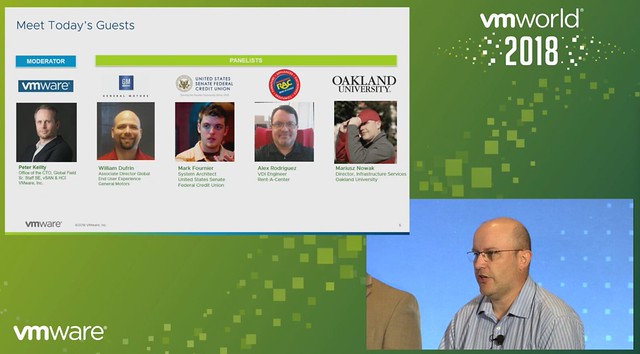
First, each of the panel members introduces themselves and followed by an intro of their environment. Let me quickly give you some stats of what they are doing/running:
- General Motors – William Dufrin
- Two locations running vSAN Thirteen vCenter Server instances
- 700+ physical hosts
- 60 Clusters
- 13,000+ VMs
William mentioned they started with various 4 node vSAN clusters, now they by default role out a minimum of 6-node or 12-node, depending on the use-case. They have server workloads and VDI desktops running, here we are talking thousands of desktops. Not using stretched vSAN yet, but this is something they will be evaluating in the future potentially.
- US Senate Federal Credit Union – Mark Fournier
- Three locations running vSAN (remote office location
- 2 vCenter Instances
- 8 hosts
- 3 clusters
- one cluster with 4 nodes, and then two 2-node configurations
- Also using VVols!
What is interesting is that Mark explains how they started virtualizing only just 4 years ago, this is not something I hear often. I guess change is difficult within the US Senate Federal Credit Union. They are leveraging vSAN in remote offices for availability/resiliency purposes at a relatively low cost (ROBO Licensing). They run all-flash but this is overkill for them, resource requirements are relatively low. Funny detail is that vSAN all-flash is outperforming their all-flash traditional storage solution in their primary data center. Now considering moving some workloads to the branches to leverage the available resources and perform better. Also a big user of vSAN Encryption, considering this is a federal organization that was to be expected, leveraging Hytrust as their key management solution.
- Rent-A-Center – Alex Rodriguez
- One location using vSAN
- 2 vCenter Server instances
- 16 hosts
- 2 clusters
- ~1000 VMs
Alex explains that they run VxRail, which for them was the best choice. Flawless and very smooth implementation, which is a big benefit for them. Mainly using it for VDI and published applications. Tested various other hyper-converged solutions, but VxRail was clearly better than the rest. Running a management cluster and a dedicated VDI cluster.
- Oakland University – Mariusz Nowak
- Two locations
- 1 vCenter Server instance
- 12 hosts
- 2 clusters
- 400 VMs
Mariusz explains the challenges around storage costs. When vSAN was announced in 2014 Mariusz was intrigued instantly, he started reading and learning about it. In 2017 they implemented vSAN and moved all VMs over, except for some Oracle VMs, but this is for licensing reasons. Mariusz leverages a lot of enterprise functionality in their environment, ranging from Stretched Cluster, Dedupe and Compression, all the way to Encryption. This is due to compliance/regulations. Interesting enough, Oakland University runs a stretched cluster with a < 1ms RTT, pretty sweet.
Various questions then came in, some interesting questions/answers or quotes:
- “vSAN Ready Node and ROBO licensing is extremely economical, it was very easy to get through the budget cycle for us and set the stage for later growth”
- The Storage Policy Based Management framework allows for tagging virtual disks with different sets of rules and policies when we implemented that we crafted different policies for SolidFire and vSAN to leverage the different capabilities of each platform (reworded for readability)
- QUESTION: What were some of the hurdles and lessons learned?
- Alex: We started with a very early version vSPEX Blue and the most challenging for us back then was updating, going from one version to the other. Support, however, was phenomenal.
- William: Process and people! It is not the same as traditional storage, you use a policy-based management framework on object-based storage, which means different procedures. Networking, in the beginning, was also a challenge, consistent MTU settings across hosts and network switches are key!
- Mariusz: We are not using Jumbo Frames right now as we can’t enable it across the cluster (including the witness host), but with 6.7 U1 this problem is solved!
- Mark: What we learned is that dealing with different vendors isn’t always easy. Also, ROBO licensing makes a big difference in terms of price point.
- QUESTION: Did you test different failure scenarios with your stretched cluster? (reworded for readability)
- Mariusz: We did various failure scenarios. We unplugged the full network of a host and watched what happened. No issues, vSphere/vSAN failed over VMs with no performance issues.
- QUESTION: How do you manage upgrades of vSphere and firmware?
- Alex: We do upgrades and updates through VxRail Manager and VUM. It downloads all the VIBs and does a rolling upgrade and migration. It works very well
- Mark: We leverage both vSphere ROBO as well as vSAN ROBO, one disadvantage is that vSphere ROBO does not include DRS which means you don’t have “automated maintenance mode”. This results in the need to manually migrate VMs and placing hosts into maintenance mode manually. But as this is a small environment this is not a huge problem currently. We can probably script it through PowerCLI.
- Mariusz: We have Ready Nodes, which is more flexible for us, but it means upgrades are a bit more challenging. But VMware has promised more is coming in VUM soon. We use Dell Plugins for vCenter so that we can do firmware upgrades etc from a single interface (vCenter).
The last session I watched was “HCI3691PUS – Customer Panel: Hyper-converged IT Enabling Agility and Innovation“, which appeared to be a session sponsored by Hitachi with ConAgra Brands and Norwegian Cruise Line as two reference customers. Matt Bouges works for ConAgra Brands as an Enterprise Architect, Brian Barretto works for Norwegian Cruise Line as a Virtualization Manager.
First Matt discussed why ConAgra moved towards HCI, which is all about scaling and availability as well as business restructuring. They needed a platform that could scale with their business needs. For Brian / Norwegian Cruise Line‘s it was all about cost. The current SAN/Storage architecture was very expensive, and as at the time, a new scalable solution (HCI) emerged they explored that and found that the cost model was in their favor. As they run the data centers on the ships as well they need something that is agile, note that these ships are huge, basically floating cities, with redundant data centers onboard of some of these ships. (Note they have close to 30 ships, so a lot of data centers to manage.) Simplicity and also rack space was a huge deciding factor for both ConAgra and Norwegian Cruise Lines.
 Norwegian Cruise Line mentioned that they also still use traditional storage, same for ConAgra. It is great that you can do this with vSAN, keep your “old investment”, while building out the new solution. Over time most applications will move over though. One thing that they feel is missing with hyper-converged is the ability to run large memory configurations or large storage capacity configurations. (Duncan: Not sure I entirely agree, limits are very close to non-HCI servers, but I can see what they are referring to.) One thing to note as well from an operational aspect is that certain types of failures are completely different, and handled completely different in an HCI world, that is definitely something to get familiar with. Another thing mentioned was the opportunity of HCI in the Edge, nice small form factor should be possible and should allow running 10-15 VMs. It removes the need for “converged infra” in those locations or traditional storage in general in those environments. Especially now that compute/processing and storage requirements go up at the edge due to IoT and data analytics that happens “locally”.
That was it for now, hope you find this useful!
CTO2860BU & VIN2183BU: It is all about Persistent Memory
I was going through the list of sessions when I spotted a session Persistent Memory by Rich Brunner and Rajesh V. Quickly after that I noticed that there also was a PMEM session by the perf team available. Both CTO2860BU and VIN2183BU I would highly recommend watching. I would recommend starting with CTO2860BU though, is it gives a great introduction to what PMEM brings to the table. I scribbled down some notes, and they may appear somewhat random, considering I am covering 2 sessions in 1 article, but hopefully the main idea is clear.
I think the sub-title of the sessions make clear what PMEM is about: Storage at Memory Speed. This is what Richard talks about in CTO2860BU during the introduction. I thought this slide explained the difference pretty well, it is all about the access times:
- 10,000,000 ns – HDD
- 100,000 ns – SAS SSD
- 10,000 ns – NVMe
- 50-300 ns – PMEM
- 30-100ns – DRAM
So that is 10 million nanoseconds vs 50 to 300 nanoseconds. Just to give you an idea, that is roughly the speed difference between the space shuttle and a starfish. But that isn’t the only major benefit of persistent memory. Another huge advantage is that PMEM devices, depending on how they are used, are byte addressable. Compare this to 512KB, 8KB / 4KB reads many storage systems require. When you have to change a byte, you no longer incur that overhead.
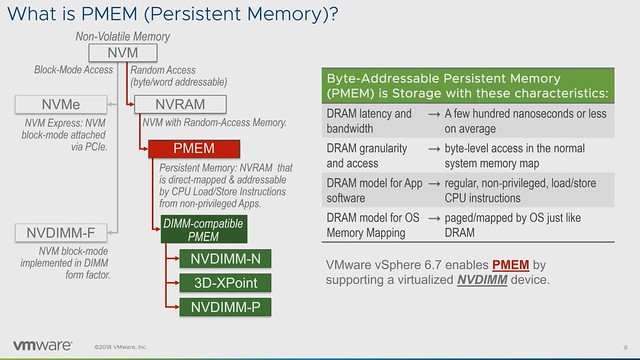
As of vSphere 6.7, we have PMEM support. A PMEM can be accessed as a block device or as a disk, but the other option would be to access it as “PMEM”. Meaning that in the latter case we serve a virtual PMEM device to the VM and the Guest OS sees this as PMEM. What also was briefly discussed in Richard’s talk was the different types of PMEM. In general, there are 4 different types, but most commonly talked about are 2. These two are NVDIMM-N and Intel Optane. With the difference being that NVDIMM-N has DRAM memory backed by NAND, and where persistence is achieved by writing to NAND only during shutdown / power-fail. Whereas with Intel Optane there’s what Intel calls 3D XPoint Memory on the DIMM directly addressable. The other two mentioned were “DRAM backed to NVMe” and NVDIMM-P, where the first was an effort by HPe which has been discontinued and NVDIMM-P seems to be under development and is expected in 2019 roughly.
When discussing the vSphere features that support PMEM what I found most interesting was the fact that DRS is fully aware of VMs using PMEM during load balancing. It will take this in to account, and as the cost is higher for a migration of a PMEM enabled VM it will most likely select a VM backed by shared storage. Of course, when doing maintenance DRS will move the VMs with PMEM to a host which has sufficient capacity. Also, FT is fully supported.
In the second session,VIN2183BU, Praveen and Qasim discussed performance details. After a short introduction, they dive deep into performance and how you can take advantage of the technology. First they discuss the different modes in which persistent memory can be exposed to the VM/Guest OS, I am listing these out as they are useful to know.
- vPMEMDisk = exposed to guest as a regular SCSI/NVMe device, VMDKs are stored on PMEM Datastore
- vPMEM = Exposes the NVDIMM device in a “passthrough manner, guest can use it as block device or byte addressable direct access device (DAX), this is the fastest mode and most modern OS’s support this
- vPMEM-aware = This is similar to the mode above, but the difference is that the application understands how to take advantage of vPMEM
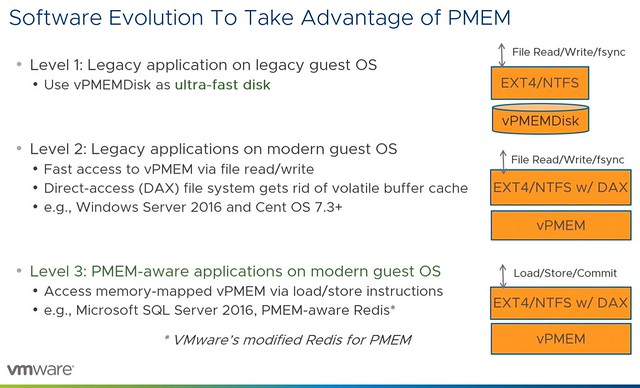
Next they discussed the various performance tests and comparisons they have done. What they have tested is various modes and compare that as well to the performance of NVMe SSD. What stood out most to me is that both the vPMEM and vPMEM-Aware mode provide great performance, up to an 8x performance increase. In the case of vPMEMDisk that is different, and that has to do with the overhead there is. Because it is presented as a block device there’s significant IO amplification which in the case of “4KB random writes” even leads to a throughput that is lower for NVMDIMM than it is for NVMe. During the session it is mentioned that both VMware as well as Intel are looking to optimize their part of the solution to solve this issue. What was most impressive though wasn’t the throughput but the latency, there was a 225x improvement measured between NVMe and vPMEM and vPMEM-Aware. Although vPMEMDisk was higher than vPMEM and vPMEM-aware, it was still significantly lower than NVMe and very consistent across reads and writes.
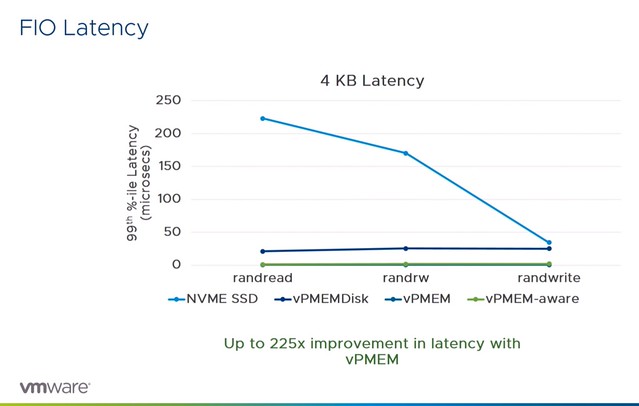
This was just the FIO example, this is followed by examples for various applications both scale out and scale up solutions. What I found interesting were the Redis tests, nice performance gains at a much lower latency, but more importantly, the cost will probably go down when leveraging persistent memory instead of pure DRAM.
Last but not least tests were conducted around performance during vMotion and the peformance of the vMotion process itself. In both cases using vPMEM or vPMEM-aware can be very beneficial for the application and the vMotion process.
Both great sessions, again highly recommended watching both.