• Skip to primary navigation
  • Skip to main content
  • Skip to primary sidebar

Yellow Bricks

by Duncan Epping

  • Home
  • Unexplored Territory Podcast
  • HA Deepdive
  • ESXTOP
  • Stickers/Shirts
  • Privacy Policy
  • About
  • Show Search
Hide Search

BC-DR

Stretched Clusters and Site Recovery Manager

Duncan Epping · Mar 23, 2012 ·

My colleague Ken Werneburg, also known as “@vmKen“, just published a new white paper. (Follow him if you aren’t yet!) This white paper talks about both SRM and Stretched Cluster solutions and explains the advantages and disadvantages of either. It provides a great overview in my opinion on when a stretched cluster should be implemented or when SRM makes more sense. Various goals and concepts are discussed and I think this is a must read for everyone exploring implementing a Stretched Clusters or SRM.

http://www.vmware.com/resources/techresources/10262

This paper is intended to clarify concepts involved with choosing solutions for vSphere site availability, and to help understand the use cases for availability solutions for the virtualized infrastructure. Specific guidance is given around the intended use of DR solutions like VMware vCenter Site Recovery Manager and contrasted with the intended use of geographically stretched clusters spanning multiple datacenters. While both solutions excel at their primary use case, their strengths lie in different areas which are explored within.
Permanent Device Loss (PDL) enhancements in vSphere 5.0 Update 1 for Stretched Clusters

Duncan Epping · Mar 16, 2012 ·

In the just released vSphere 5.0 Update 1 some welcome enhancements were added around vSphere HA and how a Permanent Device Loss (PDL) condition is handled. The PDL condition is a condition that is communicated by the array to ESXi via a SCSI sense code and indicates that a device (LUN) is unavailable and more than likely permanently unavailable. This is a condition which is useful for “stretched storage cluster” configurations where in the case of a failure in Datacenter-A the configuration in Datacenter-B can take over. An example of when a condition like this would be communicated by the array would be when a LUN “detached” in a site isolation. PDL is probably most common in non-uniform stretched solutions like EMC VPLEX. With VPLEX site affinity is defined per LUN. If your VM resides in Datacenter-A while the LUN it is stored on has affinity to Datacenter-B in case of failure this VM could lose access to the LUN. These enhancements will ensure the VM is killed and restarted on the other side.

Please note that action will only be taken when a PDL sense code is issued. When your storage completely fails for instance it is impossible to reach the PDL condition as there is no communication possible anymore from the array to the ESXi host and the state will be identified by the ESXi host as an All Paths Down (APD) condition. APD is a more common scenario in most environments. If you are testing these enhancements please check the log files to validate which problem has been identified.

With vSphere 5.0 and prior HA did not have a response in a PDL condition, meaning that when a virtual machine was residing on a datastore which had a PDL condition the virtual machine would just sit there. This virtual machine would be unable to read or write from disk however. As of vSphere 5.0 Update 1 a new mechanism has been introduced which allows vSphere HA to take action when a datastore has reached a PDL state. Two advanced settings make this possible. The first setting is configured on a host level and is “disk.terminateVMOnPDLDefault”. This setting can be configured in /etc/vmware/settings and should be set to “True”. This setting ensures that a virtual machine is killed when the datastore it resides on is in a PDL state. The virtual machine is killed as soon as it initiates disk I/O on a datastore which is in a PDL condition and all of the virtual machine files reside on this datastore. Note that if a virtual machine does not initiate any I/O it will not be killed!

The second setting is a vSphere HA advanced setting called das.maskCleanShutdownEnabled. This setting is also not enabled by default and it will need to be set to “True”. This settings allows HA to trigger a restart response for a virtual machine which has been killed automatically due to a PDL condition. This setting allows HA to differentiate between a virtual machine which was killed due to the PDL state or a virtual machine which has been powered off by an administrator.

As soon as “disaster strikes” and the PDL sense code is sent you will see the following popping up in the vmkernel.log that indicates the PDL condition and the kill of the VM:

2012-03-14T13:39:25.085Z cpu7:4499)WARNING: VSCSI: 4055: handle 8198(vscsi4:0):opened by wid 4499 (vmm0:fri-iscsi-02) has Permanent Device Loss. Killing world group leader 4491
2012-03-14T13:39:25.085Z cpu7:4499)WARNING: World: vm 4491: 3173: VMMWorld group leader = 4499, members = 1

As mentioned earlier, this is a welcome enhancement which especially in non-uniform stretched storage environment can help in specific failure scenarios.

DR of View persistent linked clone desktops…

Duncan Epping · Mar 15, 2012 ·

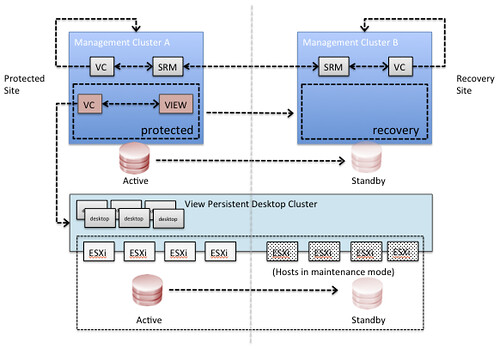
I know some of you have been waiting for this so I wanted to share some early results. I was in the UK last week and we managed to get an environment configured using persistent linked clone virtual desktops with View. We also managed to fail-over and fail-back desktops between two datacenters. The concepts is really similar to the vCloud Director DR concept.

In this scenario Site Recover Manager will be leveraged to fail-over all View management components. In each of the sites it is required to have a management vCenter Server and an SRM Server which aligns with standard SRM design concepts. Since it is difficult to use SRM for View persistent desktops there is no requirement to have an SRM environment connecting to the View desktop cluster’s vCenter Server. In order to facilitate a fail-over of the View desktops a simple mount of the volume is done. This could be using ‘esxcfg-volume -m’ for VMFS or using a DNS c-name mounting the NFS share after point the alias to the secondary NAS server.

What would the architecture look like? This is an oversimplified architecture, of course … but I just want to get the message across:

What would the steps be?

  1. Fail-over View management environment using SRM
  2. Validate all View management virtual machines are powered on
  3. Using your storage management utility break replication for the datastores connected to the View Desktop Cluster and make the datastores read/write (if required by storage platform)
  4. Mask the datastores to the recovery site (if required by storage platform)
  5. Using ESXi command line tools mount the volumes of the View Desktop Cluster cluster on each host of the cluster
    • esxcfg-volume –m <;volume ID>;
      or
    • point the DNS CNAME to the secondary NAS server and mount the NAS datastores
  6. Validate all volumes are available and visible in vCenter, if not rescan/refresh the storage
  7. Take the hosts out of maintenance mode for the View Desktop Cluster (or add the hosts to your cluster, depending on the chosen strategy)
  8. In our tests the virtual desktops were automatically powered on by vSphere HA. vSphere HA is aware of the situation before the fail-over and will power-on the virtual machines according to the last known state

These steps have been validated this week and we managed to successfully fail-over our desktops and fail them back. Keep in mind that we only did these tests two or three times, so don’t consider this article to be support statement. We used persistent linked clones as that was the request we had at that point, but we are certain this will work for the various different scenarios. We will extend our testings to include various other scenarios.

Cool right!?

Migrating VMs between clusters in vSphere 5.0 results in VMs being unprotected?

Duncan Epping · Mar 8, 2012 ·

Today on the community forums someone mentioned an issue where his VMs were not protected by vSphere HA after they had been migrated between clusters. After reading it I vague recalled this being a known issue. I dug up the KB and the work around is fairly simple:

  • Disable HA on the cluster where the unprotected VM resides
  • Enable HA on the cluster again

If you need to do a lot of migrations to a different cluster you can also temporarily disable HA, migrate all VMs and then enable it again. This leads to the same result as above, all VMs will be protected again. This is on the radar of our developers and they are working on fixing this in a future release.

HA Admission Control does not disallow HA initiated restarts

Duncan Epping · Mar 6, 2012 ·

I had a question about HA Admission Control today and as this is something that has come up multiple times I figured I would dedicate an article to it. This customer had enabled HA Admission Control and artificially wanted to control the amount of virtual machines a single host could run by manually specifying the slot size. (For more details on Admission Control slot sizes and how to configure these read the Deepdive page.) When they simulated a failure they were surprised that some host had more virtual machines running than should be allowed according to the configured slot size… This is however, contrary to their beliefs, by design. Let me copy/paste a paragraph from our book which talks about admission control.

What is HA Admission Control about? Why does HA contain this concept called Admission Control? The “Availability Guide” a.k.a HA bible states the following:

“vCenter Server uses admission control to ensure that sufficient resources are available in a cluster to provide failover protection and to ensure that virtual machine resource reservations are respected.”

Please read that quote again and especially the first two words. Indeed it is vCenter Server that is responsible for Admission Control. Although this might seem like a trivial fact it is important to understand that this means that Admission Control will not disallow HA initiated restarts. HA initiated restarts are done on a host level and not through vCenter. It is Admission Control’s task to ensure sufficient resources are available for HA to restart virtual machines, hence the reason HA does not take Admission Control in to account.

I hope this clears things up. I was pretty sure I have discussed this in multiple articles but as it comes up fairly often I figured dedicating and article to it would make it easier to find. I know it is not really clear in our documentation and I’ve requested this to be changed to reflect the actual behavior and avoid misunderstandings like these.

  • « Go to Previous Page
  • Page 1
  • Interim pages omitted …
  • Page 36
  • Page 37
  • Page 38
  • Page 39
  • Page 40
  • Interim pages omitted …
  • Page 63
  • Go to Next Page »

Primary Sidebar

About the Author

Duncan Epping is a Chief Technologist and Distinguished Engineering Architect at Broadcom. Besides writing on Yellow-Bricks, Duncan is the co-author of the vSAN Deep Dive and the vSphere Clustering Deep Dive book series. Duncan is also the host of the Unexplored Territory Podcast.

Follow Us

  • X
  • Spotify
  • RSS Feed
  • LinkedIn

Recommended Book(s)

Also visit!

For the Dutch-speaking audience, make sure to visit RunNerd.nl to follow my running adventure, read shoe/gear/race reviews, and more!

Do you like Hardcore-Punk music? Follow my Spotify Playlist!

Do you like 80s music? I got you covered!

Copyright Yellow-Bricks.com © 2026 · Log in