Can I avoid large HA slot sizes due to reservations without resorting to advanced settings? That’s the question I get almost daily. The answer used to be NO. HA uses reservations to calculate the slot size and there’s no way to tell HA to ignore them without using advanced settings pre-vSphere. So there is your answer: pre-vSphere.
With vSphere VMware introduced a percentage next to an amount of host failures. The percentage avoids the slot size issue as it does not use slots for admission control. So what does it use?
When you select a specific percentage that percentage of the total amount of resources will stay unused for HA purposes. First of all VMware HA will add up all available resources to see how much it has available. Then VMware HA will calculate how much resources are currently consumed by adding up all reservations of both memory and cpu for powered on virtual machines. For those virtual machines that do not have a reservation a default of 256Mhz will be used for CPU and a default of 0MB+memory overhead will be used for Memory. (Amount of overhead per config type can be found on page 28 of the resource management guide.)
In other words:
((total amount of available resources – total reserved VM resources)/total amount of available resources)
Where total reserved VM resources include the default reservation of 256Mhz and the memory overhead of the VM.
Let’s use a diagram to make it a bit more clear:
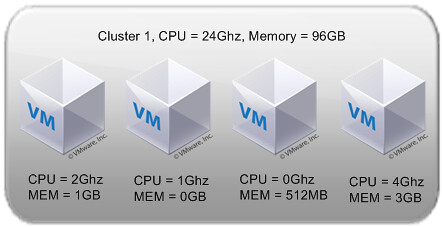
Total cluster resources are 24Ghz(CPU) and 96GB(MEM). This would lead to the following calculations:
((24Ghz-(2Gz+1Ghz+256Mhz+4Ghz))/24Ghz) = 69 % available
((96GB-(1,1GB+114MB+626MB+3,2GB)/96GB= 85 % available
As you can see the amount of memory differs from the diagram. Even if a reservation has been set the amount of memory overhead is added to the reservation. For both metrics HA admission control will constantly check if the policy has been violated or not. When one of either two thresholds are reached, memory or CPU, admission control will disallow powering on any additional virtual machines. Pretty simple huh?!
So…how does vSphere with percentages handle non-identical hosts in a cluster? Pre-vSphere, if you had a cluster with four hosts where three of the hosts had 10GHz of CPU and the fourth had 20GHz of CPU and you configured the cluster for 1 host failure, it calculated the reserve capacity based on the assumption that the largest host would fail (i.e. it would reserve 20GHz of capacity). How would this scenario play out with vSphere percentages?
Good stuff.
Ken,
From the look of it, it seems the hosts resources get calculated into the “total amount of available resources” portion. The admission control mechanism would then use this in it’s decision making.
Example:
Host 1
20Ghz
20GB
Host 2
10Ghz
10GB
Before host failure:
((30Ghz-(2Gz+1Ghz+256Mhz+4Ghz))/30Ghz) = 75 % available
((30-(1.1+.114+.626+3.2))/30) = ~83 % available
Failing the 20Ghz node:
((10Ghz-(2Gz+1Ghz+256Mhz+4Ghz))/10Ghz) = 27 % available
((10-(1.1+.114+.626+3.2))/10) = ~49 % available
As long as you don’t violate the % and/or the host failures, I believe you should be OK. That is unless I’ve completely misread the above.