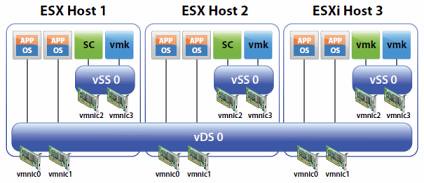
I receive the same question around dvSwitches almost every week; should I only use dvSwitches or go for a hybrid model? The whitepaper that has been released a couple of months ago clearly states that a hybrid model is a supported configuration but would I recommend it? Or would a pure vDS model make more senses?
Let me first start with the most obvious answer: it depends. Let’s break it down and create two categories:
- Hosts with two NIC ports
- Hosts with more than two NIC ports
Now most of you would probably say who the hell would only have two NIC ports? Think 10Gbe in blade environments for instance. With only two physical NIC ports available you would not have many options. You would have exactly two options(if not using Flex-10 of course):
- Pure vDS
- Pure vSwitch
Indeed, no hybrid option as you would still want to have full redundancy which means you will need at least 2 physical ports for any virtual switch. Now what would I recommend when there are only two physical NIC ports available; I guess it depends on the customer. There are multiple pros and cons for both models but I will pick the most obvious and relevant two for now:
- PRO vDS: Operational benefits. Updating port groups, consistency and increased flexibility with vDS.
- CON vDS: If vCenter fails there’s no way to manage your vDS
There it is; probably the most important argument on why or why not to run your Service Console on a vDS. If vCenter fails there’s no way to manage your vDS. For me personally this is the main reason why I would most like not recommend running your Service Console/VMkernel portgroups on a dvSwitch. In other words: Hybrid is the way to go…
<update 21-April-2011>
I guess it all comes down to what you are comfortable with and a proper operational procedure! But why? Why not just stick to Hybrid? I guess you could, but than again why not benefit from what dvSwitches have to offer? Especially in a converged network environment being able to use dvSwitches will make your life a bit easier from an operational perspective. On top of that you will have that great dvSwitch only Load Based Teaming to your disposal, load balancing without the need to resort to IP-Hash. I guess my conclusion is: Go Distributed… There is no need to be afraid if you understand the impact and risks and mitigate these with solid operational procedures.
</update 21-April-2011>
totally agree to go for hybrid because of losing the ability to manage after losing vCenter – or having license issues. Furthermore not all features are already able to use dvSwitches flawlesse, for example if you import a virtual appliance (ovf). You´ll end up with a message telling you that no network switches could be recognized. After creating a standard vSwitch everything works fine.
In this type of environment where do you recommend placing the 2nd service console?
2nd Service Console? I usually don’t even set it up. It’s more complex and confusing to most people. But if you do set it up, it’s a secondary so it would be fine to use the dvSwitch for that!
So if vCenter fails and there’s no way to manage your vDS, what would you be able to do by having your SC and VMkernal ports on a standard vSwitch? I’m probably thinking you would still be able to login locally to an ESX host and then manage the standard vSwitch but what use will that be when your vCentre has gone down?
Also – where did you get the icons for your diagram?
with a normal vSwitch you can do everything from the COS. (VLANs, amount of ports, you name it and you can do it)
Diagram is a copy from the Whitepaper VMware released linked in the article. Most of them however can be found on VI:OPS.
does dvs still work when vcentre goes down or is it totally cripple
Yes it works fine when vCenter is down. Making changes though is moe difficult but ou could easily capture that in an operational procedure
Duncan, thanks for your writeup and link to the whitepaper! I’ve been dealing with having to maximize available vSwitch’es while maintaining redundancy and bandwidth (standby, load balancing schemes, etc) in ‘low nic environments’.
It’s always been working fine for me.. but having had some remarks about ‘hey, that’s not a best practice!!’, this has reinforced that what I’m doing is the right thing to do in such environments.
You saved the day again! 😉
thanks!
Thanks for brining awareness to this whitepaper. I’m a fan of VMs on on the vDS and VMkernel ports on traditional switches. The end.
Another thought – if you have configured Lockdown mode so that ESX hosts can only be managed via vCenter, and your vCenter server goes down, can you still connect to your ESX host?
Thanks for posting this awareness about the vCenter. Actually, I was already in my way to configure it, but after reading your blog i decided not to till I got my CPU’s that are supported for FT.
Once I got them, then I will configure the vCenter with FT Mode and then play around with the vDS 🙂
if vCenter go down, you will still able to access the ESX host
If vc goes down you only have access to standard switches, not dvs. you are also not able to turn up a powered off VM and get it on the network if all your network ports are on a dvS…unless of course you are using a straight access port…with no vlans
It’s understood a best practice is to keep the Mgmt Console on a Standard Switch. Is there any thought (or possibly the same; losing vCenter) for keeping the iSCSI Storage VMkernel switches on Standard or Distributed?
I know this is dredging up an old article but I’m going through our first setup of NFS/possibly iSCSI and am trying to decide on using a vDS for the IP storage.
I’ve decided that like with the service console and vCenter as VM – you want the most critical pieces that help the environment stay “up” on standard vSwitches that can be easily manipulated when directly logging into the host with the client or at the service console.
VM network connectivity is critical, but as long as the server is still running and manageable from the host directly, you can always create new standard switches to takeover for networking if it suddenly becomes critical.
So if you recommend leaving the Mgmt Console on a standard vswitch and everything else is in the VSM how do you achieve Mgmt Console redundancy to satisfy HA cluster requirements.
2 NICs on a single vSwitch offers redundancy?
There is a recommendation to avoid this issue,to use VCenter Server HeartBeat, as it delivers high availability for VMware vCenter Server, protecting the virtual and cloud infrastructure from application, configuration, operating system or hardware related outages.
Why would one complicate their environment with vCenter Server Heartbeat, when the issue is simply fix by using the hybrid model.
Keep it simple …
For me, service Console for ESX / vmk0 vmkernel portgroup for the ESXi, and Infrasturcture VMs (Ex: vCenter VM, AD, DNS ..and such) remains on traditional vSwitch.
Where all other mass VMs (non infrastructure) can be on DVswitch.
Over the years this proven to be a lot easier to troubleshoot and less complicated/dependency.
If one only have a few ESX/i, and do not do a lot of repeat host deployment. It is not necessary to use DVswitch. It does not take that long to login to vSphere client and compare one host to another..people!
Unless its for obvious reason one may need the features (for example if you have 1000 ESX/i or have hundreds of VLAN). As Duncan said, before using DVS, one should know the risk, and depending on one comfort level.
Great Post – very informative! Thank you all for your input. With dvSwitches being so heavily hooked into vCenter 4.x, what is the impact during a vCenter migration?
We are planning to migrate from vCenter 4.0 (32bit) to vCenter 4.1 (64bit) and have a number of dvSwitches. What is the impact to dvSwitches, ESX Hosts and VMs during and after the migration? I have performed the above vCenter Migration before but with Std switches (only) and we did not have any down time to Hosts or VMs. Our goal is to perform the same migration (w\ dvSwitches), WITHOUT any down time.
Has anyone out there performed a migration that included dvSwitches? And if so, what issues occurred? Are there any special precautions that have to be
taken?
I have read the VMware vDS Whitepaper above and multiple VMware vCenter 4.1 Migration docs- including the Upgrade Guide but I cannot find any specific information.