• Skip to primary navigation
  • Skip to main content
  • Skip to primary sidebar

Yellow Bricks

by Duncan Epping

  • Home
  • Unexplored Territory Podcast
  • HA Deepdive
  • ESXTOP
  • Stickers/Shirts
  • Privacy Policy
  • About
  • Show Search
Hide Search

vSphere

vSAN 8.0 U1 ESA – Auto Policy Management

Duncan Epping · Mar 28, 2023 ·

One of the features that is introduced in vSAN 8.0 U1 for ESA is Auto-Policy Management. I personally love this feature, as it will help a lot of customers make the right decision in terms of what the default policy should be on their vSAN Datastore. Now, Pete Koehler wrote a very extensive blog post, and I don’t want to copy his work and simply rewrite it, so I suggest you read his blog for the full details on this brand new feature.

I do realize that some of you are just as lazy as I am, so here’s a short summary of what Auto-Policy Management is. Auto-Policy Management, when enabled, creates a new vSAN VM storage policy based on the capabilities enabled on your cluster and the size of your cluster. After creating the policy, the policy is also assigned to the datastore as the “default policy” so that any VMs which are provisioned without the selection of a policy get this optimized policy assigned. What influences the policy characteristics? Well: size of the cluster, stretched vs normal, host rebuild reserve enabled/disabled. All those factors will determine what kind of policy is created and associated with the datastore. If over time your cluster configuration changes, well then Skyline Health will inform you that changes are required to have an optimal policy again. Wonder what that looks like? Watch the demo below!

vSphere 8.0 U1 and vSAN 8.0 U1 what’s new podcast episodes available now!

Duncan Epping · Mar 15, 2023 ·

We (the Unexplored Territory team) have just published two brand-new episodes which discuss What’s New with vSphere 8.0 U1 and vSAN 8.0 U1. You can of course listen to them using your favorite podcast app, or you simply use the embedded players below to enjoy the content.

Why is vCenter Server trying to access assets.contentstack.io or send DNS requests for it?

Duncan Epping · Feb 9, 2023 ·

On VMTN I noticed somehow asking why vCenter Server was trying to access  assets.contentstack.io, and why there were so many DNS requests for  assets.contentstack.io. It took me a while to figure it out, but I noticed that there’s a plugin for the VMware Cloud Provider Services, this plugin is hosted on contentstack.io, and that is the reason you see vCenter Server trying to connect with that URL and why you are seeing DNS requests for assets.contentstack.io. You can prevent this from happening by simply selecting the plugin, and then removing it. That is, of course, if you are not planning on using these services.

Podcast episodes: vSphere 8, vSAN 8, and VMware Explore wrap-up…

Duncan Epping · Sep 5, 2022 ·

It was a busy week at VMware Explore last week, but we still managed to record new content to discuss what was happening at VMware Explore. We spoke with folks like Kit Colbert, Chris Wolf, Dave Morera, Sazzala Reddy, and many others. We also recorded episodes to cover the vSAN 8.0 and vSphere 8.0 release. For vSAN 8.0 we asked Pete Koehler to go over all the changes with vSAN Express Storage Architecture. vSphere 8.0 was covered by Feidhlim O’Leary, going into every aspect of the release, and it is a lot.

Introducing vSphere+ and vSAN+

Duncan Epping · Jun 28, 2022 ·

VMware just announced vSphere+ and vSAN+ today. I was reading up on the offering and personally was very intrigued about it. I have to be fair, at first I was under the impression that vSphere+ and vSAN+ was only about subscription-based licensing, but it is not, it is much more than that. If you like to head more about it, Frank and I invited Himanshu Singh to the podcast to provide us a quick overview, in ~20 minutes you know everything you need to know at this stage, make sure to listen to it below or open up the podcast in your favorite podcast app.

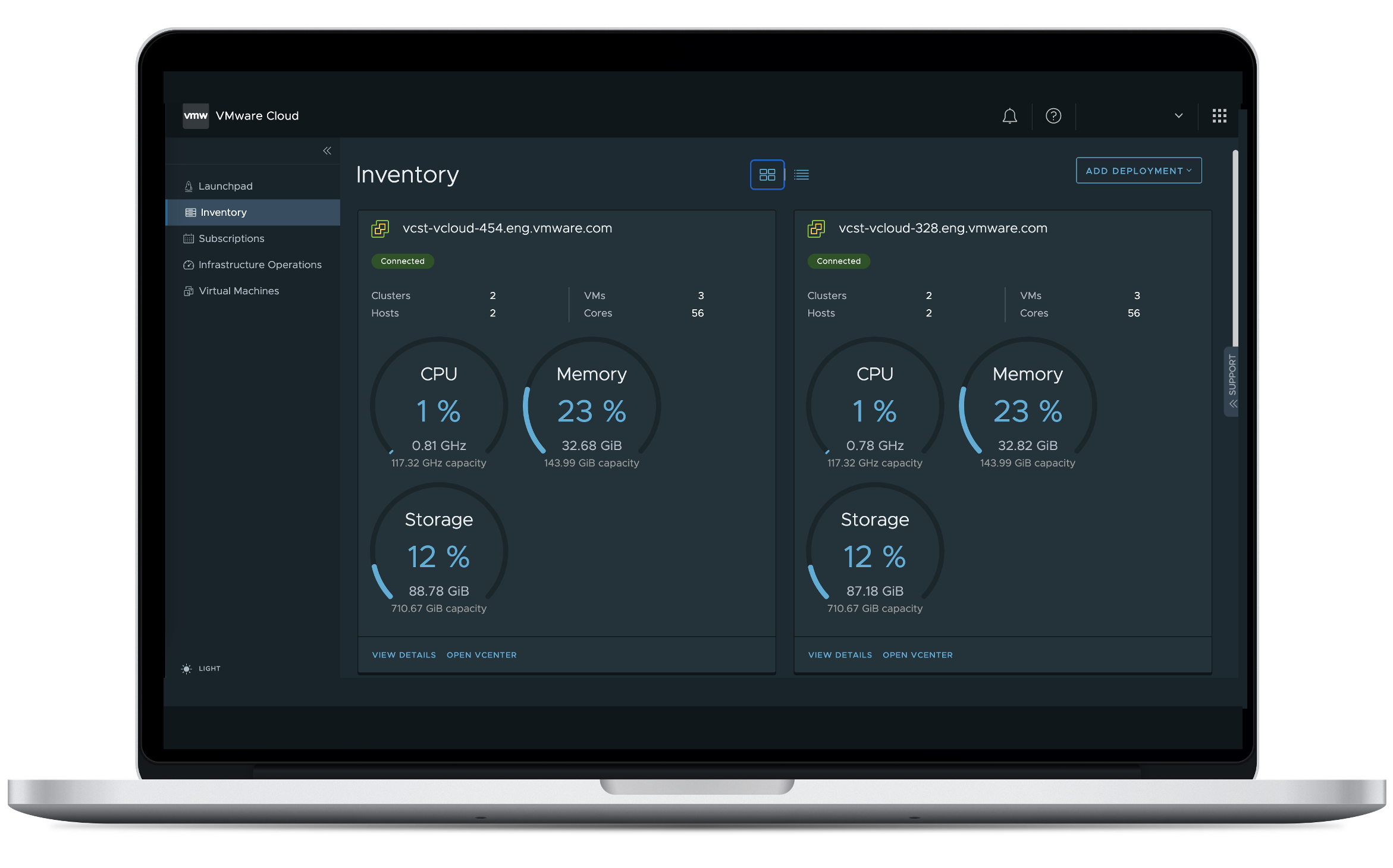
I am not going to type up a summary of the podcast, but I do briefly want to share my thoughts. First of all, as mentioned already, vSphere+ aka Project Arctic is about much more than just subscription-based licensing. Yes, the platform is subscription-based, but it also delivers additional capabilities to your on-prem environment. Details of pricing and packaging is still to be announced, but Himanshu mentioned to us that VMware will provide an upgrade path from perpetual licenses to vSphere+ taking into account that you have already bought licenses. Mind, most of you renew SnS every X years, this would be also included in vSphere+. But that is not what excited me, what excited me is that you get access to the Cloud Console, which basically provides a holistic overview of your VMware estate, with today a focus on vSphere and vSAN, and the extra capabilities the platform provides.

This Cloud Console is, no surprise I guess, running in the cloud and connects your on-prem VMware environment to cloud services. In order to do so, you will need to deploy a Cloud Gateway and connect your vCenter Server instances to the gateway, do note that each Cloud Gateway in the initial release can manage up to 4 vCenter Server instances. You can, however, deploy multiple Cloud Gateway of course if you want to manage more vCenter Server instances.

Now, when you get access to the Cloud Console, it immediately shows you what the value is, you will get an instant overview of all resources available in your VMware environment. Not only that, but you will also get centralized alerts and events, a global inventory, VM provisioning capabilities, and enhanced vCenter upgrade capabilities, which is my favorite feature! This upgrade capability is very useful as it shortens the downtime/maintenance window for vCenter to roughly 5 minutes. It also provides the ability to do a rollback if needed. There’s much more, but I will leave that for a follow up podcast with one of the vSphere+ specialists!

The two last things I want to point out is the fact that additional services will also be provided through this platform. There are the Developer Services and there are Add-On Services. The Developer Services are included, the Add-On services are not included in the price, but are fully integrated and can be subscribed to individually. A great example of an add-on service is VMware Disaster Recovery as a Service solution. Of course, developer services is all about Kubernetes as it includes Tanzu Standard Runtime, and Tanzu Mission Control Essentials!

Hopefully this provides a decent enough overview of what vSphere+ is. Make sure to listen to the podcast episode, it is only ~20 minutes and it provides a bit more background and detail!

  • « Go to Previous Page
  • Page 1
  • Page 2
  • Page 3
  • Page 4
  • Page 5
  • Interim pages omitted …
  • Page 159
  • Go to Next Page »

Primary Sidebar

About the Author

Duncan Epping is a Chief Technologist and Distinguished Engineering Architect at Broadcom. Besides writing on Yellow-Bricks, Duncan is the co-author of the vSAN Deep Dive and the vSphere Clustering Deep Dive book series. Duncan is also the host of the Unexplored Territory Podcast.

Follow Us

  • X
  • Spotify
  • RSS Feed
  • LinkedIn

Recommended Book(s)

Also visit!

For the Dutch-speaking audience, make sure to visit RunNerd.nl to follow my running adventure, read shoe/gear/race reviews, and more!

Do you like Hardcore-Punk music? Follow my Spotify Playlist!

Do you like 80s music? I got you covered!

Copyright Yellow-Bricks.com © 2026 · Log in