• Skip to primary navigation
  • Skip to main content
  • Skip to primary sidebar

Yellow Bricks

by Duncan Epping

  • Home
  • Unexplored Territory Podcast
  • HA Deepdive
  • ESXTOP
  • Stickers/Shirts
  • Privacy Policy
  • About
  • Show Search
Hide Search

VMware

Storage IO Control and Storage vMotion?

Duncan Epping · Jan 14, 2011 ·

I received a very good question this week to which I did not have the answer, I had a feeling but that is not enough. The question was if Storage vMotion would be “throttled” by Storage IO Control. As I happened to have a couple of meetings scheduled this week with the actual engineers I asked the question and this was their answer:

Storage IO Control can throttle Storage vMotion when the latency threshold is exceeded. The reason for this being is that Storage vMotion is “billed” to the virtual machine.

This basically means that if you initiate a Storage vMotion the “process” belongs to the VM and as such if the host is throttled the Storage vMotion process might be throttled as well by the local scheduler(SFQ) depending on the amount of shares that were originally allocated to this virtual machine. Definitely something to keep in mind when doing a Storage vMotion of a large virtual machine as it could potentially lead to an increase of the amount of time it takes for the Storage vMotion to complete. Don’t get me wrong, that is not necessarily a negative thing cause at the same time it will prevent that particular Storage vMotion to consume all available bandwidth.
How cool is TPS?

Duncan Epping · Jan 10, 2011 ·

Frank and I have discussed this topic multiple times and it was briefly mentioned in Frank’s excellent series about over-sizing virtual machines; Zero Pages, TPS and the impact of a boot-storm. Pre-vSphere 4.1 we have seen it all happen, a host fails and multiple VMs need to be restarted. Temporary contention exists as it could take up to 60 minutes before TPS completes. Or of course when the memory pressure thresholds are reached the VMkernel requests TPS to scan memory and collapse pages if and where possible. However, this is usually already too late resulting in ballooning or compressing (if your lucky) and ultimately swapping. If it is an HA initiated “boot-storm” or for instance you VDI users all powering up those desktops at the same time, the impact is the same.

Now one of the other things I also wanted to touch on was Large Pages, as this is the main argument our competitors are using against TPS. Reason for this being that Large Pages are not TPS’ed as I have discussed in this article and many articles before that one. I even heard people saying that TPS should be disabled as most Guest OS’es being installed today are 64Bit and as such ESX(i) will back even Small Pages (Guest OS) by Large Pages and TPS will only add unnecessary overhead without any benefits… Well I have a different opinion about that and will show you with a couple of examples why TPS should be enabled.

One of the major improvements in vSphere 4.0 is that it recognizes zeroed pages instantly and collapses them. I have dug around for detailed info but the best I could publicly find about it was in the esxtop bible and I quote:

A zero page is simply the memory page that is all zeros. If a zero guest physical page is detected by VMKernel page sharing module, this page will be backed by the same machine page on each NUMA node. Note that “ZERO” is included in “SHRD”.

(Please note that this metric was added in vSphere 4.1)

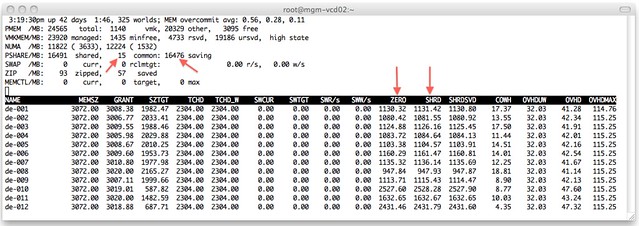
I wondered what that would look like in real life. I isolated one of my ESXi host (24GB of memory) in my lab and deployed 12 VMs with 3GB each with Windows 2008 64-Bit installed. I booted all of them up in literally seconds and as Windows 2008 zeroes out memory during boot I knew what to expect:

I added a couple of arrows so that it is a bit more obvious what I am trying to show here. On the top left you can see that TPS saved 16476MB and used 15MB to store unique pages. As the VMs clearly show most of those savings are from “ZERO” pages. Just subtract ZERO from SHRD (Shared Pages) and you will see what I mean. Pre-vSphere 4.0 this would have resulted in severe memory contention and as a result more than likely ballooning (if the balloon driver is already started, remember it is a “boot-storm”) or swapping.

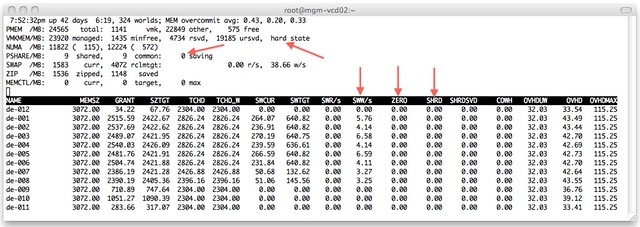
Just to make sure I’m not rambling I disabled TPS (by setting Mem.ShareScanGHz to 0) and booted up those 12 VMs again. This is the result:

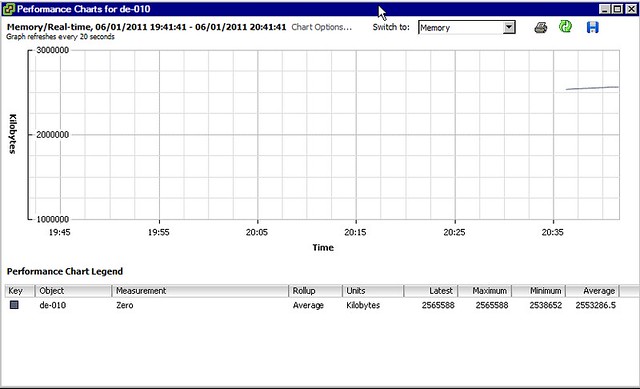
As shown at the top, the hosts status is “hard” as a result of 0 page sharing and even worse, as can be seen on a VM level, most VMs started swapping. We are talking about VMkernel swap here, not ballooning. I guess that clearly shows why TPS needs to be enabled and where and when you will benefit from it. Please note that you can also see “ZERO” pages in vCenter as shown in the screenshot below.

One thing Frank and I discussed a while back, and I finally managed to figure out, is why after boot of a Windows VM the “ZERO” pages still go up and fluctuate so much. I did not know this but found the following explanation:

There are two threads that are specifically responsible for moving threads from one list to another. Firstly, the zero page thread runs at the lowest priority and is responsible for zeroing out free pages before moving them to the zeroed page list.

In other words, when an application / service or even Windows itself “deprecates” the page it will be zeroed out by the “zero page thread” aka garbage collector at some point. The Page Sharing module will pick this up and collapse the page instantly.

I guess there is only one thing left to say, how cool is TPS?!

HA role promotion…

Duncan Epping · Dec 24, 2010 ·

I received a very valid question this week from someone who bought our book. The question was as follows:

On Page 35 it is mentioned that a Secondary Node is not automatically elected as a Primary if a Primary fails. It then goes on to state the conditions under which this does occur, one of these is if the primary node becomes disconnected from the Cluster. When an ESX host fails doesn’t it always end up in the “disconnected” status, if so why isn’t the role transferred?

This one had me thinking for a couple of minutes as it was 6 months ago that I wrote that section, but I knew I tested this back then. When a host fails it will not receive the status “disconnected” but it will receive the status “not responding”. You can disconnect a host by right clicking it and selected “disconnect from cluster”, that would transfer the role to another node… in the case of “not responding” this doesn’t happen as vCenter is unaware of what happened to the host.

Shares set on Resource Pools

Duncan Epping · Dec 14, 2010 ·

During our session at the Dutch VMUG Frank was explaining Resource Pools and the impact of limits and reservations. As I had the feeling not everyone in the room was using resource pools I asked the following questions:

  1. How many people are using Resource Pools today?
    • Out of the roughly 300 people who attended our session 80 showed their hands. The follow-up question I asked was…
  2. How many people change the Shares setting from the default?
    • Out of those 80 hands roughly 20 people raised their hands and that lead me to the next question…
  3. How many people change the Shares value based on the amount of VMs running in that Resource Pool?
    • Now only a handful of people raised their hand.

That is what triggered this post as I believe it is an often made mistake. First of all when you create a Resource Pool there are a couple of things you can set a reservation, a limit and of course shares. For some reason shares are often overlooked. There are a couple of things I wanted to make sure everyone understands as judging by the numbers of hands that were raised I am certain there are a couple of common misunderstandings when it comes to Resource Pools:

  • If you create a Resource Pool a default Shares value is defined for the resource pool on both Memory and CPU
  • Shares specify the priority of the resource pool relative to other resource pools on the same level

This means that even if you don’t touch the shares values they will come into play whenever there is contention. This also means that the resource allocation on a VM level is dependent on the entitlement of the resource pool it belongs to.

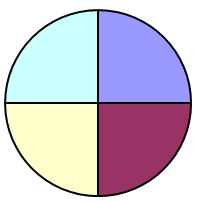
Now what is the impact of that? I guess I should quote from the “The Resource Pool Priority-Pie Paradox” blog post my colleague Craig Risinger wrote as it clearly demonstrates the issues that can be encountered when Resource Pools are used and Shares values are not based on the relative priority AND the amount of VMs per pool.

“Test” 1000 shares, 4 VMs => 250 units per VM (small pie, a few big slices):

“Production” 4000 shares, 50 VMs => 80 units per VM (bigger pie, many small slices):

I guess this makes it really obvious that shares might not always give you the results you expected it would.

Another issue that could arise is when Virtual Machines are created on the same level as the Resource Pools…. Believe me it doesn’t take a lot for a single VM to have higher priority than a Resource Pool in times of contention.

Again, whenever you create a Resource Pool it will “inherit” the default shares value, which equals a 4vCPU/16GB Virtual Machine, and whenever there is contention these will come into play. Keep this in mind when designing your virtual infrastructure as it could potentially lead to unwanted results.

VMware HA Deployment Best Practices

Duncan Epping · Dec 13, 2010 ·

Last week VMware officially released an official paper around Deployment Best Practices for HA. I was one of the authors of the document. Together with several people from the Technical Marketing Team we gathered all best practices that we could find, validated and simplified them to make it rock solid. I think it is a good read. It is short and sweet and I hope you will enjoy it.

Latest Revision:
Dec 9, 2010

Download:
http://www.vmware.com/files/pdf/techpaper/VMW-Server-WP-BestPractices.pdf

Description

This paper describes best practices and guidance for properly deploying VMware HA in VMware vSphere 4.1.  These include discussions on proper network and storage design, and recommendations on settings for host isolation response and admission control.

  • « Go to Previous Page
  • Page 1
  • Interim pages omitted …
  • Page 86
  • Page 87
  • Page 88
  • Page 89
  • Page 90
  • Interim pages omitted …
  • Page 124
  • Go to Next Page »

Primary Sidebar

About the Author

Duncan Epping is a Chief Technologist and Distinguished Engineering Architect at Broadcom. Besides writing on Yellow-Bricks, Duncan is the co-author of the vSAN Deep Dive and the vSphere Clustering Deep Dive book series. Duncan is also the host of the Unexplored Territory Podcast.

Follow Us

  • X
  • Spotify
  • RSS Feed
  • LinkedIn

Recommended Book(s)

Also visit!

For the Dutch-speaking audience, make sure to visit RunNerd.nl to follow my running adventure, read shoe/gear/race reviews, and more!

Do you like Hardcore-Punk music? Follow my Spotify Playlist!

Do you like 80s music? I got you covered!

Copyright Yellow-Bricks.com © 2026 · Log in