• Skip to primary navigation
  • Skip to main content
  • Skip to primary sidebar

Yellow Bricks

by Duncan Epping

  • Home
  • Unexplored Territory Podcast
  • HA Deepdive
  • ESXTOP
  • Stickers/Shirts
  • Privacy Policy
  • About
  • Show Search
Hide Search

VMware

VMkernel Observations (VOBs)

Duncan Epping · Jul 7, 2017 ·

I never really looked at VOBs but as this came up last week during a customer meeting I decided to look in to it a bit. I hadn’t realized there was such a large number of them in the first place. My conversation was in the context of vSAN, but there are many different VOBs. For those who don’t know VOBs are system events. These events are logged and you can create different alarms for when they are being logged.

You can check the full list of VOBs on ESXi, SSH in to it and then look at this file:

  • /usr/lib/vmware/hostd/extensions/hostdiag/locale/en/event.vmsg

When they are triggered you will see them here:

  •  /var/log/vobd.log

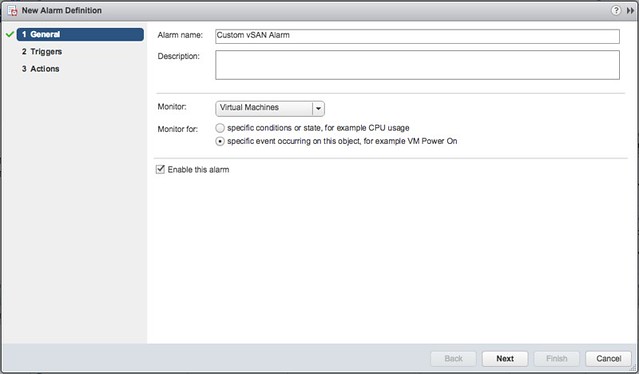
And as stated when you want to do something with them you can create a customer alarm. Select “specific event occuring on this object” and click next:
Now you add an event, simply click the “+” and remove the current value and simply copy/paste the VOB string in, the string will look something like this: “esx.problem.vob.vsan.pdl.offline”. Hit enter when you added it and then click “Next” and “Finish”.
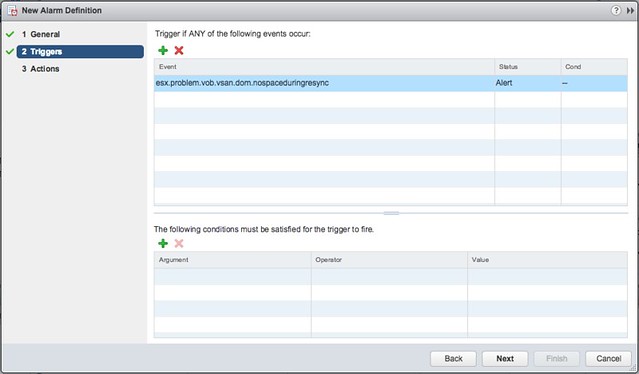
I find the following useful myself:

  • esx.problem.vsan.net.redundancy.reduced
  • esx.problem.vob.vsan.lsom.componentthreshold
  • esx.problem.vob.vsan.lsom.diskerror
  • esx.problem.vob.vsan.pdl.offline
  • esx.problem.vsan.lsom.congestionthreshold
  • esx.problem.vob.vsan.dom.nospaceduringresync

There are many more, and I just listed those I found useful for vSAN, for more detail check the following links:

  • https://docs.vmware.com/en/VMware-vSphere/6.0/com.vmware.vsphere.virtualsan.doc/GUID-FB21AEB8-204D-4B40-B154-42F58D332966.html
  • http://www.virtuallyghetto.com/2015/03/new-vobs-for-creating-vcenter-server-alarms-in-vsphere-6-0.html
  • http://www.virtuallyghetto.com/2014/04/handy-vsan-vobs-for-creating-vcenter-alarms.html
  • http://www.virtuallyghetto.com/2014/04/other-handy-vsphere-vobs-for-creating-vcenter-alarms.html
 

vSAN 6.6 Stretched Cluster Demo

Duncan Epping · May 19, 2017 ·

I had one more demo to finish and share and that is the vSAN 6.6 stretched cluster demo. I already did a stretched clustering demo when we initially released it, but with the enhanced functionality around local protection I figured I would re-record it. In this demo (~12 minutes) I will show you how to configure vSAN 6.6 with dedupe / compression enabled in a Stretched Cluster configuration. I will also create 3 VM Storage Policies, assign those to VMs and show you that vSAN has place the data across locations. I hope you find it useful.

vSAN 6.6 Demo: Configuration Assist

Duncan Epping · May 15, 2017 ·

I just noticed I still had a demo recoding on my desktop from a couple of weeks ago. The topic is vSAN 6.6 configuration assist. Hadn’t done anything with it, so I just added the narratives and shared it on youtube. Only a 3 minute video and quickly shows you where Configuration Assist can be useful. Hope you like it.

Change multicast address when running multiple vSAN clusters in same VLAN

Duncan Epping · May 10, 2017 ·

Before vSAN 6.6 we would always recommend to change the multicast address when running multiple vSAN clusters in the same VLAN. Now that with vSAN 6.6 we removed multicast, does this best practice/recommendation still apply? I went looking for a clear statement but couldn’t find any, until Cormac pointed me to the excellent vSAN Networking Guide he wrote together with Paudie. After reading the table a couple of times, this is what I would consider to be the new best practice/recommendation:

If you run a vSAN 6.6 cluster with on-disk format v5.0 then there’s no need to change the multicast address when you have multiple clusters in the same VLAN as there’s no chance older host can be introduced in to the cluster as they will be partitioned instantly.

If you run a vSAN 6.6 cluster with on-disk format pre v5.0 then it is recommend to change the multicast address when you have multiple clusters in the same VLAN as when older hosts are added the cluster switches back to multicast mode. Although this could be considered an “operational consideration”, to avoid problems we would recommend changing the multicast address.

We also stated in the past that you could give each vSAN cluster a different VLAN for the vSAN network, the same applies. You can use a single VLAN for multi clusters, as long as those clusters are vSAN 6.6 and running on-disk format v5.0.

I hope that helps.

vSAN 6.6: Manual vs Automatic Disk Claim Mode

Duncan Epping · May 3, 2017 ·

I received this question on Manual vs Automatic disk claim mode in vSAN 6.6. Someone upgraded a cluster from 6.2 to 6.6 and  wanted to add a second cluster. They noticed that during the creation of the new cluster there was no option to select “automatic vs manual”.

I think a blog post will be published that explains the reasoning behind this, I figured I would share some of it before hand so you don’t end up looking for something that does not exist. In vSAN 6.6 the “Automatic” option which automatically creates disk groups for you has disappeared. The reason for this is because we see the world moving to all-flash rather fast. With All-Flash it is difficult to differentiate between the capacity and cache device. For that reason, in previous versions of vSphere/vSAN you already had to grab the devices yourself when it was an all-flash configuration. With 6.6 we removed the “automatic” option as we also recognized that when there are multiple disk groups and you need to take disk controllers, and location of disks etc in to account it even becomes more complex to automatically form disk groups. In our experience most customers preferred to maintain control and had this configured to “manual” by default. As such this option was removed.

I hope that clarifies things. I will add a link to the article explaining it.

  • « Go to Previous Page
  • Page 1
  • Interim pages omitted …
  • Page 35
  • Page 36
  • Page 37
  • Page 38
  • Page 39
  • Interim pages omitted …
  • Page 124
  • Go to Next Page »

Primary Sidebar

About the Author

Duncan Epping is a Chief Technologist and Distinguished Engineering Architect at Broadcom. Besides writing on Yellow-Bricks, Duncan is the co-author of the vSAN Deep Dive and the vSphere Clustering Deep Dive book series. Duncan is also the host of the Unexplored Territory Podcast.

Follow Us

  • X
  • Spotify
  • RSS Feed
  • LinkedIn

Recommended Book(s)

Also visit!

For the Dutch-speaking audience, make sure to visit RunNerd.nl to follow my running adventure, read shoe/gear/race reviews, and more!

Do you like Hardcore-Punk music? Follow my Spotify Playlist!

Do you like 80s music? I got you covered!

Copyright Yellow-Bricks.com © 2026 · Log in