• Skip to primary navigation
  • Skip to main content
  • Skip to primary sidebar

Yellow Bricks

by Duncan Epping

  • Home
  • Unexplored Territory Podcast
  • HA Deepdive
  • ESXTOP
  • Stickers/Shirts
  • Privacy Policy
  • About
  • Show Search
Hide Search

VMware

Can I vMotion a VM while IO Insight is tracing it?

Duncan Epping · Mar 4, 2021 ·

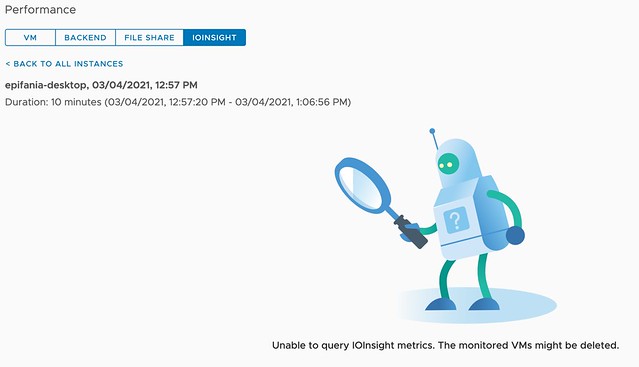
Today during the Polish VMUG we had a great question, basically, the question was if you can vMotion a VM while vSAN IO Insight is tracing it. I did not know the answer as I had never tried it, so I had to test and validate it in the lab. While testing it became obvious that IO Insight and vMotion are not a supported combination today. Or better said, when you vMotion a VM which has IO Insight enabled and the VM is being traced, then the tracing will stop and you will not be able to inspect the results. When you click on view results you will see the error suggesting that the “monitored VMs might be deleted” as shown below.
For now, if you are tracing a VM for an extended period of time, make sure to override the DRS automation level for that VM so that DRS does not interfere with the tracing. (You can do this on a per VM basis.) I would also recommend informing other administrators to not manually migrate the VM temporarily to avoid the situation where the trace is stopped.  You may wonder why this is the case, well it is pretty simple, tracing happens on a host level. We start a user world on the host where the VM is running to trace the IO. If you move the VM, the user world doesn’t know what has happened to the VM unfortunately. For now, who knows if this is something that may change over time… Either way, I would always recommend not migrating VMs while tracing, as that also impacts the data.

Hope that helps, and thank Tomasz for the great question!

What is this Catalog folder on my datastore?

Duncan Epping · Feb 22, 2021 ·

A question popped up on our internal slack earlier these days, and as I didn’t find anything online for it I figured I would write a quick article. When you look at your datastore, you may find various folders. Some you will recognize like the “.vSphere-HA” folder structure, which is used by vSphere HA, others you may not recognize, like the folder called “catalog” (see screenshot below), which has folders like “shard”, “mutex”, “tidy”, and “vclock” in it. The folder “catalog”, and all folders underneath, are created automatically when you use First Class Disk’s (FCD). FCD uses the folder structure to store it’s metadata in it. So please do not remove/delete or touch these folders. If you like to know more about FCD, make sure to read Cormac’s post on it.

Oh and if wonder why you are using FCD in the first place, it is often used for Kubernetes “persistent volumes”. So if you are using Tanzu/Kubernetes and have persistent volumes, chances are you are using FCD, which would result in those folders on your datastore. Nothing to worry about. 🙂

I joined the Futr Tech Podcast last week, check out the episode here!

Duncan Epping · Feb 16, 2021 ·

Last week I had the pleasure of joining Chris and Sandesh on the Futr Tech podcast. The episode was just published online, and I wanted to share it with all of you via this blog post. Make sure to watch/listen to the episode and subscribe to the youtube channel or podcast. I’ve been following these guys for a while, and there are some very interesting conversations to check out. (I enjoyed the episode with Bipul Sinha very much.)

You can find them on youtube here, or add them to your podcast app of choice (buzzsprout, spotify, itunes) I had fun, looking forward to some more podcasting in 2021!

What if the disk controller driver included in my vendor’s ESXi image is not on the vSAN HCL?

Duncan Epping · Jan 15, 2021 ·

Sometimes unfortunately there are situations where a vendor’s ESXi image includes a disk controller driver that is not on the vSAN HCL/VCG (VMware Compatibility Guide). Typically it is a new version of the driver which is supported for vSphere, but not yet for vSAN. In that situation, what should you do? So far there are two approaches I have seen customers take:

  1. Keep running with the included driver and wait for the driver to be supported and listed on the vSAN HCL/VCG
  2. Downgrade the driver to the version which is listed on the vSAN HCL/VCG

Personally, I feel that option 2 is the correct way to go. The reason is simple, vSphere and vSAN have different certification requirements for disk controllers and the vSAN certification criteria are just more stringent than vSphere’s. Hence, sometimes you see vSAN skipping certain versions of drivers, this usually means a version did not pass the tests. Now, of course, you could keep running the driver and wait for it to appear on the vSAN HCL/VC. If however, you hit a problem, VMware Support will always ask you first to bring the environment to a fully supported state. Personally, I would not want the extra stress while troubleshooting. But that is my experience and preference. Just to be clear, from a VMware stance, there’s only one option, and that is option two, downgrade to the supported version!

Is a crossover cable needed for vSAN 2-Node Direct Connect?

Duncan Epping · Jan 8, 2021 ·

I had this question last week around vSAN 2-node direct connect and whether using a crossover cable is still required to be used or if a regular CAT6 cable (CAT 5E works as well) can be used. I knew the answer and figured this would be documented somewhere, but it doesn’t appear to be. To be honest, many websites when talking about the need for crossover cables are blatantly wrong. And yes, I also spotted some incorrect recommendations in VMware’s own documentation, so I requested those entries to be updated. Just to be clear, with vSAN 2-Node Direct Connect, or vMotion, or any other service for that matter, you can use a regular CAT6 cable, combined with 10GbE (or faster) NICs, this gives you great performance without the cost of a 10GbE (or faster) switch. I can’t recall having seen a NIC in the past 10 years that does not have Auto MDI/MDI-X implemented, even though it was an optional feature in the 1000Base-T standard. In other words, there’s no need to buy a crossover cable, or make one, just use a regular cable.

  • « Go to Previous Page
  • Page 1
  • Interim pages omitted …
  • Page 18
  • Page 19
  • Page 20
  • Page 21
  • Page 22
  • Interim pages omitted …
  • Page 124
  • Go to Next Page »

Primary Sidebar

About the Author

Duncan Epping is a Chief Technologist and Distinguished Engineering Architect at Broadcom. Besides writing on Yellow-Bricks, Duncan is the co-author of the vSAN Deep Dive and the vSphere Clustering Deep Dive book series. Duncan is also the host of the Unexplored Territory Podcast.

Follow Us

  • X
  • Spotify
  • RSS Feed
  • LinkedIn

Recommended Book(s)

Also visit!

For the Dutch-speaking audience, make sure to visit RunNerd.nl to follow my running adventure, read shoe/gear/race reviews, and more!

Do you like Hardcore-Punk music? Follow my Spotify Playlist!

Do you like 80s music? I got you covered!

Copyright Yellow-Bricks.com © 2026 · Log in