• Skip to primary navigation
  • Skip to main content
  • Skip to primary sidebar

Yellow Bricks

by Duncan Epping

  • Home
  • Unexplored Territory Podcast
  • HA Deepdive
  • ESXTOP
  • Stickers/Shirts
  • Privacy Policy
  • About
  • Show Search
Hide Search

VMware

Unexplored Territory: A conversation with Kit Colbert, VMware’s new CTO

Duncan Epping · Oct 18, 2021 ·

One of my goals for this year was starting the Unexplored Territory Podcast. A podcast however is only relevant when people bother to listen to it, as such I figured I would use my blog to promote the podcast for now. As you can imagine, we are hoping to grow our audience fast, and we can use all the help we can get. If you enjoyed the podcast, make sure to subscribe, like, and share the episode on all social platforms, and preferably with your colleagues and friends. You can find the podcast in your favorite podcast app by searching for “Unexplored Territory, or simply click one of the following links: Apple Podcasts, Spotify, Google Podcasts, Overcast, Stitcher, or Amazon Music. You can also listen to the episode by hitting play in the embedded player below.

In this episode, we talk to Kit Colbert. Kit was recently promoted to CTO within VMware. Kit talks about how he started as an intern and managed to find his way through the company to ultimately become the CTO. We also discuss various projects that were introduced at VMworld like Project Monterey, Project Capitola, and Project Santa Cruz. I hope you will enjoy this episode as much as we did recording it.

Announcing the Unexplored Territory Podcast!

Duncan Epping · Oct 11, 2021 ·

Frank, Johan, and I have been working on this for a few months already, but today I can finally share that a brand new podcast series will be out soon. This bi-weekly podcast (released on Monday) is titled “Unexplored Territory“. We will be discussing topics such as public cloud, virtualization, cloud-native applications, Kubernetes, end-user computing, storage, business continuity, and important (VMware-based) emerging technologies with industry/subject matter experts.

You may wonder, where you will be able to find it/us? Well of course we have a website: UnexploredTerritory.Tech. You can find us on Twitter on @UnexploredPod. You can listen to the podcast via any of your favorite podcast apps: Apple Podcasts, Spotify, Google Podcasts, Overcast, Stitcher, Amazon Music, Stitcher, Pocket Cast. Or use the RSS Feed to add the podcast to your favorite podcast player.

Make sure to subscribe and download the episodes automatically! Our very first guest will be a very special one, we invited VMware’s brand new CTO Kit Colbert to join us, and this episode will be available on Monday the 18th of October! We created a short teaser for the podcast, you can find it in your podcast app or check it out below via the embedded player. We hope everyone will enjoy the podcast, we are looking forward to many great conversations!

vSAN 7.0 U3 enhanced stretched cluster resiliency, what is it?

Duncan Epping · Oct 4, 2021 ·

I briefly discussed the enhanced stretched cluster resiliency capability in my vSAN 7.0 U3 overview blog. Of course, immediately questions started popping up. I didn’t want to go too deep in that post as I figured I would do a separate post on the topic sooner or later. What does this functionality add, and in which particular scenario?

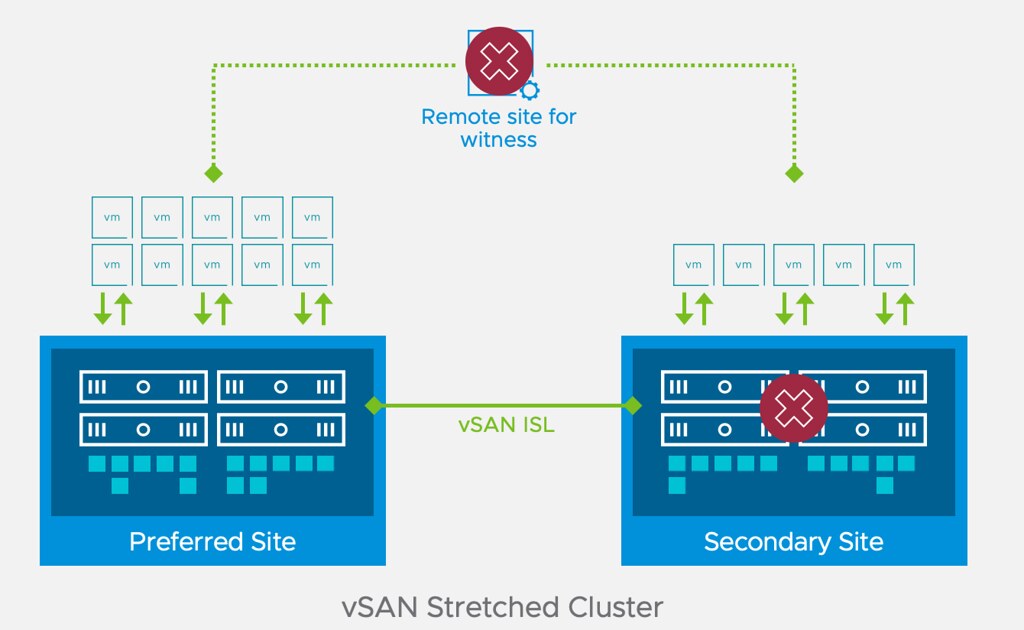
In short, this enhancement to stretched clusters prevents downtime for workloads in a particular failure scenario. So the question then is, what failure scenario? Let’s take a look at this diagram first of a typical stretched vSAN cluster deployment.

If you look at the diagram you see the following: Datacenter A, Datacenter B, Witness. One of the situations customers have found themselves in is that Datacenter A would go down (unplanned). This of course would lead to the VMs in Datacenter A being restarted in Datacenter B. Unfortunately, sometimes when things go wrong, they go wrong badly, in some cases, the Witness would fail/disappear next. Why? Bad luck, networking issues, etc. Bad things just happen. If and when this happens, there would only be 1 location left, which is Datacenter B.

Now you may think that because Datacenter B typically will have a full RAID set of the VMs running that they will remain running, but that is not true. vSAN looks at the quorum of the top layer, so if 2 out of 3 datacenters disappear, all objects impacted will become inaccessible simply as quorum is lost! Makes sense right? We are not just talking about failures right, could also be that Datacenter A has to go offline for maintenance (planned downtime), and at some point, the Witness fails for whatever reason, this would result in the exact same situation, objects inaccessible.

Starting with 7.0 U3 this behavior has changed. If Datacenter A fails, and a few (let’s say 5) minutes later the witness disappears, all replicated objects would still be available! So why is this? Well in this scenario, if Datacenter A fails, vSAN will create a new votes layout for each of the objects impacted. It basically will assume that the witness can fail and give all components on the witness 0 votes, on top of that it will give the components in the active site additional votes so that we can survive that second failure. If the witness would fail, it would not render the objects inaccessible as quorum would not be lost.

Now, do note, when a failure occurs and Datacenter A is gone, vSAN will have to create a new votes layout for each object. If you have a lot of objects this can take some time. Typically it will take a few seconds per object, and it will do it per object, so if you have a lot of VMs (and a VM consists of various objects) it will take some time. How long, well it could be five minutes. So if anything happens in between, not all objects may have been processed, which would result in downtime for those VMs when the witness would go down, as for that VM/Object quorum would be lost.

What happens if Datacenter A (and the Witness) return for duty? Well at that point the votes would be restored for the objects across locations and the witness.

Pretty cool right?!

vSphere 7.0 U3 contains two great vCLS enhancements

Duncan Epping · Sep 28, 2021 ·

I have written about vCLS a few times, so I am not going to explain what it is or what it does (detailed blog here). I do want to talk about what is part of vSphere 7.0 U3 specifically though as I feel these features are probably what most folks have been waiting for. Starting with vSphere 7.0 U3 it is now possible to configure the following for vCLS VMs:

  1. Preferred Datastores for vCLS VMs
  2. Anti-Affinity for vCLS VMs with specific other VMs

I created a quick demo for those who prefer to watch videos to learn these things if you don’t skip to the text below. Oh and before I forget, a bonus enhancement is that the vCLS VMs now have a unique name, this was a very common request from customers.

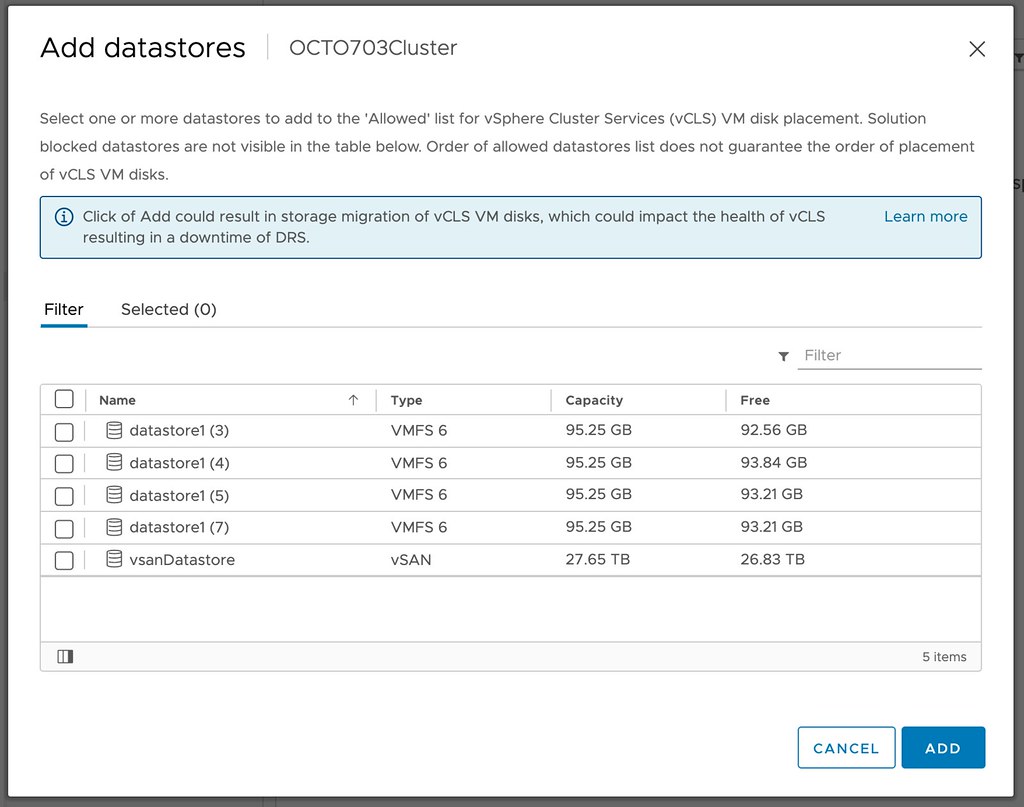
Why would you need the above functionality? Let’s begin with the “preferred datastore” feature, this allows you to specify where the vCLS VMs need to be provisioned to from a storage point of view. This would be useful in a scenario where you have a number of datastores that you would prefer to avoid. Examples could be datastores that are replicated or a datastore that is only intended to be used for ISOs and templates, or maybe you prefer to provision on hybrid storage versus flash storage.

So how do you fix this? Well, it is simple, you click on your cluster object. You then click on “Configure”, and on “Datastores” under “vSphere Cluster Services”. Now you will see “VCLS Allowed”, if you click on “ADD” you now will be able to select the datastores to which these vCLS VMs should be provisioned.

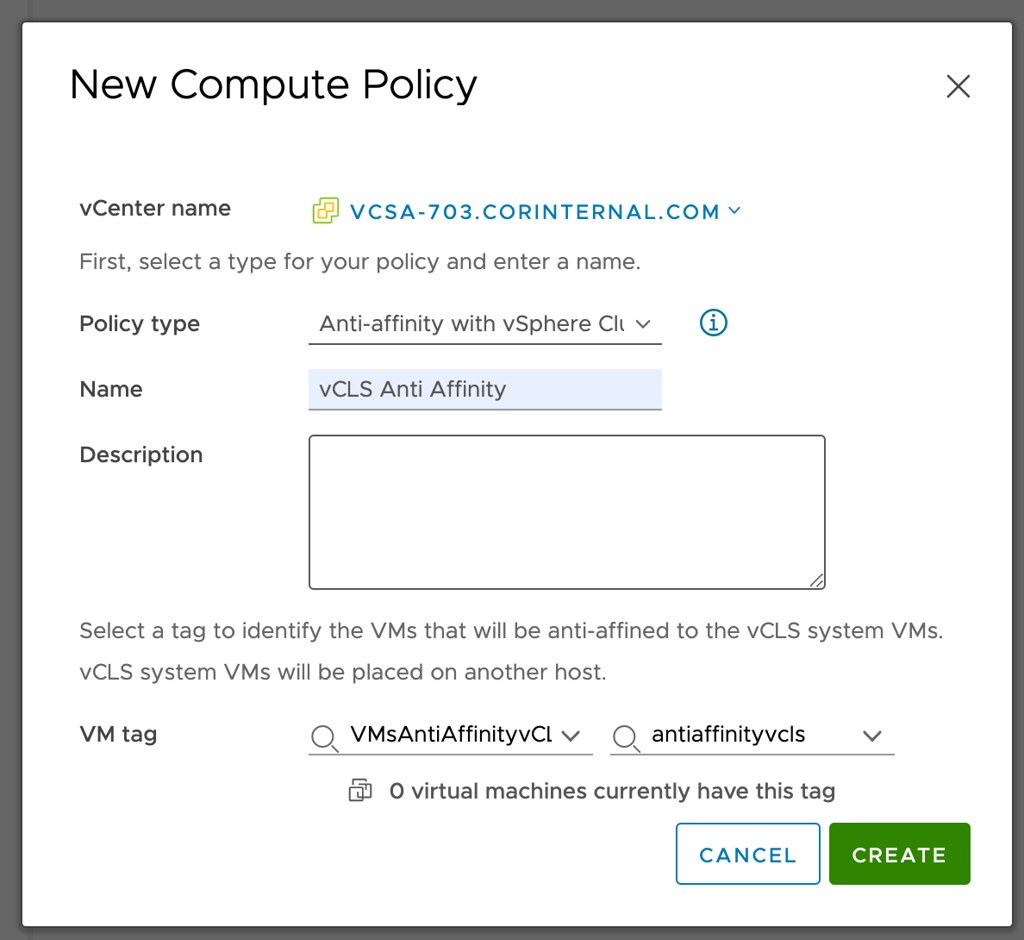
Next up Anti-Affinity for vCLS. You would this feature for situations where for instance a single workload needs to be able to solely run on a host, something like SAP for instance. In order to achieve this, you can use anti-affinity rules. We are not talking about regular anti-affinity rules. This is the very first time a brand new mechanism is used on-premises. I am talking about compute policies. Compute policies have been available for VMware Cloud on AWS customers for a while, but now are also appear to be coming to on-prem customers. What does it do? It enables you to create “anti-affinity” rules for vCLS VMs and specific other VMs in your environment by creating Compute Policies and using Tags!

How does this work? Well, you go to “Policies and Profiles” and then click “Compute Policies”. Now you can click “ADD” and create a policy. You now select “Anti Affinity with vSphere Cluster Services (vCLS) VMs”. Then you select the Tag you created for the VMs that should not run on the same hosts as the vCLS VMs, and then you click create. The vCLS VM Scheduler will then ensure that the vCLS VMs will not run on the same hosts as the tagged VMs. If there’s a conflict, the vCLS Scheduler will move away the vCLS VMs to other hosts within the cluster. Let’s reiterate that, the vCLS VMs will be vMotioned to another host in your cluster, the tagged VMs will not be moved!

Hope that helps!

vSAN 7.0 U3 feature overview

Duncan Epping · Sep 28, 2021 ·

In this blog post, I want to go over the features which have been released for vSAN as part of 7.0 U3. It is not going to be a deep dive, just a simple overview as most features speak for themselves! Let’s list the feature first, and then discuss some of them individually.

  • Cluster Shutdown feature
  • vLCM support for Witness Appliance
  • Skyline Health Correlation
  • IO Trip Analyzer
  • Nested Fault Domains for 2-Node Clusters
  • Enhanced Stretched Cluster durability
  • Access Based Enumeration for SMB shares via vSAN File Services

I guess the Cluster Shutdown feature speaks for itself. It basically enables you to power off all the hosts in a cluster when doing maintenance. Even if those hosts contain vCenter Server! If you want to trigger a shutdown, just right click the cluster object, go to vSAN, select “shutdown cluster” and follow the 2-step wizard. Pretty straight forward. Do note, besides the agent VMs, you will need to power-off the other VMs first. (yes, I requested this to be handled by the process as well in the future!)

The Skyline Health Correlation feature is very useful for customers who are seeing multiple alarms being triggered and are not sure what to do. In this scenario, starting with 7.0 U3, vSAN will now understand the correlation between the events and inform you what the issue is (most likely) and show you which other tests it would impact. This should enable you to fix the problem faster than before.

IO Trip Analyzer is also brand new in 7.0 U3. I actually wrote a blog post on the subject separately and included a demo, I would recommend watching that one. But if you just want the short summary, the IO Trip Analyzer basically provides an overview of latency introduced at every layer in the form of a diagram!

Nested Fault Domains for 2-node clusters has been on the “wish list” of some of our customers for a while. It is a very useful feature for those customers who want to be able to tolerate multiple failures even in a 2-node configuration. The feature requires you to have at least 3 disk groups per host, in each of the 2 hosts, and will then enable you to have “RAID-1” across those two hosts and RAID-1 within the host (Or RAID-5 if you have sufficient disk groups). If a host fails, and then a disk fails in the surviving host, the VMs would still be available. Basically a feature for customers who don’t need a lot of compute power (3 hosts or more), but do need added resiliency!

Enhanced Stretched Cluster durability (also applies to 2-node) is a feature that Cormac and I requested a while back. We requested this feature as we had heard from a few customers that unfortunately, they had found themselves in a situation where a datacenter would go offline, followed by the witness going down. This would then result in the VMs (only those which were stretched of course) in the remaining location also be unusable, as 2 out of the 3 parts of the RAID tree would be gone. This would even be the case in a situation where you would have a fully available RAID-1 / RAID-5 / RAID-6 tree in the remaining datacenter. This new feature now prevents this scenario!

Last, but not least, we now have support for Access Based Enumeration for SMB shares via vSAN File Services. What does this mean? Pre vSAN 7.0 U3, if a user had access to a file share the user would be able to see all folders/directories in this share. Starting with 7.0 U3 when looking at the share, only the folders that you have the appropriate permissions for will be displayed! (More about ABE here)

  • « Go to Previous Page
  • Page 1
  • Interim pages omitted …
  • Page 13
  • Page 14
  • Page 15
  • Page 16
  • Page 17
  • Interim pages omitted …
  • Page 124
  • Go to Next Page »

Primary Sidebar

About the Author

Duncan Epping is a Chief Technologist and Distinguished Engineering Architect at Broadcom. Besides writing on Yellow-Bricks, Duncan is the co-author of the vSAN Deep Dive and the vSphere Clustering Deep Dive book series. Duncan is also the host of the Unexplored Territory Podcast.

Follow Us

  • X
  • Spotify
  • RSS Feed
  • LinkedIn

Recommended Book(s)

Also visit!

For the Dutch-speaking audience, make sure to visit RunNerd.nl to follow my running adventure, read shoe/gear/race reviews, and more!

Do you like Hardcore-Punk music? Follow my Spotify Playlist!

Do you like 80s music? I got you covered!

Copyright Yellow-Bricks.com © 2026 · Log in