• Skip to primary navigation
  • Skip to main content
  • Skip to primary sidebar

Yellow Bricks

by Duncan Epping

  • Home
  • Unexplored Territory Podcast
  • HA Deepdive
  • ESXTOP
  • Stickers/Shirts
  • Privacy Policy
  • About
  • Show Search
Hide Search

VMware

MS Virtualization blogs and VMotion

Duncan Epping · Apr 21, 2008 ·

Recently there was an article published on the Microsoft Virtualization Blog which compared Hyper-V’s High Availability/Quick Migration capabilities to VMware’s VMotion. (VMblog pointed me towards the article) In the second article the writer responds on a large amount of reactions he had regarding VMotion being superior:

After my last blog I received almost two dozen email telling me that VMotion was far superior for unplanned host downtime and that it was a much better HA solution because it could live migrate virtual machines. I’ve heard this fallacy espoused for many years and, folks, this simply isn’t the case.

In the case of unplanned downtime, VMotion can’t live migrate because there is no warning. Instead you must have VMware HA configured and the best it can do is restart the affected virtual machines on other nodes which is the same as what is provided with Windows Server 2008 Hyper-V and Failover Clustering.

I can imagine why people reacted, in the first post the writer only mentioned VMotion. For unplanned downtime VMware doesn’t use VMotion because when it’s unplanned the VM’s get cutoff and will be restarted on another host with the use of HA(VMware High Availability). There’s no need for a migration when a VM is powered off.

Indeed Microsoft can do the same with the use of Clustering. But can you live migrate virtual machines when a server needs maintenance? No, at this moment that’s not possible. In other words, you will have to wait for a suitable moment… planned downtime, probably after business hours. But in a 24×7 environment will there ever be a suitable moment? Even when your business isn’t 24×7, if there’s a possible hardware failure would you want to wait? But when you have a 8:1 consolidation ratio you probably will not be the most popular system engineer when “quick migrating” the file server or the mail server especially when these VM’s have a lot of RAM assigned.

Besides that, with the upcoming new product, Continuous Availability, even unplanned downtime will not crash your VM. CA will constantly mirror your VM to another host, like a continous VMotion I guess, and when the active host fails the standby host will become active. In other words, no unplanned downtime anymore.
Powershell VI Toolkit

Duncan Epping · Apr 21, 2008 ·

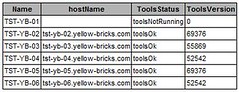
Today I combined a couple of Powershell scripts which as a result gives a nice html formatted file with a table. This table contains all VM’s with their VMware Tools status and version. I’ve uploaded the script here. The outcome looks like the following:

As you can see, the VMware tools status is “ok” but the versions are totally out of line. I know there are already a few tools handling this but as far as I know none of them creates a text/html output file.

Patches for 3.0.1 and 3.0.2…

Duncan Epping · Apr 11, 2008 ·

I just received the following:

New patches are available for ESX Server 3.0.1 and ESX Server 3.0.2.

ESX Server patches can be accessed through the on-line ESX Server Patch Download tool:
[http://app.connect.vmware.com/e/er.aspx?s=524&lid=2272&elq=4D5713F997F04342981A231DF09609D0“>]

Please follow the instructions on the appropriate patch download page.

VMware ESX Server 3.0.1 Patches

ESX-1003516 (Critical): fixes an issue where snapshot of a Suspended Virtual Machine fails;includes a fix for Windows OEM CDs Installation Failure; fixes an issue where Virtual Machines stop responding When Updated with Symantec Virus Definition
ESX-1003517 (Security):updates the e2fsprogs package
ESX-1003518 (Critical):changes the default Multipath Policy;fixes an issue where ESX Server stops responding due to low COW Heap Memory;fixes an issue where ESX Server hosts stop responding due to a spinlock timeout;includes fixes for SysAlert Warning Message, Partially Disabled Processors
ESX-1003520 (General):fixes an issue with the USB Subsystem and High-Speed USB HID Devices
ESX-1003521 (Security):Updates the libxml2 Utility

VMware ESX Server 3.0.2 Patches

ESX-1003523 (Security):updates the e2fsprogs package
ESX-1003524 (Critical):updates VMware-esx-vmkernel, VMware-esx-vmx, and VMware-esx-apps
ESX-1003526 (General):fixes an issue with USB Subsystem and High-Speed USB HID
ESX-1003527 (General):adds support for Ubuntu 7.10 GA
ESX-1003528 (Security):updates the libxml2 Utility

We expect the next patch release in late April 2008. If you have any questions, please contact support at 877-4-VMWARE.

Performance stats gone

Duncan Epping · Apr 11, 2008 ·

Clint discovered the following:

Source –
Ran into a problem while doing some performance testing on some test VMs. We found that we had no historical performance data for the VM or Host. All we had was real time data. This can be a major issue, especially when you are trying to troubleshoot or like in this case get performance data for a performance test! My co-worker did some research and found that we are not an isolated event. This is a bug in VC 2.5.

The Fix

We found a few references to doing a “repair” install of VC 2.5. So we went ahead and tried it and it worked. We also found references to the performance data getting corrupted. In that case they had to restore the database to a prior dataset and re-install the VC.

I’ve seen the same at several customer sites and indeed the fix that Clint describes, repair of VirtualCenter, works.

ESX(i) 3.5 and VirtualCenter 2.5 Update 1 Available now!

Duncan Epping · Apr 11, 2008 ·

Check out the release notes, there are a lot of fixes in this update! There’s also an update to the Update Manager and the Converter plugin.

Download link
Releasenotes link

  • « Go to Previous Page
  • Page 1
  • Interim pages omitted …
  • Page 108
  • Page 109
  • Page 110
  • Page 111
  • Page 112
  • Interim pages omitted …
  • Page 124
  • Go to Next Page »

Primary Sidebar

About the Author

Duncan Epping is a Chief Technologist and Distinguished Engineering Architect at Broadcom. Besides writing on Yellow-Bricks, Duncan is the co-author of the vSAN Deep Dive and the vSphere Clustering Deep Dive book series. Duncan is also the host of the Unexplored Territory Podcast.

Follow Us

  • X
  • Spotify
  • RSS Feed
  • LinkedIn

Recommended Book(s)

Also visit!

For the Dutch-speaking audience, make sure to visit RunNerd.nl to follow my running adventure, read shoe/gear/race reviews, and more!

Do you like Hardcore-Punk music? Follow my Spotify Playlist!

Do you like 80s music? I got you covered!

Copyright Yellow-Bricks.com © 2026 · Log in