• Skip to primary navigation
  • Skip to main content
  • Skip to primary sidebar

Yellow Bricks

by Duncan Epping

  • Home
  • Unexplored Territory Podcast
  • HA Deepdive
  • ESXTOP
  • Stickers/Shirts
  • Privacy Policy
  • About
  • Show Search
Hide Search

vmotion

DRS Deepdive part II

Duncan Epping · Oct 22, 2009 ·

Yesterday I posted the DRS Deepdive. One of the questions still left open was how DRS decides which VM to move to create a balance cluster. After a lot of digging for non-NDA info I found this “procedure” in a VMworld presentation(TA16) amongst some other cool info.

The following procedure is used to form a set of recommendations to correct the imbalanced cluster:

While (load imbalance metric > threshold) {
move = GetBestMove();
  If no good migration is found:
    stop;
  Else:
    Add move to the list of recommendations;
    Update cluster to the state after the move is added;
}

Step by step in plain English:

While the cluster is imbalanced (Current host load standard deviation > Target host load standard deviation) select a VM to migrate based on specific criteria and simulate a move and recompute the “Current host load standard deviation” and add to the migration recommendation list. If the cluster is still imbalanced(Current host load standard deviation > Target host load standard deviation) repeat procedure.

Now how does DRS select the best VM to move? DRS uses the following procedure:

GetBestMove() {
  For each VM v:
    For each host h that is not Source Host:
      If h is lightly loaded compared to Source Host:
      If Cost Benefit and Risk Analysis accepted
      simulate move v to h
      measure new cluster-wide load imbalance metric as g
  Return move v that gives least cluster-wide imbalance g.
}

Again in plain English:

For each VM check if a VMotion to each of the hosts which are less utilized than source host would result in a less imbalanced cluster and meets the Cost Benefit and Risk Analysis criteria. Compare the outcome of all tried combinations(VM<->Host) and return the VMotion that results in the least cluster imbalance.

This should result in a migration which gives the most improvement in terms of cluster balance, in other words: most bang for the buck! This is the reason why usually the larger VMs are moved as they will most likely decrease “Current host load standard deviation” the most. If it’s not enough to balance the cluster within the given threshold the “GetBestMove” gets executed again by the procedure which is used to form a set of recommendations.

Now the next question would be what does “Cost Benefit” and “Risk Analysis” consist of and why are we doing this?

First of all we want to avoid a constant stream of VMotions and this will be done by weighing costs vs benefits vs risks. These consists of:

  • Cost benefit
    Cost: CPU reserved during migration on t he target host
    Cost: Memory consumed by shadow VM during VMotion on the target host
    Cost: VM “downtime” during the VMotion
    Benefit: More resources available on source host due to migration
    Benefit: More resources for migrated VM as it moves to a less utilized host
    Benefit: Cluster Balance
  • Risk Analysis
    Stable vs unstable workload of the VM (historic info used)

Based on these consideration a cost-benefit-risk metric will be calculated and if this has an acceptable value the VM will be consider for migration.

I will consolidate both post in a single blog page today to make it easier to find!
DRS Deepdive

Duncan Epping · Oct 21, 2009 ·

Last week I mentioned which metrics DRS used for load balancing VMs across a cluster. Of course the obvious question was when the DRS Deepdive would be posted. I must admit I’m not an expert on this topic as like most of you I always took for granted that it worked out of the box. I can’t remember that there ever was the need to troubleshoot DRS related problems, or better said I don’t think I’ve ever seen an issue which was DRS related.

This article will focus on two primary DRS  functions:

  1. Load balancing VMs due to imbalanced Cluster
  2. VM Placement when booting

I will not be focusing on Resource Pools at all as I feel that there are already more than enough articles which explain these. The Resource Management Guide also contains a wealth of info on resource pools and this should be your starting place!

Load Balancing

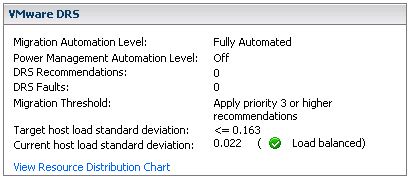
First of all VMware DRS evaluates your cluster every 5 minutes. If there’s an imbalance in load it will reorganize your cluster, with the help of VMotion, to create an evenly balanced cluster again. So how does it detect an imbalanced Cluster? First of all let’s start with a screenshot:

fig 1

There are three major elements here:

  1. Migration Threshold
  2. Target host load standard deviation
  3. Current host load standard deviation

Keep in mind that when you change the “Migration Threshold” the value of the “Target host load standard deviation” will also change. In other words the Migration Threshold dictates how much the cluster can be “imbalanced”. There also appears to be a direct relationship between the amount of hosts in a cluster and the “Target host load standard deviation”. However, I haven’t found any reference to support this observation. (Two host cluster with threshold set to three has a THLSD of 0.2, a three host cluster has a THLSD of 0.163.) As said every 5 minutes DRS will calculate the sum of the resource entitlements of all virtual machines on a single host and divides that number by the capacity of the host:

sum(expected VM loads) / (capacity of host)

The result of all hosts will then be used to compute an average and the standard deviation. (Which effectively is the “Current host load standard deviation” you see in the screenshot(fig1).) I’m not going to explain what a standard deviation is as it’s explained extensively on Wiki.

If the environment is imbalanced and the Current host load standard deviation exceeds the value of the “Target host load standard deviation” DRS will either recommend migrations or perform migrations depending on the chosen setting.

Every migration recommendation will get a priority rating. This priority rating is based on the Current host load standard deviation. The actual algorithm being used to determine this is described in this KB article. I needed to read the article 134 times before I actually understood what they were trying to explain so I will use an example based on the info shown in the screenshot(fig1). Just to make sure it’s absolutely clear, LoadImbalanceMetric is the Current host load standard deviation value and ceil is basically a “round up”. The formula mentioned in the KB article followed by an example based on the screenshot(fig1):

6 - ceil(LoadImbalanceMetric / 0.1 * sqrt(NumberOfHostsInCluster))
6 - ceil(0.022 / 0.1 * sqrt(3))

This would result in a priority level of 5 for the migration recommendation if the cluster was imbalanced.

The only question left for me is how does DRS decide which VM it will VMotion… If anyone knows, feel free to chip in. I’ve already emailed the developers and when I receive a reply I will add it to this article and create a seperate article about the change so that it stands out.

VM Placement

The placement of a VM when being powered on is as you know part of DRS. DRS analyzes the cluster based on the algorithm described in “Load Balancing”. The question of course is for the VM which is being powered on what kind of values does DRS work with? Here’s the catch, DRS assumes that 100% of the provisioned resources for this VM will be used. DRS does not take limits or reservations into account. Just like HA, DRS has got “admission control”. If DRS can’t guarantee the full 100% of the resources provisioned for this VM can be used it will VMotion VMs away so that it can power on this single VM. If however there are not enough resources available it will not power on this VM.

That’s it for now… Like I said earlier, if you have more indepth details feel free to chip in as this is a grey area for most people.

Which Metrics does DRS use?

Duncan Epping · Oct 15, 2009 ·

I received a question a while back about DRS initiated VMotions. One of my customers wanted to know which metrics were used by DRS for deciding if a VM needs to be VMotioned to a different host or not. These metrics are:

Host CPU: Active (includes run and ready Mhz)

Host Memory: Active

Just a little something that’s nice to know I guess. I need to dive into the actual algorithm that is being used by DRS and if I can find some decent info and have some spare time on my hands I will definitely write an article about it.

Long Distance VMotion

Duncan Epping · Sep 21, 2009 ·

As you might have noticed last week I’m still digesting all the info from VMworld. One of the coolest new supported technologies is Long Distance VMotion. A couple of people already wrote a whole article on this session so I will not be doing this. (Chad Sakac, Joep Piscaer) However I do want to stress some of the best practices / requirement to make this work.

Requirements:

  • An IP network with a minimum bandwidth of 622 Mbps is required.
  • The maximum latency between the two VMware vSphere servers cannot exceed 5 milliseconds (ms).
  • The source and destination VMware ESX servers must have a private VMware VMotion network on the same IP subnet and broadcast domain.
  • The IP subnet on which the virtual machine resides must be accessible from both the source and destination VMware ESX servers. This requirement is very important because a virtual machine retains its IP address when it moves to the destination VMware ESX server to help ensure that its communication with the outside world (for example, with TCP clients) continues smoothly after the move.
  • The data storage location including the boot device used by the virtual machine must be active and accessible by both the source and destination VMware ESX servers at all times.
  • Access from VMware vCenter, the VMware Virtual Infrastructure (VI) management GUI, to both the VMware ESX servers must be available to accomplish the migration.

Best practices:

  • Create HA/DRS Clusters on a per site basis. (Make sure I/O stays local!)
  • A single vDS (like the Cisco Nexus 1000v) across clusters and sites.
  • Network routing and policies need to be synchronized or adjusted accordingly.

Most of these are listed in this excellent whitepaper from VMware, Cisco and EMC by the way.

Combining this current available technology with what Banjot discussed during his VMworld session regarding HA futures I think the possibilities are endless. One of the most obvious ones is of course Stretched HA Clusters. When adding VMotion into the mix a stretched HA/DRS Cluster would be a possibility. This would require other thresholds of course but how cool would it be if DRS would re-balance your clusters based on specific pre-determined and configurable thresholds?!

Stretched HA/DRS Clusters would however mean that the cluster needs to be carved into sub-clusters to make sure I/O stays local. You don’t want to run your VMs on site A while their VMDKs are stored on site B. This of course depends on the array technology being used. (Active / Active, as in one virtual array would solve this.) During Banjot session it was described as “tagged” hosts in a cross site Cluster and during the Long Distance VMotion session it’s described as “DRS being aware of WAN link and sidedness”. I would rather use the term “sub-cluster” or “host-group”. Although this all seems to be still far away it seems to be much closer than we expect. Long Distance VMotion is supported today. Sub-clusters aren’t available yet but knowing VMware, and looking at the competition,  they will go full steam ahead.

Second vswp file when doing a VMotion with vSphere?

Duncan Epping · Jul 31, 2009 ·

I was just reading this topic on the VMTN community. In short, a second vswp file gets created during a VMotion. As the starter of this topic noticed it could lead to not being able to VMotion VMs if you don’t have enough free disk space on your VMFS volume.

One of my UK colleagues, David Burgess, jumped in and explained what is happening during the VMotion and why this temporary vswp file is being created. Read it, it’s useful info:

  1. It is only used if the target is under memory pressure. It is thin provisioned so even though it looks the size of the memory it should have very little impact on the free space of the VMFS.
  2. The other thing is that the temp swap will only be used for activity as the machine transitions so should not grow to the size of the memory. If you “du” the file systems you should see the the blocks being consumed. Engineers think this should be tops 400M, if it is used at all. By pressured we mean the amount of memory free is low. That will not deny the VM to VMotion unless we can’t allocate enough reserved memory (this is zero by default). Once the transition is complete the VM reverts to the original swap file and the temp is deleted.

Take a look at the screenshot David uploaded, the bottom two vswp files are the ones created during the VMotion and as you can see are consuming 0 blocks.

  • « Go to Previous Page
  • Page 1
  • Interim pages omitted …
  • Page 4
  • Page 5
  • Page 6
  • Page 7
  • Page 8
  • Go to Next Page »

Primary Sidebar

About the Author

Duncan Epping is a Chief Technologist and Distinguished Engineering Architect at Broadcom. Besides writing on Yellow-Bricks, Duncan is the co-author of the vSAN Deep Dive and the vSphere Clustering Deep Dive book series. Duncan is also the host of the Unexplored Territory Podcast.

Follow Us

  • X
  • Spotify
  • RSS Feed
  • LinkedIn

Recommended Book(s)

Also visit!

For the Dutch-speaking audience, make sure to visit RunNerd.nl to follow my running adventure, read shoe/gear/race reviews, and more!

Do you like Hardcore-Punk music? Follow my Spotify Playlist!

Do you like 80s music? I got you covered!

Copyright Yellow-Bricks.com © 2026 · Log in