• Skip to primary navigation
  • Skip to main content
  • Skip to primary sidebar

Yellow Bricks

by Duncan Epping

  • Home
  • Unexplored Territory Podcast
  • HA Deepdive
  • ESXTOP
  • Stickers/Shirts
  • Privacy Policy
  • About
  • Show Search
Hide Search

vmotion

vSphere 5.0 vMotion Enhancements

Duncan Epping · Jul 20, 2011 ·

**disclaimer: this article is an out-take of our book: vSphere 5 Clustering Technical Deepdive**

There are some fundamental changes when it comes to vMotion scalability and performance in vSphere 5.0. Most of these changes have one common goal: being able to vMotion ANY type of workload. It doesn’t matter if you have a virtual machine with 32GB of memory that is rapidly changing memory pages any more with the the following enhancements:

  • Multi-NIC vMotion support
  • Stun During Page Send (SDPS)

Multi-NIC vMotion Support

One of the most substantial and visible changes is multi-NIC vMotion capabilities. vMotion is now capable of using multiple NICs concurrently to decrease the amount of time a vMotion takes. That means that even a single vMotion can leverage all of the configured vMotion NICs. Prior vSphere 5.0, only a single NIC was used for a vMotion enabled VMkernel. Enabling multiple NICs for your vMotion enabled VMkernel’s will remove some of the constraints from a bandwidth/throughput perspective that are associated with large and memory active virtual machines. The following list shows the currently supported maximum number of NICs for multi-NIC vMotion:

  • 1GbE – 16 NICs supported
  • 10GbE – 4 NICs supported

It is important to realize that in the case of 10GbE interfaces, it is only possible to use the full bandwidth when the server is equipped with the latest PCI Express busses. Ensure that your server hardware is capable of taking full advantage of these capabilities when this is a requirement.

Stun During Page Send

A couple of months back I described this cool vSphere 4.1 vMotion enhancement called Quick Resume and now it is replaced with Stun During Page Send, or also often referred to as “Slowdown During Page Send” is a feature that “slowsd own” the vCPU of the virtual machine that is being vMotioned. Simply said, vMotion will track the rate at which the guest pages are changed, or as the engineers prefer to call it, “dirtied”. The rate at which this occurs is compared to the vMotion transmission rate. If the rate at which the pages are dirtied exceeds the transmission rate, the source vCPUs will be placed in a sleep state to decrease the rate at which pages are dirtied and to allow the vMotion process to complete. It is good to know that the vCPUs will only be put to sleep for a few milliseconds at a time at most. SDPS injects frequent, tiny sleeps, disrupting the virtual machine’s workload just enough to guarantee vMotion can keep up with the memory page change rate to allow for a successful and non-disruptive completion of the process. You could say that, thanks to SDPS, you can vMotion any type of workload regardless of how aggressive it is.

It is important to realize that SDPS only slows down a virtual machine in the cases where the memory page change rate would have previously caused a vMotion to fail.

This technology is also what enables the increase in accepted latency for long distance vMotion. Pre-vSphere 5.0, the maximum supported latency for vMotion was 5ms. As you can imagine, this restricted many customers from enabling cross-site clusters. As of vSphere 5.0, the maximum supported latency has been doubled to 10ms for environments using Enterprise Plus. This should allow more customers to enable DRS between sites when all the required infrastructure components are available like, for instance, shared storage.

vSphere 5.0: vMotion enhancement, tiny but very welcome!

Duncan Epping · Jul 19, 2011 ·

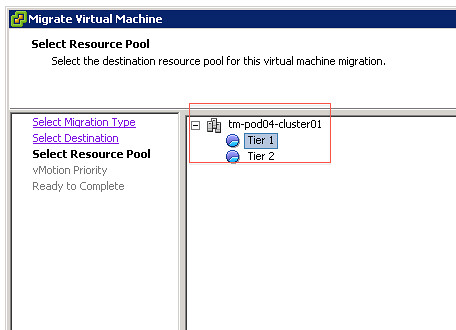
vSphere 5.0 has many new compelling features and enhancements. Sometimes though it is that little tiny enhancement that makes life easier. In this case I am talking about a tiny enhancements for vMotion which I know many of you will appreciate. It is something that both Frank Denneman and I have addressed multiple times with our engineers and finally made it into this release.

Selection Resource Pools?

I guess we have all cursed when we had to manually migrate VMs around and accidentally selected the wrong Resource Pool. This operational “problem” has finally been resolved and I am very happy about it. As of 5.0 the “source” resource pool will automatically be selected. Of course it is still possible to override this and to select a different resource pool but in most cases “next – next – finish” will be just fine.

vMotion and Quick Resume

Duncan Epping · Apr 13, 2011 ·

I was reading up on vMotion today and stumbled on this excellent article by my colleague Kyle Gleed and noticed something that hardly anyone has blogged about…. Quick Resume. Quick Resume is a feature that allows you to vMotion a virtual machine which has a high memory page change rate. Basically when the change rate of your memory pages exceeds the capabilities of your network infrastructure you could end up in a scenario where vMotioning a virtual machine would fail as the change rate would make a switch-over impossible. With Quick Resume this has changed.

Quick Resume enables the source virtual machines to be stunned while starting the destination virtual machine before all pages have copied. However, as the virtual machine is already running at the destination it could possibly attempt to touch (read or write) a page which hasn’t been copied yet. In that case Quick Resume requests the page from the source to allow the guest to complete the action while continuously copying the remaining memory pages until all pages are migrated. But what if the network would fail at that point, wouldn’t you end up with a destination virtual machine which cannot access certain memory pages anymore as they are “living” remotely? Just like Storage IO Control, vMotion leverages shared storage. A special file would be created in the case Quick Resume is used and this file is basically used as a backup buffer. In the case the network would fail this file would allow for the migration to complete. This file is typically in the order of just a couple MBs. Besides being used as a buffer for transferring the memory pages it also enables bi-directional communication between the two hosts allowing the vMotion to complete as though the network hadn’t failed. Is that cool or what?

The typical question that arises immediately  is if this will impact performance? It is good to realize that without Quick Resume vMotioning large memory active virtual machines would be difficult. The switch-over time could potentially be too large and lead to temporary loss of connection with the virtual machine. Although Quick Resume will impact performance when pages that are not copied yet are accessed, the benefits of being able to vMotion very large virtual machines with minimal impact by far outweigh this temporary increase of memory access time.

There is so many cool features and enhancements in vSphere that I just keep being amazed.

VMotion, the story and confessions

Duncan Epping · Nov 11, 2010 · 52 Comments

There is something I always wanted to know and that is how VMotion (yes I am using the old school name on purpose) came to life. After some research on the internet and even on the internal websites I noticed that there are hardly any details to be found.

Now this might be because the story isn’t as exciting as we hope it  will be or because no one took the time to document it. In my opinion however VMotion is still one of the key features VMware offers but even more important it is what revolutionized the IT world. I think it is a great part of VMware history and probably the turning point  for the company. For me personally VMotion literally is what made me decide, years ago, to adopt virtualization and I am certain this goes for many others.

At VMworld I asked around who was mainly responsible for VMotion back in the days but no one really had a clear answer until I bumped into Kit Colbert. Kit, who was still an intern back then, worked closely with the person who originally developed VMotion. I decided to contact the engineer and asked him if he was willing to share the story as there are a million myths floating around.

Before I reveal the real story about how VMotion came to life I want to thank Mike Nelson for revolutionizing the world of IT and taking the time to share this with me and allowing me to share it with the rest of the world. Here is the true story of VMotion:

A bunch of us at VMware came from academia where process migration was popular but never worked in any mainstream OS because it had too many external dependencies to take care of.  The VMware platform on the other  hand provided the ability to encapsulate all of the state of a virtual machine.  This was proven with checkpointing; where we were able to checkpoint a virtual machine, copy the state to another host, and then resume it.  It was an obvious next step that if we could checkpoint to disk and resume on another machine that we should be able to checkpoint over the network to another machine and resume.

During the design phase for what would later become Virtual Center a couple of us discussed the notion of virtual machine migration.  I took the lead and wrote up some design notes. I managed to extract myself from the mainline development of ESX 2.0 and I decided to go off and build a virtual machine migration prototype.  I was able to build a prototype fairly quickly because we already had checkpointing support.  However, of course there was a lot more work done by myself and others to turn the prototype into a high quality product.

I needed something to demo it so I used the pinball application on Windows.  The only interactive app I had on my virtual machines was pinball.  I had two machines side by side each with a display. I would start pinball on a virtual machine on one physical machine.  Then I would start the migration and keep playing pinball. When the pre-copy of memory was done it would pause for a second and then resume on the other machine. I would then keep playing pinball on the other machine.

That’s the VMotion story. Basically VMware had built the underlying technology that made VMotion possible.  All it required was someone to take the time to exploit this technology and build VMotion.

-Mike

The funny thing is that although this might have been the obvious next step for VMware engineering it is something that “shocked” many of us. Most of us will still remember the first time they heard about VMotion or remember it being demoed, and as I stated it is the feature that convinced me to adopt virtualization at large scale, or better said it is responsible for me ending up here! In my case the demo was fairly “simple” as we VMotioned a Windows VM, however we had an RDP session open to the VM and of course we were convinced the session would be dropped. I think we did the actual VMotion more than 10 times as we couldn’t believe it actually worked.

Now I am not the only one who was flabbergasted by this great piece of technology of course hence the reason I reached out to a couple of the well known bloggers and asked if they could tell their VMotion story/confessions…

Cormac Hogan, comachogan.com

So for me, it happened back around 2004 when I was still at EMC. I was part of a team that provided customer support for Unix and Linux platform. I had seen ESX (might have been 2.0) when someone said that I needed to see this new vMotion feature. I didn’t really get it when he said that he had just moved all the VMs from host A to host B. But when he then flicked the power button on host A, and when I saw that all the VMs were still running, then it sunk in. That was then I knew I needed to work for this company!

Truly eye opening experience, which resulted in a career change. How cool is that 🙂

Chad Sakac, virtualgeek.typepad.com

For me, while I remember being amazed from a generic bland use case, the “this is going to change everything” moment occured for me in 2007.

If vmotion is about non-disruptive workload mobility (an amazing concept), where things get crazy cool for me are scenarioes and definitions of “workload” and “mobility” are stretched.

In early 2007, I was in the basement of my house playing with early prototypes of the Celerra VSA running on ESX whiteboxes. It was one of those now-common “russian doll” scenarios where the host powering the VSA was in turn being supported by an iSCSI LUN being presented by the VSA, which in turn supported other VMs. While intellectually obvious that VMotion **should** work, it was never the less amazing to see in it action, with no dropped connection under load.

At that moment, I realized that the workload could be as broad a definition as I wanted, including full blown stacks normally associated with “hardware” like arrays. It was also an “aha” that this could transform a million use cases not normally associated with a server workload.

Ironic side note – the next day, I was showing that concept in the boardroom during a discussion why all our stacks needed to be encapsulated and virtualized. Turns out they were already working on it 🙂

That all said – those “aha moments” happen constantly. Another example – this time more recently – was about stretching the definition of “mobility”. It was during the run-up to VMworld 2010, when we were doing the demo work for the VERY long distance vMotion scenarios with early prototypes of VPLEX Geo. As we dialed up the latency between the ESX hosts on the network and storage – I was very curious to where it would blow up. When it made it past 44ms RTT (for math/physics folks – that’s the latency equivalent of 13,000km at the speed of light!), it was a “wow” moment (BTW, it blew up at 80ms :-)) I need to point out here that it completely violates the VMware support position (and for many, many good reasons – one “it worked in this narrow case in the lab” does not equal “works in the real world”), so don’t try this at home.

BUT it highlighted how, over time, the idea of non-disruptive workload mobility over what TODAY are consider crazy distances, network, and storage configs will tomorrow be considered normal.

vMotion and svMotion never cease to amaze me.

Nothing less than expected of course, some crazy scenario and as Chad states it isn’t supported but it definitely shows the potential of the technology!

Frank Denneman, frankdenneman.nl

During our VCDX sessions in Copenhagen we spoke about  things in your life you would always remember. My reply was ; Seeing  Return of the Jedi in the cinema, the falling of the Berlin wall, 9/11, Pim Fortuyn murder and witnessing vMotion in action for the first time.

I clearly remember my colleague screaming through the wall that separated our office. “Frank do you really want to see something cool?” As an MS exchange admin/architect responsible for a global spanning exchange infrastructure nothing really could impress me those days but  giving him the benefit of the doubt I walked over. Peter sitting there grinning like a madman, offered me a seat, because he thought it was better to sit down. He opened a dos prompt, triggered a continuous ping and showed the virtual infrastructure explaining the current location of the virtual machine. As he started to migrate the virtual machine he instructed me to keep tracking the continuous ping, after the one ping loss he explained the virtual machine was up and running on the other host and to prove me, he powered-down the ESX host. I just leaped out of my seat, said some words I cannot repeat online and was basically sold. I think we  migrated the virtual machine all day long, inviting anyone who passed by our office to see the best show on earth. No explanation needed of course, but from that point I was hooked on virtualization and the rest is history.

I still enjoy explaining people the technology of vMotion and it still ranks in my book as one of the most-kick-ass technologies available today. As Mendel explained in the keynote of VMworld 2006 demonstrating recording an execution stream (now FT), we have the technology and the platform available to do anything we want, the problem is we still haven’t reached the boundaries of our creativity, I fully concur and I think we still haven’t reached the full potential of vMotion.  Heck, I’m off to my lab just to vMotion a bunch of virtual machines.

Can I thank Peter for introducing Frank to the wonderful world of virtualization?

Mike Laverick, rtfm-ed.co.uk

My first VMotion was  demo of media server being moved from one ESX hosts to another – with the buffering switched off. I forget now what movie clip was being shown to the desktops – I think it might have been a Men In Black trailer. Anyway, nothing flickered and nothing stopped – the video just kept on playing without a hick-up.

At that point my mind began to race. I was thinking initially about hardware maintenance. But quickly (this in in ESX2) days began to think of moving VMs around to improve performance, and possibility of moving VMs across large distances. At the time I told my Microsoft chums all about this, and they were very skeptical. Virtualization, they (mis)informed me, was going to be a flash in the pan, and that VMotion was some kind of toy – of course, in a Road to Damascus way now HyperV supports “Live Migrate” its an integral part of virtualization. In truth when I started to demo VMotion to my students occasionally I felt like I was show-boating. This was in the vCenter 1.x days. But in some respects there’s no harm in showboating. It allowed me to demonstrate to students how far ahead VMware was against the competition, and what a visionary are company VMware is. It certainly added to my credibility to have a technology that was so easy to setup (so long as you meet the basic pre-requisites) and the great thing about VMware and the courses is that you didn’t have to “hard sell” the product sold itself.

On a more humorous note I’ve seen all kind of wacky VMotion setups. I once had two PIII servers with a shared DEC JBOD with SCSI personality cables (circa NT4 Clustering configuration) just to get the shared storage running. I managed to get VMotion working with 1997 era equipment. I’ve also been asked by student – who had laser line-of-site connectivity between two buildings – if he could VMotion between them. I laughed and said as long as he could  meet the pre-requisites there would be no reason why not. Although it would definitely be unsupported. Then I smiled and said, if he ever got VMotion working – I would come round in my Dr Evil outfit to explain – VMotion – with laser.

As I already stated, but re-enforced by Mike… VMotion changed the world, and the fact that both Microsoft and Citrix copied the feature definitely supports that claim… now I am wondering if the VMotion across “laser line-of-site connectivity” actually worked or not!

Scott Lowe, blog.scottlowe.org

I remember when I first started testing vMotion (then VMotion, of course). I was absolutely sure that it had to be a trick–surely you can’t move a running workload from 1 physical server to another! I performed my first vMotion with just a standard Windows 2000 server build. It worked as expected. So I tried a Citrix Metaframe server with users logged in. It worked, too. Then I tried a file server while copying files to and from the server. Again, it worked. SSH? Worked. Telnet? Worked. Media server with clients streaming content? Web server while users were accessing pages and downloading files? Active Directory? Solaris? Linux? Everything worked. At this point, after days–even weeks–of unsuccessfully trying to make it fail, I was sold. I was officially hooked on virtualization with VMware.

Thanks for the invitation to share memories about vMotion!

It appears that all top bloggers got hooked on virtualization when they witnessed a VMotion… As I stated at the beginning of this post; VMotion revolutionized the world of IT and I would like to thank VMware and especially Mike Nelson for this great gift! I also like to thank Scott, Mike, Frank and Chad for sharing their stories and I bet many of you are currently having flashbacks of when you first witnessed a VMotion.

Layer 2 Adjacency for vMotion (vmkernel)

Duncan Epping · Aug 19, 2010 ·

Recently I had a discussion around Layer 2 adjacency for the vMotion(vmkernel interface) network. With that meaning that all vMotion interfaces, aka vmkernel interfaces, are required to be on the same subnet as otherwise vMotion would not function correctly.

Now I remember when this used to be part of the VMware documentation but that requirement is nowhere to be found anywhere. I even have a memory of documentation of the previous versions stating that it was “recommended” to have layer-2 adjacency but even that is nowhere to be found. The only reference I could find was an article by Scott Lowe where Paul Pindell from F5 chips in and debunks the myth, but as Paul is not a VMware spokes person it is not definitive in my opinion. Scott also just published a rectification of his article after we discussed this myth a couple of times over the last week.

So what are the current Networking Requirements around vMotion according to VMware’s documentation?

  • On each host, configure a VMkernel port group for vMotion
  • Ensure that virtual machines have access to the same subnets on source and destination hosts
  • Ensure that the network labels used for virtual machine port groups are consistent across hosts

Now that got me thinking, why would it even be a requirement? As far as I know vMotion is all layer three today, and besides that the vmkernel interface even has the option to specify a gateway. On top of that vMotion does not check if the source vmkernel interface is on the same subnet as the destination interface, so why would we care?

Now that makes me wonder where this myth is coming from… Have we all assumed L2 adjacency was a requirement? Have the requirements changed over time? Has the best practice changed?

Well one of those is easy to answer; no the best practice hasn’t changed. Minimize the amount of hops needed to reduce latency, is and always will be, a best practice. Will vMotion work when your vmkernels are in two different subnets, yes it will. Is it supported? No it is not as it has not explicitly gone through VMware’s QA process. However, I have had several discussions with engineering and they promised me a more conclusive statement will be added to our documentation and the KB in order to avoid any misunderstanding.

Hopefully this will debunk this myth that has been floating around for long enough once and for all. As stated, it will work it just hasn’t gone through QA and as such cannot be supported by VMware at this point in time. I am confident though that over time this statement will change to increase flexibility.

References:

  • Integrating VMs into the Cisco Datacenter Architecture (ESX 2.5)
  • Deploying BIG-IP to enable LD vMotion
  • vMotion Practicality
  • http://kb.vmware.com/kb/1002662
  • « Go to Previous Page
  • Page 1
  • Interim pages omitted …
  • Page 3
  • Page 4
  • Page 5
  • Page 6
  • Page 7
  • Page 8
  • Go to Next Page »

Primary Sidebar

About the Author

Duncan Epping is a Chief Technologist and Distinguished Engineering Architect at Broadcom. Besides writing on Yellow-Bricks, Duncan is the co-author of the vSAN Deep Dive and the vSphere Clustering Deep Dive book series. Duncan is also the host of the Unexplored Territory Podcast.

Follow Us

  • X
  • Spotify
  • RSS Feed
  • LinkedIn

Recommended Book(s)

Also visit!

For the Dutch-speaking audience, make sure to visit RunNerd.nl to follow my running adventure, read shoe/gear/race reviews, and more!

Do you like Hardcore-Punk music? Follow my Spotify Playlist!

Do you like 80s music? I got you covered!

Copyright Yellow-Bricks.com © 2026 · Log in