• Skip to primary navigation
  • Skip to main content
  • Skip to primary sidebar

Yellow Bricks

by Duncan Epping

  • Home
  • Unexplored Territory Podcast
  • HA Deepdive
  • ESXTOP
  • Stickers/Shirts
  • Privacy Policy
  • About
  • Show Search
Hide Search

vmotion

Minimum bandwidth requirements per concurrent vMotion?

Duncan Epping · Aug 16, 2013 ·

I have been digging for a long time now to figure out what the minimum bandwidth requirements are per concurrent vMotion. After a long time I finally managed to get a statement. In the past the statement was made that 622Mbps was the minimum required bandwidth for vMotion, it appears that this is incorrect for vSphere 5.0 and higher. With vSphere 5.0 a new feature called Stun During Page Send (SDPS) was introduced and this has decreased the bandwidth requirements from 622Mpbs down to 250Mbps per concurrent vMotion.

Always nice to know right?!
Manual vMotion and using DRS to select a host results in no migration?

Duncan Epping · May 30, 2013 ·

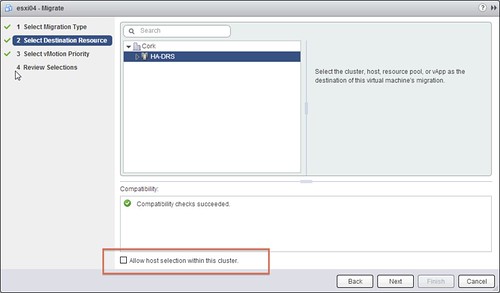
I had a question from a customer last week. He was doing a manual migration on a cluster which had DRS enabled. He was using the vSphere Web Client and was wondering if he should tick the “Allow host selection within this cluster” tickbox or not, as shown in the screen shot below. The customer decided not to tick the “host selection” tickbox and decided that DRS would pick the right destination for the virtual machine. After he clicked “Finish” he noticed that the “relocation” literally finished in seconds and he wondered if anything happened at all… When he looked at the virtual machine he noticed it was still located on the same host, how can that be?

Well the answer is fairly straight forward, in this case the DRS cluster was balanced and that is the typical situation for most clusters out there I would say. When initiating the vMotion workflow the Cluster was selected as a destination so DRS had to figure out what the best destination would be. Considering the cluster was in balance, there would be absolutely no point in moving this virtual machine so what did DRS decide? Indeed, destination = source.

If you are going through this workflow using the Web Client, make sure to tick “Allow host selection within this cluster” and select a destination other than your source… otherwise the effort was pointless.

Manual vMotion

vMotion over VXLAN is it supported?

Duncan Epping · Jan 29, 2013 ·

I have seen this question popping up in multiple places now, vMotion over VXLAN is it supported? I googled it and nothing turned up, so I figured I would write a short statement:

In vSphere 5.1 (and earlier) vMotion over VXLAN is not supported.

This statement might change in the future, it could be that in the next version vMotion traffic over a VXLAN wire will be supported, but with the current release it is not. Do note that vMotioning virtual machines which are attached to a VXLAN network is supported.

The next question people ask typically is, will it work? Yes it probably will, but again… it is not supported. Keep that in mind when you are designing a multi-site environment and want to use VXLAN.

Bandwidth requirements for long distance vMotion

Duncan Epping · Oct 31, 2012 ·

I received a question a while back about the bandwidth requirements for long distance vMotion, aka live migration across distance. I was digging through some of the KBs around stretched clusters and must say they weren’t really clear, or at least not consistently clear…

Thanks everyone. Is Long Distance vMotion still requiring a minimum of 622 (1Gb) in current versions? /cc @duncanyb

— Kurt Bales (@networkjanitor) October 3, 2012

I contacted support and asked them for a statement but have had no clear response yet. The following statements is what I have been able to validate when it comes to “long distance vmotion”. So this is no VMware support statement, but my observations:

  • Maximum latency of 5 milliseconds (ms) RTT (round trip time) between hosts participating in vMotion, or 10ms RTT between hosts participating with Enterprise Plus (Metro vMotion feature).
  • <update>As of 2013 the official required bandwidth is 250Mbps per concurrent vMotion</update>
  • Source and destination vSphere hosts must have a network interface on the same IP subnet and broadcast domain.

There are no longer any direct bandwidth requirements as far as I have been able to validate. The only requirement VMware seems to have are the ones mentioned above around maximum tolerated latency and layer 2 adjacency. If this statement changes I will update this blog post accordingly.

PS: There are various KBs that mention 622Mbps, but there are also various that don’t list it. I have requested our KB team to clear this up.

Say goodbye to the “Transfer LUN” aka “Swing LUN” aka “Stepping Stone”

Duncan Epping · Sep 21, 2012 ·

Every once in a while I go through some articles and see if they need to be revised or not. As there are over 1400 articles on yellow-bricks.com that is not an easy task, I can tell you that. Today I stumbled on this article I wrote early 2010. This article discussed the use of a “swing lun” to limit the amount of LUNs masked to a single host. Let me copy/paste the part that I want to revise:

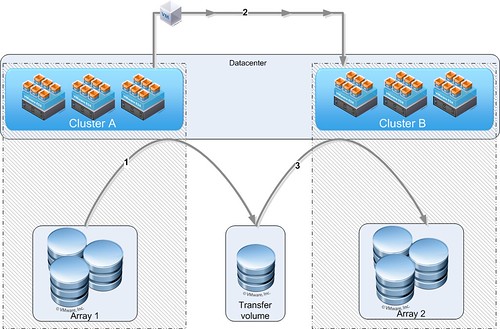
In my design I usually propose a so called “Transfer Volume”. This Volume(NFS or VMFS) can be used to transfer VMs to a different cluster. Yes there’s a slight operational overhead here, but is also reduces overhead in terms of traffic to a LUN and decreases the chance of scsi reservation conflicts etc.

Here’s the process:

  1. Storage VMotion the VM from LUN on Array 1 to Transfer LUN
  2. VMotion VM from Cluster A to Cluster B
  3. Storage VMotion the VM from Transfer LUN to LUN on Array 2

Of course these don’t necessarily need to be two separate arrays, it could just as easily be a single array with a group of LUNs masked to a particular cluster. For the people who have a hard time visualizing it:

I guess this is a great example of why you need to revise your design with every release… This used to be a valid workaround to limit the amount of LUNs attached to a Cluster while maintaining the flexibility to move between clusters using Storage vMotion and vMotion. With vSphere 5.1 that is no longer needed now that we have enhanced functionality for vMotion. (Frank has an awesome vMotion deepdive… read it) Make sure to update your design and make the needed changes to your infrastructure if and when required…

  • « Go to Previous Page
  • Page 1
  • Page 2
  • Page 3
  • Page 4
  • Page 5
  • Interim pages omitted …
  • Page 8
  • Go to Next Page »

Primary Sidebar

About the Author

Duncan Epping is a Chief Technologist and Distinguished Engineering Architect at Broadcom. Besides writing on Yellow-Bricks, Duncan is the co-author of the vSAN Deep Dive and the vSphere Clustering Deep Dive book series. Duncan is also the host of the Unexplored Territory Podcast.

Follow Us

  • X
  • Spotify
  • RSS Feed
  • LinkedIn

Recommended Book(s)

Also visit!

For the Dutch-speaking audience, make sure to visit RunNerd.nl to follow my running adventure, read shoe/gear/race reviews, and more!

Do you like Hardcore-Punk music? Follow my Spotify Playlist!

Do you like 80s music? I got you covered!

Copyright Yellow-Bricks.com © 2026 · Log in