• Skip to primary navigation
  • Skip to main content
  • Skip to primary sidebar

Yellow Bricks

by Duncan Epping

  • Home
  • Unexplored Territory Podcast
  • HA Deepdive
  • ESXTOP
  • Stickers/Shirts
  • Privacy Policy
  • About
  • Show Search
Hide Search

vm

vSphere and the Windows Server Virtualization Validation Program

Duncan Epping · Jun 2, 2009 ·

I just noticed that vSphere has been added to the Windows Server Virtualization Validation Program:

source

Products that have passed the SVVP requirements for Windows Server 2008 R2 are considered supported on Windows Server 2008, Windows 2000 Server SP4 and Windows Server 2003 SP2 and later Service Packs, both x86 32-bit, and x64 64-bit.
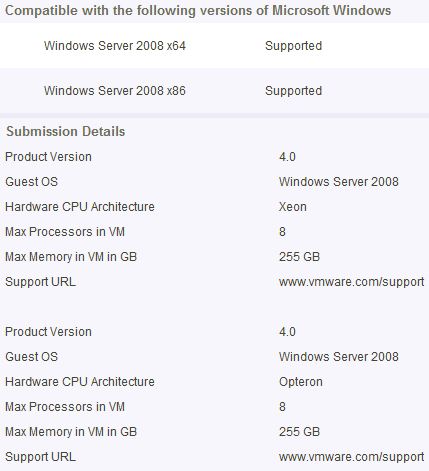
Might come in handy when you need to get support from Microsoft….

How to change the SRM change of power state time out values

Duncan Epping · May 29, 2009 ·

One of my customers recently asked if it was possible to change the time-out for a power state change, at the same time this question was asked and answered on an internal mailing list. I thought it would be nice to document it. An example of a power state change task would be the shutdown that is initiated by SRM when you run a recovery plan. The default value is 120 seconds which might not be long enough and could lead to issues when a power off is forced. You can increase or decrease this value by editing the SRM configuration file (vmware-dr.xml). Look for the following section:

<Recovery>
<powerStateChangeTimeout>120</ powerStateChangeTimeout>
</Recovery>

Like stated above, the time-out value is in seconds. The default value is 120 and it can be changed according to your requirements. This change will be effective when the SRM service has been restarted. (If you can’t find this section in the XML file, just add it…)

VM’s vmware.log rotation options

Duncan Epping · Dec 30, 2008 ·

Yesterday I posted about the article on the hostd, vpxa and vpxd log file options. Today another KB article has been released to setup a rotation scheme for the VM’s log file: vmware.log. Might be worth checking it out and setting it up. You need to change the VM’s vmx file for this to work though. In short:

logging = true or false
log.rotateSize = maximum size in bytes the file can grow to: 10000
log.keepOld = rotation level, amount of log files to keep: 10
log.fileName = change name and path of log file

Virtual Machine tweaks for a better performance

Duncan Epping · Jun 20, 2008 ·

Over the last couple of months I gathered the following tweaks for a better performance insight the virtual machine, besides disabling / uninstalling useless services and devices:

  1. Disable the pre-logon screensaver:
    Open Regedit
    HKEY_USERS\.DEFAULT\Control Panel\Desktop
    Change the value of “ScreenSaveActive” to 0.
  2. Disable updates of the last access time attribute for your NTFS filesystem, especially for i/o intensive vm’s this is a real boost:
    Open CMD
    fsutil behavior set disablelastaccess 1
  3. Disable all visual effects:
    Properties on your desktop
    Appearance -> Effects
    Disable all options.
  4. Disable mouse pointer shadow:
    Control Panel -> Mouse
    Click on the tab “pointers” and switch “enable pointer shadow” off.

So if you’ve got an addition, please post it and I’ll keep updating this blog post!

Storage VMotion add-ons!

Duncan Epping · Jan 4, 2008 ·

I’m not the only one who thinks that the Storage VMotion interface is a burden. A couple of scripting wizards started creating a decent interface for the Storage VMotion script, which definitely come in handy. Check them out:

  • Dominic of VMProfessional created an additional perl script to make storage vmotion a bit easier. It works very simple just edit the script to include your VC url, username, password, cluster and Datacenter, then you will be prompted with a list of VMs to choose from, and a list of target datastore to choose from. Check it out at his website, VMProfessional.
  • ASP24 created a PHP website with some easy to use dropdown boxes. It’s hosted on the VMware VMTN forum. I did not had the opportunity to test it by the way.
  • « Go to Previous Page
  • Page 1
  • Page 2
  • Page 3
  • Go to Next Page »

Primary Sidebar

About the Author

Duncan Epping is a Chief Technologist and Distinguished Engineering Architect at Broadcom. Besides writing on Yellow-Bricks, Duncan is the co-author of the vSAN Deep Dive and the vSphere Clustering Deep Dive book series. Duncan is also the host of the Unexplored Territory Podcast.

Follow Us

  • X
  • Spotify
  • RSS Feed
  • LinkedIn

Recommended Book(s)

Also visit!

For the Dutch-speaking audience, make sure to visit RunNerd.nl to follow my running adventure, read shoe/gear/race reviews, and more!

Do you like Hardcore-Punk music? Follow my Spotify Playlist!

Do you like 80s music? I got you covered!

Copyright Yellow-Bricks.com © 2026 · Log in