• Skip to primary navigation
  • Skip to main content
  • Skip to primary sidebar

Yellow Bricks

by Duncan Epping

  • Home
  • Unexplored Territory Podcast
  • HA Deepdive
  • ESXTOP
  • Stickers/Shirts
  • Privacy Policy
  • About
  • Show Search
Hide Search

virtual san

Designing your hardware for Virtual SAN

Duncan Epping · Oct 9, 2013 ·

Over the past couple of weeks I have been watching the VMware VSAN Community Forum with close interest and also twitter. One thing that struck me was the type of hardware people used for to test VSAN on. In many cases this is the type of hardware one would use at home, for their desktop. Now I can see why that happens, I mean something new / shiny and cool is released and everyone wants to play around with it, but not everyone has the budget to buy the right components… And as long as that is for “play” only that is fine, but lately I have also noticed that people are looking at building an ultra cheap storage solution for production, but guess what?

Virtual SAN reliability, performance and overall experience is determined by the sum of the parts

You say what? Not shocking right, but something that you will need to keep in mind when designing a hardware / software platform. Simple things can impact your success, first and foremost check the HCL, and think about components like:

  • Disk controller
  • SSD / PCIe Flash
  • Network cards
  • Magnetic Disks

Some thoughts around this, for instance the disk controller. You could leverage a 3Gb/s on-board controller, but when attaching lets say 5 disks to it and a high performance SSD do you think it can still cope or would a 6Gb/s PCIe disk controller be a better option? Or even leverage 12Gb/s that some controllers offer for SAS drives? Not only can this make a difference in terms of number of IOps you can drive, it can also make a difference in terms of latency! On top of that, there will be a difference in reliability…

I guess the next component is the SSD / Flash device, this one is hopefully obvious to each of you. But don’t let these performance tests you see on Tom’s or Anandtech fool you, there is more to an SSD then just sheer IOps. For instance durability, how many writes per day for X years life can your SSD handle? Some of the enterprise grades can handle 10 full writes or more per day for 5 years. You cannot compare that with some of the consumer grade drives out there, which obviously will be cheaper but also will wear out a lot faster! You don’t want to find yourself replacing SSDs every year at random times.

Of course network cards are a consideration when it comes to VSAN. Why? Well because I/O will more than likely hit the network. Personally, I would rule out 1GbE… Or you would need to go for multiple cards and ports per server, but even then I think 10GbE is the better option here. Most 10GbE are of a decent quality, but make sure to check the HCL and any recommendations around configuration.

And last but not least magnetic disks… Quality should always come first here. I guess this goes for all of the components, I mean you are not buying an empty storage array either and fill it up with random components right? Think about what your requirements are. Do you need 10k / 15k RPM, or does 7.2k suffice? SAS vs SATA vs NL-SATA? Also, keep in mind that performance comes at a cost (capacity typically). Another thing to realize, high capacity drives are great for… yes adding capacity indeed, but keep in mind that when IO needs to come from disk, the number of IOps you can drive and your latency will be determined by these disks. So if you are planning on increasing the “stripe width” then it might also be useful to factor this in when deciding which disks you are going to use.

I guess to put it differently, if you are serious about your environment and want to run a production workload then make sure you use quality parts! Reliability, performance and ultimately your experience will be determined by these parts.

<edit> Forgot to mention this, but soon there will be “Virtual SAN” ready nodes… This will make your life a lot easier I would say.

</edit>
Virtual SAN news flash pt 1

Duncan Epping · Oct 3, 2013 ·

I had a couple of things I wanted to write about with regards to Virtual SAN which I felt weren’t beefy enough to dedicate a full article to so I figured I would combine a couple of news worthy items and create a Virtual SAN news flash article / series.

  • I was playing with Virtual SAN last week and I noticed something I hadn’t noticed yet… I was running vSphere with an Enterprise license and I added the Virtual SAN license for my cluster. After adding the Virtual SAN license all of a sudden I had the Distributed Switch capability on the cluster I had VSAN licensed. Now I am not sure what this will look like when VSAN will go GA, but for now those who want to test with VSAN and want to use the Distributed Switch you can. Use the Distributed Switch to guarantee bandwidth (leveraging Network IO Control) to Virtual SAN when combining different types of traffic like vMotion / Management / VM traffic on a 10GbE pair. I would highly recommend to start playing around with this and get experienced. Especially because vSphere HA traffic and VSAN traffic are combined on a single NIC pair and you do not want HA traffic to be impacted by replication traffic.
  • The Samsung SM1625 SSD series (eMLC) has been certified for Virtual SAN. It comes in sizes ranging between 100Gb and 800GB and can do up to 120k IOps random read… Nice to see the list of supported SSDs expanding, will try to get my hands on one of these at some point to see if I can do some testing.
  • Most people by now are aware of the challenges there were with the AHCI controller. I was just talking with one of the VSAN engineers who mentioned that they have managed to do a full root cause analysis and pinpoint the root of this problem. Currently there is a team working on solving it and things are looking good and hopefully soon a new driver will be released, when we do I will let you guys know as I realize that many use these controllers in their home-lab.

Virtual SAN and Data Locality/Gravity

Duncan Epping · Sep 30, 2013 ·

I was reading this article by Michael Webster about the benefit of Jumbo Frames. Michael was testing what the impact was from both an IOps and latency perspective when you run Jumbo Frames vs non-Jumbo Frames. Michael saw a clear benefit:

  • Higher IOps
  • Lower latency
  • Lower CPU utilization

I would highly recommend reading Michael’s full article for the details, I don’t want to steal his thunder. Now what was most interesting is the following quote, I highly regard Michael he is a smart guy and typically spot-on:

I’ve heard reports that some people have been testing VSAN and seen no noticeable performance improvement when using Jumbo Frames on the 10G networks between the hosts. Although I don’t have VSAN in my lab just yet my theory as to the reason for this is that the network is not the bottleneck with VSAN. Most of the storage access in a VSAN environment will be local, it’s only the replication traffic and traffic when data needs to be moved around that will go over the network between VSAN hosts.

As I said, Michael is a smart guy and as I’ve seen various people asking questions around this and it isn’t a strange assumption to make that with VSAN most IO will be local, I guess this is kind of the Nutanix model. But VSAN is no Nutanix. VSAN takes a different approach, a completely different approach and this is important to realize.

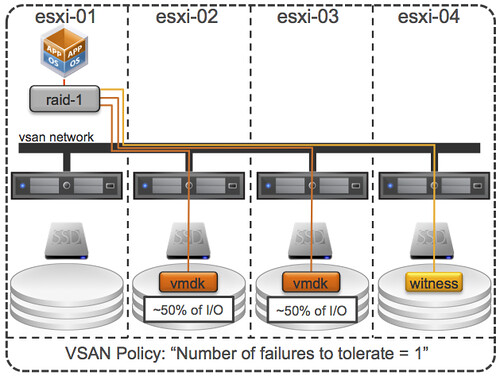
I guess with a very small cluster of 3 nodes Michael chances of IO being local are bigger, but even then IO will not only be local at a minimum 50% (when failures to tolerate is set to 1) due to the data mirroring. So how does VSAN handle this, what are some of the things to keep in mind, lets starts with some VSAN principles:

  • Virtual SAN uses an “object model”, objects are stored on 1 or multiple magnetic disks and hosts.
  • Virtual SAN hosts can access “objects” remotely, both read and write.
  • Virtual SAN does not have the concept of data locality / gravity, meaning that the object does not follow the virtual machine, reason for this is that moving data around is expensive from a resource perspective.
  • Virtual SAN has the capability to read from multiple mirror copies, meaning that if you have 2 mirror copies IO will be distributed equally.

What does this mean? First of all, lets assume you have an 8 host VSAN cluster. You have a policy configured for availability: N+1. This means that the objects (virtual disks) will be on two hosts (at a minimum). What about your virtual machine from a memory and CPU point of view? Well it could be on any of those 8 hosts. With DRS being envoked every 5 minutes at a minimum I would say that chances are bigger that the virtual machine (from a CPU/Memory) resides on one of the 6 hosts that does not hold the objects (virtual disk). In other words, it is likely that I/O (both reads and writes) are being issued remote.

From an I/O path perspective I would like to re-iterate that both mirror copies can and will serve I/O, each would serve ~50% of the I/O. Note that each host has a read cache for that mirror copy, but blocks in read cache are only stored once, this means that each host will “own” a set of blocks and will serve data for those be it from cache or be it from spindles. Easy right?

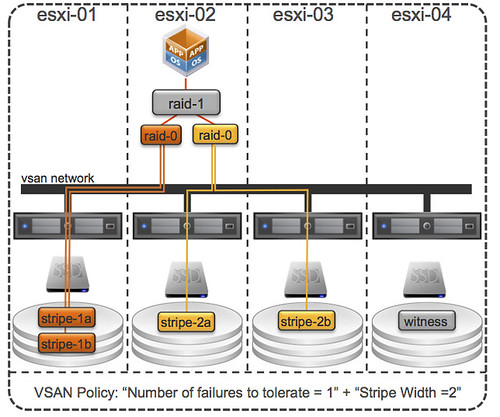
Now just imagine you have configured your “host failures” policy set to 2. I/O can now come from 3 hosts, at a minimum. And why do I say at a minimum? Because when you have the stripe width configured or for whatever reason striping goes across hosts instead of disks (which is possible in certain scenarios) then I/O can come from even more hosts… VSAN is what I would call a true fully distributed solution! Below is an example of “number of failures” set to 1 and “stripe width” set to 2, as can be seen there are 3 hosts that are holding objects.

Lets reiterate that. When you define “host failures” as 1 and stripe width as 1 then VSAN can still, when needed, stripe across multiple disks and hosts. When needed, meaning when for instance the size of a VMDK is larger than a single disk etc.

Now lets get back to the original question Michael asked himself, does it make sense to use Jumbo Frames? Michael’s tests clearly showed that it does, in his specific scenario that is of course. I have to agree with him that when (!!) properly configured it will definitely not hurt, so the question is should you always implement this? I guess if you can guarantee implementation consistency, then conducts tests like Michael did. See if it benefits you, and if it lowers latency and increase IOps I can only recommend to go for it.


PS: Michael mentioned that even when mis-configured it can’t hurt, well there were issues in the past… although they are solved now, it is something to keep in mind.

Virtual SAN webinars, make sure to attend!

Duncan Epping · Sep 29, 2013 ·

Interested in Virtual SAN? VMware is organizing various webinars about Virtual SAN in the upcoming weeks. Last week there was an introduction on VSAN, you can watch the recording here. The next one is by no one less than Cormac Hogan. Cormac will talk about how to install and configure Virtual SAN and will discuss various do’s and don’ts. If anyone has a vast experience with running Virtual SAN than it is Cormac, so make sure to attend this webinar upcoming Wednesday the 2nd of October at 08:30 PDT. Recording can be found here!

There is another great webinar scheduled for Wednesday October the 9th at 08:30 PDT, which is all about Monitoring Virtual SAN. This webinar is hosted by one of the lead engineers on the Virtual SAN product: Christian Dickmann. Christian was also responsible for developing the RVC extensions for VSAN and I am sure he will do a deepdive on how to monitor VSAN, needless to say: highly recommended. I will update this page when I know more around when it will be hosted!

I created a folder on my VSAN datastore, but how do I delete it?

Duncan Epping · Sep 27, 2013 ·

I created a folder on my VSAN datastore using the vSphere Web Client, but when I wanted to deleted it I received this error message that that wasn’t possible. So how do I delete a VSAN folder when I don’t need it any longer? It is fairly straight forward, you open up an SSH session to your host and do the following:

  • change directory to /vmfs/volumes/vsanDatastore
  • run “ls -l” in /vmfs/volumes/vsanDatastore to identify the folder you want to delete
  • run “/usr/lib/vmware/osfs/bin/osfs-rmdir <name-of-the-folder>” to delete the folder

This is what it would look like:

/vmfs/volumes/vsan:5261f0c54e0c785a-81e199f6c9a23d73 # ls -lah
total 6144
drwxr-xr-x    1 root     root         512 Sep 27 03:17 .
drwxr-xr-x    1 root     root         512 Sep 27 03:17 ..
drwxr-xr-t    1 root     root        1.4K Sep 24 05:38 16254152-1469-2c18-3319-002590c0c254
drwxr-xr-t    1 root     root        1.2K Sep 26 01:21 85803a52-6858-ded5-b40b-00259088447a
lrwxr-xr-x    1 root     root          36 Sep 27 03:17 ISO -> e64d1b52-1828-04ca-95a8-00259088447e
lrwxr-xr-x    1 root     root          36 Sep 27 03:17 TestVM -> ed31d351-a222-83bf-bb70-002590884480
drwxr-xr-t    1 root     root        1.4K Sep 27 01:40 cc8ebe51-6881-7dc8-37f8-00259088447e
drwxr-xr-t    1 root     root        1.2K Sep 27 01:52 e64d1b52-1828-04ca-95a8-00259088447e
drwxr-xr-t    1 root     root        1.2K Jul  3 07:52 ed31d351-a222-83bf-bb70-002590884480
lrwxr-xr-x    1 root     root          36 Sep 27 03:17 iso -> 16254152-1469-2c18-3319-002590c0c254
lrwxr-xr-x    1 root     root          36 Sep 27 03:17 las-fg01-vc01.vmwcs.com -> cc8ebe51-6881-7dc8-37f8-00259088447e
lrwxr-xr-x    1 root     root          36 Sep 27 03:17 vmw-iol-01 -> 85803a52-6858-ded5-b40b-00259088447a

/vmfs/volumes/vsan:5261f0c54e0c785a-81e199f6c9a23d73 # /usr/lib/vmware/osfs/bin/osfs-rmdir vmw-iol-01

Deleting directory 85803a52-6858-ded5-b40b-00259088447a in container id 5261f0c54e0c785a81e199f6c9a23d73 backed by vsan

Be careful though, cause when you delete it guess what… it is gone! Yes not being able to delete it using the Web Client is a known issue, and on the roadmap to be fixed.

  • « Go to Previous Page
  • Page 1
  • Interim pages omitted …
  • Page 32
  • Page 33
  • Page 34
  • Page 35
  • Page 36
  • Go to Next Page »

Primary Sidebar

About the Author

Duncan Epping is a Chief Technologist and Distinguished Engineering Architect at Broadcom. Besides writing on Yellow-Bricks, Duncan is the co-author of the vSAN Deep Dive and the vSphere Clustering Deep Dive book series. Duncan is also the host of the Unexplored Territory Podcast.

Follow Us

  • X
  • Spotify
  • RSS Feed
  • LinkedIn

Recommended Book(s)

Also visit!

For the Dutch-speaking audience, make sure to visit RunNerd.nl to follow my running adventure, read shoe/gear/race reviews, and more!

Do you like Hardcore-Punk music? Follow my Spotify Playlist!

Do you like 80s music? I got you covered!

Copyright Yellow-Bricks.com © 2026 · Log in