• Skip to primary navigation
  • Skip to main content
  • Skip to primary sidebar

Yellow Bricks

by Duncan Epping

  • Home
  • Unexplored Territory Podcast
  • HA Deepdive
  • ESXTOP
  • Stickers/Shirts
  • Privacy Policy
  • About
  • Show Search
Hide Search

vcdx

Aligning your VMs virtual hard disks

Duncan Epping · Apr 8, 2010 ·

I receive a lot of hits on an old article regarding aligning your VMDKs. This article doesn’t actually explain why it is important but only how to do it. The how is not actually as important in my opinion. I do however want to take the opportunity to list some of the options you have today to align your VMs VMDKs. Keep in mind that some require a license(*) or login for that matter:

  • UberAlign by Nick Weaver
  • mbralign by NetApp(*)
  • vOptimizer by Vizioncore(*)
  • GParted (Free tool, Thanks Ricky El-Qasem).

First let’s explain why alignment is important. Take a look at the following diagram:
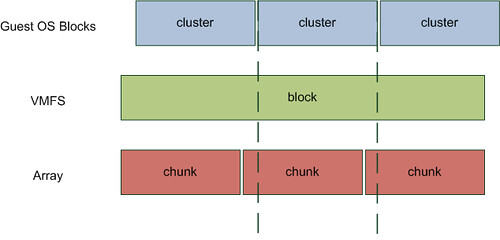
In my opinion there is no need to discuss VMFS alignment. Everyone, and if  you don’t you should!, creates their VMFS via vCenter which means it is automatically aligned and you won’t need to worry about it. However you will need to worry about the Guest OS. Take Windows 2003, by default when you install the OS your partition is misaligned. (Both Windows 7 and Windows 2008 create aligned partitions by the way.) Even when you create a new partition it will be misaligned. As you can clearly see in the diagram above every cluster will span multiple chunks. Well actually it depends. I guess that’s the next thing to discuss but first let’s show what an aligned OS partition looks like:
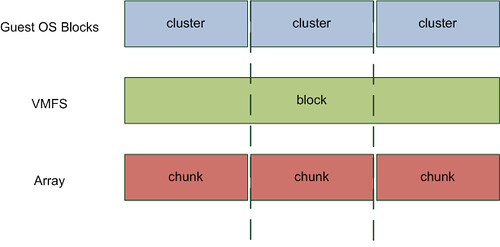
I would recommend everyone to read this document. Although it states at the beginning it is obsolete it still contains relevant details! And I guess the following quote from the vSphere Performance Best Practices whitepaper says it all:

Src
The degree of improvement from alignment is highly dependent on workloads and array types. You might want to refer to the alignment recommendations from your array vendor for further information.

Now you might wonder why some vendors are more effected by misalignment than others. The reason for this is block sizes on the back end. For instance NetApp uses a 4KB block size (correct me if I am wrong). If your filesystem uses a 4KB block size (or cluster size as Microsoft calls it) as well this basically means every single IO will require the array to read or write to two blocks instead of 1 when your VMDK’s are misaligned as the diagrams clearly show.

Now when you take for instance an EMC Clariion it’s a different story. As explained in this article, which might be slightly outdated, Clariion arrays use a 64KB chunk size to write their data which means that not every Guest OS cluster is misaligned and thus EMC Clariion is less effected by misalignment. Now this doesn’t mean EMC is superior to NetApp, I don’t want to get Vaughn and Chad going again ;-), but it does mean that the impact of misalignment is different for every vendor and array/filer. Keep this in mind when migrating and / or creating your design.

What’s the point of setting “–IOPS=1” ?

Duncan Epping · Mar 30, 2010 ·

To be honest and completely frank I really don’t have a clue why people recommend setting “–IOPS=1” by default. I have been reading all these so called best practices around changing the default behaviour of “1000” to “1” but none of these contain any justification. Just to give you an example take a look at the following guide: Configuration best practices for HP StorageWorks Enterprise Virtual Array (EVA) family and VMware vSphere 4. The HP document states the following:

Secondly, for optimal default system performance with EVA, it is recommended to configure the round robin load balancing selection to IOPS with a value of 1.

Now please don’t get me wrong, I am not picking on HP here as there are more vendors recommending this. I am however really curious how they measured “optimal performance” for the HP EVA. I have the following questions:

  • What was the workload exposed to the EVA?
  • How many LUNs/VMFS volumes were running this workload?
  • How many VMs per volume?
  • Was VMware’s thin provisioning used?
  • If so, what was the effect on the ESX host and the array? (was there an overhead?)

So far none of of the vendors have published this info and I very much doubt, yes call me sceptical, that these tests have been conducted with a real life workload. Maybe I just don’t get it but  when consolidating workloads a threshold of a 1000 IOPS isn’t that high is it? Why switch after every single IO? I can imagine that for a single VMFS volume this will boost the performance as all paths will be equally hit and load distribution on the array will be optimal. But for a real life situation where you would have multiple VMFS volumes this effect decreases.  Are you following me? Hmmm, let me give you an example:

Test Scenario 1:

1 ESX 4.0 Host
1 VMFS volume
1 VM with IOMeter
HP EVA and IOPS set to 1 with Round Robin based on the ALUA SATP

Following HP’s best practices the Host will have 4 paths to the VMFS volume. However as the HP EVA is an Asymmetric Active Active array(ALUA) only two paths will be shown as “optimized”. (For more info on ALUA read my article here and Frank’s excellent article here.) Clearly when IOPS is set to 1 and there’s a single VM pushing IOs to the EVA on a single VMFS volume the “stress” produced by this VM would be equally divided on all paths without causing any spiky behaviour. In contrary to what a change of paths every “1000 IOs” might do. Although a 1000 is not a gigantic number it will cause spikes in your graphs.

Now lets consider a different scenario. Let’s take a more realistic one:

Test Scenario 2:

8 ESX 4.0 Hosts
10 VMFS volumes
16 VMs per volume with IOMeter
HP EVA and IOPS set to 1 with Round Robin based on the ALUA SATP

Again each VMFS volume will have 4 paths but only two of those will be “optimized” and thus be used. We will have 160 VMs in total on this 8 Host cluster and 10 VMFS volumes which means 16 VMs per VMFS volume. (Again following all best practices.) Now remember we will only have two optimized paths per VMFS volume and we have 16 VMs driving traffic to a volume, but not only 16 VMs this is also coming from 8 different hosts to these Storage Processors. Potentially each host is sending traffic down every single path to every single controller…

Let’s assume the following:

  • Every VM produces 8 IOps on average
  • Every host runs 20 VMs of which 2 will be located on the same VMFS volume

This means that every ESX host changes the path to a specific VMFS volume every 62 seconds(1000/(2×8)), with 10 volumes that’s a change every 6 seconds on average per host. With 8 hosts in a cluster and just two Storage Processors… You see where I am going? Now I would be very surprised if we would see a real performance improvement when IOPS is set to 1 instead of the default 1000. Especially when you have multiple Hosts running multiple VMs hosted on multiple VMFS volumes. If you feel I am wrong here or work for a Storage Vendor and have access to the scenarios used please don’t hesitate to join the discussion.

<update> Let me point out though that every situation is different, if you have had discussions with your storage vendor based on your specific requirements and configuration and this recommendation was given… Do not ignore it, ask why and if it indeed fits –> implement! Your storage vendor has tested various configurations and knows when to implement what, this is just a reminder that implementing “best practices” blind is not always the best option!</update>

VMware vSphere Design Workshop

Duncan Epping · Mar 24, 2010 ·

A week ago I posted about an upcoming class titled “managing for performance“. As many of you know Scott Drummonds, VMware’s performance guru was involved in crafting this excellent course. This is VMware’s new approach for developing new training material / courses. Course material will be developed with the help of the Subject Matter Experts within the company.

I was fortunate enough to be part of the development team for the VMware vSphere Design Workshop. Notice the “Workshop” part as this course is different then any other VMware course you have done so far. Indeed it is a real workshop and it is all about discussing design considerations with your peers and crafting a design based on specific requirements and constraints. Although it is not an official pre-requisite I would highly recommend this to anyone who wants to become a VCDX. I hope you will enjoy this workshop as much as we did creating it.

Again a great job by the VMware Education Team, I just love this new concept. For those who can’t wait, check this section of the VMware website to see where they are scheduled. And for the Benelux readers, Eric Sloof is running three of these workshops soon… be there!

Source: VMware vSphere: Design Workshop

Module 1: Course Introduction

  • Provide a general overview of the course

Module 2: Design Process Overview

  • Discuss the design methodology, criteria, and approach
  • Introduce an example five-step design process

Module 3: ESX/ESXi Host Design

  • Identify useful information for making host design decisions
  • Analyze best practices and host design alternatives

Module 4: vSphere Virtual Datacenter Design

  • Identify useful information for making vCenter Server, database, cluster, and resource pool design decisions
  • Analyze best practices and vCenter Server, database, cluster, and resource pool design alternatives

Module 5: vSphere Network Design

  • Identify useful information for making network design decisions
  • Analyze best practices and network design alternatives

Module 6: vSphere Storage Design

  • Identify useful information for making storage design decisions
  • Analyze best practices and storage design alternatives

Module 7: Virtual Machine Design

  • Identify useful information for making virtual machine design decisions
  • Analyze best practices and virtual machine design alternatives

Module 8: Management and Monitoring Design

  • Identify useful information for making management and monitoring design decisions
  • Analyze best practices and management and monitoring design alternatives

VCDX – Design and Troubleshooting scenarios

Duncan Epping · Mar 22, 2010 ·

After the VCDX defenses last week in Munich and the defense sessions we had during VMware PEX I want to stress the following from my VCDX Defense blog article:

Next two are role-play based. The panel is the customer and you are the architect. By asking questions, white boarding, discussions you will need to solve an issue or come to a specific solution for the customer. This is something you can not really prepare. Although you may think you will have more than enough time, you will not have time enough. Time flies when the pressure is on. Keep in mind that it’s not the end result that counts for these scenarios, it’s your thought process! (source)

Please read the underlined section several times, it is about showing your skills as an architect/consultant. We do not expect you to to craft a full design in 30 minutes, we expect you to gather requirements and based on the info start crafting a high level overview/design. Or as John stated in his VCDX tips:

  • Scenarios for VCDX defenses test journey to solution, not necessarily the final answer. Whiteboard, talk and ask questions.
  • Troubleshooting scenarios – think of the architecture and implementation approach to resolution. Logs, design, SC commands.

Keep in mind that during the scenarios the panellists are working through a scoring rubric, and have prescreened apps and have specific questions that they need answered in order to score effectively.   So ask questions and LISTEN to the answers!

Scale UP!

Duncan Epping · Mar 17, 2010 ·

Lately I am having a lot of discussions with customers around sizing of their hosts. Especially Cisco UCS(with the 384GB option) and the upcoming Intel Xeon 5600 series with six cores per CPU takes the “Scale Up” discussion to a new level.

I guess we had this discussion in the past as well when 32GB became a commodity. The question I always have is how many eggs do you want to have in one basket. Basically do you want to scale up(larger hosts) or scale out(more hosts).

I guess it’s a common discussion and a lot of people don’t see the impact sizing your hosts correctly. Think about this environment, 250 VMs in total with the need of roughly 480GB of memory:

  • 10 Hosts, each having 48GB and 8 Cores, 25 VMs each.
  • 5 Hosts, each having 96GB and 16 Cores, 50 VMs each.

If  you look at it from an uptime perspective; Would a failure occur in scenario 1 you will lose 10% of your environment. If you look at scenario 2 this is 20%. Clearly the associated cost with the down time for 20% of your estate is higher than for 10% of your estate.

Now it’s not only the associated cost with the impact of a host failure it is also for instance the ability of DRS to load balance the environment. The less hosts you will have the smaller the chances are DRS will be able to balance the load. Keep in mind DRS uses a deviation to calculate the imbalance and simulates a move to see if it results in a balanced cluster.

Another thing to keep in mind is HA. When you design for N+1 redundancy and need to buy an extra host the costs associated for redundancy is high for a scale up scenario. Not only the costs associated are high, the load when the fail-over needs to occur will also increase immense. If you only have 4 hosts and 1 host fails the added load on the 3 hosts will have a higher impact than it would have on for instance 9 hosts in a scale out scenario.

Licensing is another often used argument for buying larger hosts but for VMware it usually will not make a difference. I’m not the “capacity management” or “capacity planning” guru to be honest but I can recommend VMware Capacity Planner as it can help you to easily create several scenarios. (Or Platespin Recon for that matter.) If you have never tried it and are a VMware partner check it out and run the scenarios based on scale up and scale out principles and do the math.

Now, don’t get me wrong I am not saying you should not buy hosts with 96GB but think before you make this decision. Decide what an acceptable risk is and discuss the impact of the risk with your customer(s). As you can imagine for any company there’s a cost associated with down time. Down time for 20% of your estate will have a different financial impact than down time for 10% of your estate and this needs to be weighted against all the pros and cons of scale out vs scale up.

  • « Go to Previous Page
  • Page 1
  • Page 2
  • Page 3
  • Page 4
  • Page 5
  • Page 6
  • Interim pages omitted …
  • Page 9
  • Go to Next Page »

Primary Sidebar

About the Author

Duncan Epping is a Chief Technologist and Distinguished Engineering Architect at Broadcom. Besides writing on Yellow-Bricks, Duncan is the co-author of the vSAN Deep Dive and the vSphere Clustering Deep Dive book series. Duncan is also the host of the Unexplored Territory Podcast.

Follow Us

  • X
  • Spotify
  • RSS Feed
  • LinkedIn

Recommended Book(s)

Also visit!

For the Dutch-speaking audience, make sure to visit RunNerd.nl to follow my running adventure, read shoe/gear/race reviews, and more!

Do you like Hardcore-Punk music? Follow my Spotify Playlist!

Do you like 80s music? I got you covered!

Copyright Yellow-Bricks.com © 2026 · Log in