• Skip to primary navigation
  • Skip to main content
  • Skip to primary sidebar

Yellow Bricks

by Duncan Epping

  • Home
  • Unexplored Territory Podcast
  • HA Deepdive
  • ESXTOP
  • Stickers/Shirts
  • Privacy Policy
  • About
  • Show Search
Hide Search

security

vShield App and layering your design

Duncan Epping · Nov 10, 2011 ·

I started diving in to vShield App and one thing that I like about vShield App is that it allows you to use different types of objects to apply your policies to. Never really put too much thought in to it, but considering the world is more and more changing to policy based management this fits right in. I just wanted to share something that I was working on, any feedback / thoughts are welcome…

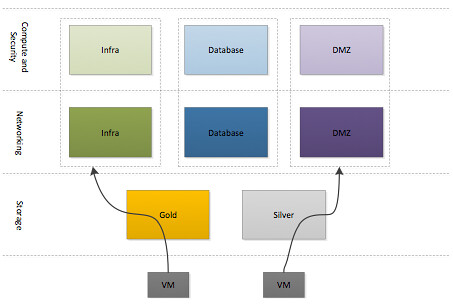
The VMware Cloud Infrastructure aims to reduce operational overhead and lower Total Cost of Ownership (TCO) by simplifying management tasks and abstracting complex processes. The focus of this architecture, as indicated by our customer requirements, is resource aggregation and isolation through the use of pools for each of the crucial pillars: network, storage and compute. Each of the three pillars will be carved in to multiple units of consumption with priority allocated based on their service level agreement. This will be achieved by leveraging core functionality offered by vSphere 5.0. Subsequently vShield App will be used to isolate each of the different type of workloads. As a hypervisor-based application-aware firewall solution, vShield App allows defining policies to logical, dynamic application boundaries (security groups) instead of physical boundaries.

This resource and security layering method will allow for a fast and safe deployment of new workloads.

Each of the different types of resources are carved up in to different groups for each of the respective workload types. A virtual machine, or vApp, will be deployed in one of the three different compute and security groups after which a specific networking group will be selected and a storage tier. Compute, Security and Network  group types are currently defined based on the different type of workloads this virtual infrastructure will host. In the future additional blocks may be added based on the requirements of the internal customers and the different types of workloads being deployed…
Anti-virus and the impact in virtualized environments

Duncan Epping · Feb 16, 2011 ·

I was reading Richard Garsthagen’s article about anti-virus solutions yesterday and decided that this deserved a little bit of extra attention as it is an often overlooked area when it comes to architecture and impact. As Richard points out the difference in terms of load that it generates and overhead is enormous. All of these combined will most definitely result in an increase of consolidation ratio. Not only that but is will also seriously lower the risk during for instance a VDI boot storm but also think about the impact of HA initiated restarts. This could cause an enormous amount of IOps and CPU/Memory overhead which in its turn could impact the other virtual machines.

I guess there is no point in rehashing what is written in the whitepaper of what Richard wrote, I just want to point out the whitepaper as I believe it is a good read. As always results may vary but it is pretty obvious that from an architectural and operational perspective End Point Security is most definitely worth looking into and I cannot wait for more vendors to jump on the bandwagon. Download the tolly report here. (I personally found the disk results very interesting…)

VMware vCloud Director Security Hardening Guide

Duncan Epping · Sep 16, 2010 ·

For those looking into deploying vCloud Director (vCD), VMware just published a white paper titled “VMware vCloud Director Security Hardening Guide”. I reviewed the document a couple of weeks ago and thought it was a really good read!

Download:
http://www.vmware.com/files/pdf/techpaper/VMW_10Q3_WP_vCloud_Director_Security.pdf

Description

The VMware® vCloud™ Director Security Hardening Guide helps users who are embarking into the journey of cloud computing understand key security elements and technologies found in VMware’s vCloud Director product. It also provides guidelines and best practices for installation, configuration and operation of secure clouds based on VMware’s vCloud Director.

Workaround for: ESX(i) 4.1 Password Issue

Duncan Epping · Jul 20, 2010 ·

As many of you already know there is an issue with the encryption mechanism of ESX(i) 4.1. When passwords are used which are longer than 8 characters the password will be truncated after the 8th character. As such during authentication only the first 8 characters are used. In other words if you have  a 10 character password you will only need to type the first 8 characters correct and the rest can be completely random.

The KB article that was published yesterday contains a workaround to change this behaviour. I recommend everyone to read the article and implement this workaround when your password policy describes passwords longer than 8 characters.

Hytrust Labs….

Duncan Epping · May 13, 2010 ·

During VMware Tech Summit last week one of the few Labs I did get to do myself was the Hytrust Lab. Roughly a year ago I first got introduced to Hytrust.

Hytrust is a policy driven appliance which enhances security and auditing for virtualized environments. Although I had seen multiple demos I had never actually played around with it. I must say I was pleasantly surprised at Tech Summit.

Hytrust sits in between you, the user/admin, and the vCenter/ESX. Basically it proxies the requests based on your role. If the role has no permissions on the specific “task” it will return a message stating “permission denied by Hytrust”.

Now that sounds cool doesn’t it? I guess what was even more impressing was the fact that with Hytrust this also works on ESXi. Yes you are reading that correct, role based “unsupported” mode access to ESXi, that’s something VMware doesn’t even offer at the moment. I tested it, it works great! (Yeah I know it is still not supported, but it does offer a solution to those who need it.)

Another cool thing is the configuration templates for Hosts. It basically enables assessment of security configuration. Hytrust contains several pre-built templates including for instance VMware’s Security Hardening Best Practices. Not only assessment but also the option to remediate when needed.

And I haven’t even talked about the auditing functionality yet. As Hytrust proxies all commands, it is just a small step for them to log all the info and make it audit-able….

After playing around with in Hytrust I fully understand why Cisco invested, it rocks. Just try it out. The Community Edition, free for up to three hosts is available here: Hytrust Appliance v2.0 Community Edition

  • « Go to Previous Page
  • Page 1
  • Page 2
  • Page 3
  • Page 4
  • Page 5
  • Page 6
  • Interim pages omitted …
  • Page 8
  • Go to Next Page »

Primary Sidebar

About the Author

Duncan Epping is a Chief Technologist and Distinguished Engineering Architect at Broadcom. Besides writing on Yellow-Bricks, Duncan is the co-author of the vSAN Deep Dive and the vSphere Clustering Deep Dive book series. Duncan is also the host of the Unexplored Territory Podcast.

Follow Us

  • X
  • Spotify
  • RSS Feed
  • LinkedIn

Recommended Book(s)

Also visit!

For the Dutch-speaking audience, make sure to visit RunNerd.nl to follow my running adventure, read shoe/gear/race reviews, and more!

Do you like Hardcore-Punk music? Follow my Spotify Playlist!

Do you like 80s music? I got you covered!

Copyright Yellow-Bricks.com © 2026 · Log in