• Skip to primary navigation
  • Skip to main content
  • Skip to primary sidebar

Yellow Bricks

by Duncan Epping

  • Home
  • Unexplored Territory Podcast
  • HA Deepdive
  • ESXTOP
  • Stickers/Shirts
  • Privacy Policy
  • About
  • Show Search
Hide Search

ha

Did you know? All hosts failed…

Duncan Epping · Oct 22, 2010 ·

** for vSphere 5.0 check this update! **

Today I received a very valid question around a full cluster failure. What happens when all the hosts in a cluster go down and at some point return? Will the VMs be restarted and what do I need to have in place to ensure they will?

It seems to be an urban myth that you need to use “auto-start” for a full cluster failure. But as you might have noticed that won’t work when HA is enabled. So what will?

VMware HA

Is it really that simple? Yes it is! When a full cluster fails and nodes start powering up HA will restart the VMs. As you know HA (or to be precise the primary nodes) maintains the host states, which includes the status of all VMs on those hosts. When one of the primary nodes returns to duty it will trigger the restarts based on the last known state. Make sure you set the restart priority correct so that any VMs hosting “management apps” will be booted up first.

It can’t get any simpler than that can it!
HA, the missing link…

Duncan Epping · Oct 20, 2010 ·

One of the things that has always been missing from VMware’s High Availability solution stack is application awareness. As I explained in one of my earlier posts this is something that VMware is actively working on. Instead of creating a full App clustering level VMware decided to extend “VM Monitoring” and created an API to enable App level resiliency.

At VMworld I briefly sat down with Tom Stephens who is part of the Technical Marketing Team as an expert on HA and of course the recently introduced App Monitoring. Tom explained me what App Monitoring enables our partners to do and he used Symantec as the example. Symantec monitors the Application and all its associated services and ensure appropriate action is taken depending on the type of failure. Now keep in mind, it is still a single node so in case of OS maintenance their will be a short downtime. However, I personally feel that this does bridge a gap, this could add that extra 9 and that extra level of assurance your customer needs for his tier-1 app.

Not only will it react to a failover, but it also ensures for instance that all service are stopped and started in the correct order if and when needed. Now think about that for a second, you are doing maintenance during the weekend and need to reboot some of the Application Servers which are owned by someone else. This feature would enable you to reboot the machine and guarantee that the App will be started correctly as it knows the dependencies!

Tom recently published a great article about this new HA functionality and the key benefits of it, make sure you read it on the VMware Uptime blog!

VMware High Availability – Futures (part of BC7803)

Duncan Epping · Oct 14, 2010 ·

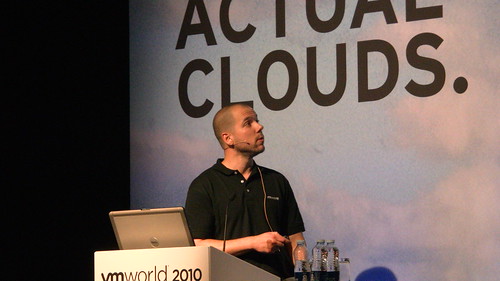
First of all need me start by thanking everyone who attended our session at VMworld Copenhagen. First session filled up quick and 5 minutes before we were supposed to start they had to close the doors as the place was packed. I can tell you that is the best compliment you can get! I know a bunch of people took pictures of the session, if you did we would appreciate it if you could sent me a copy! (Eric Sloof shot a video, thank Eric!)

There is something that was discussed during the presentation and actually mentioned on the very last slide which I wanted to share with all of you and that is around some of the HA futures. Now I am not going to fully elaborate on these as I don’t want to get into any NDA related issues, but I will try to add a bit more detail as soon as I have the whole video of the session. (I need to know the boundaries.)

  • All New Architecture, a single lightweight HA agent process
  • Eliminate concept of “Primaries”
  • Storage heartbeating as backup communication channel
  • Automatic resolution of network partitions
  • VMs still protected during partitions, no “fighting” for VM control
  • Greater scalability, extensible
  • Ability to deal with any number of simultaneous host failures
  • New lightweight communication model
  • All state required to recover from any failure is persisted
  • Improved isolation actions (VMs left running and restarted as needed via storage subsystem monitoring)
  • No dependencies on DNS

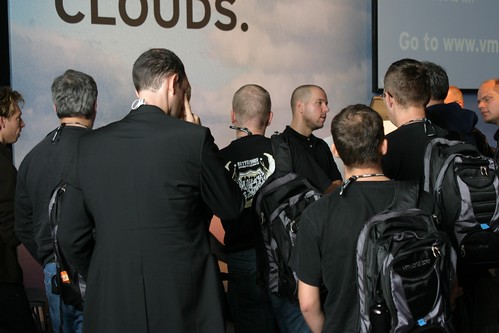
All the people rounding up after the session with questions (Thanks Jannie Hanekom!) …

duncan epping vmworld 2010 copenhagen
And of course a big thanks to Eric Sloof for this picture:
duncan epping vmworld 2010 copenhagen

Application Monitoring (HA)

Duncan Epping · Sep 10, 2010 ·

Over the last couple of weeks I received multiple questions around Application Monitoring. Application Monitoring is part of the HA stack. Application Monitoring is a feature of VM Monitoring and similar to VM Monitoring the VMware Tools heartbeat mechanism is used to detect outages.

Currently the API is only available to a select group of partners who are delivering a solution based on the App Monitoring API. However in the future it should be available to everyone as part of the Guest SDK, but unfortunately I can’t give you a time frame or more details around that. Some of you might have seen one of the recent announcements by Symantec. Symantec’s solution is actually based on VMware App Monitoring and I believe they were the first to announce that they would be using it. If you have seen other announcements let me know!

I have been told that VMware is currently looking into integrating some of it’s app with App Monitoring. In my opinion the most obvious ones that would benefit from this integration would be vCenter, SRM, View, Zimbra, vShield etc. However that is pure speculation and I seriously don’t know if VMware is planning anything around these products.

So in short, Application Monitoring uses the VMware Tools Heartbeat mechanism to detect an app failure. App Monitoring relies on the application to tell it if it needs to be restarted or not…. It is the responsibility of the application developer to utilize this functionality. I am trying to dig up more details around the innerworkings but unfortunately there isn’t more I can disclose at this point in time.

Hopefully this tiny bit of extra info is useful.

Soon in a book store near you! HA and DRS Deepdive

Duncan Epping · Aug 25, 2010 ·

Over the last couple of months Frank Denneman and I have been working really hard on a secret project. Although we have spoken about it a couple of times on twitter the topic was never revealed.

Months ago I was thinking about what a good topic would be for my next book. As I already wrote a lot of articles on HA it made sense to combine these and do a full deepdive on HA. However a VMware Cluster is not just HA. When you configure a cluster there is something else that usually is enabled and that is DRS. As Frank is the Subject Matter Expert on Resource Management / DRS it made sense to ask Frank if he was up for it or not… Needless to say that Frank was excited about this opportunity and that was when our new project was born: VMware vSphere 4.1 – HA and DRS deepdive.

As both Frank and I are VMware employees we contacted our management to see what the options were for releasing this information to market. We are very excited that we have been given the opportunity to be the first official publication as part of a brand new VMware initiative, codenamed Rome. The idea behind Rome along with pertinent details will be announced later this year.

Our book is currently going through the final review/editing stages. For those wondering what to expect, a sample chapter can be found here. The primary audience for the book is anyone interested in high availability and clustering. There is no prerequisite knowledge needed to read the book however, the book will consist of roughly 220 pages with all the detail you want on HA and DRS. It will not be a “how to” guide, instead it will explain the concepts and mechanisms behind HA and DRS like Primary Nodes, Admission Control Policies, Host Affinity Rules and Resource Pools. On top of that, we will include basic design principles to support the decisions that will need to be made when configuring HA and DRS or when designing a vSphere infrastructure.

I guess it is unnecessary to say that both Frank and I are very excited about the book. We hope that you will enjoy reading it as much as we did writing it. Stay tuned for more info, the official book title and url to order the book. We hope to be able to give you an update soon.

Frank and Duncan

  • « Go to Previous Page
  • Page 1
  • Interim pages omitted …
  • Page 35
  • Page 36
  • Page 37
  • Page 38
  • Page 39
  • Interim pages omitted …
  • Page 54
  • Go to Next Page »

Primary Sidebar

About the Author

Duncan Epping is a Chief Technologist and Distinguished Engineering Architect at Broadcom. Besides writing on Yellow-Bricks, Duncan is the co-author of the vSAN Deep Dive and the vSphere Clustering Deep Dive book series. Duncan is also the host of the Unexplored Territory Podcast.

Follow Us

  • X
  • Spotify
  • RSS Feed
  • LinkedIn

Recommended Book(s)

Also visit!

For the Dutch-speaking audience, make sure to visit RunNerd.nl to follow my running adventure, read shoe/gear/race reviews, and more!

Do you like Hardcore-Punk music? Follow my Spotify Playlist!

Do you like 80s music? I got you covered!

Copyright Yellow-Bricks.com © 2026 · Log in