• Skip to primary navigation
  • Skip to main content
  • Skip to primary sidebar

Yellow Bricks

by Duncan Epping

  • Home
  • Unexplored Territory Podcast
  • HA Deepdive
  • ESXTOP
  • Stickers/Shirts
  • Privacy Policy
  • About
  • Show Search
Hide Search

esxi

The Compatibility Guides are now updated with VSAN and vFlash info!

Duncan Epping · Sep 23, 2013 ·

For those wanting to play with Virtual SAN (VSAN) and vSphere Flash Read Cache (vFRC / vFlash), the compatibility guides are being updated at the moment. Hit the following URL to find out what is currently supported and what not:

  • vmware.com/resources/compatibility/
  • For vSphere Flash Read Cache:
    • Select “VMware Flash Read Cache” from the drop down list titled “What are you looking for”.
    • Hit “update and view results”
  • For Virtual SAN:
    • Select “Virtual SAN (beta)” from the drop down list titled “What are you looking for”
    • Select “ESXi 5.5” and click “Next”
    • Select a category (server, i/o controller, hdd, ssd), at the time of writing only server was available
    • Select the type of Server and click next
    • Now a list is presented of supported servers

I know both lists are short today, this is an on-going efforts and I know many vendors are now wrapping up and submitting their test reports, more to be added over the course of the next couple of weeks so keep on coming back to the compatibility guide.
vSphere 5.5 nuggets: Change Disk.SchedNumReqOutstanding per device!

Duncan Epping · Sep 3, 2013 ·

Always wanted to change Disk.SchedNumReqOutstanding per device instead of per host? Well now with vSphere 5.5 you can! I didn’t know about this either, but my colleague Paudie pointed this out. Useful feature when you have several storage arrays and you need to tweak these values, now lets be clear… I do not recommend tweaking this, but in the case you need to you can now do it per device using esxcli.

Get the current configured value for a specific device:
esxcli storage core device list --device <device>

Set the value for a specific device::
esxcli storage core device set -d <device> -O <value between 1-256>.

ESXi “Management traffic” tickbox, what does it do?

Duncan Epping · Aug 14, 2013 ·

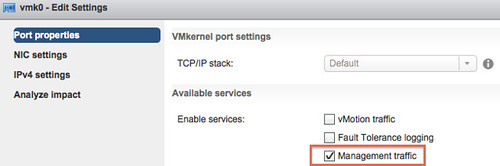
I have seen this popping up various times over the last few years. That little tickbox on your VMkernel NIC that says “Management traffic” (aka management network) what is it for? What if I untick it, will SSH to that VMkernel still work? Will the HA heartbeat still work? Can I still ping the VMkernel NIC? Those are all questions I have had in the past, and I can understand why… I would say that the term “Management traffic” is really really poorly chosen, but why?

The feature described as “Management traffic” does nothing more than enabling that VMkernel NIC for HA heartbeat traffic. Yes that is it. Even if you disable this feature, management traffic, you can still use the VMkernel’s associated IP address for adding it to vCenter Server. You can still SSH that VMkernel associated IP address if you have SSH enabled. So keep that in mind.

Yes I fully agree, very confusing but there you have it: the “management traffic” enables the HA heartbeat network, nothing more and nothing less.

Pinging from different VMkernel NICs using esxcli?

Duncan Epping · May 27, 2013 ·

Today I had a network issue in my lab, I still don’t have a clue what the issue was but I did discover something useful. I had 3 different VMkernel’s setup and I wanted to make sure each of the three had network connection to a specific destination address. After going through the esxcli command I bumped in to the following command which I found very helpful:

esxcli network diag ping -I vmk0 -H 10.27.51.132

In this case I use VMkernel Interface “vmk0” to ping to the address “10.27.51.132”. If I want to use a different VMkernel Interface I just specify it, so swap “vmk0” with “vmk1” for instance. Useful right?!

How to disable ESXi firewall

Duncan Epping · Jan 23, 2013 ·

For a project I had to disable the ESXi firewall on a host permanently. To be honest, it isn’t something I would do normally or would recommend even. It wasn’t listed in “chkconfig”, which kinda makes sense, so I looked at the networking section of esxcli. What an awesome command by the way! Quickly after “tab’ing” through esxcli I figured out how to disable it permanently:

esxcli network firewall set --enabled false

I figured I would write it down, because this is the stuff I tend to forget easily.

PS: If you ever need anything around esxcli, the vSphere Blog is a good place to check as most of the relevant posts are tagged with “esxcli”.

  • « Go to Previous Page
  • Page 1
  • Interim pages omitted …
  • Page 3
  • Page 4
  • Page 5
  • Page 6
  • Page 7
  • Interim pages omitted …
  • Page 66
  • Go to Next Page »

Primary Sidebar

About the Author

Duncan Epping is a Chief Technologist and Distinguished Engineering Architect at Broadcom. Besides writing on Yellow-Bricks, Duncan is the co-author of the vSAN Deep Dive and the vSphere Clustering Deep Dive book series. Duncan is also the host of the Unexplored Territory Podcast.

Follow Us

  • X
  • Spotify
  • RSS Feed
  • LinkedIn

Recommended Book(s)

Also visit!

For the Dutch-speaking audience, make sure to visit RunNerd.nl to follow my running adventure, read shoe/gear/race reviews, and more!

Do you like Hardcore-Punk music? Follow my Spotify Playlist!

Do you like 80s music? I got you covered!

Copyright Yellow-Bricks.com © 2026 ยท Log in