• Skip to primary navigation
  • Skip to main content
  • Skip to primary sidebar

Yellow Bricks

by Duncan Epping

  • Home
  • Unexplored Territory Podcast
  • HA Deepdive
  • ESXTOP
  • Stickers/Shirts
  • Privacy Policy
  • About
  • Show Search
Hide Search

esxi

VMFS/LUN size?

Duncan Epping · Jun 23, 2009 ·

A question that pops up on the VMTN Community once every day is what size VMFS datastore should I create? The answer always varies,  one says “500Gb” the other says “1TB”. Now the real answer should be, it depends.

Most companies can use a simple formula in my opinion. First you should answer these questions:

  • What’s the maximum amount of VMs you’ve set for a VMFS volume?
  • What’s the average size of a VM in your environment? (First remove the really large VM’s that typically get an RDM.)

If you don’t know what the maximum amount of VMs should be just use a safe number, anywhere between 10 and 15. Here’s the formula I always use:

round((maxVMs * avgSize) + 20% )

I usually use increments of 25GB. This is where the round comes in to play. If you end up with 380GB round it up to 400GB and if you end up with 321GB round it up to 325GB. Let’s assume your average VM size is 30GB and your max amount of VMs per VMFS volume is 10:

(10*30) + 60 =360
360 rounded up -> 375GB
ESX Deployment Appliance v0.90

Duncan Epping · Jun 14, 2009 ·

For those who don’t own vSphere Enteprise Plus licenses it’s a bit more difficult to set up a consistent virtual environment. I’m glad Herco van Brug aka Brugh put a lot of time and effort in developing the ESX Deployment Appliance.

Herco just released a brand new version, v0.90. Here are the release notes:

  • ESX 4 support
  • ESXi 4 support (installable and stateless!)
  • ESX 4 script parts (post any good scriptparts on this forum or PM me and I’ll integrated it into the appliance)
  • new first config screen
  • some bugs removed (patch system, backups, host input routine, apache tweaks)

Download it now!

vSphere ESXi on a USB memory stick

Duncan Epping · Jun 9, 2009 ·

***Please use this supported method instead of the one below***

The procedure has not changed much since ESXi 3.5 but I thought I would document it anyway. A lot of people seem to end up here by googling “USB ESXi vSphere”.


Here you go:

  1. First get the following tools: 7-Zip(Free), WinImage(Demo)
  2. Download the ESXi ISO (VMware-VMvisor-Installer-4.0.0-164009.x86_64.iso)
  3. Open the ISO with 7-Zip
  4. Open “image.tgz” with 7-Zip
  5. Browse to “image.tgz.temptarusrlibvmwareinstallerVMware-VMvisor-big-164009-x86_64.dd.bz2”
  6. Extract “VMware-VMvisor-big-164009-x86_64.dd”
  7. Open WinImage and go to Disk, click on “Restore Virtual Harddisk Image on physical drive”
  8. Select a physical drive
  9. Select “VMware-VMvisor-big-164009-x86_64.dd”
  10. And click “yes” to write the DD image to the USB Disk

Done! Now, let’s see if I can get my old Dell GX620 running with vSphere ESXi

vSphere HA Isolation Response

Duncan Epping · May 24, 2009 ·

As of VMware vCenter 2.5 Update 2 the HA default isolation response changed from “Power Off” to “Leave powered on”. A lot of people liked this new default setting because it would lower the chances of downtime due to a “false positive”. I’ve never been a fan though, I just don’t like using degraded hardware or a degraded ESX host for that matter.

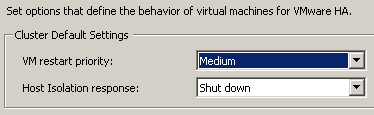
Those that did like the change should take notice of the fact that with vSphere comes a new default isolation response:

Note that this change is only for new clusters, if you upgrade(d) your vCenter the selected isolation response will remain. For those of you who never looked into the setting “Shut down”, it uses VMware Tools to initiate a guest shut down. If the shut down does not complete within five minutes the VM will be powered off. These five minutes are a configurable setting, if you want to increase or decrease it add the following advanced option das.isolationShutdownTimeout with the new value in seconds.

Updating an ESXi server with Vendor agents…

Duncan Epping · May 14, 2009 ·

I just received a very useful email on a VMware internal mailing list and thought I would share it with you guys.

Here’s the question:

I want to update ESXi U3 to U4. My ESXi contains specific vendor modules for monitoring. (HP for instance) When I do the updates will these modules be removed or will they be upgraded?

And the answer:

Source article, page 10 : http://www.vmware.com/files/pdf/ESXi_management.pdf

The core hypervisor code also can contain custom code provided by server vendors (OEMs) that provides additional functionality, such as hardware monitoring and support information. These customizations would be present, for example, if ESXi had been obtained in embedded form from the server manufacturer or if a custom version of ESXi was installed onto the hard drive. Any update to an existing ESXi installation automatically incorporates the proper update to this custom code. The process is described in greater detail in the following section.

In a doc that HP provides to its customers on updating ESXi, it states that the HP CIM providers are updated as well, provided they are installed before the Update. Does that mean that the Update that VUM pulls from our site includes newest versions of all CIM providers and the installer just upgrades any existing?

This is correct. VUM pulls a bundle with the latest customizations from all OEMs and will deploy that customization based on what is already on the user’s machine. As HP has stated, if the customer has a standard, VMware image, he will continue to get that image. However, if a customer has deployed a customized (by Dell, HP, IBM, etc.) image, then the update will also include any customization updates from the OEM. There is no additional dependence from the OEM.

Thanks Mr. Tom Vandenbosch. (My fav. inside SE – Benelux ;-))

  • « Go to Previous Page
  • Page 1
  • Interim pages omitted …
  • Page 38
  • Page 39
  • Page 40
  • Page 41
  • Page 42
  • Interim pages omitted …
  • Page 66
  • Go to Next Page »

Primary Sidebar

About the Author

Duncan Epping is a Chief Technologist and Distinguished Engineering Architect at Broadcom. Besides writing on Yellow-Bricks, Duncan is the co-author of the vSAN Deep Dive and the vSphere Clustering Deep Dive book series. Duncan is also the host of the Unexplored Territory Podcast.

Follow Us

  • X
  • Spotify
  • RSS Feed
  • LinkedIn

Recommended Book(s)

Also visit!

For the Dutch-speaking audience, make sure to visit RunNerd.nl to follow my running adventure, read shoe/gear/race reviews, and more!

Do you like Hardcore-Punk music? Follow my Spotify Playlist!

Do you like 80s music? I got you covered!

Copyright Yellow-Bricks.com © 2026 · Log in