• Skip to primary navigation
  • Skip to main content
  • Skip to primary sidebar

Yellow Bricks

by Duncan Epping

  • Home
  • Unexplored Territory Podcast
  • HA Deepdive
  • ESXTOP
  • Stickers/Shirts
  • Privacy Policy
  • About
  • Show Search
Hide Search

esxi

ESXi and the update manager part II

Duncan Epping · Jul 14, 2009 ·

A couple of days ago I posted about Update Manager wanting to install updates regarding the Nexus while I did not have the Nexus installed. I’ve rebuild my entire test environment with the latest(GA) build and noticed that I’m not experiencing these issues anymore. Now I’ve either had an outdated version of VUM, a screwed up database or I was sleeping when I wanted to apply the patches. Normally I take screenshots when things like this happen but because I did not have much time I did not take them.

I reinstalled my test environment again this morning and again I’m not able to reproduce it. The patch only installs when the Cisco Nexus 1000v is installed. It seems like my observation was wrong, I do however think it’s a smart thing not trust on technology for 100%, check your baseline before you apply it.
vSphere ESXi and the update manager

Duncan Epping · Jul 12, 2009 ·

I was playing around with vSphere ESXi 4.0 and the Update Manager. As Jason Boche already reported several patches have been released and I wanted to test Update Manager. After downloading all the patches I noticed that there was a patch regarding the Cisco Nexus 1000v.

Although I did not have the 1000v installed Update Manager did want to install the patch. Kind of weird because why install the patch when you are not using the plugin? I decided to exclude it from my baseline to make sure I did not install it.

I was lucky to notice it because according to this KB article it can and probably will cause issues. If you did install it read the KB article on how to remove the patch!

Now this made me rethink my patching strategy. Normally I just install every single patch out there to make sure I am running the latest and greatest version, but apparently this is not the best practice anymore. My recommendation: review your patches and if it doesn’t apply to you exclude them!

Max amount of VMs per VMFS volume

Duncan Epping · Jul 7, 2009 ·

Two weeks ago I discussed how to determine the correct LUN/VMFS size. In short it boils down to the following formula:

round((maxVMs * avgSize) + 20% )

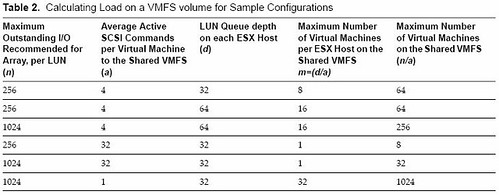
So in other words, the max amount of virtual machines per volume multiplied by the average size of a virtual machine plus 20% for snaps and .vswp rounded up. (As pointed out in the comments if you have VMs with high amounts of memory you will need to adjust the % accordingly.) This should be your default VMFS size. Now a question that was asked in one of the comments, which I already expected, was “how do I determine what the maximum amount of VMs per volume is?”. There’s an excellent white paper on this topic. Of course there’s more than meets the eye but based on this white paper and especially the following table I decided to give it a shot:

No matter what I tried typing up, and believe me I started over a billion times, it all came down to this:

  1. Decide your optimal queue depth.
    I could do a write up, but Frank Dennenman wrote an excellent blog on this topic. Read it here and read NetApp’s Nick Triantos article as well. But in short you’ve got two options:

    • Queue Depth = (Target Queue Depth / Total number of LUNs mapped from the array) / Total number of hosts connected to a given LUN
    • Queue Depth = LUN Queue Depth / Total number of hosts connected to a given LUN

    There are two options because some vendors use a Target Queue Depth and others specifically specify a LUN Queue Depth. In the case they mention both just take the one which is most restrictive.

  2. Now that you know what your queue depth should be you, let’s figure out the rest.
    Let’s take a look at the table first. I added “mv” as it was not labeled as such in the table.
    n = LUN Queue Depth
    a = Average active SCSI Commands per server
    d = Queue Depth (from a host perspective)

    m = Max number of VMs per ESX host on a single VMFS volume
    mv = Max number VMs on shared VMFS volume

    First let’s figure out what “m”, max number of VMs per host on a single volume, should be:

    • d/a = m
      queue depth 64 / 4 active I/Os on average per VM = 16 VMs per host on a single VMFS volume

    The second one is “mv”, max number of VMs on a shared VMFS volume

    • n/a = mv
      Lun Queue Depth of 1024 / 4 active I/Os on average per VM = 256 VMs in total on a single VMFS volume but multiple hosts
  3. Now that we know “d”, “m” and “mv” it should be fairly easy to give a rough estimate of the maximum amount of VMs per LUN if you actually know what your average active I/Os number is. I know this will be your next question so my tip of today:
    Windows perfmon – average disk queue length. This contains both active and queued commands.
    For Linux this is “top” and if you are already running a virtual environment open up esxtop and take a look at “qstats”.
    Another option of course would be running Capacity Planner.

Please don’t overthink this. If you are experiencing issues there are always ways to move VMs around that’s why VMware invented Storage VMotion. Standardize your environment for ease of management and also make sure you feel comfortable about the number of “eggs in one basket”.

vSphere and vmfs-undelete

Duncan Epping · Jul 3, 2009 ·

This week someone asked me during the VMTN Podcast on chat if I knew where vmfs-undelete resided in vSphere. I had a look but couldn’t find it either. A quick search gave me this:

vmfs-undelete utility is not available for ESX/ESXi 4.0
ESX/ESXi 3.5 Update 3 included a utility called vmfs-undelete, which could be used to recover deleted .vmdk files. This utility is not available with ESX/ESXi 4.0.

Workaround: None. Deleted .vmdk files cannot be recovered.

So if you are currently actively using vmfs-undelete and looking into upgrading to vSphere take this in account!

Open source VI(vSphere) Java API 2.0 GA!

Duncan Epping · Jun 26, 2009 ·

For all the developers out there, I just received the following from my colleague Steve Jin:

VI (VSphere) Java API 2.0 was GAed last night. The 2.0 release represents 6 months of continuous (after work) engineering effort since this January. It has packed many features:

New high performance web service engine. When I told people that we replaced AXIS, most of them wanted me to confirm what I said. The new engine is 15X faster in loading, 4+X in de-serialization than AXIS 1.4 with only 1/4 of size.

  • vSphere 4 support.
  • REST client API.
  • Caching framework API.
  • Multiple version support with single set of APIs.
  • Clean licenses. The API and dependent dom4j are all BSD licenses.

The open source project was sponsored by VMware but not supported by VMware. To download it, visit http://vijava.sf.net

  • « Go to Previous Page
  • Page 1
  • Interim pages omitted …
  • Page 37
  • Page 38
  • Page 39
  • Page 40
  • Page 41
  • Interim pages omitted …
  • Page 66
  • Go to Next Page »

Primary Sidebar

About the Author

Duncan Epping is a Chief Technologist and Distinguished Engineering Architect at Broadcom. Besides writing on Yellow-Bricks, Duncan is the co-author of the vSAN Deep Dive and the vSphere Clustering Deep Dive book series. Duncan is also the host of the Unexplored Territory Podcast.

Follow Us

  • X
  • Spotify
  • RSS Feed
  • LinkedIn

Recommended Book(s)

Also visit!

For the Dutch-speaking audience, make sure to visit RunNerd.nl to follow my running adventure, read shoe/gear/race reviews, and more!

Do you like Hardcore-Punk music? Follow my Spotify Playlist!

Do you like 80s music? I got you covered!

Copyright Yellow-Bricks.com © 2026 ยท Log in