• Skip to primary navigation
  • Skip to main content
  • Skip to primary sidebar

Yellow Bricks

by Duncan Epping

  • Home
  • Unexplored Territory Podcast
  • HA Deepdive
  • ESXTOP
  • Stickers/Shirts
  • Privacy Policy
  • About
  • Show Search
Hide Search

ESX

Hytrust, virtualization under control

Duncan Epping · Apr 7, 2009 ·

A few weeks ago I had a conference call with an unknown company, well at least for me it was still unknown. Eric Chiu contacted me if he, and his team, could demonstrate their new product.

HyTrust‘s product is an appliance. Not only virtual but also physical. But as a virtualization consultant of course the virtual appliance is what interested me the most. The HT appliance ensures host security and authentication compliancy. It’s not only a single point of management for security and authentication but it’s also a single point of authentication. This may sound weird but the HT appliance acts as a authentication/security proxy. This makes for instance configuring active directory based authentication a matter of seconds. Or what about giving a specific group of people the permissions to run a specific command or deny them the permissions to run the command.

I really liked what HyTrust demoed and I think it’s a very useful tool for those who need to enforce security policies / audit hosts and vCenter / extensive logging.

I can try to explain what the HT appliance exactly does, but it’s a lot easier to just check this youtube demo of the appliance:

You can find more info here:
  • http://blog.scottlowe.org/2009/04/06/hytrust-launches-security-appliance/
  • http://kensvirtualreality.wordpress.com/2009/04/06/hytrust-appliance/
  • http://www.rationalsurvivability.com/blog/?p=691
  • http://professionalvmware.com/2009/04/07/virtually-secure-hytrust-launches-virtual-security-appliance/

Alarm Actions, exploring the new version of ESX/vCenter

Duncan Epping · Apr 7, 2009 ·

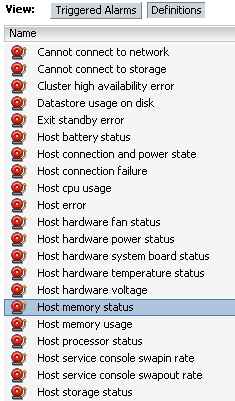
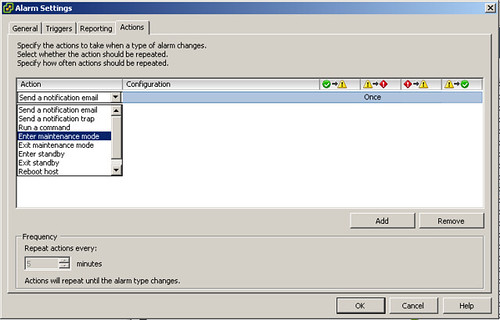
Eric Sloof(1, 2, 3) already explored the new “alarms and actions” capabilities. There’s one that really stands out in my opinion in the next release of ESX/vCenter(vSphere):

Indeed, “Enter maintenance mode“. Now you might wonder when you would want to use this. Wouldn’t it be nice that when your hardware is degraded, for instance memory status changed or hardware power changed, the host enters maintenance mode. I wouldn’t want to run virtual machines on a host that has a memory error or runs on only one power supply. Of course this action only applies to the “host” objects:

Queue depth throttling

Duncan Epping · Apr 6, 2009 ·

Most of you hopefully read about the new queue depth throttling feature in the release notes of ESX 3.5 U4 which has been released last week. A couple of customers asked me if this would be beneficial for them to set up.

Currently queue depth throttling is only supported for 3PAR Storage Arrays.

This, of course, doesn’t mean that it will not work with any of the other arrays. It actually does… but it probably hasn’t been tested to the full extent. Again, keep in mind that it’s currently not supported with any other array then 3PAR.

Now, what’s this queue depth throttling about? The knowledge base article actually has a good explanation of what it does:

VMware ESX 3.5 Update 4 introduces an adaptive queue depth algorithm that adjusts the LUN queue depth in the VMkernel I/O stack. This algorithm is activated when the storage array indicates I/O congestion by returning a BUSY or QUEUE FULL status. These status codes may indicate congestion at the LUN level or at the port (or ports) on the array. When congestion is detected,VMkernel throttles the LUN queue depth. VMkernel attempts to gradually restore the queue depth when congestion conditions subside.

In laymans terms: It’s an “algorithm” for handling queue sizes. When the array indicates it’s busy and/or that the queue is full it cuts the size of the queue in half so the array isn’t flooded with requests and can recover to a normal situation. When the array gives the green light the size of the queue will be increased again till the max specified queue depth has been reached.

Update: VMFS metadata backup

Duncan Epping · Apr 5, 2009 ·

Mike Laspina just released a new version of his VMFS metadata backup script. William Lam, the creator of the health check report script I wrote about, helped Mike out to add a new feature “rolling backup” with folder augmented organization based on the host name, store alias, date label and the rolling instance number. This new version saves 10 versions of your metadata instead of just one and gives them a more appropriate name.

You can find the new version of the VMFS metadata backup script here.

Repairing your vmdk header files…

Duncan Epping · Apr 3, 2009 ·

Increasing the size of a disk when a snapshot exists or deleting the wrong folder on your vmfs volume, it’s something that probably has happened to all of us.

This usually means that you will either need to edit the current vmdk header file or even recreate it. Although it’s not a difficult task it’s still error prone cause it’s a manual task, the procedure is outlined in this KB article for those interested.

Eric Forgette(NetApp), also known of mbralign and mbrscan, wrote a script that automates the recreation of a vmdk header file. The script also gives you the option to verify a header and if it’s corrupt fix it. Eric posted his script on the NetApp community forums and it can be found here.

I especially like the “fix” option of which the following is an example output:

[root@x3 root]# vmdkdtool /vmfs/volumes/test/testvm/fixed-template.vmdk

vmdkdtool version 1.0.090402.
Copyright (c) 2009 NetApp, Inc.
All rights reserved.

/vmfs/volumes/test/testvm/fixed-template-flat.vmdk is 12884902400 bytes (12.0000004768372 GB)

size = 25165825 (current 25125)
sectors = 63 (current value 21)
heads = 255 (current value 3)
cylinders = 1566 (current value 106)

NOTE: A backup of the file will be made if you choose yes.
Shall I fix the descriptor file? yes
Creating a backup of /vmfs/volumes/test/testvm/fixed-template.vmdk
Fixed.

Head over to the NetApp communities and pick it up, definitely a must have for your toolkit.

  • « Go to Previous Page
  • Page 1
  • Interim pages omitted …
  • Page 30
  • Page 31
  • Page 32
  • Page 33
  • Page 34
  • Interim pages omitted …
  • Page 83
  • Go to Next Page »

Primary Sidebar

About the Author

Duncan Epping is a Chief Technologist and Distinguished Engineering Architect at Broadcom. Besides writing on Yellow-Bricks, Duncan is the co-author of the vSAN Deep Dive and the vSphere Clustering Deep Dive book series. Duncan is also the host of the Unexplored Territory Podcast.

Follow Us

  • X
  • Spotify
  • RSS Feed
  • LinkedIn

Recommended Book(s)

Also visit!

For the Dutch-speaking audience, make sure to visit RunNerd.nl to follow my running adventure, read shoe/gear/race reviews, and more!

Do you like Hardcore-Punk music? Follow my Spotify Playlist!

Do you like 80s music? I got you covered!

Copyright Yellow-Bricks.com © 2026 · Log in