• Skip to primary navigation
  • Skip to main content
  • Skip to primary sidebar

Yellow Bricks

by Duncan Epping

  • Home
  • Unexplored Territory Podcast
  • HA Deepdive
  • ESXTOP
  • Stickers/Shirts
  • Privacy Policy
  • About
  • Show Search
Hide Search

drs

What is static overhead memory?

Duncan Epping · May 6, 2013 ·

We had a discussion internally on static overhead memory. Coincidentally I spoke with Aashish Parikh from the DRS team on this topic a couple of weeks ago when I was in Palo Alto. Aashish is working on improving the overhead memory estimation calculation so that both HA and DRS can be even more efficient when it comes to placing virtual machines. The question was around what determines the static memory and this is the answer that Aashish provided. I found it very useful hence the reason I asked Aashish if it was okay to share it with the world. I added some bits and pieces where I felt additional details were needed though.

First of all, what is static overhead and what is dynamic overhead:

  • When a VM is powered-off, the amount of overhead memory required to power it on is called static overhead memory.
  • Once a VM is powered-on, the amount of overhead memory required to keep it running is called dynamic or runtime overhead memory.

Static overhead memory of a VM depends upon various factors:

  1. Several virtual machine configuration parameters like the number vCPUs, amount of vRAM, number of devices, etc
  2. The enabling/disabling of various VMware features (FT, CBRC; etc)
  3. ESXi Build Number

Note that static overhead memory estimation is calculated fairly conservative and we take a worst-case-scenario in to account. This is the reason why engineering is exploring ways of improving it. One of the areas that can be improved is for instance including host configuration parameters. These parameters are things like CPU model, family & stepping, various CPUID bits, etc. This means that as a result, two similar VMs residing on different hosts would have different overhead values.

But what about Dynamic? Dynamic overhead seems to be more accurate today right? Well there is a good reason for it, with dynamic overhead it is “known” where the host is running and the cost of running the VM on that host can easily be calculated. It is not a matter of estimating it any longer, but a matter of doing the math. That is the big difference: Dynamic = VM is running and we know where versus Static = VM is powered off and we don’t know where it might be powered!

Same applies for instance to vMotion scenarios. Although the platform knows what the target destination will be; it still doesn’t know how the target will treat that virtual machine. As such the vMotion process aims to be conservative and uses static overhead memory instead of dynamic. One of the things or instance that changes the amount of overhead memory needed is the “monitor mode” used (BT, HV or HWMMU).

So what is being explored to improve it? First of all including the additional host side parameters as mentioned above. But secondly, but equally important, based on the vm -> “target host” combination the overhead memory should be calculated. Or as engineering calls it calculating “Static overhead of VM v on Host h”.

Now why is this important? When is static overhead memory used? Static overhead memory is used by both HA and DRS. HA for instance uses it with Admission Control when doing the calculations around how many VMs can be powered on before unreserved resources are depleted. When you power-on a virtual machine the host side “admission control” will validate if it has sufficient unreserved resource available for the “static memory overhead” to be guaranteed… But also DRS and vMotion use the static memory overhead metric, for instance to ensure a virtual machine can be placed on a target host during a vMotion process as the static memory overhead needs to be guaranteed.

As you can see, a fairly lengthy chunk of info on just a single simple metric in vCenter / ESXTOP… but very nice to know!
vSphere 5.1 Clustering Deepdive only $17.95, limited time!

Duncan Epping · Nov 21, 2012 ·

Frank and I decided to put the vSphere 5.1 Clustering Deepdive (paper copy) up for sale for only $ 17.95. This is a limited time offer (21st of December), so if you want to get yourself, your friend-husband-father-kids or even grandmother a nice present be quick.

How’s that for a black-friday, cyber-monday, christmas / sinterklaas special? Yes indeed, the paper copy is cheaper than all e-books on vSphere 5.x out there on Amazon and with 5 stars (11 reviews) you know you can’t go wrong.

Happy holidays,

Frank and Duncan
(ps: the kindle copy is only 7.49, so even combined it is cheaper than most e-books out there :-))

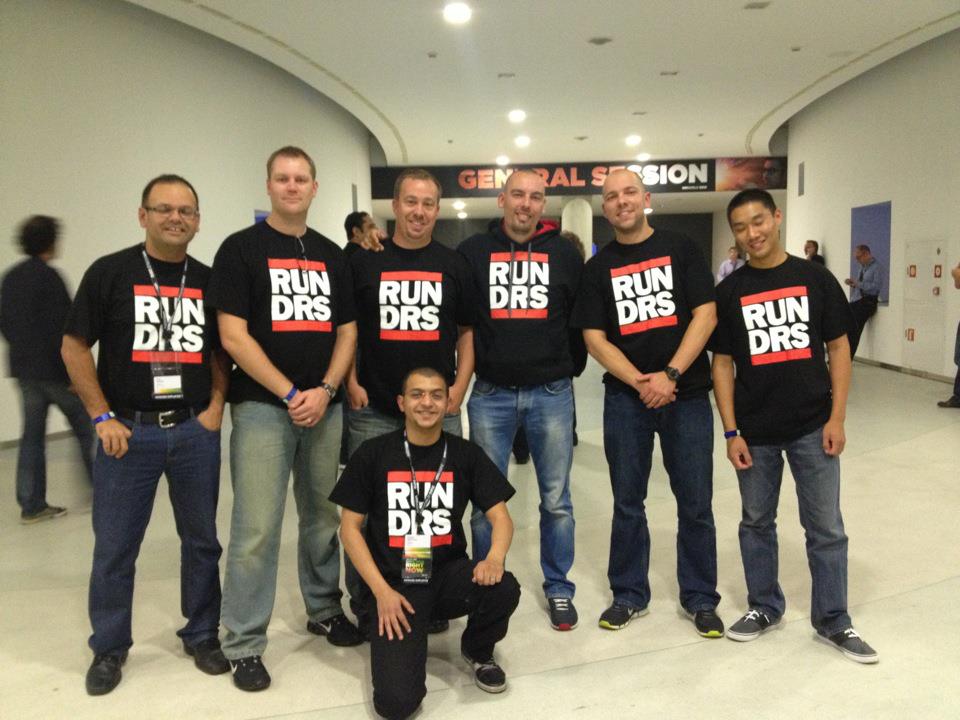
Spotted a RUN DRS t-shirt at VMworld and wondering where to buy them?

Duncan Epping · Oct 16, 2012 ·

I had so many people ask about these RUN DRS shirts I had made in the last weeks… Unfortunately it was a limited print so I cannot offer them, and to be honest I don’t really want to sell them either. Frank created the design and I asked Frank if it would be okay to share it so that everyone who wants one can get it printed themselves.

Frank just published a blog post which contains the details around how to make your own logo, and he also posted the “PSD” file. (Photoshop format) This idea is free for use, however you should not use this design for commercial purposes. Feel free to get a batch printed, maybe work with some local VMUG folks… I am sure they will be a big hit!


Limit the amount of eggs in a single basket through vSphere 5.1 DRS

Duncan Epping · Oct 1, 2012 ·

A while back I had discussion with someone and he asked me if it was possible to limit the amount of eggs in a single basket, in other words limit the amount of VMs per host. The reason this customer wanted to do this was to limit the impact of a failure. They had roughly 1500 VMs in their cluster and some hosts carried 50 VMs while other had 20 or 80. This is the nature of DRS though and totally expected.

If one of these hosts would fail, and lets say they had 80 VMs the impact of that would be substantial. To minimize the risk they wanted to limit the amount of VMs per host. I had thought about this before and had already asked the HA and DRS team if they could do anything around this. The DRS team started looking in to it and to my surprise they managed to get it in quick.

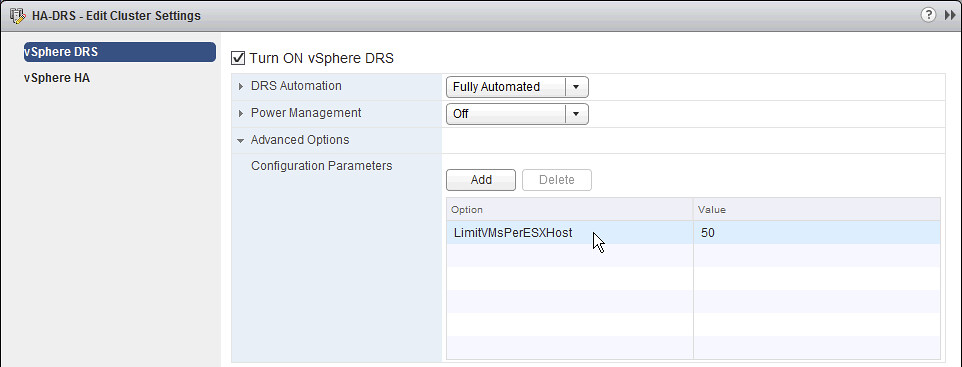
In VMworld 2012 session “VSP2825: DRS: Advanced Concepts, Best Practices and Future Directions” by Ajay Gulati and Aashish Parikh a solution is presented. (You can watch this session for free on youtube, highly recommended!) This solution is a new vSphere DRS advanced setting which is introduced in vSphere 5.1.

 LimitVMsPerESXHost

Note that when you configure this setting it might impact the performance of your virtual machines as it could limit the load balancing mechanism of your cluster. If you have no requirements to limit the amount of VMs per ESXi host, don’t do it. When this setting is configured, vSphere DRS will not allow migrations to a host which has reached the threshold and will also not admit new VMs to the host if it has reached the threshold.

Out on iBooks finally – vSphere 5.1 Clustering Deepdive

Duncan Epping · Oct 1, 2012 ·

It took about about a month to get this published, but here it finally is: vSphere 5.1 Clustering Deepdive on iBooks.

Yeah yeah, we know… you also want Nook and lulu.com says it is pending so that means it probably takes a couple of days before it is up on Barnes and Nobles as well.

  • « Go to Previous Page
  • Page 1
  • Interim pages omitted …
  • Page 6
  • Page 7
  • Page 8
  • Page 9
  • Page 10
  • Interim pages omitted …
  • Page 19
  • Go to Next Page »

Primary Sidebar

About the Author

Duncan Epping is a Chief Technologist and Distinguished Engineering Architect at Broadcom. Besides writing on Yellow-Bricks, Duncan is the co-author of the vSAN Deep Dive and the vSphere Clustering Deep Dive book series. Duncan is also the host of the Unexplored Territory Podcast.

Follow Us

  • X
  • Spotify
  • RSS Feed
  • LinkedIn

Recommended Book(s)

Also visit!

For the Dutch-speaking audience, make sure to visit RunNerd.nl to follow my running adventure, read shoe/gear/race reviews, and more!

Do you like Hardcore-Punk music? Follow my Spotify Playlist!

Do you like 80s music? I got you covered!

Copyright Yellow-Bricks.com © 2026 ยท Log in