• Skip to primary navigation
  • Skip to main content
  • Skip to primary sidebar

Yellow Bricks

by Duncan Epping

  • Home
  • Unexplored Territory Podcast
  • HA Deepdive
  • ESXTOP
  • Stickers/Shirts
  • Privacy Policy
  • About
  • Show Search
Hide Search

BC-DR

What port numbers must be open for SRM and VirtualCenter / vCenter Server?

Duncan Epping · Jun 10, 2009 ·

Every time I do a Site Recovery Manager jumpstart or start a project the same questions pops up. What port numbers must be open for SRM and VirtualCenter / vCenter Server to be able to communicate?

kb.vmware.com/kb/1006738:

The following ports are used for the respective products and must be open for remote communication:

VMware VirtualCenter / vCenter Server:

  • 80 (HTTP)
  • 443 (SSH)
  • 902 (VMware)
  • 8096 (Tomcat)

VMware Site Recovery Manager:

  • 80 (HTTP)
  • 8095 (SOAP Listen)
  • 8096 (HTTP Listen)
  • 9007 (API Listen)
  • 9008 (HTTP Listen)

How to change the SRM change of power state time out values

Duncan Epping · May 29, 2009 ·

One of my customers recently asked if it was possible to change the time-out for a power state change, at the same time this question was asked and answered on an internal mailing list. I thought it would be nice to document it. An example of a power state change task would be the shutdown that is initiated by SRM when you run a recovery plan. The default value is 120 seconds which might not be long enough and could lead to issues when a power off is forced. You can increase or decrease this value by editing the SRM configuration file (vmware-dr.xml). Look for the following section:

<Recovery>
<powerStateChangeTimeout>120</ powerStateChangeTimeout>
</Recovery>

Like stated above, the time-out value is in seconds. The default value is 120 and it can be changed according to your requirements. This change will be effective when the SRM service has been restarted. (If you can’t find this section in the XML file, just add it…)

vSphere HA Isolation Response

Duncan Epping · May 24, 2009 ·

As of VMware vCenter 2.5 Update 2 the HA default isolation response changed from “Power Off” to “Leave powered on”. A lot of people liked this new default setting because it would lower the chances of downtime due to a “false positive”. I’ve never been a fan though, I just don’t like using degraded hardware or a degraded ESX host for that matter.

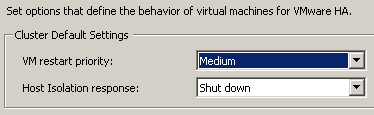
Those that did like the change should take notice of the fact that with vSphere comes a new default isolation response:

Note that this change is only for new clusters, if you upgrade(d) your vCenter the selected isolation response will remain. For those of you who never looked into the setting “Shut down”, it uses VMware Tools to initiate a guest shut down. If the shut down does not complete within five minutes the VM will be powered off. These five minutes are a configurable setting, if you want to increase or decrease it add the following advanced option das.isolationShutdownTimeout with the new value in seconds.

VI:OPS – Automating Network Setting Changes and DNS Updates on Recovery Site Using SRM

Duncan Epping · Apr 29, 2009 ·

I just received an email about an excellent article on VI:OPS. The article is titled “Automating Network Setting Changes and DNS Updates on Recovery Site Using VMware vCenter Site Recovery Manager“. It includes a PDF file which contains a description for configuring automatic IP-Changes but also includes batch files for DNS updates.

When performing site failover, IT administrators are often faced with challenges to deal with disparate networks on the recovery site:

  • Network properties of virtual machines need to be customized according to the network specification of the recovery site.
  • Domain Name Server (DNS) records pertaining to these virtual machines need to be updated.

VMware® vCenter Site Recovery Manager (SRM) enables customers to design automated recovery plans that incorporate all these necessary network property changes, relieving them of the repetitive and error-prone manual tasks.

This paper shows the mechanisms that SRM customers can use in order to automate these tasks related to network related changes.

SRM: Automatically rename your datastore back

Duncan Epping · Apr 18, 2009 ·

When doing a failover with SRM your VMFS Datastores get labeled with a “snap-xxxxxxx-name” because they’ve been resignatured. Mike Laverick gave this tip on the VMTN forum which enables you to automatically rename your datastores to it’s original name again:

Edit the vmware-dr.xml file in the C:\Program Files\Site Recovery Manager\Config directory and look for a line that reads:

  • <fixRecoveredDatastoreNames>false</fixRecoveredDatastoreNames>

Change it to:

  • <fixRecoveredDatastoreNames>true</fixRecoveredDatastoreNames>
  • « Go to Previous Page
  • Page 1
  • Interim pages omitted …
  • Page 6
  • Page 7
  • Page 8
  • Page 9
  • Page 10
  • Interim pages omitted …
  • Page 13
  • Go to Next Page »

Primary Sidebar

About the Author

Duncan Epping is a Chief Technologist and Distinguished Engineering Architect at Broadcom. Besides writing on Yellow-Bricks, Duncan is the co-author of the vSAN Deep Dive and the vSphere Clustering Deep Dive book series. Duncan is also the host of the Unexplored Territory Podcast.

Follow Us

  • X
  • Spotify
  • RSS Feed
  • LinkedIn

Recommended Book(s)

Also visit!

For the Dutch-speaking audience, make sure to visit RunNerd.nl to follow my running adventure, read shoe/gear/race reviews, and more!

Do you like Hardcore-Punk music? Follow my Spotify Playlist!

Do you like 80s music? I got you covered!

Copyright Yellow-Bricks.com © 2026 · Log in