• Skip to primary navigation
  • Skip to main content
  • Skip to primary sidebar

Yellow Bricks

by Duncan Epping

  • Home
  • Unexplored Territory Podcast
  • HA Deepdive
  • ESXTOP
  • Stickers/Shirts
  • Privacy Policy
  • About
  • Show Search
Hide Search

6.1

VSAN made storage management a non issue for the 1st time

Duncan Epping · Sep 28, 2015 ·

When ever I talk to customers about Virtual SAN the question that comes up usually is why Virtual SAN? Some of you may expect it to be performance, or the scale-out aspect, or the resiliency… None of that is the biggest differentiator in my opinion, management truly is. Or should I say the fact that you can literally forget about it after you have configured it? Yes, of course that is something you expect every vendor to say about their own product. I think the reply of one of the users during the VSAN Chat that was held last week is the biggest testimony I can provide: “VSAN made storage management a non-issue for the first time for the vSphere cluster admin”. (see tweet below)

@vmwarevsan VSAN made storage management a non-issue for this first time vSphere cluster admin! #vsanchat http://t.co/5arKbzCdjz

— Aaron Kay (@num1k) September 22, 2015

When we released the first version of Virtual SAN I strongly believed we had a winner on our hands. It was so simple to configure, you don’t need to be a VCP to enable VSAN, it is two clicks. Of course VSAN is a bit more than just that tick box on a cluster level that says “enable”. You want to make sure it performs well, all drivers/firmware combinations are certified, the network is correctly configured etc. Fortunately we also have a solution for that, this isn’t a manual process.

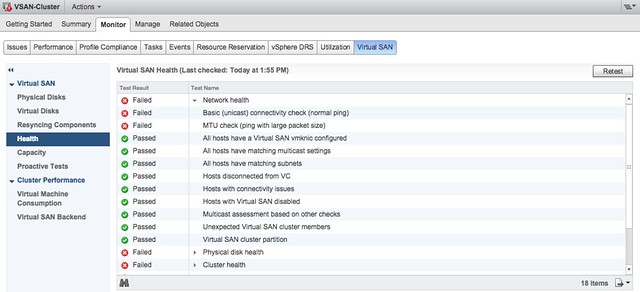
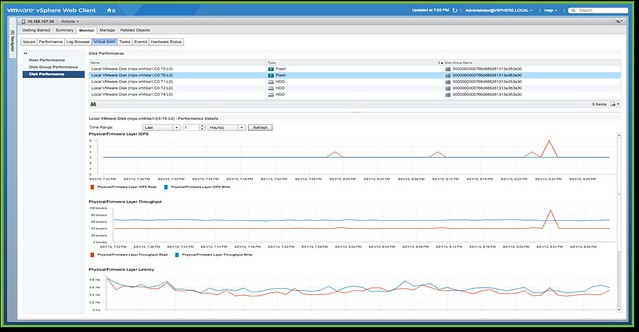
No, you simply go to the VSAN healthcheck section on your VSAN cluster object and validate everything is green. Besides simply looking at those green checks, you can also run certain pro-active tests that will allow you to test for instance multicast performance, VM creation, VSAN performance etc. It all comes as part of vCenter Server as of the 6.0 U1 release. On top of that there is more planned. At VMworld we already hinted at it, advanced performance management inside vCenter based on a distributed and decentralized model. You can expect that at some point in the near future, and of course we have the vROps pack for Virtual SAN if you prefer that!
No, if you ask me, the biggest differentiator definitely is management… simplicity is the key theme, and I guarantee that things will only improve with each release.
Virtual SAN 6.1 available today!

Duncan Epping · Sep 10, 2015 ·

What more do I need to say? vSphere 6.0 U1 was released today and it ships with Virtual SAN 6.1. By now you’ve all seen my posts on what’s new for VSAN 6.1 and you’ve hopefully seen the demo we created for stretched clustering. If you want to play with 6.1 yourself then you can find it here:

  • VSAN 6.1 Product download page
  • VSAN 6.1 Release Notes
  • VSAN 6.1 Administration Guide

VMworld 2015: Site Recovery Manager 6.1 announced

Duncan Epping · Sep 1, 2015 ·

This week Site Recovery Manager 6.1 was announced. There are many enhancements in SRM 6.1 like the integration with NSX for instance and policy driven protection, but personally I feel that support for stretched storage is huge. When I say stretched storage I am referring to solutions like EMC VPLEX, Hitachi Virtual Storage Platform and IBM San Volume Controller(etc). In the past, and you can still today, when you had these solutions deployed you would have a single vCenter Server with a single cluster and moved VMs around manually when needed, or let HA take care of restarts in failure scenarios.

As of SRM 6.1 running these types of stretched configurations is now also supported. So how does that work, what does it allow you to do, and what does it look like? Well in contrary to a vSphere Metro Storage Cluster solution with SRM 6.1 you will be using two vCenter Server instances. These two vCenter Server instances will have an SRM server attached to it which will use a storage replication adaptor to communicate to the array.

But why would you want this? Why not just stretch the compute cluster also? Many have deployed these stretched configurations for disaster avoidance purposes. The problem is however that there is no form of orchestration whatsoever. This means that all workloads will come up typically in a random fashion. In some cases the application knows how to recover from situations like that, in most cases it does not… Leaving you with a lot of work, as after a failure you will now need to restart services, or VMs, in the right order. This is where SRM comes in, this is the strength of SRM, orchestration.

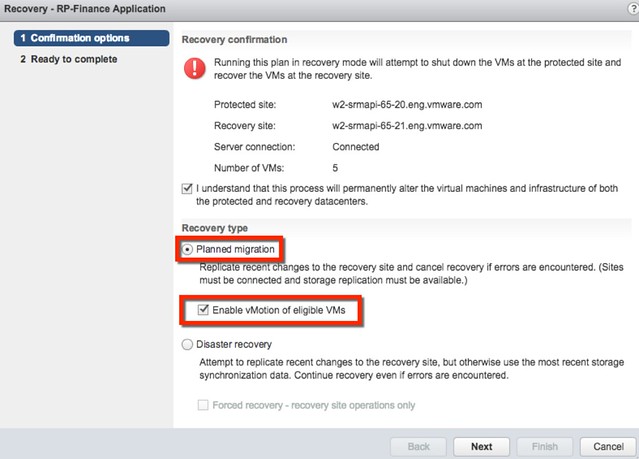
Besides doing orchestration of a full failover, what SRM can also do in the 6.1 release is evacuate a datacenter using vMotion in an orchestrated / automated way. If there is a disaster about to happen, you can now use the SRM interface to move virtual machines from one datacenter to another, with just a couple of clicks, planned migration is what it is called as can be seen in the screenshot above.

Personally I think this is a great step forward for stretched storage and SRM, very excited about this release!

What is new for Virtual SAN 6.1?

Duncan Epping · Aug 31, 2015 ·

It is VMworld, and of course there are many announcements being doing one of which is Virtual SAN 6.1 which will come as part of vSphere 6.0 Update 1. Many new features have been added, but there are a couple which stand out if you ask me. In this post I am going to talk about what are in my opinion the key new features. Lets list them first and then discuss some of them individually.

  • Support for stretched clustering
  • Support for 2 node ROBO configurations
  • Enhanced Replication
  • Support for SMP-FT
  • New hardware options
    • Intel NVMe
    • Diablo Ultra Dimm
  • Usability enhancements
    • Disk Group Bulk Claiming
    • Disk Claiming per Tier
    • On-Disk Format Upgrade from UI
  • Health Check Plug-in shipped with vCenter Server
  • Virtual SAN Management Pack for VR Ops

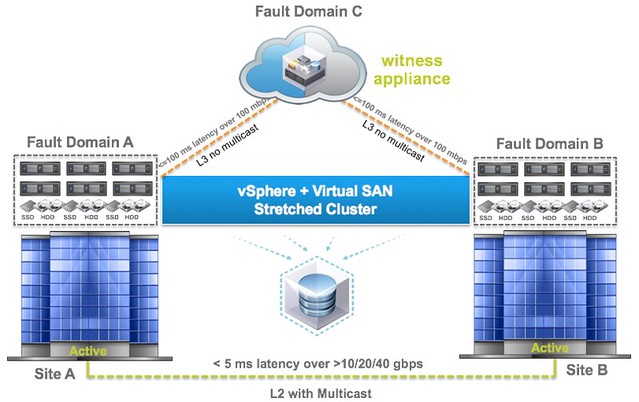
When explaining the Virtual SAN architecture and concepts there is always one question that comes up, what about stretched clustering? I guess the key reason for it being the way Virtual SAN distributes objects across multiple hosts for availability reasons and people can easily see how that would work with datacenters. With Virtual SAN 6.1 we now fully supported stretched clustering. But what does that mean, what does that look like?

As you can see in the diagram above it starts with 3 failure domains, two of which will be “hosting data” and one of which will be a “witness site”. All of this is based on the Failure Domains technology that was introduced with 6.0, and those who have used it now how easy it is. Of course there are requirements when it comes to deploying in a stretched fashion and the key requirements for Virtual SAN are:

  • 5ms RTT latency max between data sites
  • 200ms RTT latency at most from data sites to witness site

Worth noting from a networking point of view is that from the data sites to the witness site there is no requirement for multicast routing and it can be across L3. On top of that the Witness can be nested ESXi, so no need to dedicate a full physical host just for witness purposes. Of course the data sites can also connect to each other over L3 if that is desired, but personally I suspect that VSAN over L2 will be a more common deployment and it is also what I would recommend. Note that between the data sites there is still a requirement for multicast.

When it comes to deploying virtual machines on a stretched cluster not much has changed. Deploy a VM, and VSAN will ensure that there is 1 copy of your data in Fault Domain A and one copy in Fault Domain B with your witness in Fault Domain C. Makes sense right? If one of the data sites fails then the other can take over. If the VM is impacted by a site failure then HA can take action… It is no rocket science and dead simple to set up. I will have a follow up post with some more specifics in a couple of weeks

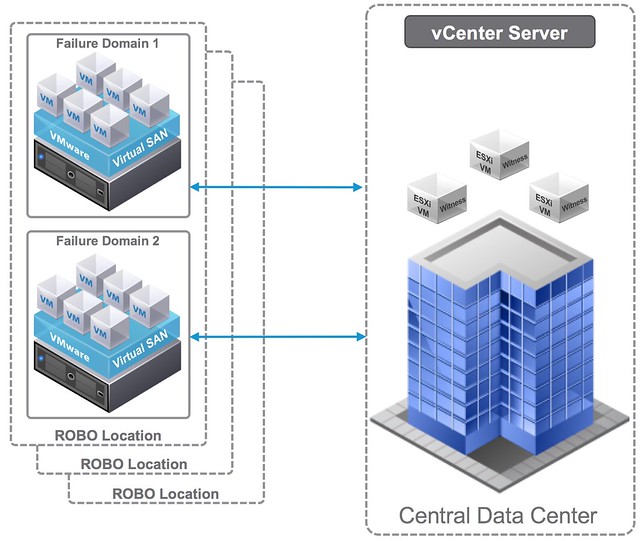
Besides stretched clustering Virtual SAN 6.1 also brings a 2 node ROBO option. This is based on the same technique as the stretched clustering feature. It basically allows you to have 2 nodes in your ROBO location and a witness in a central location. The max latency (RTT) in this scenario is 500ms RTT, which should accommodate for almost every ROBO deployment out there. Considering the low number of VMs typically in these scenarios you are usually okay as well with 1GbE networking in the ROBO location, which further reduces the cost.

When it comes to disaster recovery work has also been done to reduce the recovery point objective (RPO) for vSphere Replication. By default this is 15 minutes, but for Virtual SAN this has now been certified for 5 minutes. Just imagine combining this with a stretched cluster, that would be a great disaster avoidance and disaster recovery solution. Sync replication between active sites and then async to where ever it needs to go.

But that is not it in terms of availability, support for SMP FT has also been added. I never expected this to be honest, but I have had many customers asking for this in the past 12 months. Other common requests I have seen is the support of these super fast flash devices like Intel NVMe and Diablo Ultra Dimm, and 6.1 delivers exactly that.

Another big focus in this release has been usability and operations. Many enhancements have been done to make life easier. I like the fact that the Health Check plugin is now included with vCenter Server and you can do things like upgrading the on-disk format straight from the UI. And of course there is the VR Ops Management Pack, which will enrich your VR Ops installation with all the details you ever need about Virtual SAN. Very very useful!

All of this making Virtual SAN 6.1 definitely a release to check out!

Introduction to VMware Virtual SAN (vSAN)

Duncan Epping · Aug 26, 2013 ·

VMware Virtual SAN, or I should say VMware vSAN, has been around since August 2013. Back then it was indeed called Virtual SAN, today is it is officially known as vSAN, but that is what most people used anyway. As this article keeps popping up on google search I figured I would rewrite it and provide a better more generic introduction to vSAN which is up to date and covers all that VMware vSAN is about up to the current version of writing, which is VMware vSAN 6.6.

VMware vSAN is a software based distributed storage solution. Some will refer to it as hyper-converged, others will call it software defined storage and some even referred to is as hypervisor converged at some point. The reason for this is simple, VMware vSAN is fully integrated with VMware vSphere. Those of you who are vSphere administrators who are reading this will have no problem configuring vSAN. If you know how to enable HA and DRS, then you know how to configure vSAN. Of course you will need to have a vSAN Network, and you achieve this by creating a VMkernel interface and enabling vSAN on it. vSAN works with L2 and L3 networks, and as of vSAN 6.6 no longer requires multicast to be enabled on the network. (If you want to know what changed with vSAN 6.6 read this article.)

enable vsan

Before we will get a bit more in to the weeds, what are the benefits of a solution like vSAN? What are the key selling points?

  • Software defined – Use industry standard hardware, as long as it is on the HCL you are good to go!
  • Flexible – Scale as needed and when needed. Just add more disks or add more hosts, yes both scale-up and scale-out are possible.
  • Simplicity – Ridiculously easy to manage! Ever tried implementing or managing some of the storage solutions out there? If you did, you know what I am getting at.
  • Automated – Per virtual machine and per virtual disk policy based management. Yes, even VMDK level granularity. No more policies defined on a per LUN/Datastore level, but at the level where you need it!
  • Hyper-Converged – It allows you to create dense / building block style solutions!

To me “simplicity” is the key reason customers buy vSAN. Not just simplicity in configuring or installing, but even more so simplicity in management. Features like the vSAN Health Check provide a lot of value to the admin. With one glance you can see what the status is of your vSAN. Is it healthy or not? If not, what is wrong?

vsan health check

Okay that sounds great right, but where does that fit in? What are the use-cases for vSAN, how are our 7000+ customers using it today?

  • Production / Business Critical Workloads
    • Exchange, Oracle, SQL, anything basically…. This is what the majority of customers use vSAN for.
  • Management Clusters
    • Isolate their management workloads completely, and remove the dependency on your storage systems to be available. Even when your enterprise storage system is down you have access to your management tools
  • DMZ
    • Where NSX helps isolating a DMZ from the world from a networking/security point of view, vSAN can do the same from a storage point of view. Create a separate cluster and avoid having your production storage go down during a denial of service attack, and avoid complex isolated SAN segments!
  • Virtual desktops
    • Scale out model, using predictive (performance etc) repeatable infrastructure blocks lowers costs and simplifies operations. Note that vSAN is included with Horizon Advanced and Enterprise!
  • Test & Dev
    • Avoids acquisition of expensive storage (lowers TCO), fast time to provision, easy scale out and up when required!
  • Big Data
    • Scale out model with high bandwidth capabilities, Hadoop workloads are not uncommon on vSAN!
  • Disaster recovery target
    • Cheap DR solution, enabled through a feature like vSphere Replication that allows you to replicate to any storage platform. Other options are of course VAIO based replication mechanisms like Dell/EMC Recover Point.

Yes that is a long list of use cases, I guess it it fair to say that vSAN fit everywhere and anywhere! Now, lets get a bit more technical, just a bit as this is an introduction and for those who want to know more about specific features and settings I have hundreds of vSAN articles on my blog. Also a vSAN book available, and then there’s of course the long list of articles by the likes of William Lam and Cormac Hogan.

When vSAN is enabled a single shared datastore is presented to all hosts which are part of the vSAN enabled cluster. Typically all hosts will contribute performance (SSD) and capacity (magnetic disks or flash) to this shared datastore. This means that when your cluster grows from a compute perspective, your datastore will typically grow with it. (Not a requirement, there can be hosts in the cluster which just consume the datastore!) Note that there are some requirements for hosts which want to contribute storage. Each host will require at least one flash device for caching and one capacity device. From a clustering perspective, vSAN supports the same limits as vSphere: 64 hosts in a single cluster. Unless you are creating a stretched cluster, then the limit is 31 hosts. (15 per site.)

As can be expected from any recent storage system, vSAN heavily relies on flash for performance. Every write I/O will go to the flash cache first, and eventually they will go to the capacity tier. vSAN supports different types of flash devices, broadest support in the industry, ranging from SATA SSDs to 3D XPoint NVMe based devices. This goes for both the caching as well as the capacity tier. Note that for the capacity layer, vSAN of course also supports regular spinning disks. This ranges from NL-SAS to SAS, 7200 RPM to 15k RPM. Just check the vSAN Ready Node HCL or the vSAN Component HCL for what is supported and what is not.

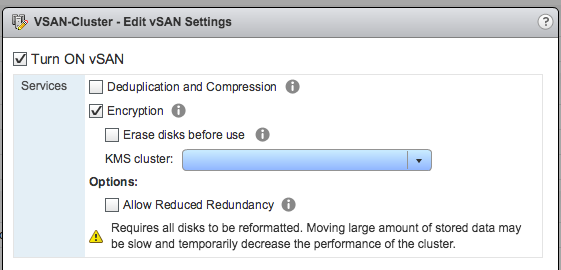
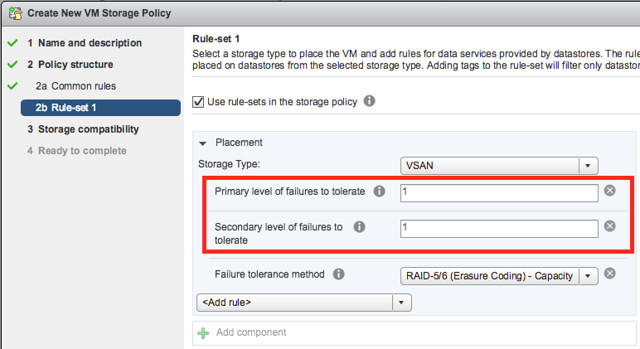
As mentioned, you can set policies on a per virtual machine or even virtual disk level. These policies define availability and performance aspects of your workloads. But for instance also allow you to specify whether checksumming needs to be enabled or not. There are 2 key features which are not policy driven at this point and these are “Deduplication and Compression” and Encryption. Both of these are enabled on a cluster level. But lets get back to the the policy based management. Before deploying your first VMs, you will typically create a (or multiple) policy. In this policy you define what the characteristics of the workload should be. For instance as shown in the example below, how many failures should the VM be able to tolerate? In the below example it shows that “primary” and “secondary” level of failures to tolerate is set to 1. Which in this case means the VM is stretched across 2 locations and also protected by RAID-5 in each site as the “Failure Tolerance Method” is also specified.

vsan policy

The above is a rather complex example, it can be as simple as only setting “Failures to tolerate” to “1”, which in reality is what most people do. This means you will need 3 nodes at a minimum and you will from a VM perspective have 2 copies of the data and 1 witness. vSAN is often referred to as a generic object based storage platform, but what does that mean? The VM can be seen as an object and each copy of the data and the witness can be seen as components. Objects are placed and distributed across the cluster as specified in your policy. As such vSAN does not require a local RAID set, just a bunch of local disks which can be attached to a passthrough disk controller. Now, whether you defined a 1 host failure to tolerate, or for instance a 3 host failure to tolerate, vSAN will ensure enough replicas of your objects are created within the cluster. Is this awesome or what?

Lets take a simple example to illustrate that as I realize it is also easy to get lost in all these technical terms. We have configured a 1 host failure and we create a new virtual disk. This results in vSAN creating 2 identical data components and a witness component. The witness is there just in case something happens to your cluster and to help you decide who will take control in case of a failure, the witness is not a copy of your data component let that be clear, it is just a quorum mechanis. Note, that the amount of hosts in your cluster could potentially limit the amount of “host failures to tolerate”. In other words, in a 3 node cluster you can not create an object that is configured with 2 “host failures to tolerate” as it would require vSAN to place components on 5 hosts at a minimum. (Cormac has a simple table for it here.) Difficult to visualize? Well this is what it would look like on a high level for a virtual disk which tolerates 1 host failure:

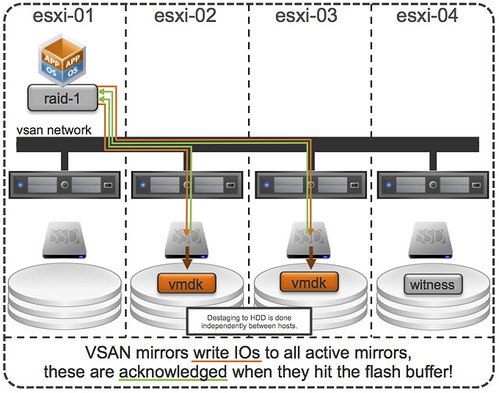
First, lets point out that the VM from a compute perspective does not need to be aligned with the data components. In order to provide optimal performance vSAN has an in memory read cache which is used to serve the most recent blocks from memory. Of course blocks which are not in the memory cache will need to be fetched from either of the two hosts that serve the data component. Note that a given block always comes from the same host for reads. This to optimize the flash based read cache. For writes it is straight forward. Every write is synchronously pushed to the hosts that contain data components for that VM. Some may refer to this as replication or mirroring. With all this replication going on, are there requirements for networking? At a minimum vSAN will require a dedicated 1Gbps NIC port for hybrid configurations, and 10GbE for all-flash configurations. Needless to say, but 10Gbps is definitely preferred with solutions like these, and you should always have an additional NIC port available for resiliency. There is no requirement from a virtual switch perspective, you can use either the Distributed Switch or the plain old vSwitch, both will work fine, the Distributed Switch is recommended and comes included with the vSAN license.

So what else is there, well from a feature / functionality perspective there’s a lot. Let me list some of my favourite features:

  • RAID-1 / RAID-5 / RAID-6
  • Stretched Clustering
  • All-Flash for all License options
  • Deduplication and Compression
  • vSAN Datastore Encryption
  • iSCSI Targets (for physical machines)

That more or less covers the basics and I think is a decent introduction to vSAN. Something that hopefully sparks your interest in this distributed storage platform that is deeply integrated with vSphere and enables convergence of compute and storage resources as never seen before. It provides virtual machine and virtual disk level granularity through policy based management. It allows you to control availability, performance and security in a way I have never seen it before, simple and efficient. And then I haven’t even spoken about features like the Health Check, Config Assist, Easy Install and any of the other cool features that are part of vSAN 6.6.

If there are any questions, find me on twitter!

  • « Go to Previous Page
  • Page 1
  • Page 2
  • Page 3
  • Page 4

Primary Sidebar

About the Author

Duncan Epping is a Chief Technologist and Distinguished Engineering Architect at Broadcom. Besides writing on Yellow-Bricks, Duncan is the co-author of the vSAN Deep Dive and the vSphere Clustering Deep Dive book series. Duncan is also the host of the Unexplored Territory Podcast.

Follow Us

  • X
  • Spotify
  • RSS Feed
  • LinkedIn

Recommended Book(s)

Also visit!

For the Dutch-speaking audience, make sure to visit RunNerd.nl to follow my running adventure, read shoe/gear/race reviews, and more!

Do you like Hardcore-Punk music? Follow my Spotify Playlist!

Do you like 80s music? I got you covered!

Copyright Yellow-Bricks.com © 2026 · Log in