• Skip to primary navigation
  • Skip to main content
  • Skip to primary sidebar

Yellow Bricks

by Duncan Epping

  • Home
  • Unexplored Territory Podcast
  • HA Deepdive
  • ESXTOP
  • Stickers/Shirts
  • Privacy Policy
  • About
  • Show Search
Hide Search

5.0

Thanks!!

Duncan Epping · Jul 13, 2011 ·

** Update: Available now: paperback full |paperback black & white **

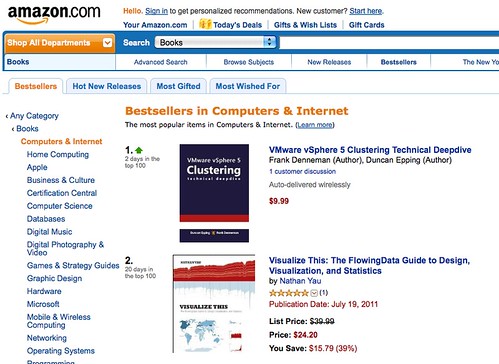
I’ve seen a lot of crazy things, but when I clicked the amazon link for our book yesterday I literally jumped up and started cheering… Number 1 in “Computers & Internet”. These are the kind of things that make it all worth it! PS: We asked amazon/createspace to get the printed copy up asap and they are looking in to it as it should have been ready by now.
vSphere 5.0: Profile-Driven Storage, what is it good for?

Duncan Epping · Jul 13, 2011 ·

By now most of you heard about this new feature called Profile-Driven Storage that will be introduced with vSphere 5.0, but what is it good for? Some of you, depending on the size of the environment, currently have a nice long operational procedure to deploy virtual machines. The procedure usually contains gathering information about the requirements of the virtual machine’s disks, finding the right datastore to meet these requirements, deploy the virtual machine and occasionally check if the virtual machine’s disks are still placed correctly. This is what Profile-Driven Storage aims to solve.

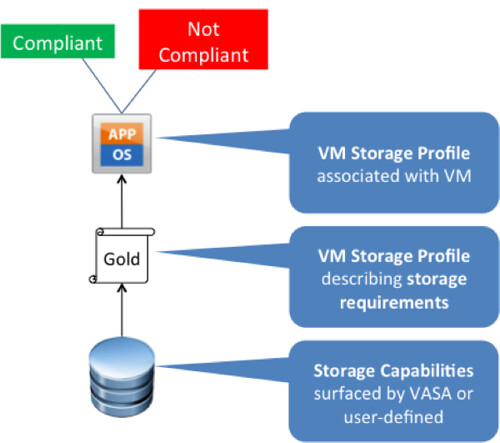
Profile-Driven Storage, in the vCenter UI referred to as VM Storage Profiles, decrease the amount of administration required to properly deploy virtual machines by allowing for the creation of Profiles. These profiles typically list the requirements of storage and can be linked to a virtual machine. I know it all sounds a bit vague, let me visualize that:

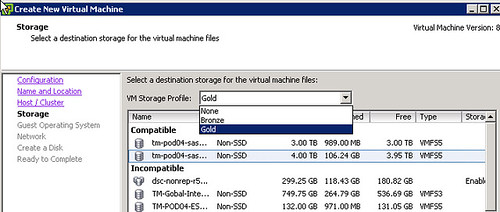
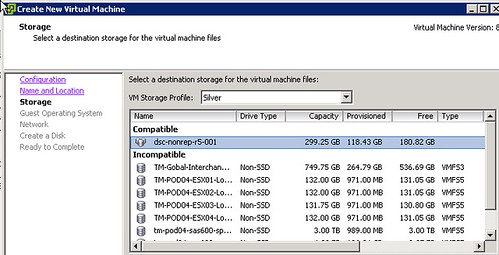
In this scenario a virtual machine requires “Gold Storage”, now lets just assume for now that that means RAID-10 and Replicated. By linking the profile to this virtual machine it is possible to validate if the virtual machine is actually located on the right tier of storage. Now this profile can of course be linked to a virtual machine / virtual disk after it has been provisioned, but even more importantly it can be used during the provisioning of the virtual machine to ensure the user picks a datastore (cluster) which is compatible with the requirements! Just check the following screenshot of what that would look like:

Now you might wonder where this storage tier comes from, this is a VM Storage Profile containing storage capabilities provided by:

  • VASA aka vSphere Storage APIs – Storage Awareness
  • User defined capabilities

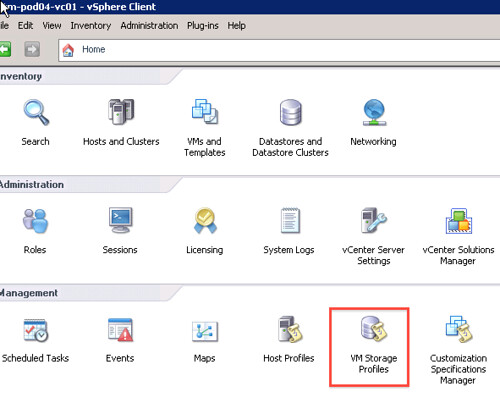
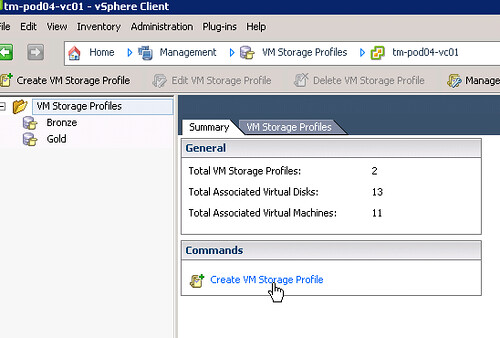
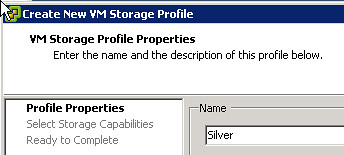
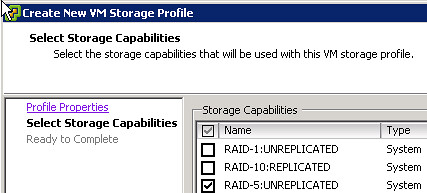
User defined capabilities are fairly simple to explain, the profile you create (gold / silver / bronze) will be linked to a User Defined “tag” you define on a datastore. For instance you could tag a datastore as “RAID-10”. When would you do this? Well typically when your storage vendor doesn’t offer a Storage Provider for VASA (yet). That takes us to the second method of selecting storage capabilities for your VM Storage Profile, VASA. VASA is a new “API” which enables you to see the characteristics of a datastore through vCenter. With characteristics I am referring to things like: raid level, de-duplication, replication etc. You know what, my a step-by-step guide makes it clear:

  • Go to VM Storage Profiles
  • Create a VM Storage Profile
  • Provide a Name
  • Select the correct Capabilities
  • Finish the creation
  • Create a new VM and select the correct VM Storage Profile, note that only 1 datastore is compatible
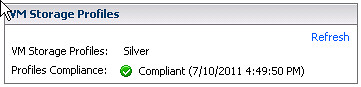
  • After creation you can easily check if it is compliant or not by going to the VMs summary tab

A couple of simple initial steps as you can clearly see, but a huge help when provisioning virtual machines and when validating storage / vm requirements!

vSphere 5.0: What has changed for VMFS?

Duncan Epping · Jul 13, 2011 ·

A lot has changed with vSphere 5.0 and so has one of the most under-appreciated “features”…. VMFS. VMFS has been substantially changed and I wanted to list some of the major changes and express my appreciation for the great work the VMFS team has done!

  • VMFS-5 uses GPT instead of MBR
  • VMFS-5 supports volumes up to 64TB
    • This includes Pass-through RDMs!
  • VMFS-5 uses a Unified Blocksize –> 1MB
  • VMFS-5 uses smaller Sub-Blocks
    • ~30.000 8KB blocks versus ~3000 64KB blocks with VMFS-3
  • VMFS-5 has support for very small files (1KB)
  • Non-disruptive upgrade from VMFS-3 to VMFS-5
  • ATS locking enhancements (as part of VAAI)

Although some of these enhancements seem to be “minor” I beg to differ. These enhancements and new capabilities will reduce the amount of volumes needed in your environment and will increase the VM-to-Volume density ultimately leading to less management! Yes I can hear the skeptics thinking “do I really want to introduce such a large failure domain, my standard is a 500GB LUN”. Think about it for a second, although that standard might have been valid years ago, it probably isn’t today. The world has changed, recovery times have decreased, disks continue to grow, locking mechanisms have been improved and can be offloaded through VAAI. Max 10 VMs on a volume? I don’t think so!

What’s new for storage whitepaper and videos

Duncan Epping · Jul 12, 2011 ·

Just noticed that the collateral I have been working on is available for download today as well. Check the “What’s new for Storage” whitepaper, the Storage DRS video and the Profile-Driven Storage video.

vSphere 5.0: Storage DRS introduction

Duncan Epping · Jul 12, 2011 ·

Storage DRS is a brand new feature of vSphere 5.0. It has been one of my focus areas for the last 6 months and probably one of the coolest features of vSphere 5.0. Storage DRS enables you to aggregate datastores in to a single object, called a datastore cluster. This new object is what you will be managing from now on. Storage DRS enables smart placement of virtual machines based on utilized diskspace, latency and LUN performance capabilities. In other words, when you create a new virtual machine you will select a Datastore Cluster instead of a Datastore and Storage DRS will place the virtual machine on one of the datastores in that datastore cluster. This is where the strength lies of Storage DRS, reducing operational effort associated with provisioning of virtual machines…

But that’s not all there is, Storage DRS is a lot more than just initial placement… lets sum the core functionality of Storage DRS up:

  1. Initial Placement
  2. Migration Recommendations (Manual / Fully Automated)
  3. Affinity Rules
  4. Maintenance Mode

These in my opinion are the 4 core pieces of functionality that Storage DRS provides. Initial placement as stated will reduce the amount of operational effort required to provision virtual machines. Storage DRS will figure out which datastore it should be placed on, no need anymore to manually monitor each datastore and figure out which one has the most available diskspace and relative low latency. On top of that SDRS also provides Migration Recommendations if and when thresholds are exceeded, it can generate them (manual mode) or generate and apply them (fully automated mode). These thresholds are utilized disk space(80%) and latency (15ms). This helps preventing bottlenecks in terms of disk space and hot spots in terms of latency.

Affinity Rules and Maintenance Mode are very similar to what DRS offers today. You have the ability to split disks and virtual machines with Affinity Rules, or keep them together. With Maintenance Mode it will be very easy to migrate to new LUNs or to do planned maintenance on a volume, couple of clicks and all VMs will be moved off.

Once again I would like to stress that although the Migration Recommendations (especially in Fully Automated mode) sound really sexy, and it is, it will more than likely be the Initial Placement recommendations where you will benefit the most. More technical information will follow soon here and on frankdenneman.nl

  • « Go to Previous Page
  • Page 1
  • Interim pages omitted …
  • Page 30
  • Page 31
  • Page 32
  • Page 33
  • Go to Next Page »

Primary Sidebar

About the Author

Duncan Epping is a Chief Technologist and Distinguished Engineering Architect at Broadcom. Besides writing on Yellow-Bricks, Duncan is the co-author of the vSAN Deep Dive and the vSphere Clustering Deep Dive book series. Duncan is also the host of the Unexplored Territory Podcast.

Follow Us

  • X
  • Spotify
  • RSS Feed
  • LinkedIn

Recommended Book(s)

Also visit!

For the Dutch-speaking audience, make sure to visit RunNerd.nl to follow my running adventure, read shoe/gear/race reviews, and more!

Do you like Hardcore-Punk music? Follow my Spotify Playlist!

Do you like 80s music? I got you covered!

Copyright Yellow-Bricks.com © 2026 ยท Log in